DrawDiff
DrawDiff compares engineering drawings, technical documents, and contracts by placing PDF pages in pixel-accurate overlays.
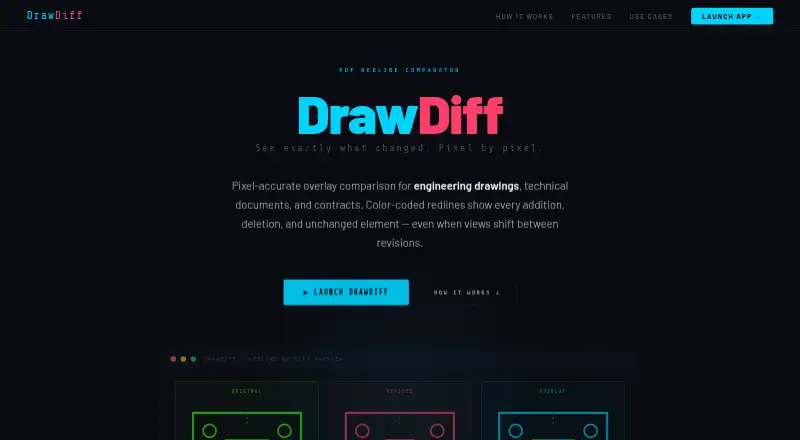
What DrawDiff is
DrawDiff compares engineering drawings, technical documents, and contracts by placing PDF pages in pixel-accurate overlays. It handles multi-page PDFs in page order and identifies changed regions across pages, numbering each change with a link to jump to it. When drawing views have shifted, the Alignment Tool lets you select matching regions and reference points. Text Compare extracts and compares words in selected areas, with OCR offered when a scanned or image-based PDF contains no text. You can export pages as JPGs, combine pages into a PDF, or copy selected regions to the clipboard. Comparison runs in the browser, and the maker says files stay on your device rather than being uploaded. Once loaded, the app can work offline; its single-file version can also be hosted on an internal web server for air-gapped environments. DrawDiff is free to use in a modern browser, with no signup or installation. Settings include render scale from 0.5 to 8 and a difference threshold from 0 to 128.
Good
- Compares multi-page PDFs in page order
- Numbers changes and links to each region
- Aligns drawings with shifted views
- Offers OCR for scanned PDFs without text
- Free, browser-based use without signup or installation
Watch out
- Requires a modern browser
- Google Analytics 4 collects usage data and device information
Who it suits
DrawDiff suits engineering drawing reviewers, architecture and construction teams, and legal or contract reviewers who need to compare PDFs. Its offline and internal-hosting options may also suit defense and government users.
Verdict
DrawDiff brings visual overlays, text comparison, alignment, and exports into a free browser app. Its on-device processing and offline capability are useful options for teams handling sensitive documents.
Plans and prices
From DrawDiff's own pricing page, checked 15 Oct 2026.
| Plan | Price | What it gives you |
|---|---|---|
| Free | Free | no signup · no installation · browser use · PDF comparison |
The facts
Each one read from DrawDiff's own pages, with the date it was checked.
Where it runs
- Air-gapped deployment
- The maker says the single self-contained HTML application can be hosted on an internal server or file system for fully air-gapped use.checked 15 Oct 2026
- Browser requirement
- The maker says DrawDiff runs in any modern browser and requires no installation or account.checked 15 Oct 2026
What it does
- Alignment
- The Alignment Tool lets users select matching regions and reference points to compare drawings whose views have shifted.checked 7 Oct 2026
- Alignment tool
- Users can select matching regions and reference points so shifted views are aligned before comparison.checked 15 Oct 2026
- Analytics
- The privacy policy says DrawDiff uses Google Analytics 4 for anonymous usage data, including visited pages, general region, device category, and feature events; it says this data excludes PDF content and filenames.checked 7 Oct 2026
- API status
- The defense page states that DrawDiff has no API endpoint or backend infrastructure for receiving files.checked 15 Oct 2026
- Comparison settings
- The app provides a render-scale setting from 0.5 to 8 and a difference-threshold setting from 0 to 128.checked 7 Oct 2026
- Compliance position
- The maker makes no compliance certifications and says users remain responsible for ITAR, EAR, GDPR and organizational compliance.checked 15 Oct 2026
- Development disclosure
- The same LinkedIn post says Claude assisted with coding, deployment, authentication and related work.checked 15 Oct 2026
- Difference detection
- Find Differences detects and numbers changed regions across pages, with links to jump to each change.checked 7 Oct 2026
- Difference numbering
- Find Differences clusters changed pixels into numbered regions that users can navigate and export.checked 15 Oct 2026
- Diff threshold
- The difference threshold ranges from 0 to 128, with 63 as the default.checked 15 Oct 2026
- Email collection
- Optional email submissions are sent to Formspree for update notifications.checked 15 Oct 2026
- Exports
- Results can be exported as individual JPG pages, a combined PDF, or copied regions.checked 15 Oct 2026
- Independent praise: privacy
- A Reddit engineering discussion describes DrawDiff as free, browser-based, installation-free and locally processed for proprietary drawings.checked 15 Oct 2026
- Integrations
- No product integrations, SDKs or developer documentation are described on the maker's pages.checked 15 Oct 2026
- Intended users
- The site names engineering drawing reviewers, architecture and construction teams, legal and contract reviewers, and defense and government users.checked 7 Oct 2026
- Licence
- The terms prohibit copying, redistribution, resale, reverse engineering and derivative works, and reserve all rights to Tom Waldman.checked 15 Oct 2026
- Limit: initial connectivity
- Offline use starts only after the application and its assets have loaded.checked 15 Oct 2026
The company
- Company founded
- LinkedIn lists 2023 as the founding year.checked 15 Oct 2026
- Company headquarters
- LinkedIn lists the headquarters as Kota, Rajasthan, India.checked 15 Oct 2026
- Company industry
- LinkedIn categorizes DrawDiff as a marketing-services company.checked 15 Oct 2026
- Company ownership
- LinkedIn identifies the company as privately held.checked 15 Oct 2026
- Company size
- LinkedIn lists DrawDiff at 2–10 employees.checked 15 Oct 2026
Alternatives to DrawDiff
- 1

Diffchecker
Free planiOSWebAPIExtension8.2From $15 a month - 2

DocFather Compare Documents
Free planiOSWeb7.6From $34.99 a year - 3
i-net PDFC
AndroidiOSWebAPI7.6From $199 a year - 4

Differino
Free planWebAPI7.3€1.99 one-time - 5
SmarterDiff
Free planAndroidiOSWebLinux7.3Free plan - 6
PDF24 Compare PDF
Free planAndroidiOSWebLinux7.2Free plan