
DevDynamics
DevDynamics is an engineering analytics platform that connects software teams’ tools to show activity across teams, projects, and initiatives.
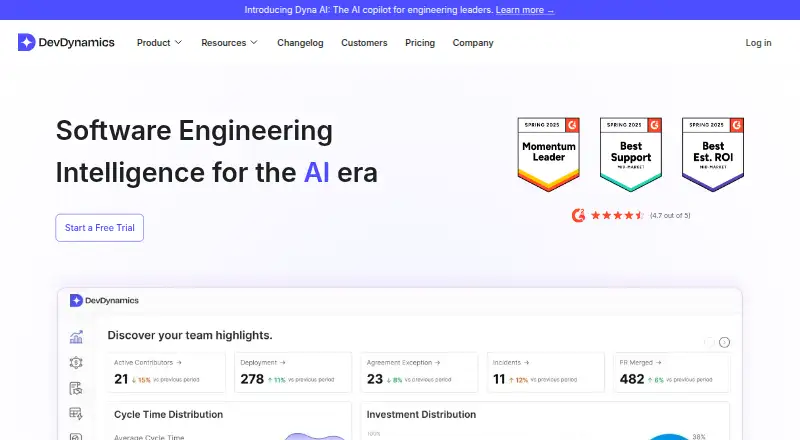
What DevDynamics is
DevDynamics is an engineering analytics platform that connects software teams’ tools to show activity across teams, projects, and initiatives. It offers metrics and reports covering DORA measures, cycle times, throughput, pull requests, code reviews, custom metrics, capacity forecasting, and developer reports for 1:1s. Dyna AI lets engineering leaders ask questions about team results and performance gaps using their actual data. The platform also supports visibility into engineering performance and well-being, working agreements, business alignment, and detection of blockers and burnout risks, with Slack or email notifications. It can be deployed in the cloud or self-hosted and connects to services including GitHub, Jira, GitLab, Slack, and PagerDuty. DevDynamics says it uses engineering metadata such as pull requests and commits without retaining source code or repository content. The Pro plan is listed at $15.00 per year with yearly billing.
Good
- Offers cloud or self-hosted deployment.
- Dyna AI answers questions using team data.
- Metrics include DORA, cycle times, and throughput.
- Source code and repository content are not retained.
Watch out
- Enterprise pricing requires a quote.
- Pro is listed at $15.00 per year with yearly billing.
- 24/7 priority support is included in Pro.
Who it suits
The pricing FAQ identifies executives, engineering managers, and individual developers as intended users. It may suit teams seeking engineering metrics, reporting, and visibility into blockers or well-being.
Verdict
DevDynamics brings engineering metrics, reports, and team signals together, with a choice of cloud or self-hosted deployment. Review the plan details for support and pricing that fit your team.
Plans and prices
From DevDynamics's own pricing page, checked 15 Oct 2026.
| Plan | Price | What it gives you |
|---|---|---|
| Free | Free | Up to 9 contributors · 1 team · Up to 3 Git repositories · Jira and GitHub integrations · Basic engineering metrics · Slack and email alerts · Email support · $0/contributor/mo |
| Pro | $15 a month | Unlimited repositories and teams · Dyna AI · AI Impact Analysis · Activity Log · CI/CD and incident-management integrations · Custom dashboards · 24/7 priority support · $15/contributor/mo |
| Enterprise | Priced on request | Dedicated account manager and SLA-backed support · Custom POC and onboarding · Custom pricing · 3 years data retention · Guided onboarding · Request a quote |
The facts
Each one read from DevDynamics's own pages, with the date it was checked.
What it does
- AI copilot
- Dyna AI lets engineering leaders ask questions about team wins, performance gaps and other metrics using their actual data.checked 28 Sep 2026
- AI features
- The plans list Dyna AI, AI impact analysis, AI-generated reports and recommendations, custom AI reports, developer one-to-one reports, and capacity forecasting.checked 15 Oct 2026
- Changelog: Dyna AI
- The current changelog describes Dyna AI as an engineering-leader copilot that answers natural-language questions with analysis and suggestions.checked 15 Oct 2026
- Changelog: Goals Dashboard
- On 11 June 2025, DevDynamics added a Goals Dashboard for tracking engineering goals with live data.checked 15 Oct 2026
- Compliance
- SOC 2, GDPRchecked 22 Sep 2026
- Core metrics
- The product reports cycle-time measures, throughput, pull-request and code-review metrics, and all four DORA metrics.checked 15 Oct 2026
- Core outcomes
- The platform supports engineering performance and well-being visibility, research-backed metrics, working agreements, business alignment, blocker and burnout-risk detection, and Slack or email notifications.checked 28 Sep 2026
- Dashboards
- Available dashboards cover Git, issues, DORA, sprint analytics, activity logs, code quality, Copilot, test suites, and CI/CD performance.checked 15 Oct 2026
- Data handling
- DevDynamics says it processes GitHub, Jira, Linear, and Azure metadata such as pull requests, test runs, and commits without copying or retaining source code.checked 15 Oct 2026
- Deployment
- cloud, self hostedchecked 22 Sep 2026
- Developer experience
- The product includes developer surveys and a quarterly developer-experience report.checked 15 Oct 2026
- Documentation and support
- The documentation contains step-by-step setup guides for integrations, API payloads, on-premises installation, MCP, and troubleshooting; paid plans list email or priority support.checked 15 Oct 2026
- DORA metrics
- Its DORA coverage includes deployment frequency, lead time for change, change-failure rate, and mean time to recovery.checked 15 Oct 2026
- Firewall requirements
- Customers connecting tools behind a firewall must allow IP address 3.131.112.244 and outbound access to api.devdynamics.ai.checked 15 Oct 2026
- Funding
- DevDynamics announced a $600,000 first funding round led by Powerhouse Ventures, with Sunn91 Ventures, PointOne Capital, and angel investors participating.checked 15 Oct 2026
- GitHub Marketplace availability
- The Devdynamics App listing shows a freemium app with 169 installs and integrations for Jira, GitHub, GitLab, Bitbucket, and Slack.checked 15 Oct 2026
- Integration count
- The homepage says DevDynamics has 20+ integrations, including Jira, GitHub, CI/CD and PagerDuty.checked 28 Sep 2026
- Integrations
- The company advertises more than 20 integrations, including Jira, GitHub, CI/CD systems, and PagerDuty.checked 15 Oct 2026
Money
- Changelog: Scenario Planner
- On 6 March 2025, DevDynamics released Scenario Planner for forecasting delivery timelines and trade-offs.checked 15 Oct 2026
- Delivery planning
- DevDynamics offers effort-allocation and engineering-workload tracking plus scenario planning and forecasting.checked 15 Oct 2026
The company
- Company focus
- LinkedIn describes the company as a software-development startup serving banking, financial-services, and insurance sectors.checked 15 Oct 2026
- Company headquarters and size
- LinkedIn lists Dev Dynamics in Dubai, Dubai, as privately held with 11–50 employees.checked 15 Oct 2026
- Company size fit
- small, mid market, enterprisechecked 22 Sep 2026
- Founded or launched
- The company’s funding announcement says DevDynamics launched in 2022.checked 15 Oct 2026
The full review of DevDynamics
DevDynamics suits engineering leaders and software teams that want delivery metrics alongside signals about blockers, working agreements and team well-being. Its combination of analytics, integrations and deployment options is compelling, but the free plan is tightly capped and the paid-plan price needs clarification.
Overview
DevDynamics connects engineering tools to show activity across teams, projects and initiatives. It brings delivery and reliability measures together with business alignment, working agreements, and blocker and burnout-risk detection, with Slack or email notifications. That broader view is useful for managers weighing team conditions alongside output; teams seeking only a narrow code-quality or infrastructure tool may find it more than they need.
Dyna AI lets engineering leaders ask questions about team wins, performance gaps and other metrics using their actual data. Its MCP server can expose live team and contributor data to assistants such as Claude, Cursor and VS Code Copilot Agent mode, with setup instructions for Windows, macOS and Linux. These are relevant additions for teams that use those workflows, not substitutes for deciding which metrics matter.
Key features
- Delivery and reliability metrics: DORA, cycle times, throughput, pull-request and code-review insights, reliability measures and custom metrics give teams several ways to examine how work moves. The breadth is useful for engineering reviews, but teams still need to interpret measures in context rather than treat activity as performance by itself.
- Reports and planning: AI-generated reports and recommendations, developer reports for 1:1s and capacity forecasting support both individual conversations and planning. These features make DevDynamics more than a dashboard, though the value of generated guidance depends on whether a team trusts its underlying metrics.
- Team signals: Working agreements, business alignment and blocker and burnout-risk detection broaden the view beyond delivery. Slack and email alerts can bring signals to existing workflows, a practical advantage for managers who need to respond promptly.
- Tool connections: Integrations span GitHub, Jira, GitLab, Slack, Microsoft Teams, PagerDuty, Linear, Bitbucket, Azure Boards, Jenkins, SonarQube, Opsgenie, Webex, ClickUp, Confluence, Google Calendar and Asana, among others. That range can reduce gaps between development and planning data, but teams should confirm their particular tools are covered.
- Source-code handling: DevDynamics says it works with engineering metadata such as pull requests, test runs and commits, without copying, cloning, storing, scanning or retaining source code or repository content. It says an external audit firm confirmed its security controls and labels the service SOC 2 Type II Compliant; it also establishes GDPR-compliant Data Processing Agreements and follows GDPR incident-notification guidelines. Those assurances matter to teams assessing data risk, though they do not remove the need for an organization’s own review.
Pricing
DevDynamics has a free plan, paid options from $20/mo, and a 21-day trial. The plan terms deserve a close read: the Pro plan is priced at $15 a year with yearly billing, which does not align plainly with the stated paid starting price. Confirm the applicable price and billing term before upgrading.
| Plan | Price and terms | What it includes | Best fit |
|---|---|---|---|
| Free | free; billed monthly or yearly | Up to 9 contributors, 1 team and 3 Git repositories; Jira and GitHub integrations; basic metrics; Slack and email alerts; email support. | A small team evaluating the workflow or tracking a limited set of repositories. The contributor, team and repository caps make it a poor fit once analytics must cover a larger organization. |
| Pro | $15 a year; billed yearly | Unlimited repositories and teams, Dyna AI, AI Impact Analysis, Activity Log, CI/CD and incident-management integrations, custom dashboards and 24/7 priority support. | Teams that need broader coverage, advanced analysis and priority support. It removes the free plan’s repository and team limits, but the stated annual price conflicts with the separate paid-from figure. |
| Enterprise | Custom pricing; request a quote | Dedicated account manager, SLA-backed support, custom proof of concept and onboarding, three years of data retention and guided onboarding. | Organizations that need managed onboarding, an SLA and longer retention. The custom quote means cost depends on the agreement. |
Support is also advertised by email, phone and WhatsApp, while Pro specifies 24/7 priority support. The free plan's basic metrics and two integrations are a meaningful starting point, but advanced AI and broader tool coverage require Pro or Enterprise.
Platforms
DevDynamics supports Linux, macOS, Windows and web, with cloud and self-hosted deployment. That choice suits teams that need to keep the deployment on their own infrastructure as well as those preferring a hosted service.
Who it's for
Forward-thinking executives, engineering managers and individual developers are identified as intended users, and the product is positioned for small, mid-market and enterprise teams. It is strongest for organizations that want delivery, reliability and team-health signals connected to their planning and communication tools. A team needing only a free dashboard for a few repositories can start on Free; one that needs more integrations, AI analysis or uncapped teams should weigh Pro’s unclear price, while organizations requiring SLA-backed support can seek an Enterprise quote.
Pros and cons
- Pro: Delivery, reliability, team-health signals and planning reports sit in one analytics platform, making it easier to consider conditions as well as output.
- Pro: Cloud and self-hosted deployment, broad integrations and metadata-only source handling give teams flexibility over connections and deployment posture.
- Pro: Free access covers a small team with basic metrics, alerts and email support, so evaluation need not begin with a paid plan.
- Con: Free is limited to 9 contributors, 1 team, 3 repositories and Jira and GitHub integrations, so growing teams may reach its ceiling quickly.
- Con: Pricing says paid plans start at $20/mo while Pro is shown as $15 a year with yearly billing. That mismatch makes the upgrade cost difficult to assess without confirmation.
- Con: Advanced capabilities such as Dyna AI, custom dashboards and 24/7 priority support are reserved for Pro, while SLA-backed support and longer retention require Enterprise.
Alternatives
Browse DevOps analytics software for more options in the category. Choose Full Chaos Dev Health if open-source access and the ability to deploy on your own infrastructure, audit metric computations and contribute to the roadmap matter most. CDviz is worth considering when Apache 2.0-licensed collectors, schemas, Grafana components and transformers that can be self-hosted for free are the priority.
Hatica may suit teams that value a free plan with unlimited members and data sources, accepting just one month of history. Waydev offers a free startup tier with 10 repositories and three months of data availability, which may work better for a small team prioritizing repository coverage. GitClear is another option for teams wanting a free starter tier with analysis and AI Data Deep Dives, subject to its repository, commit, pull-request and monthly-use caps.
DevStats is a fit for teams chiefly seeking a free benchmark report and peer comparisons across DORA, Flow and Planning. Gathr Analytics may appeal when a free tier with monthly credits, ingestion, actionable analytics and business-process automation is more relevant. For a free, self-hosted option, consider Apache DevLake.
Verdict
DevDynamics is a strong choice for engineering leaders who want delivery analytics alongside team-health signals, reports and a broad set of integrations, with cloud or self-hosted deployment. Its main reason to choose it is that it connects those operational and human signals in one place; its main reason to look elsewhere is the constrained free tier and unclear Pro pricing, especially for teams that need to budget before committing.
Getting started
- Visit https://devdynamics.ai/ to get started.
- Choose cloud or self-hosted deployment.
- Connect GitHub or Jira for the free plan, or select Pro for its expanded integrations.
- Use the free plan or start the 21-day trial.
- Access the service through web, Linux, macOS or Windows.
Limits worth knowing
The Free plan allows up to 9 contributors, 1 team and 3 Git repositories, with Jira and GitHub integrations, basic metrics and Slack and email alerts. Dyna AI, AI Impact Analysis, Activity Log, custom dashboards and CI/CD and incident-management integrations are listed with Pro at $20 a month on monthly billing.
Questions
Is there a free plan?
Yes. Free costs 0.00 USD and is billed monthly or yearly; it supports up to 9 contributors, 1 team and 3 Git repositories.
How much does Pro cost?
Pro costs $20 a month with monthly billing.
Is there a free trial?
Yes, DevDynamics offers a 21-day trial.
Which platforms and deployments are supported?
Platforms include Linux, macOS, Windows and web. Deployment options are cloud and self-hosted.
What tools does it integrate with?
Integrations include GitHub, Jira, GitLab, Slack, Microsoft Teams, PagerDuty, Linear, Bitbucket, Azure Boards, Jenkins and Confluence, among others.
What security and privacy details are provided?
DevDynamics labels its service SOC 2 Type II Compliant and says it follows GDPR requirements, including data-processing agreements. It says it uses engineering metadata without retaining source code or repository content.
Alternatives to DevDynamics
- 1

Middleware
Free planAndroidiOSWebAPI8.2$0.30 usage-based - 2

Pluralsight
AndroidiOSWebAPI7.9From $299 a year - 3

Allstacks
Free planWebAPI7.5From $200 a year - 4

Plandek
Free planWebAPISelf-hosted7.5From $2,555 a month - 5

Deviera
Free planWebAPISelf-hosted7.1From $25 a month - 6

GitClear
Free planWebAPIExtensionmacOS7.1From $29 a month