
Deskora
Deskora is a Windows desktop organizer that sorts files, manages installed software, and helps keep a desktop organized.
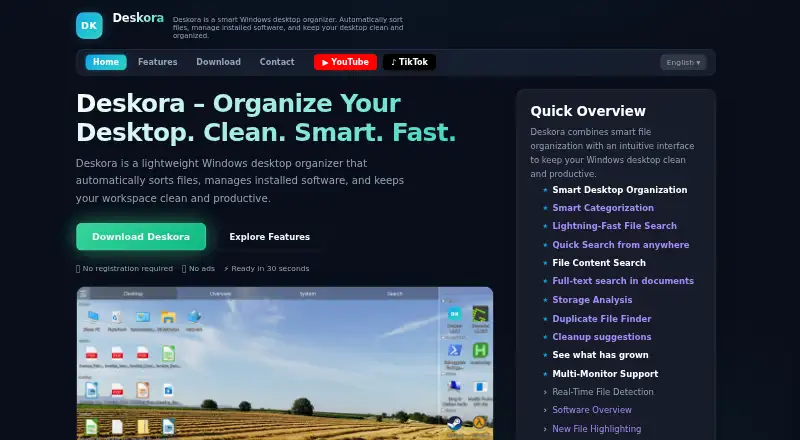
What Deskora is
Deskora is a Windows desktop organizer that sorts files, manages installed software, and helps keep a desktop organized. It groups files and shortcuts by type, name, and age, and highlights new files. Its NTFS indexer searches file names with wildcard support and can search document contents. Storage tools include a folder view sorted by size, a drive treemap, a list of the 100 largest files, duplicate finding, and cleanup suggestions. A Timeline records file activity and foreground-program duration; users can turn off or delete this recording in the app. The activity record remains on the user's PC and is not transmitted, uploaded, or shared. For unknown file types or programs, Deskora may send extension or application details to its server for classification, but not file names, paths, or contents. The indexing service reads NTFS records and the change journal; its maker says it does not access the network or parse file contents. Deskora is free, with no subscription, ads, or registration required. It requires 64-bit Windows 10 or later, 50 MB free disk space, and 4 GB RAM recommended.
Good
- Groups files and shortcuts by type, name, and age.
- Searches file names and document contents.
- Lists large files and finds duplicates.
- Timeline recording can be switched off or deleted.
- Free, with no ads or registration required.
Watch out
- Runs only on Windows 10 or later, 64-bit.
- Requires 50 MB free disk space.
- Unknown file or app details may be sent for classification.
Who it suits
Deskora suits Windows users who want automatic desktop sorting alongside file search and storage tools. Its described audiences include office workers, students, creators, home users, and people using multiple monitors.
Verdict
Deskora combines desktop organization, search, storage analysis, and an activity Timeline in a free Windows utility. Consider its Windows requirement and classification-data handling before choosing it.
Plans and prices
From Deskora's own pricing page, checked 3 Oct 2026.
| Plan | Price | What it gives you |
|---|---|---|
| Free | Free | No subscription · No ads · No registration required · Windows 10 or later (64-bit) |
The facts
Each one read from Deskora's own pages, with the date it was checked.
What it does
- Data sent for classification
- For unknown file types or programs, Deskora may send file extension or application details to its server for classification; the page says file names, paths, and contents are never transmitted.checked 3 Oct 2026
- File search
- Its NTFS indexer searches file names with wildcard support and can search inside document contents.checked 3 Oct 2026
- Indexing service
- DeskoraIndexService reads the NTFS master file table and change journal, and the maker says the service performs no network access and does not parse file contents.checked 3 Oct 2026
- Intended users
- The maker describes use by office workers and remote teams, students and researchers, designers and content creators, home users, and multi-monitor users.checked 3 Oct 2026
- Privacy
- The activity record is stored on the user's PC and is not transmitted, uploaded, or shared.checked 3 Oct 2026
- Purpose
- Deskora is a Windows desktop organizer that automatically sorts files, manages installed software, and keeps the desktop organized.checked 3 Oct 2026
- Smart organization
- It groups desktop files and shortcuts by type, name, and age, and highlights new files.checked 3 Oct 2026
- Storage tools
- The Storage tab includes a size-sorted folder view, a drive treemap, a list of the 100 largest files, duplicate finding, and cleanup suggestions.checked 3 Oct 2026
- Support
- Deskora's contact page invites users to send a message and says the team will respond as soon as possible.checked 3 Oct 2026
- System requirements
- The download page lists Windows 10 or later (64-bit), 50 MB free disk space, and 4 GB RAM recommended.checked 3 Oct 2026
- Timeline
- The Timeline records file activity and foreground program duration, and its recording can be switched off or deleted in the app.checked 3 Oct 2026
The full review of Deskora
Overview
Deskora is a free Windows utility that brings desktop sorting, file search, storage analysis, and activity history into one app. It suits Windows users who want more than a tidy desktop, especially those who also need to find large or duplicate files. Its breadth is useful, but its Windows-only scope and limited classification-data sharing deserve consideration.
Key features
Desktop organization and search
Deskora groups desktop files and shortcuts by type, name, or age, and highlights new arrivals. That makes it a practical fit for busy desktops where files accumulate quickly; multi-monitor support also suits people who spread work across displays. Its organization model uses fenced areas, so it is less compelling if you want a different approach to arranging the desktop.
The NTFS indexer supports wildcard searches by file name and can search document contents. That combination can help locate a file by partial name or remembered text, though the indexing service reads the NTFS master file table and change journal rather than parsing file contents.
Storage and activity
The Storage tab combines a size-sorted folder view, drive treemap, largest-file list, duplicate finder, and cleanup suggestions. These tools help identify what is consuming disk space and where a cleanup might start; they make Deskora more useful than a desktop organizer alone.
Timeline records file activity and how long foreground programs remain active. The record stays on the PC and is not uploaded or shared, and users can switch recording off or delete it. For unknown file types or programs, Deskora may send an extension or application details to its server for classification. It does not transmit file names, paths, or contents. The maker says the indexing service makes no network access.
Pricing
Deskora has one plan: Free at free. It requires no subscription, shows no ads, and requires no registration. There is no free trial because the product is free. This is a straightforward choice for individuals or teams who need its Windows features without a recurring charge; there is no paid tier to add capabilities.
Platforms
Deskora runs on Windows only. The download page calls for Windows 10 or later (64-bit), 50 MB of free disk space, and recommends 4 GB RAM. It is not a fit for macOS or other platforms.
Who it's for
Deskora is a strong match for Windows users who want automatic desktop sorting alongside file discovery and storage cleanup. Its mix can also serve office workers, remote teams, students, researchers, designers, content creators, home users, and people working across multiple monitors. Those who prefer not to keep an activity history, or who do not want any classification details sent to a server, should weigh its controls and privacy boundaries before choosing it.
Pros and cons
- Pros: Desktop sorting, wildcard and document-content search, and several storage-analysis tools sit in one free app, reducing the need to switch among separate utilities.
- Pros: Timeline data remains local, can be disabled or deleted, and the maker says the indexing service does not access the network.
- Cons: Unknown file extensions or application details may be sent for classification, which may not suit users who want all such metadata to remain local.
- Cons: Windows 10 or later (64-bit) is required, and the fenced-area organization model will not suit everyone.
Alternatives
Browse Desktop Organization Software for the category. DeskBox is another free Windows option, with a direct-install plan that is permanently free and supports Windows 10 21H2 or later and Windows 11 on x64 or ARM64. Choose it if that architecture and version support matter more than Deskora’s bundled search and storage tools.
Desktop Fences+ is free, open-source, portable, and limited to user-writable locations on Windows 10/11; consider it if those licensing and portability traits suit your setup. Desktop Frames+ is also free and open-source, portable, and for Windows 10/11, making it an option if those characteristics are the priority.
iTop Easy Desktop has a free plan limited to three boxes and limited wallpapers, plus paid Pro plans. Consider it if box-based organization or its wallpaper options are a better match and those free-plan caps are acceptable. DesktopBox is a free portable single-file app for 64-bit Windows 10/11, a fit if portability is the deciding factor. Portals: Desktop Organization has a pay-what-you-want license with a free option, so choose it if that licensing model appeals.
Desktop Organizer is a freemium macOS alternative for readers who need a Mac app. Tabbles is another Windows freemium option.
Verdict
Choose Deskora if you want a no-cost Windows utility that combines desktop organization with capable search, storage analysis, and controllable local activity tracking. Look elsewhere if you need another platform, prefer a different desktop-organization model, or are unwilling to send classification metadata for unknown files or programs.
Alternatives to Deskora
- 1
BitDock
Free planWindows7.2Free plan - 2

DeskBox
Free planOpen sourceWindows7.0Free plan - 3
iTop Easy Desktop
Free planWindows6.6From $11.99 a year - 4
Tabbles
Free planAPIExtensionWindows6.6From €3 a year - 5

AutoShelf
Free planmacOS6.5$19.99 one-time - 6
Right Click Enhancer
Free planWindows6.5$9.99 one-time