
Deepfence ThreatMapper
Deepfence ThreatMapper is a self-hosted security tool that finds threats in production environments and ranks them by exploit risk.
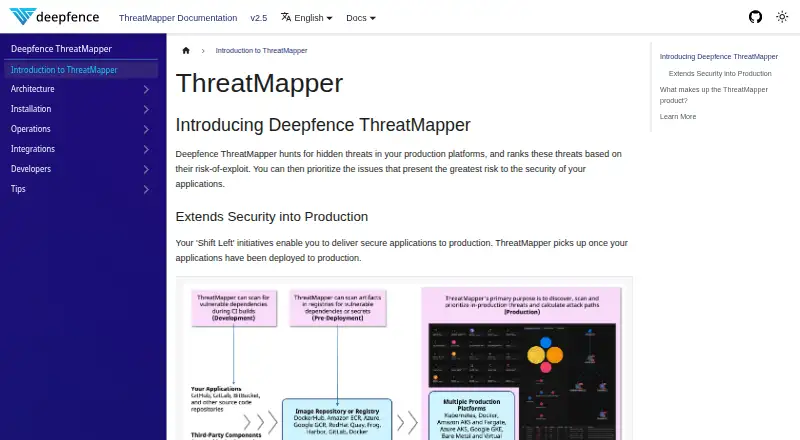
What Deepfence ThreatMapper is
Deepfence ThreatMapper is a self-hosted security tool that finds threats in production environments and ranks them by exploit risk. It discovers pods, containers, applications, and infrastructure, mapping their topology and attack surface. Runtime software bills of materials for workloads and operating systems are checked against multiple vulnerability feeds. ThreatMapper also detects exposed credentials in containers and host filesystems, and evaluates infrastructure settings against CIS, PCI-DSS, HIPAA, and other benchmarks. Its Threat Graph links vulnerabilities, secrets, and compliance issues with network flows, security groups, and live status. A standalone management console runs in containers on a Docker host or dedicated Kubernetes cluster, providing HTTPS administration and API automation. One console can manage different workload types across on-premise and cloud deployments. Documented integrations include Slack, PagerDuty, Jira, Splunk, ELK, Sumo Logic, and AWS S3; image-build scanning supports CircleCI, Jenkins, and GitLab. The project is free under the Apache 2 license, with GitHub issues and a community Slack channel available for support.
Good
- Ranks discovered threats by exploit risk.
- Generates runtime SBOMs and checks multiple vulnerability feeds.
- Finds exposed keys, tokens, and passwords.
- One console manages multiple workload types and environments.
- Free under the Apache 2 license.
Watch out
- Windows Server support is experimental, not production-suitable.
- Sensors require Linux kernel 4.4 or newer.
- Sensor agents need access to console port 443.
Who it suits
ThreatMapper suits teams managing production workloads across cloud and on-premise environments that need vulnerability, secret, or compliance visibility. Its experimental Windows Server support is not intended for production use.
Verdict
ThreatMapper combines workload discovery, vulnerability and secret scanning, and compliance checks in a self-hosted tool. Its experimental Windows Server support is an important limitation for production use.
Plans and prices
From Deepfence ThreatMapper's own pricing page, checked 30 Sep 2026.
| Plan | Price | What it gives you |
|---|---|---|
| ThreatMapper | Free | no limits · no hidden features |
The facts
Each one read from Deepfence ThreatMapper's own pages, with the date it was checked.
What it does
- CI/CD
- Image-build scanning supports CircleCI, Jenkins and GitLab.checked 30 Sep 2026
- Cloud scanning
- Cloud Scanner tasks run locally through Terraform modules, use typically read-only cloud API access and do not listen for remote connections or control.checked 30 Sep 2026
- Compliance
- It evaluates infrastructure configuration against CIS, PCI-DSS, HIPAA and other compliance benchmarks.checked 30 Sep 2026
- Deployment scope
- A single console can manage multiple workload types and on-premise and cloud deployments simultaneously.checked 30 Sep 2026
- Integrations
- Documented integrations include Slack, PagerDuty, Jira, Splunk, ELK, Sumo Logic and AWS S3.checked 30 Sep 2026
- License and support
- The ThreatMapper project is offered under the Apache 2 license, with GitHub issues and a Deepfence Community Slack channel available for support.checked 30 Sep 2026
- Management console
- The standalone management console runs as containers on a Docker host or dedicated Kubernetes cluster and exposes HTTPS administration and API automation.checked 30 Sep 2026
- Purpose
- ThreatMapper hunts for hidden threats in production platforms and ranks them by risk of exploit.checked 30 Sep 2026
- SBOM vulnerability scanning
- It generates runtime SBOMs for running pods, containers, serverless apps, applications and operating systems and matches them against multiple vulnerability feeds.checked 30 Sep 2026
- Secret detection
- It detects exposed keys, tokens and passwords in containers and host filesystems.checked 30 Sep 2026
- Sensor requirements
- Sensor requirements include 0.2 CPU cores, 200 MB to 1 GB RAM, Linux kernel version 4.4 or newer and access to console port 443.checked 30 Sep 2026
- Sensor security
- Sensor agents communicate with the management console over TLS using a URL and API key.checked 30 Sep 2026
- Threat Graph
- The Threat Graph correlates vulnerabilities, secrets and compliance issues with live and recent network flows, security groups and live status.checked 30 Sep 2026
- Workload discovery
- It scans platforms to identify pods, containers, applications and infrastructure and maps their topology and attack surface.checked 30 Sep 2026
Where it runs
- Windows support
- Windows Server support is experimental and not suitable for production use.checked 30 Sep 2026
The full review of Deepfence ThreatMapper
ThreatMapper is a self-hosted security platform for teams that need to map and assess container, cloud, and on-premise workloads. It is strongest in Linux-based environments where security staff can run its console and act on findings spanning vulnerabilities, secrets, and compliance.
Overview
ThreatMapper discovers pods, containers, applications, and infrastructure, mapping their topology and attack surface before ranking threats by exploit risk. Its Threat Graph adds useful context by correlating vulnerabilities, exposed secrets, and compliance issues with live and recent network flows, security groups, and live status. That combination helps teams prioritize findings in relation to their environment rather than review each scan result in isolation.
The deployment is self-hosted: the management console runs in containers on a Docker host or a dedicated Kubernetes cluster, and provides HTTPS administration and API automation. A single console can cover multiple workload types across cloud and on-premise deployments, a practical advantage for mixed estates. The trade-off is that teams must operate the console themselves.
Key features
Discovery and scanning
Runtime SBOMs cover running pods, containers, serverless apps, applications, and operating systems, with matches against multiple vulnerability feeds. ThreatMapper also detects exposed keys, tokens, and passwords in containers and host filesystems. Image-build scanning supports CircleCI, Jenkins, and GitLab, extending checks into build workflows rather than limiting them to running workloads.
Risk context and compliance
The Threat Graph connects vulnerabilities, secrets, and compliance findings to live and recent network flows, security groups, and workload status. Infrastructure configuration checks cover CIS, PCI-DSS, HIPAA, and other benchmarks. This breadth is valuable for teams that want one view across technical exposure and configuration posture; it does not remove the need to decide which findings warrant remediation.
Operations and integrations
Documented integrations include Slack, PagerDuty, Jira, Splunk, ELK, Sumo Logic, and AWS S3. Sensors communicate with the console over TLS using a URL and API key. Sensor requirements include 0.2 CPU cores, 200 MB to 1 GB RAM, Linux kernel 4.4 or newer, and access to console port 443, so Linux compatibility and network access are important deployment considerations.
Cloud Scanner tasks run locally through Terraform modules, typically use read-only cloud API access, and do not listen for remote connections or control. The project uses the Apache 2 license, with GitHub issues and a Deepfence Community Slack channel for support.
Pricing
ThreatMapper costs nothing, with no limits or hidden features. The free plan includes image scanning, runtime protection, Kubernetes security, registry scanning, and SBOM generation. That makes it a strong fit for teams that can self-host and want broad scanning without a paid tier or usage cap; its cost advantage does not offset the operational work of managing the console.
Platforms
ThreatMapper supports API, Linux, self-hosted, web, and Windows environments. Its Windows Server support is experimental and unsuitable for production, so organizations with production Windows Server workloads should not rely on it as their security platform for those systems.
Who it's for
ThreatMapper suits security and infrastructure teams overseeing containerized workloads across cloud and on-premise environments, especially those that value runtime SBOMs, image scanning, secret detection, and compliance checks in one self-managed system. It is less suitable for teams that need production-ready Windows Server coverage or do not want to run a Docker- or Kubernetes-based management console.
Pros and cons
- Pro: One console covers multiple workload types and cloud or on-premise deployments, giving mixed estates a common place to assess findings.
- Pro: Threat Graph context links findings to network activity, security groups, and live status, supporting more informed prioritization.
- Pro: The free plan includes image and registry scanning, runtime protection, Kubernetes security, and SBOM generation without limits or hidden features.
- Con: The management console must be self-hosted on Docker or Kubernetes, adding infrastructure and operations responsibility.
- Con: Experimental Windows Server support makes it unsuitable for production Windows Server protection.
- Con: Sensors require Linux kernel 4.4 or newer and access to console port 443, which constrains deployment environments.
Alternatives
For a broader directory of related tools, see Container Security Software.
- Docker Desktop is a better fit when the priority is Docker Engine and Kubernetes tooling, Docker Hub, Scout, and Debug, with a free Personal plan and a paid Pro plan at $9 a month.
- Snyk Open Source suits teams focused on open-source dependency analysis and willing to work within its Free plan's 5-project limit or consider its Team tier.
- Trivy is a free Apache-2.0 licensed open-source scanner for teams seeking a scanner across Linux, macOS, self-hosted, and Windows platforms.
- Kubescape is an alternative open-source option with a CLI and Kubernetes operator for self-hosted use under Apache 2.0.
- Qualys External Attack Surface Management is worth considering for a 30-day no-cost trial of its CyberSecurity Asset Management 3.0 with EASM.
- Grype is a free Apache-2.0 licensed open-source vulnerability scanner.
- Kyverno is a free Apache 2.0 open-source project.
- RapidFort may suit teams looking for curated near-zero-CVE container images, with its free plan limited to five images from a limited catalog and daily rebuilds and patching.
Verdict
Choose ThreatMapper if you want a no-cost, self-hosted platform that combines workload discovery, scanning, compliance checks, and risk context across Linux-based cloud and on-premise environments. Its broad coverage and unlimited free plan are compelling; look elsewhere if you need production Windows Server support or prefer not to operate the management console.
Getting started
- Open the ThreatMapper documentation website
- Deploy the management console as containers on a Docker host or dedicated Kubernetes cluster
- Provide the console URL and API key for sensor TLS communication
- Install sensors on systems meeting the CPU, memory, Linux kernel, and port requirements
- Connect documented integrations or CI/CD image-build scanners as needed
Limits worth knowing
The ThreatMapper free plan is listed as free with no limits and no hidden features. Windows Server support is experimental and not suitable for production use.
Questions
Is ThreatMapper free?
Yes. The ThreatMapper plan is listed as free, with no limits and no hidden features.
Which platforms does ThreatMapper support?
Its listed platforms are API, Linux, self-hosted, web, and Windows. Windows Server support is experimental.
Can it scan images and generate SBOMs?
Yes. Image scanning and registry scanning are supported, and it generates runtime SBOMs for listed workloads and operating systems.
Where does the management console run?
The standalone console runs as containers on a Docker host or a dedicated Kubernetes cluster.
Which integrations are documented?
Documented integrations include Slack, PagerDuty, Jira, Splunk, ELK, Sumo Logic, and AWS S3. CircleCI, Jenkins, and GitLab support image-build scanning.
What license covers the project?
ThreatMapper is offered under the Apache 2 license.
Alternatives to Deepfence ThreatMapper
- 1

Kubescape
Free planOpen sourceAPILinuxmacOSSelf-hosted8.2From $30 a month - 2
Kyverno
Free planOpen sourceWebAPILinuxmacOS7.7Free plan - 3
Grype
Free planOpen sourceLinuxmacOSSelf-hostedWindows7.4Free plan - 4

Open Policy Agent Gatekeeper
Free planOpen sourceAPILinuxSelf-hosted7.2Free plan - 5

Sysdig Secure
WebAPILinuxmacOS7.2From $20 a month - 6

Trivy
Free planLinuxmacOSSelf-hostedWindows7.0Free plan