
DeepDoc
DeepDoc turns a code repository into a navigable documentation site and regenerates pages affected by code changes.
What DeepDoc is
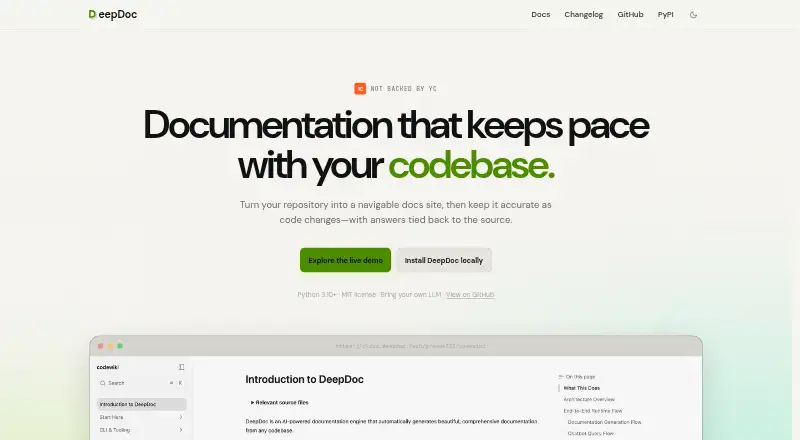
DeepDoc turns a code repository into a navigable documentation site and regenerates pages affected by code changes. It scans source files, plans documentation, creates pages, stages OpenAPI references when present and builds a site. Documentation can be grouped into topics such as architecture, endpoints, integrations and schemas. DeepDoc generates a MkDocs Material site with navigation and search, and can include an AI chatbot widget. Listed outputs also include Markdown, Mermaid diagrams, a static Next.js/Fumadocs site and an interactive API reference. Supported inputs include Python, TypeScript, JavaScript, Go, PHP, Vue, GraphQL and OpenAPI or Swagger specifications. Its AI answers can cite source file paths and line ranges from the repository. DeepDoc runs in the terminal without an account or cloud requirement, is MIT licensed and is provided as a Python package. It requires Python 3.10 or later and an LLM provider supplied by the user. The generate and update commands use that provider, with costs depending on the chosen model and documentation pages; commands including init, serve and deploy do not call an LLM. The deploy command produces a static site for any host.
Good
- MIT licensed and requires no account or cloud
- Updates pages affected by code changes
- AI answers cite repository paths and line ranges
- Static output can be deployed to any host
Watch out
- Requires Python 3.10 or later
- Users must supply an LLM provider
- Generate and update incur model-dependent costs
Who it suits
DeepDoc suits developers who want to generate and maintain repository documentation from the terminal. It is a fit for users willing to configure their own LLM provider for generation and updates.
Verdict
DeepDoc provides a terminal-based route from code repositories to structured documentation, with incremental updates and several output formats. Users need to bring an LLM provider, and generation costs depend on the chosen model and documentation pages.
Plans and prices
From DeepDoc's own pricing page, checked 7 Oct 2026.
| Plan | Price | What it gives you |
|---|---|---|
| DeepDoc | Free | MIT licensed · no account · no cloud · generation uses your chosen LLM and its costs depend on the model and documentation pages |
The facts
Each one read from DeepDoc's own pages, with the date it was checked.
The company
- Company details
- The pages opened identify no headquarters or founding year; the homepage says DeepDoc is not backed by Y Combinator.checked 7 Oct 2026
What it does
- Deployment
- DeepDoc produces a static site that can be deployed to any host.checked 7 Oct 2026
- Documentation structure
- It groups documentation into topics such as architecture, endpoints, integrations, and schemas.checked 7 Oct 2026
- Generation pipeline
- DeepDoc scans source files, plans documentation, generates pages, stages OpenAPI references when present, and builds a site.checked 7 Oct 2026
- Hosted output
- The docs say deepdoc deploy produces a static site for any host.checked 7 Oct 2026
- Incremental updates
- The update command regenerates pages affected by code changes.checked 7 Oct 2026
- License
- The homepage identifies DeepDoc as MIT licensed.checked 7 Oct 2026
- License and runtime
- The homepage identifies DeepDoc as MIT licensed and requiring Python 3.10 or later.checked 7 Oct 2026
- LLM requirement
- DeepDoc requires users to bring their own LLM provider.checked 7 Oct 2026
- LLM setup
- DeepDoc requires users to bring their own LLM provider.checked 7 Oct 2026
- Local operation
- The maker says DeepDoc runs in the terminal with no account or cloud requirement.checked 7 Oct 2026
- Pricing model
- The maker says generation and update call an LLM, while commands such as serve and deploy do not; it gives no dollar price because usage depends on the model and planned page count.checked 7 Oct 2026
- Product format
- The maker provides a Python package installed with pip install deepdoc.checked 7 Oct 2026
- Purpose
- DeepDoc turns a code repository into a navigable documentation site and keeps the docs current as code changes.checked 7 Oct 2026
- Site output
- DeepDoc generates a MkDocs Material site with navigation, search, and an optional AI chatbot widget.checked 7 Oct 2026
- Source-backed answers
- Its AI answers cite source file paths and line ranges from the codebase.checked 7 Oct 2026
- Source citations
- Its AI answers cite source file paths and line ranges from the repository.checked 7 Oct 2026
- Supported inputs
- The homepage lists Python, TypeScript, JavaScript, Go, PHP, Vue, and OpenAPI as supported.checked 7 Oct 2026
- Supported languages
- The homepage lists Python, TypeScript, JavaScript, Go, PHP, Vue, and OpenAPI as supported.checked 7 Oct 2026
Money
- Plans and pricing
- The maker's cost page describes usage-based LLM costs and provides no dollar estimates; it does not list subscription plans.checked 7 Oct 2026
- Usage costs
- The maker says init, serve, deploy, status, config, performance, and clean do not call an LLM; generate and update do, so costs depend on the chosen model and documentation pages.checked 7 Oct 2026
The full review of DeepDoc
DeepDoc is a Python package for generating and maintaining documentation from code repositories. It is best for developers who want a locally run, source-aware workflow and can configure their own LLM provider. Its targeted updates and traceable answers are useful, but generation is not free of model costs.
Overview
DeepDoc scans a repository, plans and generates documentation, and builds a navigable site organized around topics such as architecture, endpoints, integrations, and schemas. The result is more useful as a structured reference than a loose collection of generated notes, especially when readers need to move between code concepts and API material.
Its optional chatbot can answer questions with citations to source file paths and line ranges. That gives readers a way to verify explanations against the repository rather than relying on generated answers alone. The output includes site navigation and search, and the documentation can be published as a static site to any host.
Key features
Repository-aware generation and updates
The generation pipeline scans source files, plans documentation, creates pages, stages OpenAPI references when present, and builds a site. The update command regenerates pages affected by code changes, which can reduce unnecessary work when a repository evolves. These are command-driven updates, not automatic synchronization: teams expecting documentation to refresh on every code change without running a command should look elsewhere.
Languages, APIs, and output
The homepage identifies Python, TypeScript, JavaScript, Go, PHP, Vue, and OpenAPI as supported; the source-type list also includes GraphQL and OpenAPI/Swagger specifications. DeepDoc supports API specifications and can produce interactive API references, Markdown, Mermaid diagrams, and a static Next.js/Fumadocs site. Teams with a particular language or specification workflow should confirm that its documented coverage matches their repository before adopting it.
Local workflow
DeepDoc is installed with pip install deepdoc, runs in the terminal, and does not require an account or cloud service. It is MIT licensed and requires Python 3.10 or later. This is a strong fit for developers who want control over where documentation is generated and hosted, but it assumes comfort with a command-line tool and provider setup.
Pricing
DeepDoc is free at no cost under the MIT license, with no account or cloud requirement. There is no free trial because the product has a free plan. The free package does not remove LLM usage costs: users must bring their own provider, and charges for the generate and update commands depend on the selected model and the number of documentation pages. Commands including init, serve, deploy, status, config, performance, and clean do not call an LLM. This suits users who want software without a subscription, but those who need predictable all-in pricing should account for provider usage separately.
Platforms
DeepDoc supports Linux, macOS, Windows, web, and self-hosted use. It generates a static site that can be deployed to any host, so the documentation can live wherever a team prefers to publish it.
Who it's for
DeepDoc is a good choice for developers maintaining repositories who want structured documentation, source-cited answers, and page-level regeneration after code changes. It also suits teams that want to host the generated site themselves and are comfortable managing an LLM provider. It is less suitable for users seeking automatic updates, a managed cloud-first workflow, or generation with no separate model usage costs.
Pros and cons
- Pros: Incremental updates regenerate pages affected by code changes, avoiding a requirement to regenerate every page for each update.
- Pros: Chatbot answers cite source paths and line ranges, making it easier to check explanations against the code.
- Pros: MIT licensing, local terminal operation, and static-site output give developers flexibility over the workflow and hosting.
- Cons: Users must supply an LLM provider, and generation and update costs vary with the model and documentation pages.
- Cons: Updates require running a command; they are not automatic.
- Cons: The terminal-based setup and Python 3.10-or-later requirement make it a less direct fit for teams seeking a no-setup documentation service.
Alternatives
AI Documentation Generators is a useful category starting point for comparing other tools. For repository-backed documentation, AutomaDocs is worth considering if GitHub integration and automatic sync on push matter more than DeepDoc's local, command-driven workflow; its free plan includes one repository and 50 AI chat messages per month. Fern is a better fit for teams seeking a hosted documentation platform with a defined free allowance of 10 team members, 1,000 pages, 250 AI credits per month, 2,000 page generations per month, and one site. Mintlify offers a free Starter plan with five editor seats, a web editor, custom domain, authentication, MCP server, and API playground for teams that prioritize a managed documentation platform.
GitBook may suit an individual who wants a web-based documentation tool and can work within its free allowance of one user per site and 10 GitBook Agent messages per week. Guidde is a different kind of option for users making how-to videos: its free plan includes up to 25 videos, web app capture, voiceover recording, and shareable links. Tango is another workflow-focused option, with a free plan for five shared workflows, browser capture, sharing, and up to 10 workspace users. Scribe is worth considering for shareable procedural guides, with a free Basic plan offering web-app compatibility, quick customization, and link or embed sharing. Docframe is a simpler web-based publishing option if manual editing is enough; its free plan publishes on the Docframe domain and does not include AI editing or static-site export.
Verdict
Choose DeepDoc if you maintain code repositories, want documentation tied to source and targeted updates, and are willing to run a terminal workflow with your own LLM provider. Its strongest case is the combination of traceable answers, structured pages, and static-site hosting freedom. Look elsewhere if you need automatic synchronization or want model generation included in a predictable subscription.
Getting started
- Install the Python package with pip install deepdoc.
- Use a terminal on Linux, macOS, or Windows, or run it self-hosted.
- Configure an LLM provider for generate and update.
- Run the documentation generation workflow on a supported code repository.
- Use deploy to produce a static site for your host.
Limits worth knowing
DeepDoc is free, but generate and update use your chosen LLM provider, and costs depend on the model and documentation pages. Python 3.10 or later is required.
Questions
Is DeepDoc free?
Yes. The listed DeepDoc plan costs nothing. LLM usage for generate and update can cost extra depending on your chosen model and documentation pages.
What platforms does it support?
The listed platforms are Linux, macOS, self-hosted, web, and Windows.
Does it require an account or cloud service?
No. The maker says DeepDoc runs in the terminal without an account or cloud requirement.
Is DeepDoc open source?
The homepage identifies DeepDoc as MIT licensed.
Which code inputs does it support?
Listed inputs include Python, JavaScript, TypeScript, Go, PHP, Vue, GraphQL, and OpenAPI or Swagger specifications.
What outputs can DeepDoc produce?
Listed formats include Markdown, Mermaid diagrams, a static Next.js/Fumadocs site, and an interactive API reference.
Alternatives to DeepDoc
- 1

Mintlify
Free planWebAPILinuxmacOS8.0From $450 a month - 2

Scribe
Free planWebAPIExtensionmacOS7.9From $17 a month - 3
Fern
Free planOpen sourceWebAPILinuxmacOS7.8Free plan - 4

Guidde
Free planAndroidiOSWebExtension7.8From $19 a month - 5
Tango
Free planWebExtensionmacOSWindows7.8From $22 a month - 6

GitBook
Free planWebAPI7.6From $65 a month