
Dadan
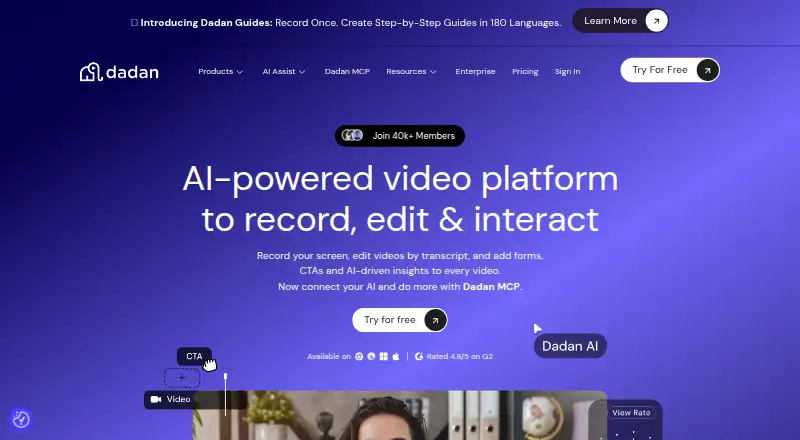
Dadan is a screen and video recording tool available on the web, Windows, macOS, Linux, and as an extension.
What Dadan is
Dadan is a screen and video recording tool available on the web, Windows, macOS, Linux, and as an extension. It can capture a screen, webcam, or both, with system audio and microphone input; recordings can reach 4K resolution. The online editor supports trimming, zooming, text, shapes, audio adjustment, and screen blur. A transcript editor allows video editing through text and AI removal of silence and filler words. Videos can contain forms, calls to action, polls, quizzes, chapters, and feedback elements. Teams can work in shared spaces and automatically share videos, with more than 30 direct integrations and a custom webhook. The free plan allows up to 25 videos, 2 GB storage, 720p resolution, 100 MB uploads, and five minutes per video; it also includes 10 AI credits and 10 minutes of meeting recording monthly. The Business plan requires at least three users.
Good
- Records screen, webcam, or both with audio.
- Editor includes screen blur and audio adjustment.
- Transcript editor can remove silence and fillers with AI.
- Videos support polls, quizzes, forms, and feedback.
- Offers more than 30 direct integrations.
Watch out
- Free plan is limited to 720p.
- Free plan allows five minutes per video.
- Business plan requires at least three users.
Who it suits
Dadan suits people who need to record screens or webcams and edit or share videos. Teams may value its shared workspaces, interactive video elements, and integrations.
Verdict
Dadan combines recording, editing, interactive video elements, and team sharing across desktop and web options. The free plan has defined storage, resolution, upload, and duration limits; annual paid pricing starts at $8 a month.
Plans and prices
From Dadan's own pricing page, checked 28 Sep 2026.
| Plan | Price | What it gives you |
|---|---|---|
| Free | Free | Up to 25 videos, 2 GB storage, and 720p resolution. · 25 videos · 2 GB storage · 720p resolution · 100 MB upload limit · 10 AI credits/month · 5 minutes per video · billed monthly |
| Lite | $14 a month | Unlimited videos, 25 GB storage, and up to 4K resolution. · Unlimited videos · 25 GB storage · 4K resolution · 2 GB upload limit · 10 AI credits/month · 10 minutes meeting recording/month · billed monthly |
| Pro | $24 a month | Unlimited videos, 50 GB storage, up to 4K resolution, and unlimited AI credits. · Unlimited videos · 50 GB storage · 4K resolution · 5 GB upload limit · Unlimited AI credits · 10 hours meeting recording/month · Popular |
| Business | $14 a month | Minimum 3 users; includes unlimited storage, integrations, priority support, and a dedicated account manager. · Unlimited videos · Unlimited storage · 25 GB upload limit · 15 hours meeting recording/month · Unlimited playlists · Minimum 3 users · Billed annually; minimum 3 users |
| Lite Annual | $8 a month | Annual pricing with unlimited videos, 25 GB storage, and up to 4K resolution. · $8/month |
| Business Annual | $14 a month | Minimum 3 users; includes unlimited storage, integrations, priority support, and a dedicated account manager. · $14 / month (Billed Annually) per seat |
| Pro Annual | $14 a month | Annual pricing with unlimited videos, 50 GB storage, up to 4K resolution, and unlimited AI credits. · $14/month |
The facts
Each one read from Dadan's own pages, with the date it was checked.
The company
- Company Copyright
- The footer identifies the company as dadan, Inc. and shows a 2026 copyright.checked 28 Sep 2026
- Founded
- 2024checked 23 Sep 2026
- Headquarters
- 3601 Al Imam Saud Ibn Faysal Rd, Al Aqiq, Riyadh 13515, Saudi Arabiachecked 23 Sep 2026
- Sharing And Teams
- Teams can use shared workspaces, collaborate online, and automatically share videos with one another.checked 28 Sep 2026
What it does
- Direct Integrations
- Dadan offers more than 30 direct integrations and a custom webhook.checked 28 Sep 2026
- Guide Languages
- Dadan Guides can translate step-by-step guides into more than 180 languages.checked 28 Sep 2026
- Interactive Elements
- Videos can include forms, CTAs, polls, quizzes, chapters, feedback, open text, and true-or-false interactions.checked 28 Sep 2026
- Maximum video quality
- 4kchecked 20 Sep 2026
- Maximum Video Quality
- Paid plans support high-definition video up to 4K.checked 28 Sep 2026
- Microphone recording
- Yeschecked 20 Sep 2026
- Named Integrations
- Integrations include MailChimp, Google Calendar, Microsoft Dynamics, YouTube, HubSpot, Shopify, Jira, GitHub, and others.checked 28 Sep 2026
- Paid from
- 8checked 20 Sep 2026
- Privacy Controls
- Users can control who views, shares, and interacts with videos and remove access at any time.checked 28 Sep 2026
- Recording Features
- Users can record their screen, webcam, or both with audio.checked 28 Sep 2026
- Recording Requests
- Users can request videos by link without sign-up or installation.checked 28 Sep 2026
- Security Certification
- The page lists AICPA SOC 2 as in progress.checked 28 Sep 2026
- Security Encryption
- The page states that data is encrypted and securely stored, with HLS/m3u8 encryption listed.checked 28 Sep 2026
Money
- Free AI Credits
- The free plan includes 10 AI credits per month.checked 28 Sep 2026
- Free Meeting Limit
- The free plan includes 10 minutes of meeting recording per month.checked 28 Sep 2026
- Free plan
- Yeschecked 20 Sep 2026
- Free Plan Limits
- The free plan allows up to 25 videos, 2 GB storage, 720p resolution, and 100 MB uploads.checked 28 Sep 2026
- Paid Starting Price
- Paid plans start at $8 per month with annual pricing.checked 28 Sep 2026
Where it runs
- Supported platforms
- web,windows,macos,linux,chrome_extensionchecked 20 Sep 2026
- Supported Platforms
- Recording is available through a browser, extension, and native app, with Chrome, Edge, Windows, and Mac downloads.checked 28 Sep 2026
The full review of Dadan
Overview
Dadan is a screen and webcam video tool for people who need more than a recording: it combines editing, viewer interactions and team sharing. It suits educators, customer-facing teams and coworkers making explainers or guided walkthroughs. Its broad editing and interaction toolkit is compelling, but the free plan’s short recording cap and modest storage make it a limited way to get started.
Record a screen, webcam or both with microphone and system audio. Paid plans reach 4K, while Free is capped at 720p. The online editor supports trimming, zooming, text, shapes, audio adjustment and screen blur, giving users practical ways to refine a clip without a separate editing step. Its transcript editor can treat editing more like revising a document and use AI to remove silence and filler words.
Videos can include forms, calls to action, polls, quizzes, chapters, feedback, open-text prompts and true-or-false interactions. That makes Dadan a stronger fit for instructional or response-seeking videos than for simple one-way screen capture. Teams get shared workspaces, online collaboration and automatic video sharing. More than 30 direct integrations and a custom webhook extend that workflow; named integrations include MailChimp, Google Calendar, Microsoft Dynamics, YouTube, HubSpot, Shopify, Jira and GitHub.
Privacy controls let users decide who can view, share or interact with videos and revoke access. Dadan says data is encrypted and securely stored, and lists HLS/m3u8 encryption. Its AICPA SOC 2 certification is in progress. Support includes contact support, webinars and video tutorials, with priority support on Business. Dadan Guides can translate step-by-step guides into more than 180 languages, and recording requests can be sent by link without sign-up or installation.
For category browsing, see Video Messaging Software and Screen Recording Software.
Key features
Recording and editing
Dadan’s recording options cover screen, webcam and audio capture, while its stated maximum video quality is 4K. The five-minute maximum recording length is a meaningful constraint for longer demos or lessons; the Free plan likewise allows five minutes per video. Editing tools such as blur and audio adjustment are useful for polishing or obscuring parts of a clip, but they do not remove the need to keep recordings concise.
Interactive video and collaboration
Polls, quizzes, forms and other responses give viewers a way to participate, while chapters and feedback can make videos more structured. These features are most useful when a video is part of instruction, onboarding or a customer journey, rather than a quick internal message. Shared workspaces and automatic sharing reduce friction for teams, though Business is the plan that explicitly includes integrations and priority support.
Pricing
Dadan uses a freemium model. Free costs nothing and includes up to 25 videos, 2 GB storage, 720p resolution, a 100 MB upload limit, 10 AI credits per month and five minutes per video. It also includes 10 minutes of meeting recording per month. Those caps make it suitable for occasional short clips, not a sustained library or high-quality publishing workflow.
Lite costs $14 a month on monthly billing, or $8 a month with annual pricing. It raises video quality to 4K and provides unlimited videos, 25 GB storage, a 2 GB upload limit and 10 AI credits per month; meeting recording remains 10 minutes monthly. The annual price is the more economical route for an individual who can commit to a year, while the monthly price costs more for flexibility.
Pro costs $24 a month on monthly billing. Its annual price is $14 a month. Both descriptions include unlimited videos, 50 GB storage, 4K resolution and unlimited AI credits; the plan limits uploads to 5 GB and includes 10 hours of meeting recording per month. Pro is the clearer fit for frequent creators who need more storage and AI use than Lite provides.
Business costs $14 a month per seat with annual billing and a three-user minimum, so the annual commitment starts at $42 a month for a team of three. It includes unlimited storage, integrations, priority support, a dedicated account manager, unlimited videos, 25 GB uploads, 15 hours of meeting recording per month and unlimited playlists. That makes it team-oriented rather than a cheaper substitute for an individual Lite subscription.
Platforms
Dadan supports web, Windows, macOS, Linux and a Chrome extension. That range accommodates desktop workflows across major operating systems, with browser access and an extension option. Android and iOS are not among its listed platforms, so mobile-first users should look elsewhere.
Who it's for
Dadan is best suited to people and teams producing concise instructional, sales or support videos that benefit from editing, viewer responses and controlled sharing. Its interactive elements and collaboration tools give it more reach than a basic recorder. It is a weaker choice for lengthy recordings: the five-minute stated maximum is restrictive, and the Free plan’s storage, resolution and upload ceilings further limit regular use.
Pros and cons
Pros
- Broad editing in one workflow: trimming, blur, audio adjustment and transcript editing can help creators refine clips without switching tools.
- Viewer participation: polls, quizzes, forms and feedback support videos intended to prompt a response, not just deliver information.
- Team and integration options: shared workspaces, automatic sharing and more than 30 direct integrations support collaborative use; Business adds a dedicated account manager and priority support.
- Cross-platform desktop coverage: web, Windows, macOS, Linux and Chrome extension options cover varied desktop setups.
Cons
- Short recording ceiling: the stated five-minute maximum makes longer lessons and demos a poor fit.
- Restrictive free allowance: 25 videos, 2 GB storage, 720p, 100 MB uploads and five minutes per video constrain ongoing use.
- Business requires a team commitment: annual billing and three seats make it unsuitable for solo users seeking its team support features.
- Mobile apps are absent from the supported platform list: users who need Android or iOS access should consider an alternative.
Alternatives
Choose Loom if a free plan with 25 videos and five-minute screen recordings is the priority; its listed platforms also include Android and iOS, unlike Dadan’s.
Hippo Video is another freemium option with a free plan and free trial, and supports Android and iOS as well as desktop and web platforms.
Dubb offers a free plan and trial across Android, iOS, web and desktop options; its paid Pro plan is $499 a year and includes unlimited videos and HD quality.
Volley is worth considering for messaging built around unlimited DMs and connections; its Basic plan includes three-minute video, audio and screen recordings and 30-day message history.
Bonjoro has a free plan for up to 50 videos and supports Android, iOS, web and extension platforms, making it an option for users who value a larger stated free video allowance.
Cap is an alternative for readers seeking open-source software: it says its code is fully open source under the AGPL license and supports self-hosting.
Jumpshare offers a Basic plan with 25 uploads, five-minute recording time and a 250 MB maximum file size per upload; consider it if those upload terms fit better than Dadan’s free limits.
Screencastify has a free plan with up to 10 recordings and 30 minutes per video, a better stated free duration allowance for users who need longer individual recordings.
Verdict
Dadan is a strong choice for teams and creators who want concise recordings to become edited, interactive videos with managed sharing. Its main advantage is the combination of transcript-based editing, viewer interactions and collaboration; its main drawback is the five-minute recording ceiling, which narrows its usefulness for longer presentations. Choose it for short, engaging explainers and team workflows, but look elsewhere if your recordings need to run longer or mobile apps are essential.
Getting started
- Visit https://www.dadan.io/.
- Choose the web service, browser extension, Windows, macOS, or Linux option.
- Start with the free plan or choose a paid plan; annual pricing starts at $8 per user per month.
- Record your screen, webcam, or both with audio.
Limits worth knowing
The free plan allows up to 25 videos, 2 GB storage, 720p resolution, 100 MB uploads, and five minutes per video. It includes 10 AI credits and 10 minutes of meeting recording per month.
Questions
Is Dadan free?
Yes. Its Free plan costs nothing.
What does the free plan include?
It allows up to 25 videos, 2 GB storage, 720p resolution, 100 MB uploads, and five minutes per video. It also includes 10 AI credits and 10 minutes of meeting recording per month.
What platforms does Dadan support?
Dadan is available on the web, Windows, macOS, Linux, and as a browser extension.
How much do paid plans cost?
Listed plans also include Pro at $24 a month and Business at $14 a month, with a minimum of three users for Business.
What integrations does Dadan offer?
Dadan offers more than 30 direct integrations and a custom webhook. Named integrations include MailChimp, Google Calendar, Microsoft Dynamics, YouTube, HubSpot, Shopify, Jira, and GitHub.
Who makes Dadan?
Dadan is made by Dadan. The maker was founded in 2024 and is headquartered in Riyadh, Saudi Arabia.
Alternatives to Dadan
- 1

Cap
Free planOpen sourceWebAPIExtensionLinux9.0From $29 a year - 2

Loom
Free planAndroidiOSWebmacOS8.9From $18 a month - 3

Vmaker
Free planiOSWebExtensionmacOS8.9From $18 a month - 4

ScreenPal
Free planAndroidiOSWebmacOS8.8From $4 a month - 5
Claap
Free planAndroidiOSWebAPI8.8From €32 a month - 6

Screencastify
Free planWebExtensionLinuxmacOS8.7From $7 a month