
csprite
csprite is a free pixel art editor for Linux, macOS, and Windows.
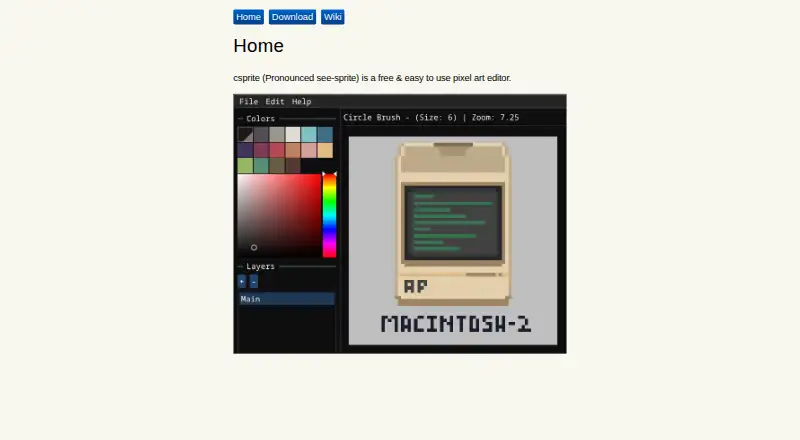
What csprite is
csprite is a free pixel art editor for Linux, macOS, and Windows. It opens with a blank 60×40 canvas, while also letting you create a new canvas or open existing pixel art. Drawing tools include square and circle brushes, plus matching eraser variants. The editor supplies the 16-color Pico-8 palette by default and includes an eyedropper for selecting colors. Its fill tool paints an area until it meets a boundary. Save and Save As commands are available with keyboard shortcuts, and projects use the custom .csprite format. csprite provides indexed color tools and is licensed under BSD-3-Clause. Minimum requirements listed for Linux and Windows 7 or later include 512 MB of usable RAM, a 64-bit processor, and OpenGL 3.0 or later. Binaries are available through GitHub Releases, with separate Windows and Linux compilation requirements.
Good
- Free plan with no listed charge
- Square and circle brushes with erasers
- 16-color Pico-8 palette and eyedropper
- Save and Save As keyboard shortcuts
- Supports Linux, macOS, and Windows
Watch out
- Requires 64-bit processor and OpenGL 3.0+
- Minimum 512 MB usable RAM listed
- Uses custom .csprite file format
Who it suits
csprite suits people making pixel art who want a focused editor with basic brushes, palette, fill, and saving tools. It supports Linux, macOS, and Windows users.
Verdict
csprite provides a focused set of pixel-art drawing and color tools at no cost. Check its stated hardware requirements and custom file format before choosing it.
Plans and prices
From csprite's own pricing page, checked 11 Oct 2026.
| Plan | Price | What it gives you |
|---|---|---|
| csprite | Free | Free pixel art editor |
The facts
Each one read from csprite's own pages, with the date it was checked.
What it does
- Brush and eraser
- The v0.1.x guide describes square and circle brush and eraser variants.checked 11 Oct 2026
- Build from source
- The repository README provides separate compilation requirements for Windows and Linux.checked 11 Oct 2026
- Canvas
- The v0.1.x guide says csprite starts with a blank 60×40 canvas and lets users create new canvases or open existing pixel art.checked 11 Oct 2026
- Downloads
- The maker's download page says binaries can be downloaded from GitHub Releases if JavaScript is unavailable.checked 11 Oct 2026
- File format
- A GitHub release changelog lists a custom .csprite file format among the changes.checked 11 Oct 2026
- Fill tool
- The fill tool paints an area until it reaches a border it cannot cross.checked 11 Oct 2026
- License
- The GitHub repository identifies its license as BSD-3-Clause.checked 11 Oct 2026
- Operating systems
- The repository README lists Linux and Windows 7 or later as minimum system requirement platforms.checked 11 Oct 2026
- Palette
- The v0.1.x guide says csprite provides the 16-color Pico-8 palette by default and includes an eyedropper tool.checked 11 Oct 2026
- Saving
- The v0.1.x guide describes Save and Save As options, including keyboard shortcuts.checked 11 Oct 2026
- System requirements
- The repository README lists at least 512 MB of usable RAM, a 64-bit processor, and OpenGL 3.0 or later as minimum requirements.checked 11 Oct 2026
- What it does
- csprite is a free pixel art editor.checked 11 Oct 2026
Alternatives to csprite
- 1
LibreSprite
Free planOpen sourceAndroidWebAPILinux8.0Free plan - 2
Pixelc
Free planOpen sourceAndroidWebLinuxmacOS7.8Free plan - 3

PixelWall
Free planWebAPILinuxmacOS7.6$15 one-time - 4
Avidemux
Free planOpen sourceWebLinuxmacOSWindows7.3Free plan - 5
Hexcalibur
Free planWebLinuxmacOSWindows7.2Free plan - 6
PixelAoi
Free planAPIWindows7.2$17 one-time