
cradleOS
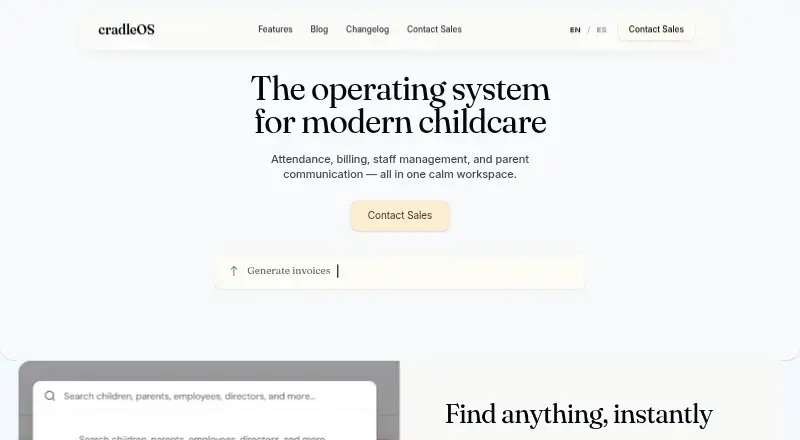
cradleOS is a childcare workspace that brings center operations and family communication together.
What cradleOS is
cradleOS is a childcare workspace that brings center operations and family communication together. Its attendance tools handle digital check-in and check-out, live headcounts, ratio tracking, and automated classroom time logs. Billing can generate invoices from attendance, accept online payments through Stripe, track balances, and automate late fees. Enrollment tools organize leads, tours, and waitlists with CRM tools. For families, cradleOS provides two-way messaging, daily reports, photo sharing, and center-wide announcements. It also includes licensing checklists, immunization records, incident logs, and audit-ready reporting. Staff tools cover shift scheduling, time tracking, certification management, and ratio-compliance monitoring. The Free plan is designed for home daycares and small centers and includes features such as records, invoicing, messaging, scheduling, compliance tools, and CACFP meal tracking. Pro adds unlimited children and classrooms, kiosk video recording, and priority support. Enterprise adds multi-site management, custom reporting, advanced permissions, API access and integrations. cradleOS is available on Android, iOS, macOS, and the web, with a native macOS app for directors. Email and chat support are included across plans; Free lists email support and Pro lists priority support.
Good
- Digital check-in, live headcounts, and ratio tracking support attendance workflows.
- Invoices can be generated from attendance, with Stripe payments and balance tracking.
- Families can exchange messages and receive reports, photos, and announcements.
- Staff tools include scheduling, time tracking, and certification management.
- Available on Android, iOS, macOS, and the web.
Watch out
- API access and integrations are included with Enterprise.
Who it suits
cradleOS suits home daycares and small centers that need attendance, billing, enrollment, staff, and family communication tools in one workspace. Enterprise is aimed at multi-site operators with advanced reporting and compliance needs.
Verdict
Choose cradleOS if your childcare operation needs attendance, billing, enrollment, staff administration, and parent communication together.
Plans and prices
From cradleOS's own pricing page, checked 14 Oct 2026.
| Plan | Price | What it gives you |
|---|---|---|
| Free | Free | Home daycares and small centers · digital check-in/out · records · messaging · activity logs · incident reports · invoicing and online payments · enrollment and waitlist · reports · ratio monitoring · compliance checklists · scheduling · photo sharing · CACFP meal tracking · email support |
| Enterprise | Priced on request | Everything in Pro · multi-site management · custom reporting and analytics · advanced role permissions · API access and integrations · dedicated onboarding · SLA and uptime guarantee · custom branding |
| Pro | Priced on request | Everything in Free · unlimited children and classrooms · kiosk video recording · priority support |
The facts
Each one read from cradleOS's own pages, with the date it was checked.
What it does
- API documentation
- No public API reference, SDK or developer documentation is provided on the pages reviewed; API access is presented as an Enterprise feature.checked 14 Oct 2026
- Attendance
- Digital check-in and check-out can run through a kiosk, parent device or web app, with live headcounts and ratio tracking.checked 14 Oct 2026
- Attendance verification
- Attendance records include signatures, authorized-pickup verification, notifications and emergency-roster exports.checked 14 Oct 2026
- CACFP
- Meal and nutrition records include details intended for CACFP reporting.checked 14 Oct 2026
- Certification alerts
- Certification and credential expiry reminders are described at 30-, 60- and 90-day intervals.checked 14 Oct 2026
- Compliance
- Compliance features include state licensing checklists, immunization tracking, incident logs with photos and signatures, ratio alerts and audit-ready reports.checked 14 Oct 2026
- COPPA controls
- A February 2026 update added parental-consent tracking and a COPPA-compliant deletion workflow for child data.checked 14 Oct 2026
- Daily reports
- Teachers can log activities, meals, portions, bottles, naps and milestones, which are compiled into automated end-of-day summaries.checked 14 Oct 2026
- Enrollment
- The enrollment CRM tracks leads, schedules tours, manages waitlists and collects digital registration, medical, emergency and consent forms.checked 14 Oct 2026
- Instant search
- A global search finds children, families and staff as users type, with record filters and keyboard navigation.checked 14 Oct 2026
- Integration
- Stripe is the explicitly named payment integration; broader API access and integrations are listed only for Enterprise.checked 14 Oct 2026
- Integrations
- The page names Stripe for online payments and says API access and integrations are included with Enterprise.checked 3 Oct 2026
- Launch date
- The changelog records the public launch on January 15, 2026.checked 14 Oct 2026
- Licence
- The Terms classify the software and content as cradleOS property and prohibit copying, reverse engineering and derivative works, indicating a proprietary licence.checked 14 Oct 2026
- Limit: pricing transparency
- Free, Pro and Enterprise are shown without numeric prices, while the paid tiers require contacting sales.checked 14 Oct 2026
- Limit: refunds
- The Terms say subscriptions may be billed monthly or annually and are generally non-refundable.checked 14 Oct 2026
- Limit: service guarantee
- The Terms disclaim guarantees that the service will be uninterrupted, timely, secure, error-free or meet a user's requirements.checked 14 Oct 2026
- Multi-site
- Enterprise supports multiple centers with centralized reporting, cross-location scheduling, unified billing and role-based access.checked 14 Oct 2026
- Notable update
- The February 28, 2026 changelog entry introduced the Free, Pro and Enterprise subscription tiers.checked 14 Oct 2026
- Parent communication
- Two-way messaging, daily reports, photos and center announcements connect families with teachers.checked 14 Oct 2026
Money
- Billing
- Invoices can be generated from attendance or schedules, with tuition plans, discounts, subsidies, deposits, credits, late fees and balance tracking.checked 14 Oct 2026
Where it runs
- Desktop app
- A native macOS desktop application is offered for directors, alongside browser and mobile access.checked 14 Oct 2026
- Kiosk languages
- The kiosk supports English, Spanish and Chinese, batch check-in/out, break tracking and administrative kiosk settings.checked 14 Oct 2026
- Kiosk offline mode
- The kiosk can save check-in actions locally while offline and synchronize them after connectivity returns.checked 14 Oct 2026
The full review of cradleOS
cradleOS is a childcare operations platform that combines center administration with family communication. It is best suited to home daycares and small centers that can use its free plan; multi-site operators should look to Enterprise. Its breadth is a strong starting point, but unlimited capacity and advanced management come with custom pricing.
Overview
Attendance, billing, enrollment, staff administration, compliance records, and parent communication sit in one workspace. Connecting those tasks can cut down on separate systems: attendance can create classroom time logs and feed invoices, while enrollment tools follow leads through tours and waitlists. Stripe handles online payments, and billing can track balances and automate late fees.
Most centers can be up and running in a day after importing a roster and configuring classrooms. The service runs on Android, iOS, and the web, with a native macOS app for directors who prefer a dedicated desktop workspace. Security measures include encryption in transit and at rest, additional application-level encryption for sensitive health information, isolated center data, and US-hosted infrastructure.
Key features
Attendance, billing, and enrollment
Check-in and check-out work through a kiosk, web app, mobile device, or QR code. Live headcounts and ratio tracking help staff monitor classroom capacity, and automated time logs connect attendance to billing. That connection makes cradleOS a practical fit for centers seeking fewer manual handoffs between daily records and invoices.
The enrollment pipeline tracks leads, schedules tours, and manages waitlists with built-in CRM tools. Centers handling prospective families alongside current attendance and billing can keep those workflows together, though the strongest benefit depends on using the platform for more than check-in alone.
Families, staff, and compliance
Two-way messaging, daily reports, photo sharing, and center-wide announcements support regular parent communication; a parent mobile app is also available. Staff tools cover shift scheduling, time tracking, certification management, and ratio-compliance monitoring. Licensing checklists, immunization records, incident logs, and audit-ready reporting add useful administrative coverage for centers managing compliance obligations.
CACFP meal tracking and meal/allergy tracking are included capabilities. Email and chat support are included across plans, while Free specifies email support and Pro adds priority support. The Enterprise plan includes dedicated onboarding and an SLA and uptime guarantee, which may matter more to operators coordinating multiple sites.
Pricing
cradleOS uses a freemium model. The Free plan costs nothing and is aimed at home daycares and small centers getting started. It includes email support, digital check-in/out, records, messaging, invoicing, enrollment, reports, compliance, scheduling, photo sharing, and CACFP meal tracking. That is a notably broad set of core tools at no subscription cost, but it does not include the unlimited children and classrooms specified for Pro.
Pro has custom pricing and includes everything in Free, plus unlimited children and classrooms, kiosk video recording, and priority support. It is the relevant step for a growing single-site center that has outgrown Free’s capacity, though no price is given to compare against its added headroom.
Enterprise also has custom pricing and includes everything in Pro, along with multi-site management, custom reporting, advanced role-based permissions, API access and integrations, dedicated onboarding, an SLA and uptime guarantee, and custom branding. Those additions target multi-site operators with more complex reporting and access needs; they are likely unnecessary for a small center seeking only basic attendance and billing.
Platforms
cradleOS supports Android, iOS, macOS, and web. Its native macOS app gives directors a dedicated desktop option, while kiosk, web, mobile-device, and QR-code attendance methods offer flexibility for check-in. Families can use the parent mobile app for communication and updates.
Who it's for
Choose cradleOS if you run a home daycare or small center and want attendance, invoicing, enrollment, staff scheduling, compliance records, and family communication in one free workspace. Pro is more suitable when child or classroom capacity becomes a constraint. Operators managing multiple locations or needing custom reporting and permissions should consider Enterprise, while centers that only need a narrow administrative tool may not benefit from the full platform.
Pros and cons
Pros
- Broad free core: Free combines attendance, invoicing, enrollment, records, messaging, scheduling, and compliance tools, giving small providers substantial operational coverage without a subscription fee.
- Connected workflows: Attendance can feed invoices and automated classroom time logs, reducing manual transfer between those tasks.
- Multiple attendance methods: Kiosk, web, mobile, and QR code options accommodate different check-in setups.
- Security measures for sensitive data: Encryption, center-data isolation, and added application-level protection for health information address important childcare record concerns.
Cons
- Growth brings custom-priced upgrades: Unlimited children and classrooms require Pro, and multi-site tools require Enterprise, with neither plan carrying a published price.
- Enterprise features are not aimed at small providers: Custom reporting, role permissions, integrations, and multi-site management matter most to larger operators, not a home daycare looking for core daily tools.
- Pro support is a paid-plan distinction: Free includes email support, while priority support is reserved for Pro.
Alternatives
Browse daycare management software for a wider category comparison. Consider Kinderly if its free Sprout plan’s cap of 10 active children and included forms, packets, share links, small website, and document storage better match your needs; its listed Bloom plan costs 49.99 US.
QikKids is another freemium option, with Playground plans organized by place-count bands from 0–39 through 70–99 places. Choose Kangarootime if its free tier’s limit of one program, one school, and five staff members fits your operation; its Premium plan supports up to 10 schools and unlimited staff.
Kriyo is a paid alternative with Value, Pro, and Pro Plus plans. LineLeader may suit NCCA members seeking a location-priced management and parent-engagement package: its listed offer is $65 a month, billed per location per month.
Procare is worth comparing for smaller centers and in-home providers looking at its $25 a month home version, though classroom management is unavailable to in-home users. Xplor Education offers freemium packages including OSHC and Xplor One Premium. Brightwheel uses custom pricing based on program information.
Verdict
cradleOS is a strong choice for home daycares and small centers that want a broad set of connected childcare workflows without paying for the Free plan. Its main advantage is the combination of attendance, billing, enrollment, staff tools, compliance, and family communication; its main drawback is that capacity growth and multi-site management lead to custom-priced plans. Look elsewhere if you need a clear price before committing to expand.
Getting started
- Visit https://cradleos.com/en/.
- Choose the Free plan for home daycare or small-center use.
- Import your roster and configure classrooms.
- Use the Android, iOS, macOS, or web version; directors can use the native macOS app.
Limits worth knowing
Free is intended for home daycares and small centers. Pro adds unlimited children and classrooms, while Enterprise adds multi-site management, custom reporting, advanced permissions, API access, and integrations.
Questions
Is cradleOS free?
Yes. The Free plan is free and is intended for home daycares and small centers.
Which platforms does cradleOS support?
It is available on Android, iOS, macOS, and the web. A native macOS app is offered for directors.
What does Pro add?
Pro includes everything in Free, unlimited children and classrooms, kiosk video recording, and priority support.
Which plan includes API access and integrations?
Enterprise includes API access and integrations.
How does cradleOS handle payments?
It can generate invoices from attendance, accept online payments through Stripe, track balances, and automate late fees.
What support comes with the plans?
Email and chat support are included on every plan. Free lists email support, while Pro lists priority support.
Alternatives to cradleOS
- 1

Xplor Education
Free planAndroidiOSWebAPI8.2Free plan - 2

illumine
AndroidiOSWebAPI7.8 - 3
OWNA
AndroidiOSWebAPI7.7 - 4

Kangarootime
Free planAndroidiOSWebAPI7.6Free plan - 5

Kinderly
Free planAndroidiOSWeb7.3From $49.99 a month - 6

Procare
AndroidiOSWeb7.0From $25 a month