
Brightwheel
Brightwheel is a platform for early education programs that combines enrollment, billing, family messaging, lesson planning, and other program tasks.
What Brightwheel is
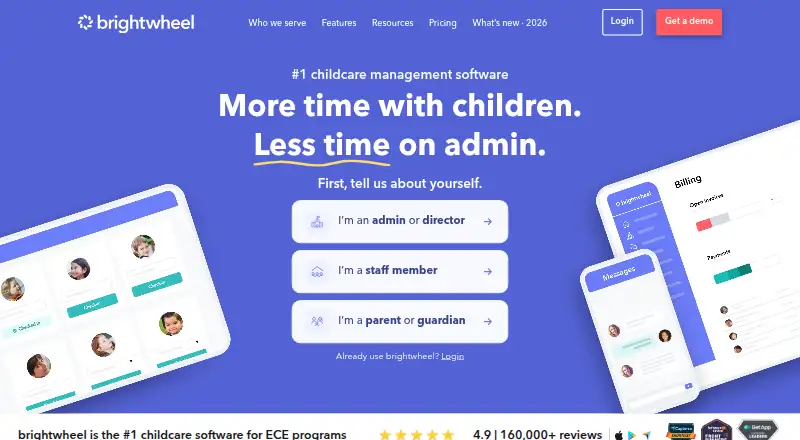
Brightwheel is a platform for early education programs that combines enrollment, billing, family messaging, lesson planning, and other program tasks. Enrollment tools cover admissions, waitlists, applications, and digital forms. Families can pay online using secure payment options, while invoices, payments, and reminders can be automated. Staff features include rosters, scheduling, time tracking, payroll, and development hours. The platform is available on the web, iOS, and Android, and a mobile app is listed among its features. Support includes onboarding, a dedicated specialist, live chat, and online resources. Brightwheel also provides webinars, templates, tools, blogs, and other online training resources. Pricing is customized after program information is collected; no specific price is listed. The site displays more than 160,000 reviews and a 4.9 rating, as well as reviews from the Apple App Store and Google Play Store.
Good
- Admissions, waitlists, applications, and digital forms
- Automated invoices, payments, and reminders
- Staff rosters, scheduling, and time tracking
- Available on web, iOS, and Android
- Onboarding, live chat, and a dedicated specialist
Watch out
- Pricing is customized and not listed
- No free plan or trial is listed
Who it suits
Brightwheel suits early education programs that need enrollment, family communication, billing, and lesson planning in one platform. Its staff tools may also suit programs managing schedules, time, payroll, and development hours.
Verdict
Brightwheel combines family-facing program tasks with enrollment and staff management features. Programs should request customized pricing to understand the cost for their needs.
Plans and prices
From Brightwheel's own pricing page, checked 27 Sep 2026.
| Plan | Price | What it gives you |
|---|---|---|
| Custom pricing | Priced on request | Pricing is customized based on program information. |
The facts
Each one read from Brightwheel's own pages, with the date it was checked.
Where it runs
- All-in-one platform
- The platform combines enrollment, billing, messaging, lessons, and more.checked 27 Sep 2026
- App store presence
- The site lists reviews from Apple App Store and Google Play Store.checked 27 Sep 2026
- Mobile app
- A mobile app is listed among the product features.checked 27 Sep 2026
- Mobile apps
- bothchecked 20 Sep 2026
What it does
- Attendance and check-in
- Yeschecked 20 Sep 2026
- Custom pricing
- Pricing is customized after collecting program details.checked 27 Sep 2026
- Enrollment management
- Yeschecked 20 Sep 2026
- Enrollment tools
- Enrollment tools include admissions, waitlists, applications, and digital forms.checked 27 Sep 2026
- Family communication
- Yeschecked 20 Sep 2026
- Review count
- The site displays more than 160,000 reviews and a 4.9 rating.checked 27 Sep 2026
- Secure online pay
- Families can pay online through secure payment options.checked 27 Sep 2026
- Staff management
- Staff tools include rosters, scheduling, time tracking, payroll, and development hours.checked 27 Sep 2026
- Support options
- Support includes onboarding, a dedicated specialist, live chat, and online resources.checked 27 Sep 2026
- Training resources
- Brightwheel provides webinars, templates, tools, blogs, and online resources.checked 27 Sep 2026
Money
- Automated billing
- Invoices, payments, and reminders can be automated.checked 27 Sep 2026
- Billing and payments
- Yeschecked 20 Sep 2026
- Lesson planning
- The platform includes lesson plans, observations, assessments, and curriculum tools.checked 27 Sep 2026
The full review of Brightwheel
Brightwheel is a childcare and early-education management platform covering enrollment, family communication, payments, lessons, attendance, and staff administration. It suits centers that want these workflows joined across web and mobile apps; programs needing only one narrowly defined function may be better served by a smaller tool. The main decision point is whether its broad operational scope justifies requesting a program-specific quote.
Overview
Brightwheel brings admissions, classroom activity, family interactions, and financial tasks into one platform. Enrollment tools handle applications, waitlists, admissions, and digital forms, while attendance and check-in support everyday arrival and departure routines. Families can communicate with the program and make payments online through secure payment options.
The product runs on the web, iOS, and Android, giving staff and families mobile access as well as a browser-based workspace. Brightwheel’s site displays more than 160,000 reviews and a 4.9 rating, with reviews from both the Apple App Store and Google Play Store. Those figures indicate substantial adoption and favorable reception, but they do not replace checking whether the platform’s workflow fits your center.
Key features
Enrollment and family workflows
Admissions, applications, waitlists, and digital forms cover the route from initial inquiry to an enrolled child. Family messaging and attendance/check-in then keep the same system involved in daily communication and presence tracking. This is a strong fit for programs trying to avoid separate enrollment, parent-communication, and attendance products.
Billing and payments
Brightwheel supports online family payments and automated billing. Invoices, payment collection, and reminders can be automated, reducing repetitive follow-up for administrative staff. Programs that need straightforward billing automation should benefit most; organizations wanting a standalone accounting product rather than a childcare operations suite may not need the wider platform.
Lessons and staff administration
Lesson planning adds classroom preparation to the administrative toolkit. Staff functions include rosters, scheduling, time tracking, payroll, and development hours, so managers can coordinate personnel information and routine workforce tasks alongside child records. The breadth is useful for centers consolidating operations, although smaller programs may find a full staff-management layer unnecessary.
Support and learning resources
Onboarding, a dedicated specialist, live chat, and online resources provide several routes to implementation help. Webinars, templates, tools, blogs, and other training materials can support continuing use, which matters when a platform spans enrollment, finance, classroom, and staffing processes.
Pricing
Custom pricing
Brightwheel has paid, customized pricing. The provider collects program information before setting the price, so buyers must request a quote rather than compare a published monthly or annual rate. This approach can accommodate different program sizes and needs, but it makes initial budgeting and direct price comparisons harder.
There is no free plan or fixed lower-cost tier described for Brightwheel. Programs should therefore assess the complete set of enrollment, communication, payment, lesson, and staff requirements before requesting terms. Centers that only need messaging or check-in may pay for a broader package than they require.
Platforms
Brightwheel is available on the web, iOS, and Android. The combination supports browser-based administration and mobile use for staff and families, with app-store presence on both major mobile platforms.
Who it's for
Brightwheel is best for childcare and early-education centers seeking one system for admissions, family communication, attendance, billing, lesson planning, and staff operations. It is particularly appropriate for teams that value automated invoices and reminders, online payments, and structured staff tools. A small provider with a single narrow requirement, or a buyer that needs a published price before engaging a vendor, should consider alternatives with transparent or free entry plans.
Pros and cons
- Pro: Enrollment, family communication, attendance, billing, lessons, and staff tools share one platform, reducing the need to coordinate multiple systems.
- Pro: Automated invoices, payments, and reminders can reduce recurring administrative work.
- Pro: Web, iOS, and Android access supports use across office, classroom, and family contexts.
- Pro: Onboarding, a dedicated specialist, live chat, and substantial training resources provide implementation support.
- Con: Custom pricing gives buyers no published figure for early budget screening or simple plan comparison.
- Con: The all-in-one scope may be excessive for programs seeking only one or two operational functions.
Alternatives
NestliCare is the better choice for programs that require a free platform with unlimited children and unlimited staff across Android, iOS, and web, and do not need a paid plan.
Procare suits smaller centers and in-home daycare providers that prefer a published home-version price of $25 a month; classroom management is unavailable for in-home users.
Kangarootime fits a program that can start free with one program, one school, and five staff members, then consider a premium plan supporting up to 10 schools and unlimited staff.
MyKidReports is worth considering for a very small provider wanting a free-forever Lite plan capped at five children, one staff account, and one room, with a free trial also offered.
BloomKidz offers a published monthly price of 24.99 GBP for nurseries with 1–30 registered children, making it preferable when child-count pricing is important.
Xplor Education is an alternative for programs comparing package-based childcare administration across web, iOS, and Android.
ChildPlus is an option for organizations focused on structured learning resources, including an Essential Learning Plan priced at $3,500 a year with 12-month access and more than 120 hours of courses and recorded webinars.
QikKids may suit programs that want place-count-based packages across web, Windows, macOS, iOS, and Android.
For broader category comparisons, see Early Childhood Education Software, Daycare Management Software, and Childcare Management Software.
Verdict
Choose Brightwheel if your childcare or early-education program wants enrollment, family communication, attendance, payments, lessons, and staff administration in one web-and-mobile system, backed by onboarding and ongoing support. Its strongest advantage is operational breadth with automated billing and secure online payments. Look elsewhere if you need a clearly published price, a free starting tier, or a focused tool without the overhead of a full management platform.
Alternatives to Brightwheel
- 1

Xplor Education
Free planAndroidiOSWebAPI9.0Free plan - 2

illumine
AndroidiOSWebAPI8.6 - 3

Kangarootime
Free planAndroidiOSWebAPI8.3Free plan - 4
BloomKidz
Free planAndroidiOS8.2From £24.99 a month - 5

OWNA
AndroidiOSWebAPI8.2 - 6
Gertrude
Free planAndroidWebLinuxmacOS8.1From €100 a year