ControllerMate
ControllerMate is a macOS utility that turns input-device controls and MIDI messages into custom keyboard, mouse, and MIDI actions.
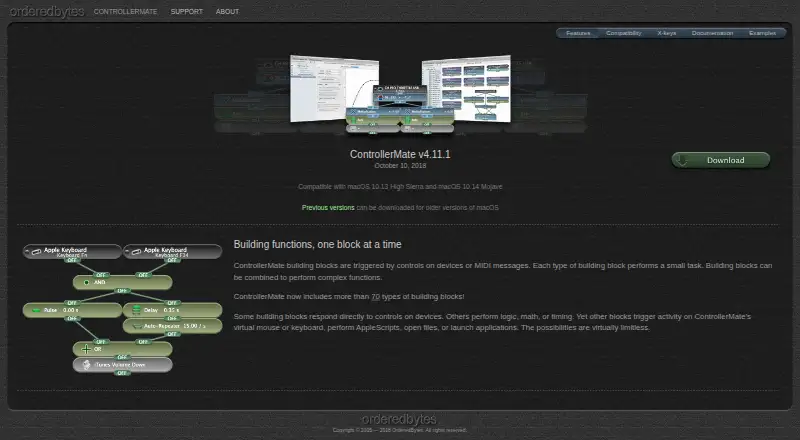
What ControllerMate is
ControllerMate is a macOS utility that turns input-device controls and MIDI messages into custom keyboard, mouse, and MIDI actions. Its programming uses more than 70 kinds of building blocks that can be combined into functions. Blocks can handle logic, math, or timing; generate keyboard or mouse activity; run AppleScripts; open files; or launch applications. Users can remap or disable keyboard buttons and set standard or custom mouse acceleration curves for devices using ControllerMate’s driver. MIDI notes, controller values, and patch changes can trigger blocks, and the software can send MIDI through a virtual MIDI source. It can also create virtual mouse, tablet, and joystick devices. A helper application can keep current programming running after the main app is quit. Unregistered use has no time limit, but only 10 blocks may generate output. The maker lists v4.11.1 compatibility with macOS 10.13 High Sierra and 10.14 Mojave.
Good
- More than 70 types of building blocks.
- Supports MIDI input and output.
- Can create virtual mouse, tablet, and joystick devices.
- Unregistered use has no time limit.
Watch out
- Only 10 unregistered blocks can generate output.
- X-keys edition omits MIDI Source and MIDI Output blocks.
- Listed compatibility covers macOS 10.13 and 10.14.
Who it suits
ControllerMate may suit macOS users who want custom input mappings for audio or video editing, music production, gaming, or flight simulation. X-keys owners can use a separate free edition with some MIDI blocks omitted.
Verdict
ControllerMate offers detailed input and MIDI customization through programmable blocks and virtual devices. Its no-time-limit free use restricts output-generating blocks, and the listed compatibility information names older macOS versions.
Plans and prices
From ControllerMate's own pricing page, checked 9 Oct 2026.
| Plan | Price | What it gives you |
|---|---|---|
| ControllerMate (unregistered) | Free | No time limit · maximum 10 output-generating building blocks · unlimited input, logic, math, and timing blocks |
The facts
Each one read from ControllerMate's own pages, with the date it was checked.
What it does
- Actions
- Building blocks can perform logic, math, and timing, generate keyboard or mouse activity, run AppleScripts, open files, or launch applications.checked 8 Oct 2026
- Audience
- OrderedBytes describes ControllerMate as used for audio/video editing, music production, gaming, and flight simulation.checked 8 Oct 2026
- Background operation
- A helper application monitors attached controllers and runs the current programming when the main ControllerMate application is closed.checked 9 Oct 2026
- Block actions
- Blocks can perform logic, math, and timing, generate virtual keyboard or mouse activity, run AppleScripts, open files, and launch applications.checked 9 Oct 2026
- Building blocks
- Its visual building-block system combines small tasks into complex functions and includes more than 70 block types.checked 9 Oct 2026
- Compatibility
- The page lists ControllerMate for X-keys v4.11.1 as compatible with macOS 10.13 High Sierra and macOS 10.14 Mojave.checked 8 Oct 2026
- Driver configuration
- Users can remap or disable keyboard buttons and configure standard or custom mouse acceleration curves.checked 8 Oct 2026
- Driver settings
- Driver configurations can remap or disable keyboard buttons and create standard or custom mouse acceleration curves for devices using ControllerMate’s driver.checked 9 Oct 2026
- Intended uses
- The maker says ControllerMate is used for audio/video editing, music production, gaming, and flight simulation.checked 9 Oct 2026
- MIDI
- MIDI notes, controller values, and patch changes can trigger blocks, and ControllerMate can send MIDI through a virtual MIDI source.checked 9 Oct 2026
- Purpose
- ControllerMate triggers custom keyboard, mouse, and MIDI actions from input devices.checked 9 Oct 2026
- Registration key help
- After purchase, ControllerMate key information is sent by email, and lost keys can be requested using the purchase email address.checked 9 Oct 2026
- Release and compatibility note
- The maker’s listed latest release is v4.11.1, whose notes mention compatibility fixes for macOS 10.14 Mojave and X-keys hardware.checked 9 Oct 2026
- Support
- Support is offered through documentation, the OrderedBytes forum, and email.checked 9 Oct 2026
- X-keys compatibility
- The maker lists compatibility with numerous X-keys models, including programmable keyboards, keypads, foot pedals, and switch interfaces.checked 9 Oct 2026
- X-keys edition
- The free ControllerMate for X-keys edition is for owners of X-keys devices and omits the MIDI Source and MIDI Output building blocks.checked 9 Oct 2026
The company
- Founded
- 2005checked 28 Sep 2026
- Maker
- OrderedBytes says it was founded in 2005 and introduced ControllerMate as its first product that year.checked 8 Oct 2026
Money
- Free use limit
- Unregistered use has no time limit, but is limited to 10 building blocks that generate output; input, logic, math, and timing blocks can be created without limit.checked 8 Oct 2026
Where it runs
- Virtual devices
- ControllerMate can create virtual mouse, tablet, and joystick devices controlled by its programming.checked 9 Oct 2026
The full review of ControllerMate
ControllerMate is a macOS control-mapping environment for turning hardware inputs and MIDI messages into coordinated keyboard, mouse, MIDI, and application actions. It suits technically minded users in music, editing, gaming, and simulation who need workflows beyond one-button remaps. The free mode is useful for experimenting, but serious builds will quickly meet its output-block ceiling.
Overview
ControllerMate replaces fixed assignments with programmable functions assembled from more than 70 block types. That makes it a strong fit when one control must trigger logic, timed sequences, scripts, or several output types. The trade-off is configuration work: users who want an immediate, preset-driven mapping tool may find this approach excessive.
OrderedBytes introduced ControllerMate in 2005 and positions it for audio/video editing, music production, gaming, and flight simulation. Its driver can handle keyboard and mouse remapping, while virtual devices extend the software’s reach to applications that expect a mouse, tablet, or joystick.
Key features
Blocks cover logic, mathematics, and timing, then connect those conditions to keyboard or mouse activity, AppleScripts, file opening, or application launches. This supports context-sensitive and multi-step controls rather than only direct key substitutions. It is especially relevant to editors and producers who want a physical control to coordinate software commands.
Driver configuration can remap or disable keyboard buttons and offers both standard and custom mouse-acceleration curves. That is valuable for tailoring a device’s feel, although these settings apply to devices using ControllerMate’s driver.
MIDI notes, controller values, and patch changes can start building-block functions. A virtual MIDI source can send MIDI messages onward, allowing ControllerMate to sit between hardware and music software. The software can also create programmable virtual mouse, tablet, and joystick devices, giving specialized controllers a way to appear as more familiar input hardware.
A helper application can continue monitoring attached controllers and run the current programming after the main application closes. That matters for setups intended to remain active during a session rather than requiring the editor window to stay open.
Pricing
ControllerMate is freemium. The unregistered plan costs free, has no time limit, and allows unlimited input, logic, mathematics, and timing blocks. Its decisive restriction is a maximum of 10 building blocks that generate output. In practice, that is enough to learn the system or build a small mapping, but complex MIDI, scripting, or multi-device workflows can exhaust the allowance quickly.
Use beyond the unregistered limits requires a registration key; paid pricing is custom pricing. The key is sent by email after purchase, and OrderedBytes can help recover a lost key through the purchase email address. A free trial is offered, with no published trial duration.
Owners of X-keys devices can use the free ControllerMate for X-keys edition. It is tailored to that hardware family and omits the MIDI Source and MIDI Output building blocks, so it is not equivalent to the general edition for MIDI-centric setups.
Platforms
ControllerMate is for macOS. The maker lists ControllerMate for X-keys v4.11.1 as compatible with macOS 10.13 High Sierra and macOS 10.14 Mojave, and the release notes mention fixes for Mojave and X-keys hardware. Compatibility with newer macOS versions is not established by these compatibility details, so users should verify their system before committing.
Who it's for
Choose ControllerMate if you need programmable relationships among physical controls, MIDI events, scripts, applications, and virtual input devices on a Mac. It is a particularly good match for producers, post-production editors, flight-simulation enthusiasts, and gamers willing to design their own control logic. It is less suitable for someone who wants a simple, cross-platform gamepad mapper or a ready-to-use library of assignments.
Pros and cons
Pros
- Deep block system: More than 70 block types support logic, timing, calculations, scripts, files, applications, and input generation.
- Broad output options: Keyboard, mouse, MIDI, and virtual mouse, tablet, and joystick devices can be combined in one setup.
- Persistent operation: The helper application can keep programming active after the main app is quit.
- Genuine time-unlimited free use: Users can learn and maintain small configurations without an expiration date.
Cons
- Free output cap: Only 10 output-generating blocks are allowed unregistered, limiting elaborate workflows.
- macOS-only focus: Windows and Linux users need another product.
- Older compatibility reference: The named X-keys release targets High Sierra and Mojave, which may concern users on newer systems.
- X-keys edition omits MIDI output blocks: Owners of that edition lose key MIDI features.
Alternatives
For a broader controller directory, start with Controller Mapping Software. PadLink is the better choice when Android, iOS, Windows, and macOS coverage matters, though its Standard plan allows one active controller. AntiMicroX suits users wanting free GPL v3 desktop software on Linux or Windows.
On macOS, Gamepad Mapper is an alternative with a free download and in-app purchases. InputConfig is a free Mac App Store option for macOS 14 or later. Windows users can consider DS4Windows, ControllerBuddy, JoyShockMapper, or Universal Control Remapper instead.
Verdict
ControllerMate is the right choice for Mac users who need deeply programmable input and MIDI workflows, especially when virtual devices and scripted actions matter. Its main reason to choose it is the unusually broad block-based control model; its main reason to look elsewhere is the unregistered 10-output limit and uncertain fit with newer macOS systems.
Alternatives to ControllerMate
- 1
Avidemux
Free planOpen sourceWebLinuxmacOSWindows7.3Free plan - 2

OmniControl
Free planWindows7.3From $59.99 a year - 3

ControllerBuddy
Free planOpen sourceLinuxmacOSWindows7.2Free plan - 4
JoyShockMapper
Free planOpen sourceLinuxSelf-hostedWindows7.2Free plan - 5

PadLink
Free planAndroidiOSmacOSWindows7.2$2.99 one-time - 6
reWASD
AndroidiOSWindows7.1$14.99 one-time