InputConfig
InputConfig maps controllers and a Mac’s keyboard, mouse, and trackpad to keyboard and mouse actions across macOS apps.
What InputConfig is
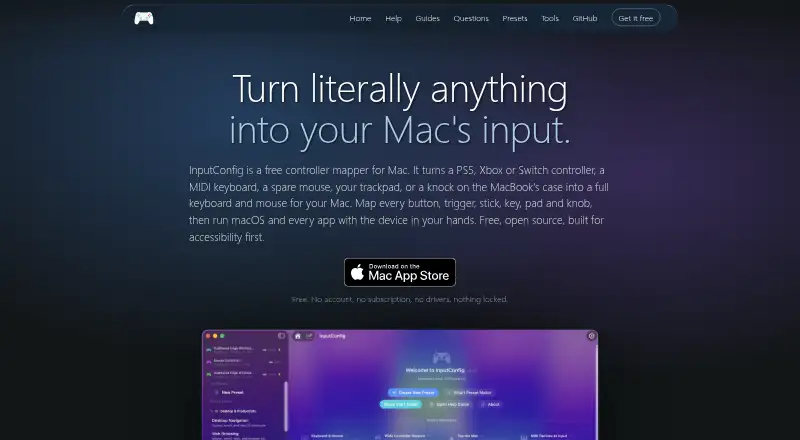
InputConfig maps controllers and a Mac’s keyboard, mouse, and trackpad to keyboard and mouse actions across macOS apps. Supported controllers include DualSense, DualSense Edge, DualShock 4, Xbox, Switch Pro, Joy-Cons, Stadia, 8BitDo, Steam Controller, and MFi or HID gamepads. Mappings can trigger keystrokes, clicks, pointer movement, scrolling, typed phrases, macros, MIDI notes, and system functions, with hold, double-tap, chord, and turbo actions. Per-app profiles and profile switching are available. For music work, the app sends MIDI notes, control changes, and pitch bend through a virtual MIDI port for use with GarageBand, Logic, and other DAWs. The maker describes accessibility support for adaptive controllers, one-stick driving, spoken feedback, dictation, and zoom. More than 450 ready-made presets cover games, apps, and workflows. InputConfig is free and open source under the MIT license. It requires macOS 14 or later and supports Apple silicon and Intel Macs. The privacy policy says settings, presets, calibration data, and usage statistics stay on the Mac, with no network calls in normal use. It does not provide virtual-controller output.
Good
- Free and open source under MIT
- Supports many controller types
- Per-app profiles and profile switching
- More than 450 ready-made presets
- No network calls in normal use
Watch out
- Requires macOS 14 or later
- No virtual-controller output
- Tap the Mac did not work on M1 Pro
- Desktop and Intel Macs lack its motion sensor
Who it suits
InputConfig suits Mac users who want to remap supported controllers or built-in input devices across apps, including for MIDI workflows. It may also suit users interested in its stated accessibility features and local data handling.
Verdict
InputConfig combines broad remapping options with MIDI output, per-app profiles, and a large preset collection. Its macOS requirement and lack of virtual-controller output are key limits to consider.
Plans and prices
From InputConfig's own pricing page, checked 5 Oct 2026.
| Plan | Price | What it gives you |
|---|---|---|
| Free | Free | macOS 14 or later · Mac App Store |
The facts
Each one read from InputConfig's own pages, with the date it was checked.
What it does
- Accessibility
- The maker says the app was built with accessibility in mind and describes support for adaptive controllers, one-stick driving, spoken feedback, dictation, and zoom.checked 5 Oct 2026
- Controller support
- It lists DualSense, DualSense Edge, DualShock 4, Xbox, Switch Pro, Joy-Cons, Stadia, 8BitDo, Steam Controller, and MFi or HID gamepads as supported controllers.checked 5 Oct 2026
- License
- The maker says InputConfig is open source under the MIT license.checked 5 Oct 2026
- MIDI
- InputConfig sends MIDI notes, control changes, and pitch bend through a virtual MIDI port for use with GarageBand, Logic, and other DAWs.checked 5 Oct 2026
- Notable hardware limit
- The maker reports that Tap the Mac did not work on an M1 Pro in its testing and that desktop and Intel Macs lack the motion sensor it uses.checked 5 Oct 2026
- Permissions
- The privacy policy says Accessibility permits sending keyboard and mouse events, Input Monitoring permits reading keyboards, mice, and trackpads, and Bluetooth and USB permit controller connections.checked 5 Oct 2026
- Presets
- The site says the app includes more than 450 ready-made presets for games, apps, and workflows.checked 5 Oct 2026
- Privacy
- The privacy policy says settings, presets, calibration data, and usage statistics stay on the Mac, and the app makes no network calls in normal use.checked 5 Oct 2026
- Purpose
- InputConfig maps controllers, MIDI devices, and a Mac’s own keyboard, mouse, and trackpad to keyboard and mouse actions across macOS apps.checked 5 Oct 2026
- Requirements
- InputConfig requires macOS 14 or later and supports Apple silicon and Intel Macs.checked 5 Oct 2026
- Support
- The privacy policy directs questions to the project’s issue tracker.checked 5 Oct 2026
Where it runs
- Mapping features
- Controls can trigger keys, clicks, pointer movement, scrolling, typed phrases, macros, MIDI notes, and system functions, with hold, double-tap, chord, and turbo actions.checked 5 Oct 2026
Alternatives to InputConfig
- 1
Avidemux
Free planOpen sourceWebLinuxmacOSWindows7.3Free plan - 2

OmniControl
Free planWindows7.3From $59.99 a year - 3
ControllerBuddy
Free planOpen sourceLinuxmacOSWindows7.2Free plan - 4
JoyShockMapper
Free planOpen sourceLinuxSelf-hostedWindows7.2Free plan - 5

PadLink
Free planAndroidiOSmacOSWindows7.2$2.99 one-time - 6
reWASD
AndroidiOSWindows7.1$14.99 one-time