
Context Agent Sandboxes
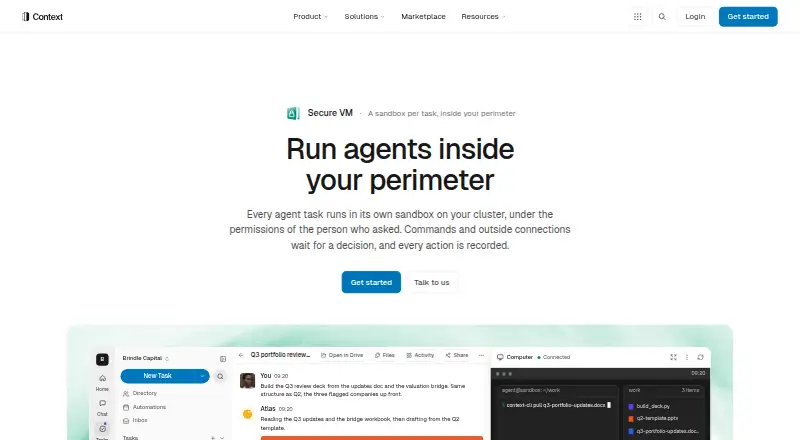
Context Agent Sandboxes gives each agent task a separate sandbox on the customer’s cluster, using the permissions of the person who requested it.
What Context Agent Sandboxes is
Context Agent Sandboxes gives each agent task a separate sandbox on the customer’s cluster, using the permissions of the person who requested it. Every run starts in a fresh environment that is destroyed after its idle window, 30 minutes by default. Sandboxes run as non-root container pods with dropped capabilities, a seccomp profile, and no cluster service-account token. Administrators can choose open, domain-allowlist, or workspace-only network access, with allowlist decisions logged. In the supervised preset, commands require human approval and connections outside the allowlist prompt for a decision. Drive is not mounted: files pass through a permission-checking gateway, and outputs must be pushed explicitly. Credentials are injected at the edge after authorization rather than placed in the sandbox. An append-only audit log records commands, files, connections, and permission decisions. Context lists more than 180 integrations and remote MCP servers. Enterprise deployments run on the customer’s Kubernetes cluster and can be installed through KOTS on EKS or AKS, including an air-gapped bundle. Plans include Free at no cost, Plus at $20 a month per person, and Pro at $200 a month; Enterprise pricing is custom.
Good
- Each task starts in a fresh sandbox
- Offers three network-access settings
- Supervised mode requires human approval for commands
- Append-only logs record actions and decisions
- Enterprise runs on the customer’s Kubernetes cluster
Watch out
- Enterprise pricing is custom
- Fresh sandboxes are destroyed after their idle window
- Persistent storage is not offered
Who it suits
It suits teams that need agent tasks to run in isolated environments with configurable network access and recorded permission decisions. Enterprise deployment is aimed at customers running sandboxes on their own Kubernetes cluster.
Verdict
Context Agent Sandboxes centers on isolated task environments, access controls, and audit records. Plan capacity varies, from one agent at a time on Free to ten on Pro.
Plans and prices
From Context Agent Sandboxes's own pricing page, checked 15 Oct 2026.
| Plan | Price | What it gives you |
|---|---|---|
| Free | Free | Includes sandboxes · one agent concurrently · model credits apply · $0 |
| Plus | $20 a month | Three agents concurrently · sandbox time not metered · model credits apply · $20 per person per month |
| Pro | $200 a month | Ten agents concurrently · 25,000 credits · sandbox time not metered · $200 per person per month |
| Enterprise | Priced on request | Own cloud deployment · cluster-sized capacity · enterprise support by agreement · Custom |
The facts
Each one read from Context Agent Sandboxes's own pages, with the date it was checked.
Where it runs
- Air-gapped operation
- Air-gapped bundles include the required images and can use open-weight models inside the disconnected boundary, reducing the available model catalog.checked 15 Oct 2026
- Apple app requirements
- The Context iPhone and iPad app requires iOS or iPadOS 16.4 or later; Mac compatibility requires macOS 12 and Apple silicon.checked 15 Oct 2026
- Approval controls
- Under the supervised preset, commands require human approval, and connections outside the allowlist prompt for a decision before leaving.checked 8 Oct 2026
What it does
- API
- The REST task API can create, poll, cancel and share tasks, upload files, download outputs and read evaluations.checked 15 Oct 2026
- API reliability features
- Task creation supports idempotency keys, structured output schemas and signed webhooks with up to three delivery attempts.checked 15 Oct 2026
- Audit
- Commands, files, connections, and permission decisions are recorded in an append-only audit log with the actor and decision maker.checked 8 Oct 2026
- Audit trail
- The append-only audit record includes task, model and tool calls, sources, actions, approvals and results, and can be exported as CSV.checked 15 Oct 2026
- Command-line client
- Context Code installs on macOS, Linux and Windows and pairs a terminal session with a workspace task list.checked 15 Oct 2026
- Connector integrations
- Documented connectors include Slack, Google Workspace, Salesforce, Notion, Snowflake, GitHub, HubSpot, Linear, Zendesk, Box and Microsoft 365 services.checked 15 Oct 2026
- Credential handling
- Standing secrets are kept out of the sandbox; credentials are issued at the edge after authorization and expire with the action or run.checked 15 Oct 2026
- Credentials
- Standing secrets are not placed in the sandbox; credentials are injected at the edge after an authorization check.checked 8 Oct 2026
- Custom integrations
- Administrators can register internal HTTP or MCP services using a form or YAML and choose bearer, API-key, HMAC-SHA256 or OAuth 2 authentication.checked 15 Oct 2026
- Deployment
- Enterprise sandboxes run on the customer's Kubernetes cluster and can be installed through KOTS on EKS or AKS, including an air-gapped bundle.checked 8 Oct 2026
- Deployment options
- Enterprise deployments can run on managed infrastructure, a customer VPC, on-premises hardware or an air-gapped environment.checked 15 Oct 2026
- Desktop clients
- Context Desktop is offered for macOS, Windows and Linux, with signed or notarized macOS packages and 64-bit Windows and Linux installers.checked 15 Oct 2026
- Documentation and support
- The Help Center covers setup, usage, agent building, connectors, deployment, security, data, billing and support, while basic business-hours support is included in agreements.checked 15 Oct 2026
- Encryption
- Context states that customer personal data uses TLS in transit and industry-standard encryption at rest.checked 15 Oct 2026
- Ephemeral environments
- A task receives a fresh sandbox that is destroyed after its configured idle period, 30 minutes by default, while task files can be snapshotted and restored.checked 15 Oct 2026
- File access
- Drive is not mounted in the sandbox; files are fetched through a permission-checking gateway and outputs are pushed explicitly.checked 8 Oct 2026
- Fresh runtime
- Each task run starts a fresh sandbox that is destroyed after its idle window, which is 30 minutes by default.checked 8 Oct 2026
- Funding news
- TechCrunch reported on May 28, 2025 that Context announced an $11 million seed round led by Lux Capital, bringing reported total funding to about $15.75 million.checked 15 Oct 2026
The company
- Company record discrepancy
- Crunchbase lists an older Context.ai product-analytics entity as Get Context Co., London-based, 1–10 employees, acquired by OpenAI, with operating status closed.checked 15 Oct 2026
- Company size and headquarters
- LinkedIn lists Context as a privately held applied-AI company headquartered in San Francisco with 11–50 employees.checked 15 Oct 2026
Money
- Compute cost
- Sandbox time is not metered on Context plans, while Enterprise customers pay their cloud provider for compute.checked 8 Oct 2026
The full review of Context Agent Sandboxes
Overview
Context Agent Sandboxes gives each agent task a temporary, permission-bounded environment on the customer’s cluster. It suits organizations that need oversight of how agents reach files, credentials, and network destinations. Its strong access controls and audit trail make it a considered choice for supervised agent work, though concurrency is plan-limited and sandbox data does not persist.
Key features
Every task starts in a fresh sandbox, which is destroyed after its idle window—30 minutes by default. That clean slate can help keep one task’s environment separate from the next, but the lack of persistent storage rules it out for workflows that rely on durable sandbox files.
Sandboxes run as non-root container pods with capabilities dropped, a seccomp profile, and no cluster service-account token. Administrators can choose open, domain-allowlist, or workspace-only network access, and allowlist decisions are logged. Under the supervised preset, commands require human approval and connections outside the allowlist prompt for a decision. These options provide meaningful oversight, although the approval flow can slow work that needs to proceed without intervention.
Drive is not mounted in the sandbox. Instead, files pass through a permission-checking gateway, and outputs must be pushed explicitly. Standing secrets stay outside the sandbox; credentials are injected at the edge after authorization. An append-only log records commands, files, connections, and permission decisions, including the actor and decision maker. That record is useful for teams that need to review what an agent did and who approved it.
Context lists more than 180 integrations across data, documents, communication, CRM, ITSM, finance, and identity, as well as remote MCP servers. API or CLI access is available. Compute time is not metered on Context plans; Enterprise customers pay their cloud provider for compute, so cloud costs remain part of that deployment’s budget.
Pricing
The Free plan costs nothing and includes sandboxes, with one agent at a time. That is a useful starting point for individual evaluation, but the single-agent cap limits concurrent work.
Plus costs $20 a month, billed per person per month, and allows three agents at a time. Sandbox time is not metered. Its per-person billing makes the seat count relevant to the total bill, while its concurrency cap may constrain a team with several simultaneous tasks.
Pro costs $200 a month, billed per month. It supports ten agents at a time, includes 25,000 credits a month for model usage, and does not meter sandbox time. It fits teams needing more concurrent capacity and a defined monthly model-credit allocation; the credit allowance is a separate limit to consider alongside concurrency.
Enterprise has custom pricing, custom enterprise deployment, and runs in your own cloud. Enterprise sandboxes run on the customer’s Kubernetes cluster and can be installed through KOTS on EKS or AKS, including with an air-gapped bundle. Enterprise customers pay their cloud provider for compute. Basic support through Context’s standard business-hours channels is included in every agreement, while Enterprise support is set per order. Context states it holds SOC 2 and ISO 27001 certifications and provides the reports on request.
Platforms
Context Agent Sandboxes supports Linux, macOS, Windows, web, and self-hosted deployments. The customer-cluster model and Enterprise Kubernetes options make it particularly relevant to organizations that want deployment in their own cloud.
Who it's for
This is best suited to organizations running agents against company resources where permissions, human approvals, and an attributable audit record matter. Free works for a single concurrent agent; Plus and Pro raise that ceiling to three and ten, respectively. Teams that need persistent sandbox storage, or more simultaneous capacity than their plan allows, should consider another option.
Pros and cons
- Strong isolation controls: Non-root pods, dropped capabilities, seccomp, and the absence of a service-account token limit sandbox privileges.
- Granular network and approval choices: Administrators can select network access modes, and supervised operation adds human review for commands and out-of-allowlist connections.
- Auditable handling of access: The append-only log captures commands, files, connections, and permission decisions with the actor and decision maker.
- No persistent storage: Fresh sandboxes are destroyed after their idle window, so files cannot be kept there for later tasks.
- Concurrency depends on plan: Free allows one agent at a time, Plus three, and Pro ten.
- Enterprise costs extend to cloud compute: Enterprise has custom pricing, and customers pay their cloud provider for sandbox compute.
Alternatives
ANY.RUN is worth considering for readers who want a freemium option with a free trial and listed Android, iOS, API, Linux, macOS, web, and Windows platforms; its Community plan is free forever and names Windows 10 64-bit, Windows 7 32-bit, Android 14 64-bit (ARM), and Ubuntu 22.04.2 64-bit.
Docker Desktop suits readers seeking a freemium choice whose free Personal plan includes Docker Desktop, Docker Engine and Kubernetes, Docker Hub, Docker Scout, and Docker Debug; its Pro plan costs $9 a month.
Northflank offers a free Sandbox plan with two services, one database, two cron jobs, and always-on compute for readers whose needs match those limits.
Anthropic Sandbox Runtime is a free option for readers considering a tool from Anthropic, which describes itself as an AI safety and research company building reliable, interpretable, and steerable AI systems.
Daytona is another freemium option with a free trial; its Pay-as-you-go plan includes 5 GiB of storage before storage charges.
microsandbox may fit readers who want defined free resource limits: its free plan includes 5 vCPU-hours, 20 memory GiB-hours, 20 disk GiB-hours, and up to three sandboxes, each capped at 1 vCPU and 512 MiB memory.
E2B is an alternative for readers interested in a freemium runtime that E2B says is Apache-2.0 licensed and self-hostable; its Hobby plan includes a one-time $100 usage credit.
Zscaler Private Access is a paid option for readers comparing private-access software, with no free plan.
Browse more options in Sandbox Software.
Verdict
Choose Context Agent Sandboxes if your organization needs isolated agent tasks, configurable access, human approval, and an audit trail, especially when deploying on its own cloud. The strongest reason to look elsewhere is the absence of persistent storage; its plan-based concurrency and custom-priced Enterprise tier also deserve attention before scaling.
Getting started
- Open the Context Agent Sandboxes website
- Choose hosted or self-hosted deployment on a supported platform
- Select a Free, Plus, Pro, or Enterprise plan
- Configure network mode, approvals, and permissions
- Connect integrations or remote MCP servers
- Run agent tasks through the web, API, or CLI
Limits worth knowing
The Free plan includes sandboxes for one agent at a time. Plus permits three agents concurrently, while Pro permits ten and includes 25,000 model-usage credits monthly; Enterprise pricing is custom.
Questions
Is there a free plan?
Yes. The Free plan costs nothing and includes sandboxes with one agent at a time.
How much do paid plans cost?
Plus costs $20 a month per person. Pro costs $200 a month; Enterprise pricing is custom.
Which platforms are supported?
Context lists Linux, macOS, Windows, web, and self-hosted platforms.
Can it run in our cloud?
Enterprise sandboxes run on the customer’s Kubernetes cluster and can be installed through KOTS on EKS or AKS, including an air-gapped bundle.
Does it provide API or CLI access?
Yes. API and CLI access are listed.
Is sandbox time metered?
Sandbox time is not metered on Context plans. Enterprise customers pay their cloud provider for compute.
Alternatives to Context Agent Sandboxes
- 1

E2B
Free planOpen sourceWebAPILinuxmacOS8.0From $150 a month - 2
Northflank
Free planWebAPILinuxmacOS8.0From $2.70 a month - 3

Daytona
Free planWebAPILinuxmacOS7.9Free plan - 4

ANY.RUN
Free planAndroidiOSWebAPI7.5Free plan - 5

Vercel
Free planWebAPI7.0$20 usage-based - 6

microsandbox
Free planAPILinuxmacOSSelf-hosted6.9From $49 a month