Anthropic Sandbox Runtime
Anthropic Sandbox Runtime (srt) is an open-source research preview for applying filesystem and network restrictions to processes at the operating-system leve…
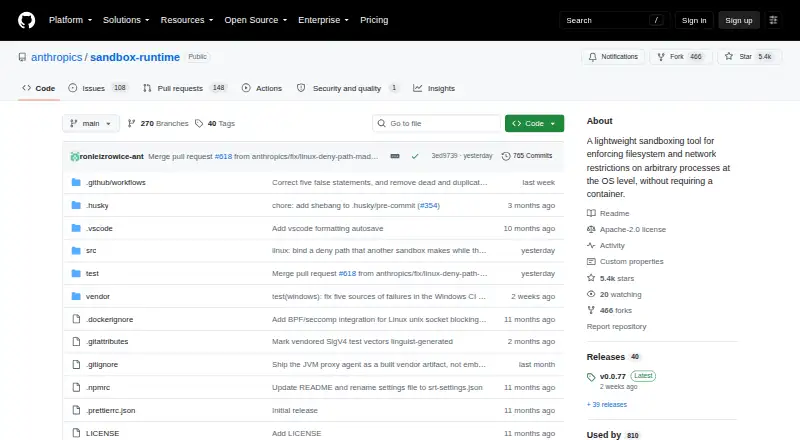
What Anthropic Sandbox Runtime is
Anthropic Sandbox Runtime (srt) is an open-source research preview for applying filesystem and network restrictions to processes at the operating-system level without requiring a container. It can be used as a CLI tool or library to sandbox agents, local MCP servers, bash commands, and other processes. Filesystem writes are denied by default unless paths are allowed, and network access is denied by default with options to allow or deny domains. The project is available for Linux, macOS, and Windows, with platform-specific mechanisms: sandbox-exec on macOS, bubblewrap on Linux, and a dedicated local sandbox account with Windows Filtering Platform egress filtering on Windows. Installation is listed as `npm install -g @anthropic-ai/sandbox-runtime`. Linux requires bubblewrap, socat, and ripgrep; macOS requires ripgrep, and Windows requires a one-time elevated setup step. The preview is developed for Claude Code, and its APIs and configuration formats may change.
Good
- Open source under Apache-2.0.
- Available for Linux, macOS, and Windows.
- Filesystem writes are denied by default.
- Network access is denied by default.
- Usable as a CLI tool or library.
Watch out
- The project is an early research preview.
- Linux filtering relies on proxy environment variables.
- Windows requires one-time elevated setup.
- APIs and configuration formats may evolve.
Who it suits
Srt suits developers who want OS-level filesystem and network restrictions for processes, agents, or local MCP servers. It is a research preview, so it is less suited to users who need stable APIs and configuration formats.
Verdict
Srt provides configurable filesystem and network restrictions across three operating systems, with distinct setup requirements and limitations. Consider its preview status and platform-specific behavior when deciding whether it fits your use case.
Plans and prices
From Anthropic Sandbox Runtime's own pricing page, checked 5 Oct 2026.
| Plan | Price | What it gives you |
|---|---|---|
| Anthropic Sandbox Runtime | Free | Open source research preview · no paid plans or usage limits stated |
The facts
Each one read from Anthropic Sandbox Runtime's own pages, with the date it was checked.
What it does
- Availability
- The project is an open source research preview licensed under Apache-2.0.checked 5 Oct 2026
- Filesystem controls
- Filesystem configuration supports read and write restrictions, with writes denied by default unless paths are explicitly allowed.checked 5 Oct 2026
- How to install
- The README gives `npm install -g @anthropic-ai/sandbox-runtime` as the installation command.checked 5 Oct 2026
- Integrations
- The README shows using srt to sandbox Model Context Protocol servers and documents a Java agent for JVM tools on macOS and Linux.checked 5 Oct 2026
- Intended users
- Anthropic describes the release as an early open source preview for the broader ecosystem to build more secure agentic systems; APIs and configuration formats may evolve.checked 5 Oct 2026
- Interfaces
- It is available as both a command-line tool and a library, installed from npm as @anthropic-ai/sandbox-runtime.checked 5 Oct 2026
- Monitoring
- The runtime tracks sandbox violations, and on macOS it can tap into the system sandbox violation log store for real-time alerts.checked 5 Oct 2026
- Network controls
- Network access is denied by default and can be restricted with allowed and denied domain lists; HTTP, HTTPS, and other TCP traffic are mediated by proxies.checked 5 Oct 2026
- Operating systems
- The project documents macOS, Linux, and Windows support; Windows is marked alpha.checked 5 Oct 2026
- Preview status
- The README describes the runtime as an early research preview developed for Claude Code and warns that APIs and configuration formats may evolve.checked 5 Oct 2026
- Purpose
- Anthropic Sandbox Runtime (srt) enforces filesystem and network restrictions on arbitrary processes at the OS level without requiring a container.checked 5 Oct 2026
- Security caveat
- The project warns that enabling weaker nested sandboxing on Linux considerably weakens security and should be used only with additional isolation.checked 5 Oct 2026
- Security limitation
- The README says network filtering restricts reachable domains but does not otherwise inspect traffic through the proxy, so users are responsible for allowing only trusted domains.checked 5 Oct 2026
- Use cases
- The README says srt can sandbox agents, local MCP servers, bash commands, and arbitrary processes, and can be used as a CLI tool or library.checked 5 Oct 2026
- Violation monitoring
- On macOS, srt can tap the system sandbox violation log store for real-time alerts; Linux bubblewrap does not provide built-in violation reporting.checked 5 Oct 2026
Where it runs
- Linux dependency
- Linux requires bubblewrap, socat, and ripgrep; macOS requires ripgrep.checked 5 Oct 2026
- Linux limitation
- Linux network filtering relies on proxy environment variables, so programs that ignore them may be unable to connect to the internet.checked 5 Oct 2026
- Linux requirements
- Linux requires bubblewrap, socat, and ripgrep, and some configurations also require additional system setup.checked 5 Oct 2026
- Platform implementation
- It uses sandbox-exec on macOS, bubblewrap on Linux, and a dedicated local user account with Windows Filtering Platform and filesystem ACLs on Windows.checked 5 Oct 2026
- Platform mechanisms
- The README says macOS uses sandbox-exec, Linux uses bubblewrap, and Windows uses a dedicated local sandbox account with Windows Filtering Platform egress filtering.checked 5 Oct 2026
- Platforms
- The project supports macOS and Linux, and lists Windows support as alpha.checked 5 Oct 2026
- Windows limitation
- On Windows, tools using schannel with certificate revocation checking enabled by default can fail because revocation requests are blocked by the egress fence.checked 5 Oct 2026
- Windows limitations
- On Windows, per-user tool installations may not be accessible to the sandbox account, and some schannel clients can fail when certificate revocation checks are enabled.checked 5 Oct 2026
The company
- Maker
- Anthropic describes itself as an AI safety and research company that builds reliable, interpretable, and steerable AI systems.checked 5 Oct 2026
The full review of Anthropic Sandbox Runtime
Anthropic Sandbox Runtime (srt) is an open-source tool for applying operating-system-level filesystem and network restrictions to processes without requiring a container. It suits developers who want to sandbox agents, local services, or commands on infrastructure they manage. Its no-cost, self-hosted approach is compelling for experimentation, but its preview status and platform-specific caveats make it a poor choice when stable interfaces or uniform behavior are essential.
Overview
srt is available as a command-line tool and a library, and can be used with agents, local Model Context Protocol (MCP) servers, bash commands, and other processes. Licensed under Apache-2.0, it is an early research preview developed for Claude Code and the broader effort to build more secure agentic systems. That makes it a useful building block for developers willing to adapt as APIs and configuration formats evolve, rather than a fixed security layer to deploy without ongoing attention.
Its central trade-off is direct OS-level control without requiring a container. Filesystem writes are denied unless paths are explicitly allowed, and network access is denied by default. These defaults help constrain a process, but they do not eliminate the need to choose permissions carefully or account for how each operating system enforces them.
Key features
- Filesystem restrictions: Configuration can restrict reads and writes, with writes blocked unless a path is allowed. That default is useful for processes that should inspect only selected files or modify a narrow working area.
- Network restrictions: Access can be limited with allowed and denied domain lists. HTTP, HTTPS, and other TCP traffic are mediated by proxies, but the proxy does not otherwise inspect traffic. Users must therefore allow only domains they trust; domain filtering is not a substitute for reviewing what a permitted service returns.
- Process and integration support: srt can be used as a CLI or library to sandbox agents, MCP servers, shell commands, and arbitrary processes. The project also documents a Java agent for JVM tools on macOS and Linux, giving teams with those workloads another integration path.
- Violation monitoring: On macOS, srt can tap the system sandbox violation log store for real-time alerts. Linux's bubblewrap mechanism does not provide built-in violation reporting, so teams that need those signals should account for the difference.
Pricing
Anthropic Sandbox Runtime — free. The software is open source, self-hosted, and has no paid plans or stated usage limits. There is no free trial because the available plan is free; there are no seat or renewal terms to weigh. This fits developers who can supply and maintain their own environment. The trade-off is that a free research preview does not come with a paid tier that changes the stated preview status or platform limitations.
Platforms
The project documents macOS, Linux, and Windows support; Windows is marked alpha. The OS-specific mechanisms and setup requirements make this less uniform than a single cross-platform install suggests.
- macOS: Uses sandbox-exec and requires ripgrep. Real-time alerts from the system sandbox violation log store are available on this platform.
- Linux: Uses bubblewrap and requires bubblewrap, socat, and ripgrep; some configurations need additional system setup. Network filtering relies on proxy environment variables, so programs that ignore them may be unable to connect to the internet. Enabling weaker nested sandboxing considerably reduces security and should be done only with additional isolation.
- Windows: Uses a dedicated local sandbox account, Windows Filtering Platform egress filtering, and filesystem ACLs. A one-time elevated windows-install step is required; the helper executable is bundled with the npm package. Per-user tool installations may not be accessible to the sandbox account. Some tools using schannel can fail when certificate revocation checking is enabled, because revocation requests are blocked by the egress fence.
The README's installation command is npm install -g @anthropic-ai/sandbox-runtime. Linux dependencies and Windows' elevated setup mean installation is not simply the same across hosts.
Who it's for
srt is a strong fit for developers building agentic systems who want to restrict process access at the OS level, can configure domain and path allowances, and are comfortable self-hosting preview software. It is less suitable for teams that need stable APIs, consistent violation reporting across systems, or network inspection beyond domain reachability. Linux users should verify that their programs honor proxy settings; Windows users should check whether their tools depend on per-user installs or schannel revocation checks.
Pros and cons
Pros
- Open source and free: Apache-2.0 licensing and no paid plan make it accessible for self-hosted experimentation without a stated usage cap.
- Restrictive defaults: Filesystem writes and network access are denied unless explicitly allowed, providing a useful starting point for limiting process access.
- Multiple interfaces and workloads: CLI and library use, plus documented MCP and JVM integrations, offer options for developers working with different process types.
Cons
- Preview APIs and formats: They may evolve, which makes srt a risky foundation for teams that require stable interfaces.
- Platform differences matter: Linux lacks built-in violation reporting and depends on proxy variables for network filtering; Windows is alpha and has setup and compatibility constraints.
- Filtering is not traffic inspection: The proxy restricts reachable domains but does not otherwise inspect traffic, so trust decisions remain with the operator.
Alternatives
ANY.RUN is a freemium alternative with a free Community plan and a free trial, spanning desktop, mobile, web, and API platforms; choose it if that broader platform coverage or trial access better suits your evaluation.
Docker Desktop is a freemium option whose Personal plan includes Docker Desktop, Docker Engine and Kubernetes, Docker Hub, Docker Scout, and Docker Debug, while Pro costs $9 a month. Choose it when that container-centered toolset is a better match than srt's OS-level process restrictions.
Context Agent Sandboxes has a free plan for one agent at a time and a Plus plan at $20 a month per person for three agents at a time. It may suit readers whose needs align with those stated agent concurrency limits.
Northflank offers a free Sandbox plan with two services, one database, two cron jobs, and always-on compute; choose it if those hosted resources are closer to your goal than local process sandboxing.
Daytona has a free trial and a pay-as-you-go plan with 5 GiB of storage free before storage charges. Consider it if that storage-based pricing approach better fits your sandbox needs.
microsandbox has a free plan capped at five vCPU-hours, 20 memory GiB-hours, and 20 disk GiB-hours, with up to three sandboxes each capped at one vCPU and 512 MiB of memory. Choose it if those metered sandbox limits suit your workload better than srt's self-hosted process controls.
E2B offers a free Hobby plan with a one-time $100 usage credit and an Apache-2.0-licensed runtime that can be self-hosted. It may suit readers seeking that alternative runtime and credit arrangement.
Zscaler Private Access is a paid alternative for readers whose requirements lead them to consider a private-access product instead.
Explore more options in Sandbox Software.
Verdict
Choose Anthropic Sandbox Runtime if you are a developer who wants free, open-source OS-level restrictions for agentic or other local processes and can manage host-specific setup. Its restrictive defaults and CLI/library interfaces make it a practical preview building block. Look elsewhere if you need stable APIs, consistent reporting across operating systems, or network traffic inspection rather than domain-based reachability controls.
Alternatives to Anthropic Sandbox Runtime
- 1

Context Agent Sandboxes
Free planAndroidiOSWebAPI8.0From $20 a month - 2

E2B
Free planOpen sourceWebAPILinuxmacOS8.0From $150 a month - 3

Northflank
Free planWebAPILinuxmacOS8.0From $2.70 a month - 4

Daytona
Free planWebAPILinuxmacOS7.9Free plan - 5

ANY.RUN
Free planAndroidiOSWebAPI7.5Free plan - 6

Vercel
Free planWebAPI7.0$20 usage-based