
Confluent
Confluent is software for deploying and operating groups of servers, from a few machines to clusters of many thousands on x86_64 and aarch64 hardware.
What Confluent is
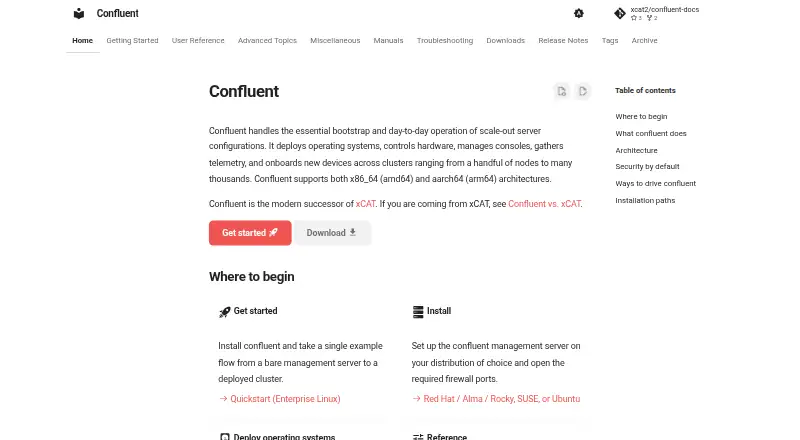
Confluent is software for deploying and operating groups of servers, from a few machines to clusters of many thousands on x86_64 and aarch64 hardware. It handles operating-system installation, hardware controls, console access, telemetry, and onboarding. Images can be deployed as stateful or stateless systems through PXE, HTTP(S) boot, or virtual media, with customization during deployment. Confluent can discover generic PXE systems and hardware managers, then identify devices by details such as serial number, MAC address, switch port, or location. Hardware management covers power, boot selection, firmware and BMC settings, RAID, health checks, and support data through IPMI, Redfish, and vendor plugins. Operators can use Linux commands, a command-line browser, a Python library, a web interface, or a REST API. Collective mode connects servers through a shared interface for high availability and scale-out operation. It is free under the Apache 2.0 license. Management server installation is documented for specified Enterprise Linux, SUSE Linux Enterprise, and Ubuntu releases; firewall changes may be required.
Good
- Supports clusters from a handful to thousands of nodes.
- Deploys stateful and stateless images through multiple boot methods.
- Provides hardware controls through IPMI and Redfish.
- Offers command-line, Python, web, and REST interfaces.
- Free and licensed under Apache 2.0.
Watch out
- Installation may require firewall adjustments.
- xCAT-exclusive features may require running xCAT alongside it.
Who it suits
Confluent suits administrators managing server clusters who need deployment, hardware management, and device onboarding in one system. Users dependent on xCAT-only features can run the two systems together.
Verdict
Confluent brings server provisioning, hardware controls, and operational interfaces together, with support for large clusters. Check its documented management-server operating systems and network requirements before installation.
The facts
Each one read from Confluent's own pages, with the date it was checked.
What it does
- Availability
- Collective mode can span one Confluent interface across multiple servers for high availability and large fleets.checked 30 Sep 2026
- Console management
- Console management provides multi-user access arbitration, timestamped logging, and VT-aware buffering for reconnects.checked 30 Sep 2026
- Deployment
- It can provision stateful and stateless images over PXE, HTTP(S) boot, or virtual media, with customization at each phase.checked 30 Sep 2026
- Discovery
- It can detect generic PXE systems or hardware managers and onboard devices by serial number, MAC address, switch port, or physical location.checked 30 Sep 2026
- Hardware management
- It supports power, boot-device selection, BIOS/UEFI/BMC settings, RAID storage controllers, health checks, telemetry, virtual media, and support data through IPMI, Redfish, and vendor plugins.checked 30 Sep 2026
- Installation requirement
- A default installation has firewall restrictions that must be adjusted for HTTPS and, depending on deployment method, additional network boot ports.checked 29 Sep 2026
- Intended users
- The documentation recommends installing Confluent directly for most users, especially those without an existing xCAT installation, while users relying on xCAT-exclusive features can run both together.checked 29 Sep 2026
- Interfaces
- Users can operate Confluent through Linux commands, the confetty command-line browser, a Python client library, or a REST API over HTTP.checked 30 Sep 2026
- License
- The project repository states that Confluent is available under the Apache 2.0 license.checked 29 Sep 2026
- Network topology
- It centralizes access to MAC address tables and LLDP information across switches through one interface.checked 30 Sep 2026
- Notable limitation
- The documentation recommends installing Confluent directly for most users and describes using it alongside xCAT when xCAT-exclusive features are needed.checked 30 Sep 2026
- Operating systems
- The download instructions cover repositories for Red Hat Enterprise Linux, AlmaLinux, Rocky Linux, Ubuntu, and SUSE Linux Enterprise.checked 30 Sep 2026
- Purpose
- Confluent handles server-cluster bootstrap and day-to-day operations, including OS deployment, hardware control, console management, telemetry, and device onboarding.checked 30 Sep 2026
- Scale
- The documentation says Confluent supports clusters from a handful of nodes to many thousands, on x86_64 and aarch64 architectures.checked 29 Sep 2026
- Scale and architecture
- It supports clusters from a handful of nodes to many thousands and supports x86_64 (amd64) and aarch64 (arm64).checked 30 Sep 2026
- Security
- The documentation describes validated TLS for collective, deployment, and hardware-management traffic, TPM2 support for boot-volume protection and persistent node trust, SSH PKI, and Secure Boot support for media and HTTP boot.checked 30 Sep 2026
Where it runs
- Supported management server OS
- The installation documentation lists Enterprise Linux 8.6 or higher, SUSE Linux Enterprise 15 SP4 or higher, and Ubuntu 22.04 or 24.04 for installation.checked 29 Sep 2026
The full review of Confluent
Confluent is software for provisioning and operating scale-out server clusters, from operating-system deployment to hardware management and telemetry. It is best suited to teams running bare-metal infrastructure that need to manage many nodes through a common interface. Its broad deployment and hardware controls are compelling, but installation requires compatible Linux management servers and deliberate firewall configuration.
Overview
Confluent covers both initial provisioning and ongoing operations: it can discover devices, deploy stateful or stateless operating-system images, manage hardware, and provide console access and telemetry. The scope makes it a fit for teams that want a single operational layer for server fleets rather than a tool limited to imaging or inventory.
Its scale range—from a handful of nodes to many thousands—and support for x86_64 and aarch64 give it room to serve both smaller installations and large clusters. Collective mode connects multiple servers behind one Confluent interface for high availability and scale-out operation. The project is available under the Apache 2.0 license.
Key features
Provisioning and discovery
Confluent provisions images through PXE, HTTP(S) boot, or virtual media, with customization at each phase. It can detect generic PXE systems and hardware managers, then onboard devices by serial number, MAC address, switch port, or physical location. That combination suits teams bringing varied hardware into service; deployment still depends on configuring the network boot path that matches the chosen method.
Hardware and consoles
Through IPMI, Redfish, and vendor plugins, Confluent supports power control, boot-device selection, BIOS/UEFI and BMC settings, RAID controllers, health checks, telemetry, virtual media, and support data. Console access adds multi-user arbitration, timestamped logs, and VT-aware buffering that restores state after reconnecting. Central access to MAC address tables and LLDP information across switches also helps operators relate servers to network topology.
Ways to operate and security
Operators can use Linux commands, the confetty command-line browser, a Python client library, a web UI, or a REST API over HTTP. Documented security capabilities include validated TLS, TPM2 support for boot-volume protection and persistent node trust, an SSH PKI strategy, and Secure Boot for media and HTTP boot. This breadth gives both command-line and API-driven teams options, while the range of controls is most valuable where server operations are already a substantial responsibility.
Pricing
Confluent is free, with a free plan and no free trial. The project is available under the Apache 2.0 license, making it a self-managed option rather than a priced hosted service. The tradeoff is operational: teams need to install and configure the management server and adjust its default firewall restrictions for HTTPS and, depending on deployment method, additional network boot ports.
Platforms
Confluent supports Linux, self-hosted deployment, a web interface, and API access. Management-server installation is documented for Enterprise Linux 8.6 or higher, SUSE Linux Enterprise 15 SP4 or higher, and Ubuntu 22.04 or 24.04. Download repositories cover Red Hat Enterprise Linux, AlmaLinux, Rocky Linux, Ubuntu, and SUSE Linux Enterprise. Its managed clusters can use x86_64 (amd64) or aarch64 (arm64) systems.
Who it's for
Confluent is aimed at administrators operating bare-metal or other scale-out server configurations who need provisioning, hardware control, onboarding, and lifecycle operations together. The documentation recommends installing Confluent directly for most users, especially those without an existing xCAT installation. Teams that depend on xCAT-exclusive features can run both together; that qualification makes it a less straightforward fit for organizations committed to those features.
Pros and cons
Pros
- Broad provisioning paths: PXE, HTTP(S) boot, and virtual media support different deployment approaches, with customization at each phase.
- Deep hardware coverage: IPMI, Redfish, and vendor plugins reach beyond image deployment into power, firmware settings, RAID, health, and telemetry.
- Scales across architectures: Support from small clusters to many thousands of nodes, on x86_64 and aarch64, gives it a wide operating range.
- Multiple operator interfaces: CLI, confetty, Python, web UI, and REST API accommodate both direct administration and automation.
Cons
- Installation has network prerequisites: Default firewall restrictions must be adjusted for HTTPS and potentially for network boot, adding setup work before deployment.
- xCAT-dependent teams may need two systems: The recommended direct installation does not replace xCAT-exclusive features, so users who need those features can run both together.
Alternatives
Browse bare-metal provisioning software to compare tools in the category. Foreman is a free, open-source, self-managed alternative for teams seeking a similar Linux, web, and API platform. MetalSoft Bare Metal Orchestrator is a paid option for buyers considering another self-hosted platform, with custom pricing.
Digital Rebar Provision is worth considering for teams that want a paid platform with a free trial and annual pricing by contact; its stated plan includes 8×5 support, an annual business review, and certification across thousands of hardware, OS, and CPU combinations. NVIDIA Infra Controller is another free option, with API and self-hosted platforms.
openQRM Enterprise offers a free community version with community support and a plugin library, plus a custom-priced enterprise plan with a full plugin library and enterprise add-ons. AuroraBoot is a free, self-hosted Apache 2.0 alternative that requires Docker or another container engine. Tengan is another paid alternative with a web platform.
NVIDIA Base Command Manager offers a free-to-use plan capped at 8 accelerators per server, node, or system, with no limit on servers, nodes, or systems; consider it if that accelerator allowance matches your needs.
Verdict
Choose Confluent if you need a free, self-managed system that combines bare-metal provisioning, hardware controls, and day-to-day operations across clusters of varied sizes. Its strongest case is the breadth of its deployment and management capabilities, backed by multiple interfaces and architectures. Look elsewhere if your team cannot accommodate its Linux installation and network setup requirements, or if xCAT-exclusive features are central to your operation.
Alternatives to Confluent
- 1

Canonical MAAS
Free planOpen sourceWebAPILinuxSelf-hosted8.1From $30 a year - 2

FOG Project
Free planOpen sourceWebAPILinuxmacOS7.7Free plan - 3

Foreman
Free planWebAPILinuxSelf-hosted6.9Free plan - 4
Supermicro SuperDoctor 5
Free planLinuxWindows6.8Free plan - 5

Clonezilla
Free planLinuxmacOSSelf-hostedWindows6.7Free plan - 6
iVentoy
Free planLinuxSelf-hostedWindows6.7$49 one-time