AuroraBoot
AuroraBoot is the official Kairos bootstrapper for building images, provisioning machines, and managing fleets.
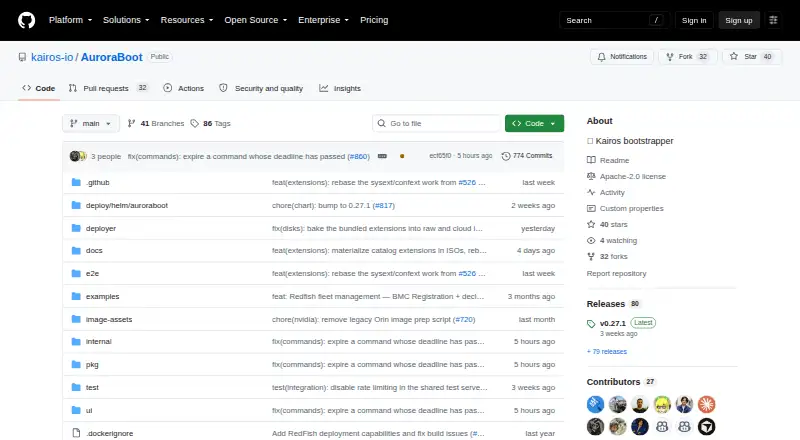
What AuroraBoot is
AuroraBoot is the official Kairos bootstrapper for building images, provisioning machines, and managing fleets. It builds ISO, UKI, raw disk, and system-extension images from Kairos flavors or container images, then provisions machines over PXE/netboot, Redfish, or USB. Its fleet server has a browser dashboard for building artifacts, deploying them, and managing registered nodes. Node commands include upgrades, reboots, resets, cloud-config, and arbitrary shell commands with captured output. The guided Artifact Builder includes templates for Ubuntu, Fedora, Debian, openSUSE, Alpine, Rocky, and Hadron. AuroraBoot also includes a SecureBoot key store and a REST API with a Go client and Swagger UI. Supported architectures are amd64, arm64, and riscv64. The fleet server uses SQLite by default and can be configured for PostgreSQL. AuroraBoot is free, open-source software under Apache License 2.0, for self-hosting with Docker or a container engine. One security limitation to consider is that its netboot HTTP server is unauthenticated and serves files over plain HTTP to reachable clients.
Good
- Builds four listed image formats
- Provisions over PXE/netboot, Redfish, or USB
- Browser dashboard for artifact and node management
- REST API and Go client
- Free under Apache License 2.0
Watch out
- Requires Docker or a container engine
- Netboot HTTP server has no authentication
- Netboot files are served over plain HTTP
Who it suits
AuroraBoot suits teams building and deploying Kairos-based images across machines or fleets. Its self-hosted setup and documented deployment integrations are relevant to administrators using PXE/netboot or Redfish.
Verdict
AuroraBoot brings image building, provisioning, and node lifecycle commands into a self-hosted fleet server. Its unauthenticated plain-HTTP netboot server is an important security limitation to account for.
Plans and prices
From AuroraBoot's own pricing page, checked 1 Oct 2026.
| Plan | Price | What it gives you |
|---|---|---|
| Open-source (Apache License 2.0) | Free | self-hosted · Docker or container engine required |
The facts
Each one read from AuroraBoot's own pages, with the date it was checked.
What it does
- API
- A REST API and Go client mirror the UI, with Swagger UI available at /api/docs.checked 1 Oct 2026
- Architectures
- The documented supported architectures are amd64, arm64 and riscv64.checked 1 Oct 2026
- Artifact templates
- The guided Artifact Builder includes templates for Ubuntu, Fedora, Debian, openSUSE, Alpine, Rocky and Hadron.checked 1 Oct 2026
- Fleet dashboard
- The fleet server provides a browser dashboard for building artifacts, deploying them and managing nodes.checked 1 Oct 2026
- Image formats
- It builds ISO, UKI, raw disk and system-extension images from Kairos flavors or container images.checked 1 Oct 2026
- Integrations
- AuroraBoot documents Redfish BMC deployment, Canonical MaaS image generation, Docker or OCI images and Pixiecore netboot serving.checked 1 Oct 2026
- Node management
- Registered nodes can receive upgrade, reboot, reset, cloud-config and arbitrary-shell commands with captured output.checked 1 Oct 2026
- Provisioning
- It provisions machines over PXE/netboot, Redfish or USB.checked 1 Oct 2026
- Purpose
- AuroraBoot is the official Kairos bootstrapper for building images, provisioning machines and managing fleets.checked 1 Oct 2026
- Rate limiting
- Node registration, heartbeat and command-polling endpoints are rate-limited by default.checked 1 Oct 2026
- Secure Boot
- AuroraBoot includes a SecureBoot key store for PK, KEK, db and TPM PCR policy keys, with signed export and import.checked 1 Oct 2026
- Security limitation
- The netboot HTTP server is unauthenticated and serves kernel, initrd, squashfs and cloud-config over plain HTTP to reachable clients.checked 1 Oct 2026
- Storage backends
- The fleet server uses SQLite by default and supports PostgreSQL through a configurable database DSN.checked 1 Oct 2026
- Support
- Bug reports and feature requests are directed to the kairos-io/kairos issue tracker, and Kairos lists enterprise support contacts on its website.checked 1 Oct 2026
The full review of AuroraBoot
Overview
AuroraBoot is Kairos’s official bootstrapper for building images, provisioning machines and managing fleets. It covers both preparing system images and carrying out operations on registered nodes, making it relevant to teams responsible for machine deployment and lifecycle management.
Images can be built from Kairos flavors or container images in ISO, UKI, raw disk and system-extension formats. Machines can be provisioned through PXE or netboot, Redfish, or USB. A fleet server adds a browser dashboard for building artifacts, deploying them and managing nodes. Readers comparing tools in this category can browse Bare Metal Provisioning Software.
Key features
Image building and provisioning
The guided Artifact Builder provides templates for Ubuntu, Fedora, Debian, openSUSE, Alpine, Rocky and Hadron. Documented integrations include Redfish BMC deployment, Canonical MaaS image generation, Docker or OCI images, and Pixiecore netboot serving. Supported architectures are amd64, arm64 and riscv64.
Fleet operations
Registered nodes can receive upgrade, reboot and reset commands, along with cloud-config and arbitrary shell commands. AuroraBoot captures command output. The fleet server uses SQLite by default and can connect to PostgreSQL through a configurable database DSN.
Secure Boot and API
AuroraBoot includes a SecureBoot key store for PK, KEK, db and TPM PCR policy keys, with signed export and import. A REST API and Go client provide access corresponding to the user interface, and Swagger UI is available at /api/docs.
Security considerations
The netboot HTTP server is unauthenticated and serves the kernel, initrd, squashfs and cloud-config over plain HTTP to clients that can reach it. Node registration, heartbeat and command-polling endpoints are rate-limited by default. These details matter when deciding where to expose the service and how to secure its network environment.
Pricing
AuroraBoot is open source and has a free plan. The listed plan is Open-source (Apache License 2.0): free (self-hosted · Docker or container engine required).
Platforms
Listed platform availability includes API, Linux, macOS, self-hosted, web and Windows. The free plan is self-hosted and requires Docker or a container engine. The documented supported architectures are amd64, arm64 and riscv64.
Who it's for
AuroraBoot is suited to teams building operating system images, provisioning machines and handling fleet operations from a central service. Its combination of image formats, deployment methods, node commands and API access may be useful where both initial setup and ongoing lifecycle management are part of the same workflow. The documented architectures and integrations also give infrastructure teams specific compatibility points to check against their environments.
Pros and cons
Pros
- Builds ISO, UKI, raw disk and system-extension images from Kairos flavors or container images.
- Supports provisioning over PXE/netboot, Redfish or USB.
- Includes a dashboard, REST API and Go client for fleet and artifact workflows.
- Offers node lifecycle commands, SecureBoot key management, and SQLite or PostgreSQL storage options.
Cons
- The netboot HTTP server has no authentication and serves several deployment assets and configuration over plain HTTP to reachable clients.
- The fleet service is self-hosted and requires Docker or a container engine under the listed free plan.
Alternatives
Other entries to consider include Clonezilla, Confluent, Foreman, Canonical MAAS, NVIDIA ShadowPlay, openQRM Enterprise, Supermicro SuperDoctor 5 and NOC-PS.
Verdict
AuroraBoot brings image creation, machine provisioning and registered-node operations into one self-hosted fleet service. Its broad image and deployment options, API, and lifecycle commands make it a substantial option for teams managing machine fleets. The key operational caveat is its unauthenticated plain-HTTP netboot server, so deployment planning should account for who can reach that service and the assets it exposes. Bug reports and feature requests go to the kairos-io/kairos issue tracker; Kairos lists enterprise support contacts on its website.
Getting started
- Open the AuroraBoot GitHub website.
- Prepare Docker or another container engine for self-hosting.
- Build an artifact from a Kairos flavor or container image.
- Choose a provisioning route: PXE/netboot, Redfish, or USB.
- Use the browser dashboard or REST API to manage deployments and nodes.
Limits worth knowing
The netboot HTTP server is unauthenticated and serves kernel, initrd, squashfs, and cloud-config over plain HTTP to reachable clients. Node registration, heartbeat, and command-polling endpoints are rate-limited by default.
Questions
How much does AuroraBoot cost?
AuroraBoot is free under the Apache License 2.0. The listed self-hosted plan is free.
What platforms and architectures are supported?
The listed platforms are API, Linux, macOS, self-hosted, web, and Windows. Documented architectures are amd64, arm64, and riscv64.
What can AuroraBoot provision?
It provisions machines over PXE/netboot, Redfish, or USB. Its documented integrations include Redfish BMC deployment, Canonical MaaS image generation, Docker or OCI images, and Pixiecore netboot serving.
Does AuroraBoot have an API?
Yes. It has a REST API and Go client that mirror the UI, with Swagger UI at /api/docs.
Which database does the fleet server use?
SQLite is the default. PostgreSQL is supported through a configurable database DSN.
Where can users get support?
Bug reports and feature requests go to the kairos-io/kairos issue tracker. Kairos lists enterprise support contacts on its website.
Alternatives to AuroraBoot
- 1

Canonical MAAS
Free planOpen sourceWebAPILinuxSelf-hosted8.1From $30 a year - 2

FOG Project
Free planOpen sourceWebAPILinuxmacOS7.7Free plan - 3

Foreman
Free planWebAPILinuxSelf-hosted6.9Free plan - 4
Supermicro SuperDoctor 5
Free planLinuxWindows6.8Free plan - 5

Clonezilla
Free planLinuxmacOSSelf-hostedWindows6.7Free plan - 6
iVentoy
Free planLinuxSelf-hostedWindows6.7$49 one-time