
ColdAisle
ColdAisle is free, MIT-licensed, on-premise software for managing data center infrastructure.
What ColdAisle is
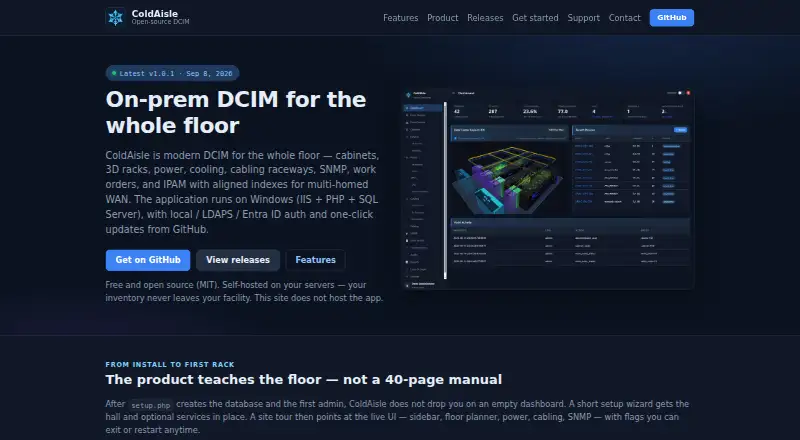
ColdAisle is free, MIT-licensed, on-premise software for managing data center infrastructure. It runs on Windows using IIS, PHP, and SQL Server, and its marketing site does not host customer inventory. The floor planner provides 2D layouts and interactive 3D views with cabinets, row PDUs, and raceways. Power tools cover A/B zones, panels, single-, dual-, and three-phase PDUs, outlet inventory, history charts, and overload alerts. Cooling features include CRAC and CRAH equipment, environmental sensors, and 3D airflow visualization. For device monitoring, it supports SNMPv2c and SNMPv3, MIB uploads, device discovery, OID templates, and scheduled polling; SNMP secrets are encrypted at rest with the application key. Authentication options include local accounts, LDAPS with Active Directory group mapping, and Microsoft Entra ID OIDC single sign-on. Built-in roles are Administrator, Operator, Auditor, and Viewer. ColdAisle can import openDCIM data through a live API or offline JSON dumps, with a preview before migration. Its IPAM feature does not provide IPv6, DNS, or a DHCP server.
Good
- Free to use under the MIT License
- Offers 2D plans and interactive 3D views
- Includes power and cooling monitoring features
- Supports SNMPv2c and SNMPv3
- Can import openDCIM data with a preview
Watch out
- IPAM does not provide IPv6
- IPAM does not provide DNS
- IPAM does not provide a DHCP server
- Bug reports and feature requests go through GitHub Issues
Who it suits
ColdAisle suits data center operators replacing spreadsheets or openDCIM, and teams that want directory authentication while keeping floor plans in-house.
Verdict
ColdAisle covers floor planning, power, cooling, and device monitoring in a self-hosted package. Teams needing IPv6, DNS, or DHCP server functions in its IPAM feature will need to account for those omissions.
Plans and prices
From ColdAisle's own pricing page, checked 2 Oct 2026.
| Plan | Price | What it gives you |
|---|---|---|
| ColdAisle | Free | Free to use · MIT license · self-hosted |
The facts
Each one read from ColdAisle's own pages, with the date it was checked.
What it does
- Access roles
- Built-in roles are Administrator, Operator, Auditor, and Viewer.checked 2 Oct 2026
- Authentication
- Authentication options include local accounts, LDAPS with Active Directory group mapping, and Microsoft Entra ID OIDC single sign-on.checked 2 Oct 2026
- Cooling
- Cooling features include CRAC and CRAH equipment, environmental sensors, and 3D airflow visualization.checked 2 Oct 2026
- Hosting
- The application runs on Windows using IIS, PHP, and SQL Server, and the marketing site does not host customer inventory.checked 2 Oct 2026
- Intended users
- The maker describes it for operators replacing spreadsheets or openDCIM and teams that need directory authentication while keeping floor plans in-house.checked 2 Oct 2026
- IPAM limits
- The IPAM feature page states that it does not provide IPv6, DNS, or a DHCP server.checked 2 Oct 2026
- License
- ColdAisle is released under the MIT License, with source, issues, and releases on its public product repository.checked 2 Oct 2026
- Migration
- ColdAisle can import openDCIM data through a live API or offline JSON dumps, with a preview before migration.checked 2 Oct 2026
- Power
- Power features include A/B zones, panels, single-, dual-, and three-phase PDUs, outlet inventory, history charts, and overload alerts.checked 2 Oct 2026
- Purpose
- ColdAisle is on-premise data center infrastructure management software for the whole datacenter.checked 2 Oct 2026
- SNMP
- ColdAisle supports SNMPv2c and SNMPv3, MIB uploads, device discovery, OID templates, and scheduled polling.checked 2 Oct 2026
- SNMP security
- SNMP secrets are encrypted at rest with the application key.checked 2 Oct 2026
- Support
- Bug reports and feature requests go through GitHub Issues, and the site says there is no paid ticket portal in v1.checked 2 Oct 2026
Money
- Floor planning
- The floor planner supports 2D plans and interactive 3D views with cabinets, row PDUs, and raceways.checked 2 Oct 2026
The company
- Maker background
- ColdAisle is developed by a working network infrastructure administrator.checked 2 Oct 2026
The full review of ColdAisle
Overview
ColdAisle is an on-premises data center infrastructure management application that runs on Windows with IIS, PHP, and SQL Server. It is a strong fit for operators who want to replace spreadsheets or openDCIM while keeping inventory in-house and using directory authentication.
Its appeal is a broad, free, MIT-licensed toolset; the trade-off is a Windows-specific stack and IPAM that stops short of IPv6, DNS, and DHCP server functions.
Key features
Floor plans, power, and cooling
ColdAisle pairs 2D floor plans with interactive 3D views of cabinets, row PDUs, and raceways. That makes it useful for teams planning space and capacity alongside rack layouts, rather than maintaining those views separately. Power management covers A/B zones, panels, single-, dual-, and three-phase PDUs, outlet inventories, history charts, and overload alerts. Cooling tools include CRAC and CRAH equipment, environmental sensors, and 3D airflow visualization, giving facilities operators a shared view of physical infrastructure.
Monitoring, access, and migration
SNMPv2c and SNMPv3 support, MIB uploads, device discovery, OID templates, and scheduled polling give operators a substantial toolkit for device monitoring. SNMP secrets are encrypted at rest with the application key. Authentication can use local accounts, LDAPS with Active Directory group mapping, or Microsoft Entra ID OIDC single sign-on; built-in Administrator, Operator, Auditor, and Viewer roles help distinguish responsibilities.
Teams moving from openDCIM can import data through a live API or offline JSON dumps and preview the migration before proceeding. That lowers the risk of a blind cutover. The IPAM feature has a narrower remit: it does not provide IPv6, DNS, or a DHCP server, so teams needing those functions must keep or choose separate services.
Pricing
ColdAisle — free. The free plan is self-hosted, released under the MIT License, and includes rack management, power and cooling monitoring, and space and capacity planning. With no paid tier or seat restriction described, it is a practical option for organizations that can operate the application themselves and want its infrastructure scope without a license charge. There is no free trial because the product is free to use.
The cost is operational rather than a subscription: deployment is on-premises, and the application runs on Windows using IIS, PHP, and SQL Server. Bug reports and feature requests go through GitHub Issues; the maker says there is no paid ticket portal in v1. Teams that require a paid support channel should weigh that limitation before relying on it for critical operations.
Platforms
ColdAisle is self-hosted and on-premises, with a web interface and a Windows application stack. It suits organizations that can provide that environment and want customer inventory to remain under their own hosting; it is a poor fit for teams seeking a vendor-hosted service or a Linux-hosted deployment.
Who it's for
ColdAisle is aimed at data center operators replacing spreadsheets or openDCIM, especially teams that need directory authentication while keeping floor plans and inventory in-house. Its combination of planning, power, cooling, and SNMP monitoring is most valuable when those jobs belong in one system. Teams with a Linux-only infrastructure, a requirement for built-in IPv6, DNS, or DHCP server capabilities, or a need for paid support should look elsewhere or plan complementary services.
Pros and cons
- Pro: 2D planning and 3D views cover cabinets, row PDUs, and raceways, with power and cooling tools alongside them; this supports joined-up space and facility planning.
- Pro: SNMP discovery and polling, plus encrypted-at-rest SNMP secrets, combine monitoring breadth with a stated security safeguard.
- Pro: Active Directory group mapping and Entra ID single sign-on suit organizations that want directory-based access rather than local accounts alone.
- Pro: OpenDCIM import with a preview gives teams a route to migrate without committing data sight unseen.
- Con: The Windows, IIS, PHP, and SQL Server stack rules out Linux-only deployments.
- Con: IPAM lacks IPv6, DNS, and DHCP server functions, limiting its use as a complete address-management service.
- Con: Support requests go through GitHub Issues, with no paid ticket portal in v1.
Alternatives
Compare data center infrastructure management software if you want to weigh ColdAisle against a broader category of tools.
- Global Site Management is worth considering for teams seeking a freemium option with Android and iOS support, or a no-cost entry-level plan for smaller data centers and pilots.
- Danbyte is another free, open-source, self-hosted option if Linux and API support matter; its free plan includes all features and has no seat license or license expiry.
- openDCIM is a free, GPL v3 web application for teams that prefer a Linux-capable self-hosted alternative.
- Brightlayer DCIM is a paid alternative sold through an Eaton reseller; buyers can request a demonstration or consultation.
- Hyperview suits buyers considering a paid product with a 30-day, all-features trial that needs no credit card; its listed plan is priced per asset, per year.
- Cormant-CS is a paid option for buyers whose needs fit its approximately 25–30 rack subscription, listed at $7,200 a year for a one-year agreement.
- EcoStruxure IT is a paid alternative with a listed three-year Expert plan for 250 nodes.
- Sunbird dcTrack is a paid choice for teams seeking a plan with unlimited users, sites, and assets, priced at $19.50 a month on an annual subscription.
Verdict
Choose ColdAisle if you want a free, self-hosted system that brings floor planning, rack capacity, power, cooling, and SNMP monitoring together, with directory-based access and an openDCIM migration path. Its main reasons to look elsewhere are the Windows application stack, incomplete IPAM scope, and lack of a paid support portal in v1.
Getting started
- Visit https://coldaisle.app/.
- Deploy the application on Windows using IIS, PHP and SQL Server.
- Choose local accounts, LDAPS with Active Directory group mapping, or Microsoft Entra ID OIDC single sign-on.
- Set access using the Administrator, Operator, Auditor or Viewer role.
- Import openDCIM data through the live API or an offline JSON dump, then review the preview.
Limits worth knowing
The free plan is listed as free. The IPAM feature lacks IPv6, DNS and a DHCP server.
Questions
How much does ColdAisle cost?
The ColdAisle plan is free and is described as free to use under the MIT License.
Where does ColdAisle run?
It is self-hosted and runs on Windows using IIS, PHP and SQL Server. Customer inventory is not hosted by the marketing site.
What license does ColdAisle use?
ColdAisle is released under the MIT License, with source, issues and releases on its public product repository.
Can ColdAisle monitor devices over SNMP?
Yes. It supports SNMPv2c and SNMPv3, MIB uploads, discovery, OID templates and scheduled polling. SNMP secrets are encrypted at rest with the application key.
Can it import openDCIM data?
Yes. ColdAisle can import through a live API or offline JSON dumps, and provides a preview before migration.
What support route does it offer?
Bug reports and feature requests go through GitHub Issues. The site says there is no paid ticket portal in v1.
Alternatives to ColdAisle
- 1
Hyperview
AndroidiOSWebAPI7.8From $3 a year - 2

Danbyte
Free planOpen sourceWebAPILinuxSelf-hosted7.4Free plan - 3
Global Site Management
Free planAndroidiOSWebWindows7.0Free plan - 4

Cormant-CS
AndroidWebAPISelf-hosted6.9From $7,200 a year - 5

Sunbird dcTrack
AndroidiOSWebAPI6.9From $19.50 a month - 6
RackTables
Free planWeb6.2Free plan