
CloudMe
CloudMe combines cloud storage, synchronization across computers and mobile devices, and file sharing.
What CloudMe is
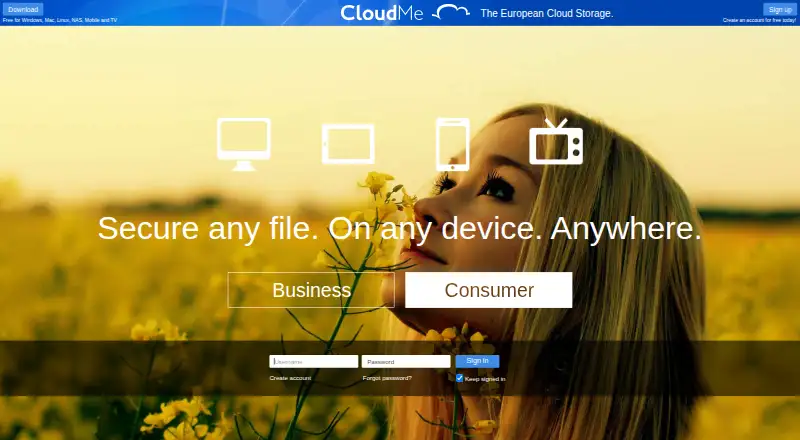
CloudMe combines cloud storage, synchronization across computers and mobile devices, and file sharing. Users can select which folders sync to each computer, including keeping personal folders off work computers. Shared project folders let members add documents and changes, while published pages can be followed without a CloudMe account. Scheduled upload-only folders create an offsite copy; regular two-way synchronization mirrors deletions and is not a backup. The mobile app supports camera roll backup, streaming music and video, sharing, and reading PDFs, documents, and other files. CloudMe supports WebDAV clients, and Apple's Pages, Numbers, and Keynote can open, edit, and save documents directly to CloudMe. It also offers more than 100 stateless API methods through SOAP and REST, plus a Java library. CloudMe says it owns and operates its data center and hardware in Sweden, within the European Union. The free plan includes 3 GB storage and a 150 MB maximum file size. Listed platforms include Android, iOS, Linux, macOS, web, and Windows.
Good
- Selective sync lets users choose folders per computer.
- Upload-only folders keep an offsite copy.
- Shared pages can be followed without an account.
- Data center and hardware are in Sweden.
Watch out
- Free accounts limit each file to 150 MB.
- Ordinary two-way sync mirrors deletions and is not backup.
- Prices for listed storage plans are not provided.
Who it suits
CloudMe suits people who want folder synchronization and sharing across computers and mobile devices. Its business accounts may suit teams that need a central file server and managed employee accounts.
Verdict
CloudMe combines personal storage, collaboration, and business file-server options. Remember that regular synchronization is not backup, and the free account has a 150 MB per-file limit.
Plans and prices
From CloudMe's own pricing page, checked 20 Sep 2026.
| Plan | Price | What it gives you |
|---|---|---|
| Free Plan | Free | 3 GB storage · 150 MB maximum file size |
| Free account | Free | 3 GB storage · 150 MB maximum file size |
| 10 GB cloud storage | $9.99 a year | 10 GB storage · 1 year |
| 25 GB cloud storage | $39.99 a year | 25 GB storage · 1 year |
| 100 GB cloud storage | $79.99 a year | 100 GB storage · 1 year |
| 200 GB cloud storage | $139.99 a year | 200 GB storage · 1 year |
| 500 GB cloud storage | $299.99 a year | 500 GB storage · 1 year |
| Small vault | — | 200 GB · maximum file size 2 GB · per month, billed annually |
| Standard vault | — | 2 TB · maximum file size 2 GB · per month, billed annually |
| Business Professional Vault | — | Business account includes a central Cloud File Server and employee accounts · maximum file size 2 GB · per user per TB per month, billed annually |
| Business Standard Vault | — | Business account includes a central Cloud File Server and employee accounts · maximum file size 2 GB · per user per TB per month, billed annually |
| Enterprise Plus Cloud-Based File-server | — | maximum file size 2 GB · per month, billed annually |
| Enterprise Pro Cloud-Based File-server | — | maximum file size 2 GB · per month, billed annually |
| Enterprise Standard Cloud-Based File-server | — | maximum file size 2 GB · per month, billed annually |
| Online Safe | — | 50 GB · maximum file size 2 GB · per month, billed annually |
The facts
Each one read from CloudMe's own pages, with the date it was checked.
What it does
- API
- CloudMe offers over 100 stateless API methods through SOAP and REST, plus a Java library, for apps and white-label services.checked 11 Oct 2026
- API protocols
- The public developer page documents SOAP and REST web services over SSL using Digest authentication.checked 14 Oct 2026
- Backup
- Scheduled upload-only folders keep an offsite copy; CloudMe says ordinary bidirectional sync mirrors deletions and is not a real backup.checked 11 Oct 2026
- Business admin controls
- Yeschecked 20 Sep 2026
- Business use
- Business accounts include a central Cloud File Server and employee accounts with additional private space and access to shared space.checked 11 Oct 2026
- Camera-roll backup
- The service uploads a phone camera roll, allows computer organization into folders and supports sharing those folders.checked 14 Oct 2026
- Collaboration
- Shared collaboration folders synchronize changes among invited CloudMe members who follow and sync the folder.checked 14 Oct 2026
- Data location
- CloudMe says it owns and operates its own data center and hardware in Sweden, within the European Union.checked 11 Oct 2026
- Documentation
- The help area includes tutorials for getting started, camera roll, sync folders, music, sharing and collaboration.checked 14 Oct 2026
- File size limit
- 0.15checked 20 Sep 2026
- Funding news
- Xcerion reports that CloudMe received 1 million SEK in funding and appointed a new CEO and management team in 2021.checked 14 Oct 2026
- Java API
- CloudMe publishes a separate Java API section and downloadable API documentation.checked 14 Oct 2026
- Licence model
- The user agreement grants a revocable, non-exclusive service licence and prohibits modifying, distributing, reverse engineering or reselling the service.checked 14 Oct 2026
- Limit: login problems
- The sole Trustpilot reviewer reported inability to log into a Smart-TV-created account from a PC browser.checked 14 Oct 2026
- Limit: missing mobile features
- An Apple reviewer requested Files-app integration, CloudMe email access and mobile CloudTop access.checked 14 Oct 2026
- Limit: mobile stability
- Android reviewers reported force-closing and startup crashes on some phones.checked 14 Oct 2026
The company
- Company legal facts
- CloudMe AB is registered in Linköping, Sweden, with organization number 556741-2431 and registration date October 30, 2007.checked 14 Oct 2026
- Company ownership
- CloudMe AB is listed as part of the Xcerion group, and Xcerion identifies CloudMe as a portfolio company.checked 14 Oct 2026
- Company size
- LinkedIn lists CloudMe as privately held, headquartered in Linköping, founded in 2011 and employing 11–50 people.checked 14 Oct 2026
- Headquarters
- Linköping, Swedenchecked 28 Sep 2026
Where it runs
- Device platforms
- Windows,Mac,Linux,iPhone,Androidchecked 20 Sep 2026
- iOS system requirement
- The App Store listing requires iOS 12.0 or later and iPadOS 12.0 or later.checked 14 Oct 2026
Money
- Free-account limits
- The free account provides 3 GB of storage with a 150 MB maximum file size.checked 14 Oct 2026
- Free plan
- Yeschecked 20 Sep 2026
The full review of CloudMe
CloudMe is a cloud storage and synchronization service for people who need to manage folders across computers and mobile devices. It is a particularly good fit for shared projects, selective syncing, and businesses that want a centrally managed file server. The 3 GB free account is useful for a small start, but its 150 MB per-file limit rules it out for many large files.
Overview
CloudMe combines storage, device synchronization, and file sharing. Selective sync lets users choose which folders reach each computer, including keeping personal folders off a work machine. That is valuable when devices have distinct roles, but ordinary two-way sync mirrors deletions; it should not be treated as a backup.
For an offsite copy, scheduled upload-only folders are the more suitable option. Shared project folders let members contribute documents and changes, while WebShare folders can be published for people without CloudMe accounts. Followers can receive push notifications when shared contents change, which helps when a folder is an ongoing source of project material.
Key features
- Selective synchronization: Choose which folders go to each computer, reducing clutter and keeping personal files away from work devices.
- Sharing and collaboration: Members can add files to shared project folders; published pages can also be followed without an account. This supports collaborative file exchange, though it is not a substitute for selecting the right backup mode.
- Mobile tools: The mobile app supports camera roll backup, music and video streaming, sharing, and reading PDFs, documents, and other files. It gives the service a broader role on phones than file access alone.
- WebDAV and Apple iWork: WebDAV clients can connect to CloudMe, and Pages, Numbers, and Keynote can open, edit, and save documents directly to it. That is useful for people already working in those apps.
- API: More than 100 stateless methods are offered through SOAP and REST, alongside a Java library, for app integrations and white-label services.
- Business file server: Business accounts include a central Cloud File Server and employee accounts with private space plus access to shared space. CloudMe says its data center and hardware are operated in Sweden, within the EU.
Pricing
CloudMe is freemium. Both named free-account entries cost free and provide 3 GB of storage, with a 150 MB maximum file size. That cap is restrictive for larger media or archives. The pricing page sets a 2 GB maximum file size for plans, so paid storage lifts the ceiling substantially, though it remains a limit.
Paid personal plans have custom pricing: Online Safe includes 50 GB, Small vault 200 GB, and Standard vault 2 TB. The larger quotas make the paid tiers more plausible for growing libraries, but without a stated price it is difficult to judge their value against one another.
Business Standard Vault and Business Professional Vault include a central Cloud File Server, administrator-managed user accounts, and EU data storage. Enterprise Standard, Enterprise Pro, and Enterprise Plus are cloud-based file-server plans with administrator-managed accounts and EU storage. All have custom pricing, and no seat counts or quota differences are given, so organizations should compare requirements directly before choosing.
Platforms
CloudMe supports Android, iOS, Linux, macOS, web, and Windows, with an API also available. That range covers common desktop and mobile environments as well as developers building integrations.
Who it's for
CloudMe suits people who want selective folder sync and flexible sharing, especially when a project folder changes over time or files need to reach non-users. It is also worth considering for businesses that need central file storage, managed employee accounts, and EU data storage. Users seeking an uncomplicated backup should pay attention to the distinction between upload-only scheduled folders and ordinary sync. Those who regularly handle files larger than 150 MB will likely need a paid plan.
Pros and cons
- Pro: Selective sync can keep personal folders off work computers, giving users control over what reaches each device.
- Pro: Shared folders, public pages, and follower notifications support ongoing collaboration with account holders and non-users.
- Pro: Scheduled upload-only folders provide an offsite-copy option distinct from deletion-mirroring sync.
- Pro: WebDAV, iWork support, and a broad API offer integration paths beyond the standard apps.
- Con: The free account's 150 MB per-file limit is restrictive for large files, despite its 3 GB storage quota.
- Con: Ordinary bidirectional sync mirrors deletions, so users can lose the protection they expect if they mistake it for backup.
- Con: Paid plans use custom pricing, making cost comparisons difficult before contacting CloudMe.
Alternatives
For a broader shortlist, browse Cloud Storage Services. Consider IDrive if its 10 GB Basic plan or 100 GB IDrive Mini plan at $0.25 a month better matches your storage needs. Yandex Disk is another freemium option, with 5 GB free and a 200 GB tier. Choose Blomp if its 40 GB free plan or 500 GB plan at $0.99 a month is a better fit. Jottacloud offers 5 GB free for one user and an Unlimited plan at $12.99 a month. Koofr may suit readers who value its 10 GB free plan and stated public-link and deleted-file-retention limits. Microsoft PowerPoint is a neighboring option for readers considering a presentation-focused product with 5 GB cloud storage on its one-person plan. Nutstore is worth comparing for teams, with plans starting at a five-member minimum. ownCloud is another option for readers comparing a service with community and self-hosted platform support.
Verdict
Choose CloudMe if you want selective sync, flexible project sharing, or a centrally managed business file server with EU data storage. Its standout case is combining those controls with mobile tools and WebDAV/API integration. Look elsewhere if you need a generous free file-size limit, clear published paid pricing, or backup behavior from ordinary sync.
Alternatives to CloudMe
- 1

Filen
Free planOpen sourceAndroidiOSWebAPI8.6From €1.99 a month - 2

Internxt Drive
Free planOpen sourceAndroidiOSWebAPI8.6Free plan - 3

Seafile
Free planOpen sourceAndroidiOSWebAPI8.6Free plan - 4

IDrive
Free planAndroidiOSWebLinux8.4From $0.25 a month - 5
Box
Free planAndroidiOSWebAPI8.3From $5 a month - 6
Dropbox Sign
Free planAndroidiOSWebAPI8.2Free plan