
Client Hub
Client Hub is accounting practice management software for firms that need to turn client communications into assigned work and coordinate workflows such as m…
What Client Hub is
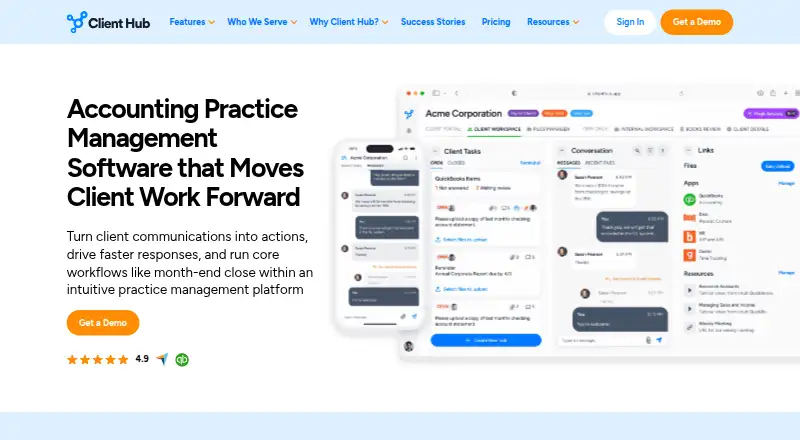
Client Hub is accounting practice management software for firms that need to turn client communications into assigned work and coordinate workflows such as month-end close. Teams can create jobs with checklists, owners, deadlines, statuses, and recurring schedules. Each client has a workspace for sending files, responding to requests, and communicating with the firm. AI tools can draft replies, summarize email threads, create workflows and tasks, and draw insights from reports.
Client Hub connects with QuickBooks Online and Xero for transaction workflows and two-way syncing. It also integrates with Anchor, Gmail, Microsoft Outlook, SignWell, and Zapier. Web, iOS, and Android access is available; mobile apps handle messages, tasks, documents, and real-time notifications. They display the 20 most recent documents, while older files are available on the web. Plans charge per firm user, with unlimited clients and storage.
Good
- Structured jobs include checklists, owners, and deadlines.
- Client workspaces support files, requests, and communication.
- QuickBooks Online and Xero include two-way syncing.
- Mobile apps provide messaging and real-time notifications.
- Plans include unlimited clients and storage.
Watch out
- No free plan is available.
- Mobile apps show only the 20 most recent documents.
Who it suits
Client Hub suits bookkeeping, CPA, tax, and CAS firms, as well as outsourced or fractional finance practices. Its workflow tools and mobile access may also fit hybrid and remote teams.
Verdict
Client Hub brings client communication, accounting workflows, and task tracking into one practice-management product. Consider its per-user pricing and the mobile document limit when deciding whether it fits your firm.
Plans and prices
From Client Hub's own pricing page, checked 4 Oct 2026.
| Plan | Price | What it gives you |
|---|---|---|
| Solopreneur | $49 a month | single user · limited to solo user firms · all features included · Annual Billing; available only on annual billing |
| Practice Manager | $99 a month | per firm user · includes QuickBooks and Xero integrations · unlimited clients · Monthly Billing |
The facts
Each one read from Client Hub's own pages, with the date it was checked.
What it does
- Accounting integrations
- Client Hub offers integrations with QuickBooks Online and Xero, including transaction workflows and two-way syncing.checked 4 Oct 2026
- AI features
- Its AI can draft replies, summarize email threads, generate workflows and client tasks, and surface insights from reports.checked 4 Oct 2026
- Client portal
- Each client gets a workspace to upload files, answer requests, and communicate with the firm.checked 4 Oct 2026
- Intended users
- The product is presented for bookkeeping, CPA, tax, and CAS firms, as well as outsourced or fractional finance practices and hybrid or remote teams.checked 4 Oct 2026
- Other integrations
- The platform integrates with Anchor, Gmail, Microsoft Outlook, SignWell, and Zapier, which the page says connects to over 5,000 applications.checked 4 Oct 2026
- Pricing limits
- Pricing is per firm user rather than per client, and all plans include unlimited clients and unlimited storage.checked 4 Oct 2026
- Privacy
- Client Hub says it acts as a data processor, does not sell personal information, and lets customers retain ownership of their data.checked 4 Oct 2026
- Purpose
- Client Hub is accounting practice management software that turns client communications into trackable actions and supports workflows such as month-end close.checked 4 Oct 2026
- Security
- Client Hub says data is encrypted in transit and at rest, hosted using Google Cloud Platform and AWS, and backed up daily.checked 4 Oct 2026
- Security controls
- The security page describes SMS two-factor authentication, role-based access, monitored sessions, and limited employee access to production data.checked 4 Oct 2026
- Support
- The company says support comes from U.S.-based staff familiar with accounting firms, and subscriptions include onboarding and support.checked 4 Oct 2026
- Workflow management
- Teams can create structured jobs with checklists, task owners, deadlines, statuses, and recurring workflows.checked 4 Oct 2026
The company
- Company origin
- The about page says Client Hub started in 2017 and identifies Judie McCarthy as co-founder.checked 4 Oct 2026
- Founded
- 2017checked 28 Sep 2026
- Headquarters
- Ocala, Florida, United Stateschecked 28 Sep 2026
Where it runs
- Mobile app
- The iOS and Android apps support messaging, task completion, document handling, and real-time notifications; the app shows the 20 most recent documents, with older files accessed on the web version.checked 4 Oct 2026
Alternatives to Client Hub
- 1

FuseBase
Free planAndroidiOSWebAPI8.2From $32 a month - 2

Plutio
AndroidiOSWebAPI7.9From $15 a month - 3

ManyRequests
AndroidiOSWebAPI7.8From $39 a month - 4

Assembly
Free planWebAPImacOSWindows7.7From $29 a month - 5
Salesforce Experience Cloud
AndroidiOSWebAPI7.5 - 6
Kitchen.co
Free planAndroidiOSWeb7.4From $29 a month