
Chartt
Chartt is a web-based AI analyst for CSV, Excel, and plain text files.
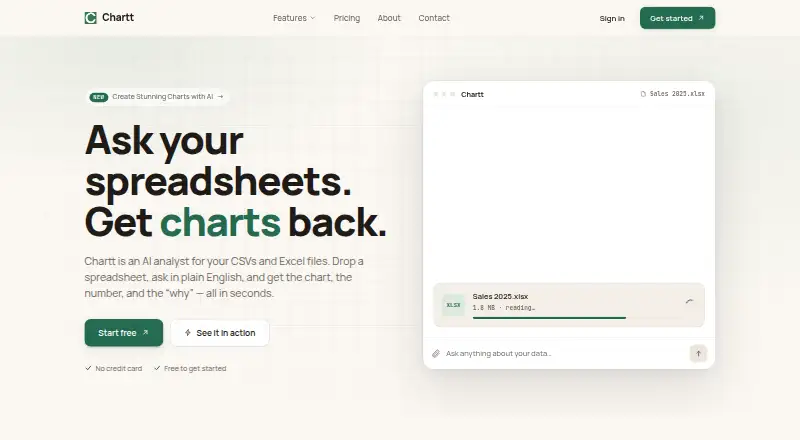
What Chartt is
Chartt is a web-based AI analyst for CSV, Excel, and plain text files. Users can ask questions in everyday language and receive charts, numbers, and explanations. The tool accepts CSV, XLSX, XLS, and plain text uploads, then infers column types, units, and date ranges. It can select bars, lines, tables, sparklines, or breakdowns to present an answer. Users can pin chart cards to dashboards that refresh when source files change. Chartt also says it can identify spikes, dips, and unexpected segments and summarize them in plain English. Shared chart, chat, and dashboard links are available, and answers link back to source rows or files. The maker says files and database contents are encrypted at rest, data is encrypted in transit, and employee access is limited. Relevant uploaded data may be sent to OpenAI and Google Gemini, but customer data is not used to train AI models. The free plan includes 100 credits a month and files under 100 MB; new queries pause when credits run out until the next billing cycle or an upgrade.
Good
- Accepts CSV, XLSX, XLS, and plain text files.
- Questions can produce charts, numbers, and explanations.
- Dashboards refresh when source files update.
- Answers link to source rows or files.
Watch out
- Free plan includes 100 credits per month.
- Free-plan files must be under 100 MB.
- Queries pause when credits run out.
- Uploaded data may be sent to OpenAI and Gemini.
Who it suits
Chartt is aimed at analysts, operations leads, and founders who want spreadsheet answers without SQL, pivot tables, or maintained BI dashboards. Its free plan may suit users with modest query needs and files under 100 MB.
Verdict
Chartt turns spreadsheet and text-file questions into charts and explanations, with source links and refreshable dashboards. Consider the credit limit and data-sharing details before choosing a plan.
Plans and prices
From Chartt's own pricing page, checked 15 Oct 2026.
| Plan | Price | What it gives you |
|---|---|---|
| Free | Free | 100 credits/month · files under 100 MB · 1 data source · 30-day chat history · PNG & CSV export · preset themes |
| Starter | $7 a month | 1,500 credits/month · 2 data sources · extended storage · 90-day chat history · PNG & CSV export · preset themes · no watermark · billed annually — $84/yr |
| Pro | $29 a month | 8,000 credits/month · 5 data sources · large storage · all export types · custom themes · long-term archiving · no watermark · billed annually — $348/yr |
| Max | $109 a month | 35,000 credits/month · 10 data sources · large storage capacity · all output types · custom themes · long-term archiving · no watermark · billed annually — $1,308/yr |
The facts
Each one read from Chartt's own pages, with the date it was checked.
What it does
- AI accuracy limitation
- The terms warn that generated charts, summaries, and answers can be inaccurate or misleading and require independent verification.checked 15 Oct 2026
- AI data use
- Chartt says relevant uploaded data may be sent to OpenAI and Google Gemini for analysis, but customer data is not used to train AI models.checked 4 Oct 2026
- AI providers
- The privacy policy names OpenAI and Google Gemini as external providers that may process data needed for an answer.checked 15 Oct 2026
- Anomaly callouts
- The product says it automatically surfaces spikes, dips, and unexpected segments with plain-language summaries.checked 15 Oct 2026
- Anomaly detection
- Chartt says it automatically surfaces spikes, dips, and unexpected segments with a plain-English summary.checked 4 Oct 2026
- API and SDKs
- No public API reference, SDK, webhook documentation, or developer portal is linked from Chartt's public pages.checked 15 Oct 2026
- Automatic schema inference
- After upload, Chartt says it infers column types, units, and date ranges.checked 15 Oct 2026
- Automatic visualization
- Chartt selects among bars, lines, tables, sparklines, and breakdowns based on the question.checked 15 Oct 2026
- Credit exhaustion
- When credits run out, new queries pause until the next billing cycle or an upgrade, while existing charts remain viewable.checked 15 Oct 2026
- Credit model
- Credits are consumed when Chartt parses rows, generates a chart, and produces an AI insight.checked 15 Oct 2026
- Dashboards
- Users can pin chart cards to dashboards that remain live and refresh when source files change.checked 15 Oct 2026
- Deletion
- Deleted files and closed accounts are scheduled for permanent deletion within 30 days, while encrypted backups may persist up to 90 days.checked 15 Oct 2026
- Documentation
- The public navigation exposes product, pricing, company, privacy, terms, and refund pages but no public documentation or help-center section.checked 15 Oct 2026
- Exports
- PNG and CSV exports are included on every plan, while higher tiers add all export types and custom themes.checked 15 Oct 2026
- Feature-page pricing inconsistency
- The line-chart feature page says paid plans start at $9/month for 1,000 credits, which differs from the main pricing page's $7/month Starter plan and 1,500 credits.checked 15 Oct 2026
- File formats
- The homepage lists CSV, XLSX, XLS, and plain-text uploads.checked 15 Oct 2026
- Independent accuracy guidance
- The same independent guide advises recomputing several key numbers manually before relying on an AI spreadsheet result.checked 15 Oct 2026
- Independent chart limitation
- The independent guide warns that incorrect column selection, skipped blanks, or text treated as numbers can make an AI result look organized while being wrong.checked 15 Oct 2026
- Independent legal corroboration
- NoviChat's legal terms independently identify Simply Tech Solutions LLC as a Wyoming company at the same Sheridan address.checked 15 Oct 2026
- Independent privacy guidance
- The independent guide recommends removing names, phone numbers, and unnecessary personal details before uploading spreadsheets to AI tools.checked 15 Oct 2026
- Independent verification guidance
- An independent October 2026 spreadsheet-AI guide recommends checking row counts, columns, blanks, duplicates, and outliers before trusting generated conclusions.checked 15 Oct 2026
Money
- Free line-chart use
- The line-chart generator allows one chart without signup and says signed-in free accounts receive 100 credits monthly.checked 15 Oct 2026
The company
- Headquarters
- Sheridan, Wyoming, United Stateschecked 28 Sep 2026
- Headquarters address
- The terms list 30 N Gould St, STE R, Sheridan, Wyoming 82801, United States.checked 15 Oct 2026
The full review of Chartt
Chartt is a web-based AI analyst for CSV, Excel, and plain-text files. It suits analysts, operations leads, and founders who need answers and shareable charts without SQL or a maintained BI stack. Its strongest case is fast, traceable exploration of files; credit quotas, source limits, and third-party AI processing make plan and data-policy decisions important.
Overview
Upload CSV, XLSX, XLS, or plain-text data and Chartt infers column types, units, and date ranges. You can ask questions in ordinary language and receive numbers, explanations, and a visualization selected for the question. Answers link to source rows or the source file, giving reviewers a way to check the basis of a result rather than accepting an opaque summary.
Chartt is designed around files rather than a large integration catalogue. Charts, chats, and dashboards can be shared by link. Pinning chart cards creates a dashboard whose layout remains live and refreshes when its source files change, which is useful for recurring operational views without maintaining a separate BI project. It is less suitable when your workflow depends on many connected business systems.
Key features
Natural-language analysis and visual choice
Chartt chooses among bars, lines, tables, sparklines, and breakdowns to fit a question. That removes the need to decide on a chart type before you know what the data says, while tables remain available when exact values matter. Automatic detection of spikes, dips, and unexpected segments adds a second pass over a dataset and explains the finding in plain English. These tools can shorten the route from a raw spreadsheet to an initial investigation, but they do not remove the need to check definitions and source quality.
Dashboards, sharing, and exports
Pinned cards and refreshable layouts are a practical middle ground between a one-off chart and a fully maintained BI dashboard. Shared links let colleagues view a chart, conversation, or dashboard, and source-row links support provenance when a conclusion is questioned. PNG and CSV exports are included on the Free and Starter plans; Pro and Max add all export types, including SVG.
Security and data handling
Chartt says stored files and database contents are encrypted at rest, traffic is encrypted in transit, employee access is limited, and dependencies receive regular audits and security updates. It also says relevant uploaded data may be sent to OpenAI and Google Gemini for analysis, while customer data is not used to train AI models. That arrangement may be acceptable for routine business files, but organizations with strict data-residency or third-party-processing rules should look elsewhere or obtain approval first.
Pricing
Chartt is freemium. New queries pause when credits are exhausted until the next billing cycle or an upgrade, so the monthly allowance is a functional limit rather than a soft guideline.
| Plan | Price and allowance | What you get |
|---|---|---|
| Free | free; 100 credits/month | Files under 100 MB, 1 data source, 30-day chat history, PNG and CSV export, preset themes |
| Starter | $7 a month, billed annually ($84/yr); 1,500 credits/month | Up to 2 data sources, extended storage, 90-day history, PNG and CSV export, preset themes, no watermark |
| Pro | $29 a month, billed annually ($348/yr); 8,000 credits/month | Up to 5 data sources, large storage, all export types, custom themes, long-term archiving, no watermark |
| Max | $109 a month, billed annually ($1,308/yr); 35,000 credits/month | Up to 10 data sources, large storage capacity, all output types, custom themes, long-term archiving, no watermark |
Free is appropriate for occasional, small-file questions, but 100 credits, one source, and a 30-day history constrain sustained use. Starter is the sensible step for a single analyst who needs more queries and two sources; annual billing is required for its advertised monthly rate. Pro targets heavier analysis, archiving, custom presentation, and SVG or other output needs. Max is for high-volume users managing up to ten sources, not for teams that need unlimited capacity. The published plans do not state seat counts, so collaborative access should be confirmed before purchase.
Platforms
Chartt runs on the web. It accepts CSV, XLSX, XLS, and plain-text imports, with a 100 MB maximum upload size. Team collaboration is supported through shared charts, chats, and dashboards rather than a separately described native desktop or mobile application.
Who it's for
Analysts, operations leads, and founders who repeatedly interrogate spreadsheets will get the most from natural-language questions, anomaly summaries, provenance links, and refreshable dashboards. It is a good fit when speed and explainable file-based results matter more than building a broad data model. It is a poor fit for very large files, workloads that exceed monthly credits, or organizations unwilling to send relevant data to external AI providers.
Pros and cons
- Pro: Plain-language questions produce numbers, explanations, and several chart forms without requiring SQL or pivot-table work.
- Pro: Source-row links and shared outputs make findings easier to verify and circulate.
- Pro: Refreshable dashboards turn uploaded files into repeatable views.
- Con: Queries stop at the credit limit until renewal or upgrade, which can interrupt active analysis.
- Con: Even Max is capped at ten data sources, limiting larger multi-source operations.
- Con: Relevant uploaded data may be processed by OpenAI and Google Gemini, a material consideration for sensitive information.
Alternatives
For a wider directory of comparable products, see AI Data Analysis Tools.
- Quadratic is the better choice if you need Android, iOS, macOS, Windows, API, or self-hosted deployment and can accept limited AI usage and sharing on its Personal plan.
- Julius AI fits users who want mobile access and a Google Drive connector, with free daily credits and limited creation features on its Free plan.
- Byaan suits individuals seeking a free, MIT-licensed macOS app or teams considering a self-hosted, AGPL-licensed version.
- Kiln is an option for users who prefer an open-source Python library, desktop app, and local datasets with git sync.
- ExcelGPT is aimed at spreadsheet analysis with a credit-based Free plan and a $19.90 monthly Pro tier.
- MySheetAI is suited to very light use: its free tier allows five questions per month, 3 MB uploads, and seven-day answer retention.
- Loam offers a free individual workspace for uploading files, asking grounded questions, and connecting supported AI tools.
- PerSight is a desktop option for macOS and Windows with a free allowance of 15 questions per month and one database connection.
Verdict
Choose Chartt if you want quick, explainable answers from CSV, Excel, or text files, plus dashboards that refresh as those files change. The main reason to look elsewhere is scale or sensitivity: credit and source caps limit sustained workloads, and relevant data may be sent to external AI services.