
Byaan
Byaan is an AI data analyst that answers natural-language questions about connected databases and files.
What Byaan is
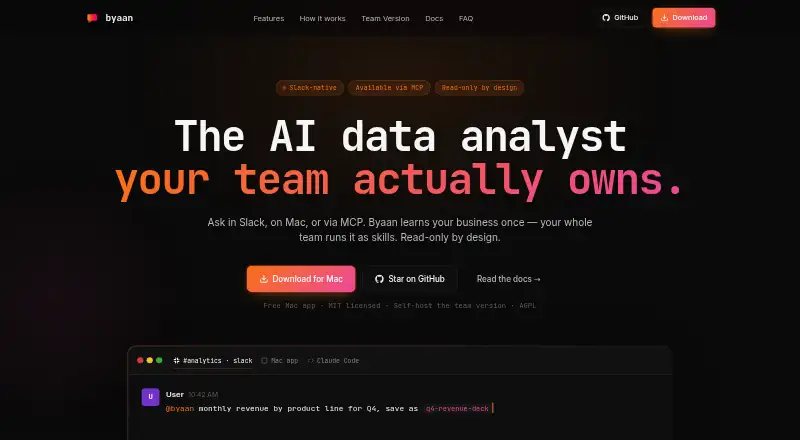
Byaan is an AI data analyst that answers natural-language questions about connected databases and files. It can work with PostgreSQL, MongoDB, MySQL, MSSQL, SQLite, and CSV, Excel, Parquet, or JSON inputs. Users can access it through Slack, its Mac app, or MCP clients such as Claude Code, Cursor, and Codex, and can connect model-provider keys from Anthropic, OpenAI, Azure, Bedrock, Groq, OpenRouter, and xAI. Byaan can save organizational context and workflows as reusable skills, and read a connected GitHub repository to understand business rules and data intent. It can create interactive dashboards and export reports as PDF, Excel, or standalone HTML. The maker says it blocks write operations across supported data sources. The Mac app is free for individuals and MIT licensed. A team version is self-hosted in a VPC, requires Linux and Docker, and has a minimum of 2 GB RAM, with 4 GB recommended. The maker directs questions to GitHub issues and discussions.
Good
- Supports several SQL databases and common file formats.
- Can create interactive dashboards and export reports.
- The Mac app is free for individuals.
- The maker says writes are blocked across supported data sources.
Watch out
- The team version requires Linux and Docker.
- Team deployment needs at least 2 GB RAM.
- The team version has no listed price.
Who it suits
Byaan suits engineers and teams looking for answers from connected data, particularly those who want to query databases or files in natural language. Its self-hosted team version is for organizations prepared to meet its Linux and Docker requirements.
Verdict
Byaan combines natural-language data queries with reusable business context and report exports. Individuals can use the free Mac app, while teams need to account for the self-hosting requirements.
Plans and prices
From Byaan's own pricing page, checked 29 Sep 2026.
| Plan | Price | What it gives you |
|---|---|---|
| Mac App | Free | Free for individuals · macOS app · MIT licensed |
| Team Version | Priced on request | Self-hosted · AGPL licensed · multi-user auth and RBAC · Slack · automatic HTTPS |
The facts
Each one read from Byaan's own pages, with the date it was checked.
What it does
- GitHub
- Byaan can read a connected GitHub repository to understand the intent behind data and business rules.checked 29 Sep 2026
- Integrations
- The site lists PostgreSQL, MongoDB, MySQL, MSSQL, SQLite, and CSV, Excel, Parquet, and JSON inputs.checked 29 Sep 2026
- Interfaces
- Users can access Byaan through Slack, the Mac app, or MCP clients such as Claude Code, Cursor, and Codex.checked 29 Sep 2026
- Memory and skills
- It saves business context and workflows as reusable skills for an organization.checked 29 Sep 2026
- Model providers
- Users can bring keys for Anthropic, OpenAI, Azure, Bedrock, Groq, OpenRouter, and xAI.checked 29 Sep 2026
- Privacy
- The maker says the Mac app runs locally and the team version runs in the customer's infrastructure, keeping credentials, queries, and results there.checked 29 Sep 2026
- Product
- Byaan is an AI data analyst that answers natural-language questions about connected databases and files.checked 29 Sep 2026
- Read-only guardrails
- The maker says Byaan blocks DDL and DML writes across supported data sources.checked 29 Sep 2026
- Reports
- Byaan can create interactive dashboards and export reports as PDF, Excel, or standalone HTML.checked 29 Sep 2026
- Support
- The maker directs questions to GitHub issues and discussions.checked 29 Sep 2026
- Who it is for
- The site describes Byaan as built for engineers and teams that need answers from their data.checked 29 Sep 2026
The company
- Team deployment
- The Team Version is self-hosted in a VPC and includes multi-user authentication, RBAC, Slack, and automatic HTTPS.checked 29 Sep 2026
- Team requirements
- The team deployment requires Linux and Docker, with 2 GB RAM minimum and 4 GB recommended.checked 29 Sep 2026
The full review of Byaan
Byaan turns questions about databases and files into AI-assisted analysis, visualizations, and reports. Its strongest fit is engineers and teams that want business context reused across queries rather than starting from scratch each time. The trade-off is deployment: the team edition requires a Linux and Docker environment in the customer’s infrastructure.
Overview
Byaan connects SQL databases and common file formats so users can ask questions in natural language. It can also read a connected GitHub repository to relate data to code, business rules, and their intent. That connection is useful when a query needs more context than table contents alone, though the product’s value depends on having the relevant sources connected.
Reusable skills let an organization retain business context and workflows for later queries. Users can work through Slack, the Mac app, or MCP clients including Claude Code, Cursor, and Codex. The combination suits teams already using those interfaces; it is less compelling for someone seeking a conventional standalone spreadsheet or a broad, prebuilt analytics suite.
Key features
Querying and source connections
Byaan accepts PostgreSQL, MongoDB, MySQL, MSSQL, and SQLite connections, as well as CSV, Excel, Parquet, and JSON files. Natural-language questions lower the barrier to exploring those sources, while support for several model providers—Anthropic, OpenAI, Azure, Bedrock, Groq, OpenRouter, and xAI—lets users bring their own keys. That flexibility is useful for organizations with an established provider preference, but it also means choosing and supplying a provider is part of setup.
Context, visualizations, and safeguards
Byaan can create interactive dashboards and export reports as PDF, Excel, or standalone HTML, giving users options for sharing analysis beyond the query interface. Its read-only guardrails block DDL and DML writes across supported data sources, a meaningful protection when querying operational databases. The maker says the Mac app runs locally; for the team version, credentials, queries, and results stay in the customer’s infrastructure. Those deployment boundaries may suit privacy-conscious users, but teams must operate the self-hosted service themselves.
Pricing
Mac App: free. It is free for individuals, runs on macOS, and is MIT licensed. This is the straightforward choice for an individual Mac user who wants Byaan without deploying a service. The plan does not provide the team edition’s multi-user authentication, RBAC, Slack, and automatic HTTPS.
Team Version: custom pricing. It is self-hosted, AGPL licensed, and includes multi-user authentication, RBAC, Slack, and automatic HTTPS. It fits teams that need shared access and want the service inside their own VPC. Deployment requires Linux and Docker, with 2 GB RAM minimum and 4 GB recommended, so it is a poor fit for teams unwilling to maintain infrastructure.
Platforms
Byaan supports macOS, Linux, web, API, and self-hosted use. The free Mac App is the individual route; team deployment is self-hosted. Slack and MCP clients provide additional ways to interact with the service.
Who it's for
Byaan is best for engineers and teams that need answers from connected data, want to reuse organizational context, and can accommodate the team deployment requirements. Individual Mac users have a low-friction way to try the workflow for free. Readers who want team analytics without managing a Linux and Docker deployment should look elsewhere.
Pros and cons
- Pro: Reusable skills preserve business context and workflows, which can make recurring questions more consistent.
- Pro: Database, file, GitHub, and model-provider options support varied data and development workflows.
- Pro: Read-only write blocking and customer-infrastructure hosting address important safeguards for data access.
- Con: The team edition requires Linux and Docker plus at least 2 GB RAM, creating an operational burden.
- Con: Team pricing is custom, so teams cannot compare its cost from a fixed published rate.
- Con: The free Mac App is for individuals; teams needing authentication and role-based access need the self-hosted edition.
Alternatives
Choose Quadratic if broader device coverage, including mobile and Windows, matters more than Byaan’s reusable business skills and self-hosted team deployment. Its personal plan has limited AI usage, sharing, files, connections, and support.
Julius AI is an alternative for users who want a web or mobile option and a free tier with daily credits and a Google Drive connector; Plus costs $20 a month.
Veezoo may suit teams seeking a paid analytics option with a free trial and support for up to 300 users on its Pro plan.
Vizly is worth considering for a web-only workflow with a published Basic plan at $19.99 a month for up to 200 messages monthly.
H2O.ai is an alternative for users interested in its Apache-licensed H2O-3 machine-learning platform for Python and R.
ExcelGPT is another freemium option for AI data analysis, with a Pro plan at $19.90 a month.
AnswerRocket is a paid alternative.
Auto-Analyst is a free web alternative.
See more options in AI Data Analysis Tools.
Verdict
Choose Byaan if you want natural-language analysis grounded in reusable business context and can match the product to your setup: a free Mac app for individual use or a self-hosted service for teams. Its strongest reasons to choose it are source flexibility, reusable skills, and read-only safeguards. Look elsewhere if your team needs a fixed published price or does not want to run the required Linux and Docker deployment.
Getting started
- For individual use, choose the free Mac App.
- For team use, prepare Linux and Docker for the self-hosted VPC deployment.
- Connect a supported database or provide CSV, Excel, Parquet, or JSON data.
- Provide a key for a supported model provider.
- Access Byaan through the Mac app, Slack, or an MCP client.
Limits worth knowing
The free Mac App is for individuals. Team deployment requires Linux and Docker, with 2 GB RAM minimum and 4 GB recommended.
Questions
Which databases and files can it use?
Supported databases include PostgreSQL, MongoDB, MySQL, MSSQL, and SQLite. File inputs include CSV, Excel, Parquet, and JSON.
Which platforms and interfaces are available?
Listed platforms include API, Linux, macOS, self-hosted, and web. Users can access Byaan through Slack, the Mac app, or MCP clients such as Claude Code, Cursor, and Codex.
Can Byaan export reports?
Yes. Reports can be exported as PDF, Excel, or standalone HTML.
Is Byaan open source?
The free Mac App is MIT licensed, and the Team Version is AGPL licensed.
What does the Team Version include and require?
It is self-hosted in a VPC and includes multi-user authentication, RBAC, Slack, and automatic HTTPS. Deployment requires Linux and Docker, with 2 GB RAM minimum and 4 GB recommended.