
Certify The Web
Certify The Web provides software for requesting, deploying, and renewing TLS certificates.
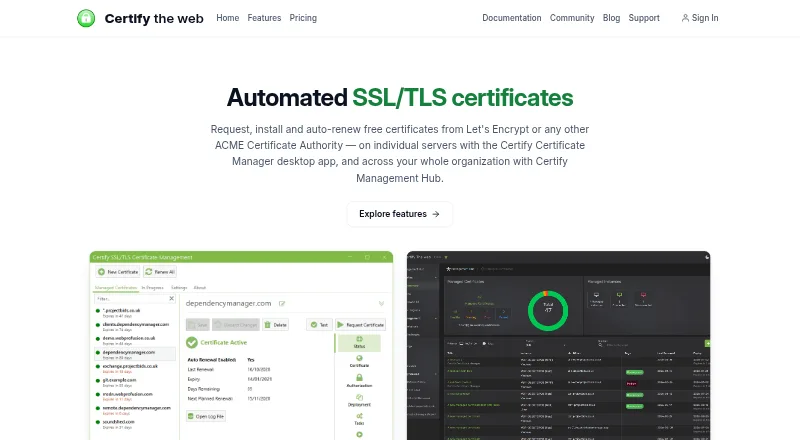
What Certify The Web is
Certify The Web provides software for requesting, deploying, and renewing TLS certificates. Certificate Manager is intended for Windows servers or desktops, Management Agent for headless Linux and macOS systems, and Management Hub for centrally administering multiple instances. Domain validation can use HTTP or DNS, including built-in providers, manual TXT records, and custom scripts. Deployment tasks cover services such as IIS, Apache, nginx, Tomcat, Exchange, Azure App Service, and HashiCorp Vault; other services can use scripts, webhooks, SSH/SFTP, or UNC shares. The Hub provides a web interface, API, role-based access, managed DNS challenges, and certificate monitoring across instances. Credentials are encrypted at rest, and supported ACME authorities include Let's Encrypt, Google Trust Services, ZeroSSL, Actalis, and private or enterprise CAs. A free evaluation has no feature limitations or time limit. Licenses do not override certificate authority rate limits.
Good
- Requests, deploys, and renews TLS certificates.
- Supports HTTP and DNS validation.
- Automates deployment to numerous services.
- Credentials are encrypted at rest.
Watch out
- Licenses do not exceed certificate authority rate limits.
- Cloud-managed pricing is per install.
- Some plans use multi-year billing terms.
Who it suits
Certify The Web suits administrators managing TLS certificates on Windows, Linux, or macOS systems. The Hub is relevant to teams coordinating multiple instances centrally.
Verdict
Certify The Web offers certificate lifecycle tools for individual systems and centrally managed deployments. Check the license scope and certificate authority rate limits that apply to your setup.
Plans and prices
From Certify The Web's own pricing page, checked 15 Oct 2026.
| Plan | Price | What it gives you |
|---|---|---|
| Free evaluation | Free | No feature restrictions · no time limit · unlicensed evaluation mode |
| Cloud Managed License | $4.99 a month | Per activated install · Hub requires 10 or more installs/seats · Monthly through Microsoft Azure |
| Certify Certificate Manager cloud managed license | $4.99 a month | Hub requires a quantity of 10 or more · per install / month through Microsoft Azure |
| Starter | $59 a year | 1 activated instance · no Management Hub · 12 months |
| Certify DNS (Standard) | $60 a year | Hosted acme-dns service · CNAME delegation of ACME DNS challenges · for 1 year |
| Professional | $149 a year | Up to 3 activated instances · no Management Hub · 12 months |
| Power Pro | $1,199 a year | Up to 50 activated instances · Management Hub included · 24 months |
| Enterprise | $5,499 a year | Up to 250 activated instances · Management Hub included · 36 months |
The facts
Each one read from Certify The Web's own pages, with the date it was checked.
What it does
- API
- Management Hub exposes a web API with scoped API authentication and service-principal access.checked 15 Oct 2026
- Central management
- Management Hub provides a web UI, API, role-based access, managed DNS challenges, and coordination for Certificate Manager and Management Agent instances.checked 28 Sep 2026
- Certificate authorities
- Supported authorities include Let's Encrypt, Google Trust Services, ZeroSSL, Actalis and private or enterprise ACME CAs.checked 15 Oct 2026
- Certificate Manager
- Certify Certificate Manager is a Windows desktop application with a background service for certificate lifecycle management.checked 15 Oct 2026
- Certificate validation
- Domain validation can use HTTP or DNS, including built-in DNS providers, Certify DNS, acme-dns, manual TXT records, or custom DNS scripts.checked 28 Sep 2026
- Changelog
- The published release notes list version 6.1.11 dated 2025-10-21, including SSH and certificate-key cleanup fixes.checked 15 Oct 2026
- CLI
- The software includes a command-line interface for operations such as joining a Hub and managing credentials.checked 15 Oct 2026
- Custom deployment
- Other services can use PowerShell or Bash scripts, webhooks, SSH/SFTP, or UNC shares for deployment.checked 28 Sep 2026
- Dashboard
- Certify Dashboard aggregates certificate status, renewal activity and failures across an organization.checked 15 Oct 2026
- Data protection
- Credentials are encrypted at rest using Windows DPAPI or .NET key-based encryption, while Hub adds role-based access controls.checked 15 Oct 2026
- Deployment automation
- Built-in deployment tasks can export certificates or update services such as Apache, nginx, Tomcat, Exchange and vault systems.checked 15 Oct 2026
- Deployment integrations
- Built-in deployment tasks cover IIS, Apache, nginx, Tomcat, Exchange, ADFS, RDP, Azure App Service, Azure Key Vault, HashiCorp Vault, and IIS Centralized Certificate Store.checked 28 Sep 2026
- DNS service
- Certify DNS provides hosted ACME DNS challenge handling with CNAME delegation and acme-dns compatibility.checked 15 Oct 2026
- Documentation depth
- The documentation covers product guides, installation, certificate requests, deployment tasks, troubleshooting, licensing and security.checked 15 Oct 2026
- IIS integration
- Certificate Manager directly manages IIS bindings and the Windows certificate store.checked 15 Oct 2026
- Independent listing
- SourceForge describes Certify The Web as a Windows ACME application with IIS deployment and automatic renewal, and shows no user reviews yet.checked 15 Oct 2026
- Independent praise: automation
- A Reddit user reported that the product made certificate installation and renewal easy across customer servers.checked 15 Oct 2026
- Independent praise: IIS
- A Reddit administrator said Certify The Web handles IIS natively and is among the strongest options for IIS integration.checked 15 Oct 2026
- Independent project scale
- The public GitHub repository shows about 1.7k stars, 283 forks and 3,667 commits.checked 15 Oct 2026
The company
- Company founded
- The vendor says the business was established in 2017.checked 15 Oct 2026
- Company headquarters
- The vendor lists its address as Unit 9A, 151 Herdsman Parade, Wembley, Western Australia 6014, Australia.checked 15 Oct 2026
- Company legal name
- The legal provider is Webprofusion Pty Ltd ATF The Webprofusion Trust.checked 15 Oct 2026
- Company size
- The vendor describes itself as a small business based in Western Australia.checked 15 Oct 2026
- Headquarters
- Wembley, Western Australia, Australiachecked 28 Sep 2026
The full review of Certify The Web
Overview
Certify The Web is a TLS certificate lifecycle suite for requesting, deploying, renewing, and managing certificates across servers. It is best suited to administrators who want automated certificate handling on Windows, Linux, or macOS, with a path to centralized oversight as their deployment grows. Its mix of unlimited-certificate plans and broad deployment options is compelling, though server caps and certificate authority rate limits still shape the right tier.
Key features
Validation and certificate authorities
ACME support spans Let’s Encrypt, Google Trust Services, ZeroSSL, Actalis, and private or enterprise certificate authorities. Domain validation can use HTTP or DNS challenges, with choices including built-in DNS providers, Certify DNS, acme-dns, manual TXT records, and custom DNS scripts. That flexibility suits varied DNS environments, while the certificate authority’s own rate limits remain in force regardless of license.
Deployment and renewal
Certificate Manager and Management Agent can automate deployment to IIS, Apache, nginx, Tomcat, Exchange, ADFS, RDP, Azure App Service, Azure Key Vault, HashiCorp Vault, and IIS Centralized Certificate Store. PowerShell or Bash scripts, webhooks, SSH/SFTP, and UNC shares extend deployment to other services. Automatic renewal, certificate discovery, and revocation workflows make the suite useful beyond initial issuance, especially for teams maintaining certificates across several types of infrastructure.
Central oversight and security
Management Hub provides a web interface, API, role-based access, managed DNS challenges, and coordination for Certificate Manager and Management Agent instances. Hub and Certify Dashboard aggregate certificate status, expiries, renewal failures, notifications, and renewal history. Hub and Management Agent can also monitor Certbot, acme.sh, win-acme, simple-acme, and Posh-ACME, which helps bring existing clients into a wider operational view.
Credentials are encrypted at rest: Certificate Manager uses Windows DPAPI or .NET key-based encryption, while Hub adds role-based access controls and scoped API authentication. Webprofusion says its security practices align with ISO/IEC 27001 principles, but it is not ISO/IEC 27001 certified. Every license includes email support tickets, and the free evaluation includes helpdesk guidance.
Pricing
The Free evaluation costs nothing, has no feature limitations, and has no time limit. That makes it a substantial way to use the suite without a paid commitment, though its certificate activity remains subject to authority rate limits.
The Certify Certificate Manager cloud managed license costs $4.99 a month, billed per install / month through Microsoft Azure; Hub requires a quantity of 10 or more. Starter costs $59 a year, billed for 1 year, and covers 1 server with unlimited certificates plus Certificate Manager and Management Agent. It is the lowest-cost annual fit for a single server, but offers no multi-server capacity.
Professional costs $149 a year, billed for 1 year, and covers up to 3 servers with unlimited certificates and both Certificate Manager and Management Agent. It suits small multi-server setups. Certify DNS (Standard) costs $60 a year, billed for 1 year, and supplies a hosted acme-dns service with CNAME delegation of ACME DNS challenges; it addresses DNS challenge hosting rather than expanding server coverage.
For larger estates, Power Pro costs $1,199 a year, billed for 2 years, and covers up to 50 servers with unlimited certificates, including Certify Management Hub. Enterprise costs $5,499 a year, billed for 3 years, and raises that coverage to up to 250 servers, also with Hub. These tiers make centralized management part of the package, but commit buyers to longer billing periods and finite server caps.
Platforms
The suite spans Windows, Linux, macOS, web, API, and self-hosted environments. Certificate Manager is aimed at Windows servers or desktops; Management Agent is for headless Linux and macOS systems; Hub centrally administers multiple instances.
Who it's for
Certify The Web fits administrators who need automated TLS issuance and deployment across mixed systems, or organizations that want one place to monitor certificate health across instances and supported third-party clients. The unlimited-certificate allowance is attractive when certificate counts are high, while server-based tiers help buyers match cost to deployment size. It is less suitable when required server capacity exceeds the selected tier or when a certificate authority’s rate limits are too restrictive for the workload.
Pros and cons
- Pro: Unlimited certificates on Starter, Professional, Power Pro, and Enterprise avoid a per-certificate plan ceiling.
- Pro: Built-in deployment tasks plus scripts, webhooks, SSH/SFTP, and UNC shares cover both common services and custom targets.
- Pro: Hub aggregates renewal status and can monitor several third-party ACME clients alongside Certify instances.
- Con: Paid annual tiers cap the number of servers, from 1 on Starter to 250 on Enterprise.
- Con: The largest Hub plans require two- or three-year billing terms, limiting flexibility compared with one-year tiers.
- Con: Licensing cannot override the rate limits set by the certificate authority.
Alternatives
ManageEngine Key Manager Plus is worth considering when managed-key capacity matters more than unlimited TLS certificates: its $59 a month on-premises license covers 25 managed keys, and it also has a 118 USD perpetual option for 25 keys.
Certbot is a natural alternative for readers seeking free, open-source certificate software from the Electronic Frontier Foundation rather than a paid tiered suite. acme.sh is another free option for readers looking for a certificate client across Windows, macOS, and Linux.
Oracle Cloud Infrastructure Secret Management offers a free plan and may suit readers considering Oracle’s secret-management offering. KeyTalk CKMS has a paid plan starting at €5 a month billed per user per month and may suit readers comparing certificate-management products with per-user pricing.
Entrust Certificate Manager, Keyfactor Platform, and OpenXPKI are also alternatives to consider.
See the Certificate Management Software category for more options.
Verdict
Certify The Web is a strong choice for administrators who need automated TLS certificate lifecycle work across Windows, Linux, or macOS, particularly when broad deployment support and centralized monitoring matter. Its unlimited-certificate annual plans and Hub-based oversight are the main reasons to choose it. Look elsewhere if your server count exceeds the relevant cap, or if the authority rate limits that apply to your workload make this approach impractical.
Getting started
- Visit the Certify The Web website and choose the component for your environment: Certificate Manager, Management Agent, or Management Hub.
- Use the free evaluation, which has no feature limitations or time limit, or choose a license.
- Configure certificate requests through a supported ACME authority.
- Choose HTTP or DNS domain validation and configure the available validation method.
- Set up a built-in deployment task or use a supported script, webhook, SSH/SFTP, or UNC share.
- Use Hub to centrally administer multiple instances if that matches your setup.
Limits worth knowing
The free evaluation has no feature limitations or time limit, but certificates remain subject to their authority's rate limits. The least expensive paid option, the $4.99/mo cloud-managed license, is billed per install through Microsoft Azure; Hub requires a quantity of 10 or more. Starter costs $59.00 per year and covers one server with unlimited certificates.
Questions
Is there a free plan?
Yes. The free evaluation has no feature limitations and no time limit.
How much does paid access cost?
Other listed plans include $59.00 per year for Starter and $149.00 per year for Professional.
Which operating systems are supported?
Certificate Manager is for Windows servers or desktops. Management Agent is for headless Linux and macOS systems.
Which certificate authorities can it use?
Supported ACME authorities include Let's Encrypt, Google Trust Services, ZeroSSL, Actalis, and private or enterprise CAs.
Can it deploy certificates automatically?
Built-in deployment tasks cover services including IIS, Apache, nginx, Tomcat, Exchange, and Azure App Service. Other services can use scripts, webhooks, SSH/SFTP, or UNC shares.
Does a license increase certificate authority limits?
No. A license does not let customers exceed the rate limits set by their certificate authority.
Alternatives to Certify The Web
- 1

EJBCA
Free planOpen sourceWebAPILinuxmacOS8.2From £62,065 a year - 2

KeyTalk CKMS
AndroidiOSWebAPI7.7From €5 a month - 3
Let's Encrypt
Free planOpen sourceWebAPILinuxmacOS7.6Free plan - 4

ManageEngine Key Manager Plus
Free planWebAPILinuxSelf-hosted7.6From $475 a year - 5

GeoTrust
Free planWebAPILinuxWindows6.9From $2 a month - 6

ServiceNow Event Management
WebAPILinuxWindows6.5