acme.sh
acme.sh is a free Unix shell script ACME client for automating SSL/TLS certificate work.
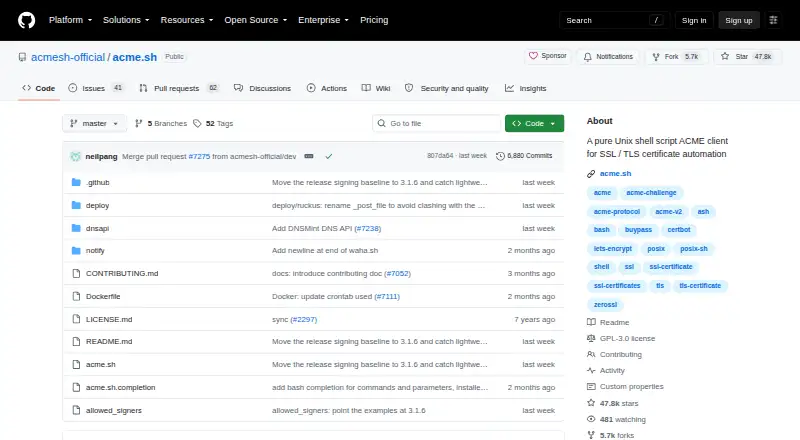
What acme.sh is
acme.sh is a free Unix shell script ACME client for automating SSL/TLS certificate work. It can issue, renew, and install certificates, and its installer creates a daily cron job to check for renewals. Written purely in shell, it is compatible with Bash, dash, and sh. Certificate options include ECDSA, RSA, SAN, and wildcard types. Validation methods include webroot, standalone, standalone TLS-ALPN, Apache, Nginx, DNS, DNS alias, stateless, and DNS persist. ZeroSSL is the default certificate authority; listed alternatives include Let's Encrypt, SSL.com, Google Public CA, Actalis, Pebble strict mode, and any RFC8555-compliant CA. The project says it offers API integrations for most DNS providers. Automatic renewal uses a CA's ACME Renewal Information when available, with a 30-day fallback otherwise. Manual DNS mode cannot renew automatically because a new TXT record must be added each time. General use does not require Python, root, or sudo access. The project is GPLv3-licensed and officially maintained by ZeroSSL.
Good
- Automates certificate issue, installation, and renewal checks.
- Supports ECDSA, RSA, SAN, and wildcard certificates.
- Works with multiple listed certificate authorities.
- General use does not require Python, root, or sudo.
- Supports many validation methods and DNS API integrations.
Watch out
- Manual DNS mode cannot renew automatically.
- Windows support is listed through Cygwin.
- Release tags through version 3.1.5 are unsigned.
Who it suits
acme.sh suits users who want a shell-based way to issue and renew certificates across listed Unix-like and Windows environments. It may fit administrators who can use automated validation methods or manage manual DNS updates themselves.
Verdict
acme.sh offers certificate automation through a shell script, with varied certificate types, validation methods, and certificate authorities. Avoid manual DNS mode if automatic renewal is required, since each renewal needs a new TXT record.
Plans and prices
From acme.sh's own pricing page, checked 7 Oct 2026.
| Plan | Price | What it gives you |
|---|---|---|
| acme.sh | Free | GPLv3 · shell script ACME client |
The facts
Each one read from acme.sh's own pages, with the date it was checked.
What it does
- Certificate authorities
- The README lists ZeroSSL as the default CA and also lists Let's Encrypt, SSL.com, Google Public CA, Actalis, Pebble strict mode, and any RFC8555-compliant CA as supported.checked 7 Oct 2026
- Certificate handling
- It can issue, renew, and install certificates automatically, with a daily cron job created by the installer to check and renew certificates when needed.checked 7 Oct 2026
- Certificate types
- It supports ECDSA, RSA, SAN, and wildcard certificates.checked 7 Oct 2026
- DNS integrations
- The project says it supports most DNS providers through API integrations and links to its DNS API list.checked 7 Oct 2026
- Implementation
- The client is written purely in Unix shell and is compatible with Bash, dash, and sh.checked 7 Oct 2026
- License and maintenance
- The repository is licensed under GPLv3 and says it is officially maintained by ZeroSSL, with donations going to original independent maintainer Neil Pang.checked 7 Oct 2026
- Manual DNS limit
- DNS manual mode cannot renew automatically because a new TXT record must be added manually for each renewal.checked 7 Oct 2026
- Operating systems
- The project lists tested systems including macOS, Windows through Cygwin, FreeBSD, and multiple Linux distributions.checked 7 Oct 2026
- Purpose
- acme.sh is a Unix shell script ACME client for SSL/TLS certificate automation.checked 7 Oct 2026
- Renewal behavior
- Certificates are renewed automatically, using a CA's ACME Renewal Information when available and a 30-day fallback rule otherwise.checked 7 Oct 2026
- Runtime requirements
- The README says the client has no Python dependency and does not require root or sudo access for general use.checked 7 Oct 2026
- Security
- Release tags from version 3.1.6 onward are signed with the maintainer's SSH key, while tags through 3.1.5 are unsigned.checked 7 Oct 2026
- Support
- The README directs users to the project's GitHub Issues and Pull Requests for discussion and contributions.checked 7 Oct 2026
- Validation modes
- Supported modes include webroot, standalone, standalone TLS-ALPN, Apache, Nginx, DNS, DNS alias, stateless, and DNS persist.checked 7 Oct 2026
The full review of acme.sh
acme.sh is a Unix shell client that automates SSL/TLS certificate work. It suits administrators comfortable with command-line tools who want to manage certificates across varied server and DNS setups. Its broad ACME support is compelling, provided DNS validation can be automated where hands-off renewal matters.
Overview
acme.sh issues, renews, and installs certificates, with an installer-created daily cron job checking when renewals are due. Written purely in shell and compatible with Bash, dash, and sh, it needs no Python dependency and does not require root or sudo for general use. That makes it a practical fit for lightweight or constrained environments where a scriptable client is preferable to a larger management service.
Supported certificate types include RSA, ECDSA, SAN, and wildcard certificates. ZeroSSL is the default certificate authority; the client also supports Let's Encrypt, SSL.com, Google Public CA, Actalis, Pebble strict mode, and any RFC8555-compliant CA. This flexibility helps when a deployment calls for a particular CA, though users should account for the default when configuring their setup.
Key features
Validation choices
Validation methods include webroot, standalone, standalone TLS-ALPN, Apache, Nginx, DNS, DNS alias, stateless, and DNS persist. That breadth lets administrators choose an approach suited to their server and domain configuration rather than forcing one validation path. DNS integrations cover most providers through API integrations, a useful route to automating DNS challenges.
Renewal and deployment
Automatic renewal uses a CA's ACME Renewal Information when available and otherwise follows a 30-day fallback rule. Deployment automation is also supported, so certificate handling can extend beyond issuance and renewal. Manual DNS mode is the important exception: each renewal requires a new TXT record to be added by hand, making it a poor fit for unattended operation.
Maintenance and security
The project is officially maintained by ZeroSSL, while donations go to original independent maintainer Neil Pang. Release tags from version 3.1.6 onward are signed with the maintainer's SSH key; tags through 3.1.5 are unsigned. The repository uses GPLv3, and GitHub Issues and Pull Requests are the project's channels for discussion and contributions.
Pricing
acme.sh is free: its sole listed plan costs nothing and is a GPLv3 shell-script ACME client. There is no free trial because the free plan is the product's offering. The plan includes automatic renewal, deployment automation, revocation workflows, and CA integrations, making it a strong option for individuals and administrators who can operate a shell-based tool and do not need a paid service tier.
Platforms
The listed platforms are Linux, macOS, self-hosted environments, and Windows. The project names tested systems including macOS, Windows through Cygwin, FreeBSD, and multiple Linux distributions. Compatibility with Bash, dash, and sh adds flexibility across shell environments, though Windows support is specifically associated with Cygwin.
Who it's for
acme.sh is best for technically capable users managing certificates on their own servers, especially those who want to select among several certificate authorities and validation methods. Its low runtime requirements and automatic renewal suit routine certificate upkeep without a Python dependency or general need for elevated privileges. It is less suitable for users who want manual DNS validation to renew without intervention, or who prefer not to manage a command-line client.
Pros and cons
- Pros: Free under GPLv3, with no paid tier needed for the listed certificate automation capabilities.
- Pros: Supports several certificate types, a wide range of validation modes, and multiple CAs, giving administrators room to fit different environments.
- Pros: Daily renewal checks, automatic renewal, and deployment automation reduce recurring certificate administration when validation is configured for automation.
- Cons: Manual DNS validation needs a newly added TXT record at every renewal, so it cannot support fully unattended renewal.
- Cons: Its shell-script approach is aimed at users comfortable managing command-line tools, not those seeking a managed interface.
Alternatives
For a different certificate management option, see Certificate Management Software. Certbot is another free, open-source choice for readers comparing certificate clients. Choose lego when a free, independent project with no paid plans stated is a better fit. Let's Encrypt is a free option for readers seeking certificates from that certificate authority. Certify The Web offers a free evaluation with no feature limitations and no time limit, plus a cloud-managed license plan. GeoTrust pairs AutoInstall SSL with SSL certificates and offers SSL Monitor at $2 a month per standard domain, with volume pricing of $1.80/m. Qualys External Attack Surface Management offers a 30-day no-cost plan for CyberSecurity Asset Management with EASM. EJBCA Community Edition provides basic PKI functionality for learning, testing, and prototyping, and is not intended for production. OpenXPKI Community Edition is a free, fully functional code base with Debian packages, example configuration, documentation, and mailing-list support.
Verdict
Choose acme.sh if you want a free, shell-based certificate client with wide validation and CA support and can configure renewals around your environment. Its strongest reason to choose it is the combination of broad automation and minimal runtime requirements. Look elsewhere if manual DNS validation is central to your setup and you need renewals to happen without human intervention.
Getting started
- Open the acme.sh project website on GitHub.
- Choose a listed environment: Linux, macOS, self-hosted, or Windows.
- Choose a supported certificate authority and validation mode.
- Use the installer to set up the client and its daily renewal check.
Limits worth knowing
Manual DNS mode cannot renew automatically because a new TXT record must be added for each renewal. Other renewal checks use a CA’s ACME Renewal Information when available, with a 30-day fallback rule otherwise.
Questions
How much does acme.sh cost?
The listed plan is free at no cost.
Does acme.sh renew certificates automatically?
Yes. The installer creates a daily cron job to check whether renewal is needed. Manual DNS mode requires a new TXT record for each renewal and cannot renew automatically.
Which certificate authorities does it support?
ZeroSSL is the default. Listed alternatives include Let’s Encrypt, SSL.com, Google Public CA, Actalis, Pebble strict mode, and any RFC8555-compliant CA.
Which platforms are listed?
The listed platforms are Linux, macOS, self-hosted, and Windows. Tested systems include Windows through Cygwin and multiple Linux distributions.
What license does acme.sh use?
The project is licensed under GPLv3.
Alternatives to acme.sh
- 1

EJBCA
Free planOpen sourceWebAPILinuxmacOS8.2From £62,065 a year - 2

Certify The Web
Free planWebAPILinuxmacOS7.7From $59 a year - 3

KeyTalk CKMS
AndroidiOSWebAPI7.7From €5 a month - 4
Let's Encrypt
Free planOpen sourceWebAPILinuxmacOS7.6Free plan - 5

ManageEngine Key Manager Plus
Free planWebAPILinuxSelf-hosted7.6From $475 a year - 6

GeoTrust
Free planWebAPILinuxWindows6.9From $2 a month