Capme
Capme helps teams replace recurring status meetings with recorded video updates organized around an agenda.
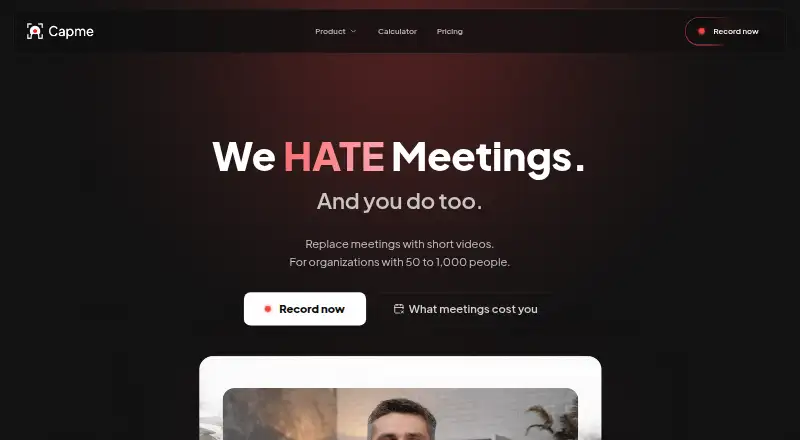
What Capme is
Capme helps teams replace recurring status meetings with recorded video updates organized around an agenda. Teams assign an owner and deadline to each topic, contributors record their parts, and viewers watch the agenda asynchronously. Its browser recorder can capture a webcam, a screen, or both, and includes branding tools, a video trimmer, and a teleprompter. Video quality goes up to 1080p, with MP4 and WebM exports. Capme says recordings are processed locally in the browser and do not touch its servers. The free recorder saves videos locally; organization workspaces offer EU hosting, and the homepage says Business and Enterprise can write directly to customer S3 storage. Organization analytics track recording volume, recording modes, and adoption of features such as branding and the teleprompter. The service supports Linux, macOS, Windows, and the web. Free is limited to one user and three downloads per month. Pilot costs €199 per month and has a three-month maximum; Flat costs €749 per month with a 12-month commitment.
Good
- Agenda topics have owners and deadlines.
- Recorder supports webcam, screen, or combined capture.
- Includes a trimmer, branding tools, and teleprompter.
- Exports MP4 and WebM video.
- Organization workspaces offer EU hosting.
Watch out
- Free plan allows three downloads per month.
- Free plan is limited to one user.
- Pilot costs €199 per month and lasts at most three months.
- Flat costs €749 per month with a 12-month commitment.
Who it suits
Capme suits teams with recurring status meetings that want to share updates asynchronously. It may also suit companies that need to specify where video is stored.
Verdict
Capme structures recorded updates around agenda topics and offers tools for recording and organization analytics. Check the plan limits and storage options against your team’s requirements.
Plans and prices
From Capme's own pricing page, checked 4 Oct 2026.
| Plan | Price | What it gives you |
|---|---|---|
| Free | Free | 1 user · 3 downloads/month · no admin features · limited features |
| Pilot | €199 a month | Up to 10 members · unlimited downloads · 10 videos · branding controls · studio analytics · 10 teleprompter templates · video trimming · €199/month; cancellable monthly, max. 3 months |
| Flat | €749 a month | Up to 1,000 employees · domain whitelist · public access token · multiple admins · standard support (≤1 business day) · €749/month; annual contract, 12-month commitment |
| Enterprise | Priced on request | 1,000+ employees · scalability and compliance review · custom onboarding · dedicated account manager · individual SLA · Custom contract |
The facts
Each one read from Capme's own pages, with the date it was checked.
What it does
- Access controls
- The organization platform supports company-domain whitelisting for automatic workspace access and multiple administrators.checked 4 Oct 2026
- Analytics
- The organization analytics dashboard tracks recording volume, recording modes, and adoption of features such as teleprompter and branding.checked 4 Oct 2026
- Integrations
- The download page says the Progressive Web App can be deployed through Google Workspace or Microsoft Intune; the security page describes saving recordings to local storage that may sync through OneDrive or SharePoint.checked 4 Oct 2026
- Intended users
- The homepage describes Capme as intended for teams with recurring status meetings and companies that need to specify where video is stored.checked 4 Oct 2026
- Meeting workflow
- Teams create an agenda with an owner and deadline for each topic, contributors record their parts, and viewers watch the agenda asynchronously.checked 4 Oct 2026
- Notable limits
- Pilot is limited to 10 members and a maximum of three months, while the Flat plan is described for up to 1,000 employees and has a 12-month commitment.checked 4 Oct 2026
- Purpose
- Capme lets teams replace recurring status meetings with short, recorded video updates organized as an agenda.checked 4 Oct 2026
- Recording modes
- The browser recorder supports webcam, screen, or combined webcam and screen recording.checked 4 Oct 2026
- Security and compliance
- Capme states that its videos stay on the device and describes the service as GDPR compliant and HIPAA-suitable; its trust center lists a CAIQ-Lite self-assessment updated August 2026.checked 4 Oct 2026
- Storage
- The free recorder saves videos locally; organization workspaces offer EU hosting, and the homepage says Business and Enterprise can write directly to the customer’s S3 storage.checked 4 Oct 2026
- Studio tools
- The recorder includes branding tools, a built-in video trimmer, and a teleprompter.checked 4 Oct 2026
- Support
- Free users have documentation access, Pilot includes email support, Flat includes support with a response time of no more than one business day, and Enterprise support is individually defined.checked 4 Oct 2026
- Video privacy
- The security page says recordings are processed locally in the browser and never touch Capme’s servers.checked 4 Oct 2026
The company
- Company
- The imprint names Capme Digital GmbH and gives its address as Kasernenstraße 67, Düsseldorf, Germany.checked 4 Oct 2026
- Headquarters
- Düsseldorf, Germanychecked 28 Sep 2026
The full review of Capme
Capme is an agenda-driven video-update workspace for teams replacing recurring status meetings. It fits organizations whose contributors need to record separately and whose storage requirements are specific. The workflow is focused and practical, but serious team use requires a paid plan with meaningful limits and commitments.
Overview
Teams create an agenda, assign an owner and deadline to every topic, and let contributors record their sections for asynchronous viewing. This makes Capme more suitable for recurring project or operational updates than for general video publishing: each recording remains tied to the meeting structure. Browser recording supports webcam, screen, or both, with exports in MP4 or WebM and a maximum of 1080p. That covers routine business updates, while the lack of viewer analytics means managers cannot measure who watched.
Key features
The browser studio combines branding controls, a built-in trimmer, and a teleprompter. Branding and trimming are useful when updates need a consistent presentation without a separate editor; teleprompter templates help contributors stay concise and on message. Organization analytics report recording volume, recording modes, and adoption of features such as branding and teleprompter. They describe production activity rather than audience engagement.
Storage is a notable differentiator. The free recorder saves videos locally, organization workspaces provide EU hosting, and Business and Enterprise can write directly to a customer’s S3 storage. Capme says recordings are processed locally in the browser and never touch its servers. Its security materials describe the service as GDPR compliant and HIPAA-suitable, while the trust center lists a CAIQ-Lite self-assessment updated August 2026. The Progressive Web App can be deployed through Google Workspace or Microsoft Intune, and local files may sync through OneDrive or SharePoint.
Company-domain whitelisting can grant automatic workspace access, and multiple administrators support larger rollouts. These controls matter to organizations standardizing access, but the 1080p ceiling and absence of viewer analytics limit Capme for presentation-heavy or measurement-focused programs.
Pricing
The Free plan costs nothing user and permits one user, three downloads per month, no admin features, and limited features. It is useful for evaluating the recording workflow or making occasional personal updates, not for running a team agenda.
Pilot costs €199 a month, billed at €199/month, cancellable monthly, with a maximum term of three months. It supports up to 10 members, unlimited downloads, 10 videos, branding controls, studio analytics, 10 teleprompter templates, and video trimming. This is the sensible short trial for a small team, but the 10-video allowance and 10-member ceiling make it a pilot rather than a durable departmental plan. Pilot includes email support.
Flat costs €749 a month, billed at €749/month, on a 12-month commitment. It supports up to 1,000 employees and adds domain whitelisting, a public access token, multiple administrators, and standard support with a response time of no more than one business day. The scale and access controls suit a broad company rollout, while the annual commitment makes it a poor fit for teams still proving adoption.
Enterprise uses a custom contract for organizations with 1,000 or more employees. It includes scalability and compliance review, custom onboarding, a dedicated account manager, and an individual SLA. Support is individually defined. Buyers needing those arrangements must accept custom pricing rather than a published rate.
Platforms
Capme supports Linux, macOS, Windows, and the web. Its PWA deployment options also suit organizations managing software through Google Workspace or Microsoft Intune.
Who it's for
Capme is best for distributed teams with recurring status meetings, agenda owners, and contributors who need asynchronous recording. It is especially relevant to companies that must keep video locally, in EU hosting, or in their own S3 environment. It is less appropriate for audiences requiring viewer-level engagement reporting, higher-than-1080p output, or a generous free team tier.
Pros and cons
Pros
- Agenda ownership and deadlines give recurring updates a clear operating structure.
- Webcam, screen, and combined recording cover common status-reporting formats.
- Branding, trimming, and teleprompter tools improve consistency without leaving the browser.
- Local processing, EU hosting, and customer S3 options address distinct storage requirements.
- Domain whitelisting and multiple administrators support controlled company deployment.
Cons
- The free plan is restricted to one user, three downloads per month, and no admin features.
- Pilot is capped at 10 members, 10 videos, and three months.
- Flat requires a 12-month commitment at €749 per month.
- There is no viewer analytics, so watch behavior is not measured.
- 1080p is the maximum video quality.
Alternatives
Presentation Recording Software is the broader category for readers comparing presentation-focused tools. Google Drive is a better fit when general file storage and sharing matter more than an agenda-based recording workflow; its free Google Account storage includes 15 GB. Choose Slideator for presentation files and slide-linked video across desktop and mobile platforms, with a free tier limited to 3 MB files, 12 slides, three presentation files, and three videos per day. HeyGen suits short, avatar-oriented video creation, with its free plan allowing three videos per month up to one minute. Knovio is an alternative for presentation recording with student-priced plans. Explain Everything is aimed at collaborative whiteboard-style projects, with its free plan limited to three projects and 500 MB cloud storage. Flonnect Presentation Recorder suits browser and desktop capture with a free lifetime allowance of 20 videos and 1 GB storage. VIDAREO offers a free tier of five two-minute recordings per month at 720p with a watermark. Visme is a design-led presentation option with a free 500 MB plan.
Verdict
Choose Capme if your team needs recurring updates organized by agenda and must control where recordings are stored. Its strongest case is the combination of asynchronous workflow, browser studio tools, and storage choices. Look elsewhere if you need generous free collaboration, viewer engagement data, higher resolution, or a plan without a substantial annual commitment.
Alternatives to Capme
- 1

Visme
Free planAndroidiOSWebAPI8.4From $12.25 a month - 2

HeyGen
Free planAndroidiOSWebAPI8.3From $24 a month - 3
Explain Everything
Free planAndroidiOSWebmacOS8.2Free plan - 4

Fliki
Free planAndroidiOSWebAPI8.2From $28 a month - 5

Flonnect Presentation Recorder
Free planWebExtensionmacOSWindows7.8From $12 a month - 6

Knovio
Free planAndroidiOSWeb7.4Free plan