
Canarytokens
Canarytokens are decoy tokens placed in networks, computers, and cloud environments to alert users when someone accesses them.
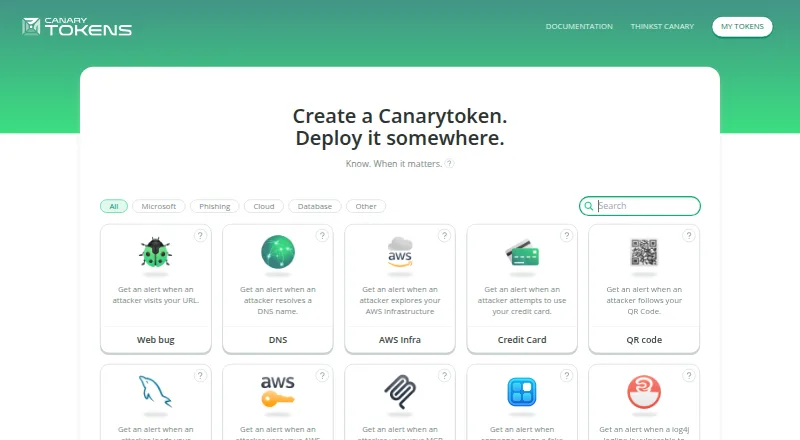
What Canarytokens is
Canarytokens are decoy tokens placed in networks, computers, and cloud environments to alert users when someone accesses them. The hosted service lets users create tokens without installing software; an email address can be supplied to receive an alert when a token is triggered. Some token types also accept a webhook address for notifications. Documented examples include HTTP, DNS, Windows directory, AWS API key, Kubernetes configuration, and WireGuard tokens. The Fake App token is a Progressive Web App that alerts when opened and can include device location if location access is allowed. It supports Safari and Google Chrome. The Sensitive Command token monitors a specified command running on Windows and requires importing its registry file with admin permissions. Microsoft Entra ID and Okta setup instructions are included for the Fake IdP SAML App token. The hosted service is free, and the maker also publishes the server as open-source software and recommends Docker for self-hosting.
Good
- Create hosted tokens without installing software
- Email alerts when a token is triggered
- Documented decoys cover several environments and token types
- Some tokens support webhook alerts
- Open-source server can be self-hosted with Docker
Watch out
- Fake App supports only Safari and Google Chrome
- Sensitive Command requires Windows admin permissions
- New Slack API Tokens can no longer be created
Who it suits
Canarytokens suits people who want alerts when decoys in their network, devices, or cloud environments are accessed. It offers a hosted setup as well as a self-hosted server option.
Verdict
Canarytokens offers free decoys for triggering alerts, with a range of documented token types and hosted or self-hosted deployment. Check the browser and Windows requirements for the specific tokens you plan to use.
Plans and prices
From Canarytokens's own pricing page, checked 28 Sep 2026.
| Plan | Price | What it gives you |
|---|---|---|
| Canarytokens hosted service | Free | Tokens deployed through canarytokens.org are free |
The facts
Each one read from Canarytokens's own pages, with the date it was checked.
What it does
- Alerts
- Users can provide an email address when creating a token and receive an email when it is triggered.checked 28 Sep 2026
- Identity integrations
- The Fake IdP SAML App token includes setup instructions for Microsoft Entra ID and Okta.checked 28 Sep 2026
- Legacy token limit
- The Slack API Token is deprecated, and new ones can no longer be created; existing tokens continue to work.checked 28 Sep 2026
- Phone use
- The Fake App token is a Progressive Web App that alerts when opened and can include the device location if location access is allowed.checked 28 Sep 2026
- Purpose
- Canarytokens are decoy tokens placed in networks, computers, and cloud environments to alert when accessed.checked 28 Sep 2026
- Self-hosting
- The maker publishes the Canarytokens server as open-source software and recommends installing it with Docker.checked 28 Sep 2026
- Setup
- The hosted service lets users create tokens without installing software.checked 28 Sep 2026
- Token types
- Documented examples include HTTP, DNS, Windows directory, AWS API key, Kubernetes configuration, and WireGuard tokens.checked 28 Sep 2026
- Webhook alerts
- Some tokens, including Kubeconfig and Sensitive Command, accept a webhook address for alerts.checked 28 Sep 2026
Where it runs
- Browser support limit
- The Fake App token currently supports Safari and Google Chrome.checked 28 Sep 2026
- Windows monitoring
- The Sensitive Command token monitors execution of a specified command on Windows and requires importing its registry file with admin permissions.checked 28 Sep 2026
The company
- Headquarters
- Cape Town, South Africachecked 28 Sep 2026
The full review of Canarytokens
Overview
Canarytokens are decoys you place in networks, computers, or cloud environments to surface unexpected access. Rather than blocking activity, a token is meant to alert you when someone interacts with it. The hosted service at canarytokens.org lets you create tokens without installing software, while the maker also publishes an open-source server for self-hosting and recommends Docker for installation.
The service has a multi-layer decoy scope, with credential lures and cloud decoys among its uses. Documented token types range from HTTP and DNS tokens to Windows directory tokens, AWS API keys, Kubernetes configurations, and WireGuard tokens. Each represents a different kind of decoy, so setup and behavior depend on the token chosen.
Canarytokens is made by an organization headquartered in Cape Town, South Africa. Browse more options in Honeypot Software.
Key features
- Email alerts: You can add an email address when creating a token and receive an email if it is triggered.
- Webhook alerts: Some token types, including Kubeconfig and Sensitive Command, accept a webhook address for notifications.
- Identity decoy: The Fake IdP SAML App token includes setup instructions for Microsoft Entra ID and Okta.
- Phone-oriented decoy: Fake App is a Progressive Web App that alerts when opened. It can include the device location if location access is allowed. It currently supports Safari and Google Chrome.
- Windows command monitoring: Sensitive Command monitors execution of a specified command on Windows. It requires importing its registry file with administrator permissions.
- Self-hosting: The open-source server can be installed separately, with Docker recommended by the maker.
- Legacy Slack token: New Slack API Token instances can no longer be created because the token is deprecated, though existing ones continue to work.
Pricing
Canarytokens is free. The hosted service plan is listed at free, and tokens deployed through canarytokens.org are free. There is no free trial listed; the service has a free plan.
Platforms
Listed platforms are Android, iOS, self-hosted, web, and Windows. These labels do not mean every token works in every environment: for example, Fake App currently supports Safari and Chrome, while Sensitive Command is specifically for Windows and requires an administrator-level registry import.
Who it's for
Canarytokens may suit people who want to make access to selected files, credentials, endpoints, or cloud configuration decoys visible. It can be used through the hosted service without installing software, or self-hosted when an independently deployed server is preferred. The different token types make it possible to choose decoys suited to particular environments, but users should check each token's setup requirements and notification options.
Pros and cons
Pros
- The hosted service is free and does not require software installation to create tokens.
- Email alerts are available, with webhook notifications supported by some token types.
- Documented examples cover several environments, including cloud credentials, Windows, Kubernetes, and network protocols.
- An open-source server is available for self-hosting.
Cons
- Token capabilities and setup requirements vary; Sensitive Command requires an administrator-permission registry import.
- Fake App has limited browser support, currently Safari and Google Chrome, and location information depends on permission being granted.
- The deprecated Slack API Token cannot be created anew.
Alternatives
Other options in this category include OpenCanary, Beelzebub, Cowrie, Heralding, DentiGrid, Thinkst Canary, T-Pot, and Conpot.
Verdict
Canarytokens is a free decoy-token service with both hosted and self-hosted deployment paths. Its documented token range and email alerts give users several ways to make unexpected access observable, while webhook support applies only to some tokens. The main considerations are choosing token types that fit the intended environment and accounting for their specific requirements, such as browser compatibility, location permission, or Windows administrator access.
Getting started
- Go to canarytokens.org to use the hosted service.
- Create a token for the environment or use case, such as HTTP, DNS, or a Windows directory.
- Enter an email address to receive a notification when the token is triggered.
- Provide a webhook address for alert delivery when using a token type that accepts one.
- For self-hosting, install the open-source Canarytokens server; Docker is the maker's recommended route.
Limits worth knowing
The Fake App token currently works with Safari and Google Chrome. Sensitive Command requires importing its registry file with administrator permissions on Windows; new Slack API Tokens cannot be created.
Questions
Is Canarytokens free?
Yes. Tokens deployed through canarytokens.org are free at no cost.
Do I need to install software to create tokens?
No. The hosted service lets you create tokens without installing software.
How can I receive an alert?
You can provide an email address when creating a token. Some token types, including Kubeconfig and Sensitive Command, also accept a webhook address.
Can Canarytokens be self-hosted?
Yes. The maker publishes the server as open-source software and recommends installing it with Docker.
Which browsers support the Fake App token?
It currently supports Safari and Google Chrome. If location access is allowed, the token can include the device location in its alert.
Can I create a Slack API Token?
No. That token type is deprecated and new ones cannot be created, though existing tokens continue to work.
Alternatives to Canarytokens
- 1
OpenCanary
Free planLinuxmacOSSelf-hosted6.5Free plan - 2
Honeytrap
Free planLinuxSelf-hosted6.2Free plan - 3
KFSensor
Windows6.2From $120 a year - 4

Thinkst Canary
WebAPILinuxmacOS6.2From $7,500 a year - 5
Honeyd
Free planLinuxSelf-hostedWindows6.0Free plan - 6
MedPot
Free planLinuxSelf-hosted6.0Free plan