
BoardKite
BoardKite brings agendas, board packs, minutes, decisions, and follow-up into a browser-based workspace for boards, with a focus on nonprofits and organizati…
What BoardKite is
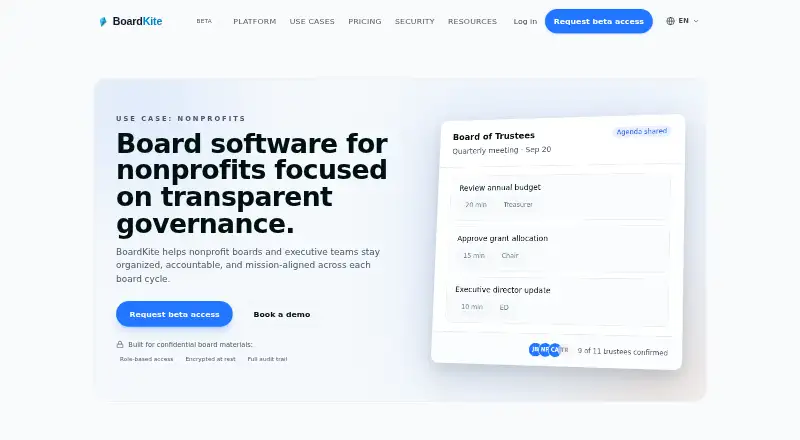
BoardKite brings agendas, board packs, minutes, decisions, and follow-up into a browser-based workspace for boards, with a focus on nonprofits and organizations handling sensitive records. Teams can plan meetings, share board packs, record decisions and votes, and carry actions into the next cycle. Its AI can suggest agendas, summarize board packs, draft minutes using transcript context, and carry unresolved actions forward. Meeting transcription is optional for each meeting, and organizations can choose an AI provider or upload VTT, SRT, or plain-text transcripts. BoardKite works in a browser, including on iPad, and directors do not need to install an app. Sensitive fields are encrypted at rest with an organization-specific key, and traffic is encrypted in transit using TLS. The free tier is listed for three users; Core costs €39 a month for up to 10 members. Storage is allocated per organization, files are limited to 250 MB each, and new uploads are blocked when an organization reaches its storage quota.
Good
- Combines agendas, minutes, decisions, and action tracking.
- AI can summarize packs and draft minutes.
- Transcription is opt-in per meeting.
- Sensitive fields are encrypted at rest.
- Directors can use it in a browser without installation.
Watch out
- Free tier is limited to three users.
- Files are limited to 250 MB each.
- Uploads stop when the organization reaches its storage quota.
Who it suits
BoardKite suits nonprofit boards, trustees, and volunteers who need a shared place for meeting records and follow-up. It may also fit organizations that handle sensitive records and want browser access without director installations.
Verdict
BoardKite covers board meeting preparation, records, voting, and follow-up, with configurable AI and transcription. Its organization-based storage limits and blocked uploads at quota are important to consider.
Plans and prices
From BoardKite's own pricing page, checked 20 Sep 2026.
| Plan | Price | What it gives you |
|---|---|---|
| Free | Free | 3 users |
| Core | €39 a month | Up to 10 members · Basic search · Meetings, AI agenda planning, minutes, decisions, action tracking, OKRs · per month |
| Pro | €99 a month | 25 members · Global search · Slack/email alert integrations · Audit log · per month |
| Enterprise | €299 a month | Unlimited members · Advanced permissions · Signature workflows · API access · SSO · Priority support · Data room listed as future feature · per month |
| Free tier | Free | Basics for 3 users · Free testing access currently maps to BETA subscription mode in-app |
The facts
Each one read from BoardKite's own pages, with the date it was checked.
What it does
- AI and transcription controls
- Organizations can configure their AI provider, and meeting transcription is opt-in per meeting; manual VTT, SRT, or plain-text transcript uploads are also supported.checked 29 Sep 2026
- AI features
- BoardKite AI suggests agendas, summarizes board packs, drafts minutes from transcript context, and carries unresolved actions forward.checked 29 Sep 2026
- Availability
- The pricing page offers beta access and describes free testing access as the BETA subscription mode in-app.checked 29 Sep 2026
- Calendar limits
- Google Calendar is optional and organization-scoped; the connection is used for events and Google Meet links scheduled in BoardKite, and does not access Gmail or Drive.checked 29 Sep 2026
- Compliance support
- BoardKite says it can provide a SOC 2 report, DPA, penetration-test summaries, and subprocessor list within one business day after a security request.checked 29 Sep 2026
- Integrations
- The site names Google Meet, Zoom, Webex, Microsoft Teams, Google Calendar, Anthropic, Ollama, OpenAI, Azure OpenAI, vLLM, and Recall.ai; it also lists Slack/email alerts in Pro and Enterprise pricing.checked 29 Sep 2026
- Meeting workflow
- It supports planning meetings and agendas, sharing board packs, capturing decisions and votes, and carrying actions into the next cycle.checked 29 Sep 2026
- Nonprofit audience
- The product is presented for nonprofits, including trustees, volunteers, and organizations handling sensitive records.checked 29 Sep 2026
- Notable limits
- Storage is measured per organization, the maximum upload size is 250 MB per file, and new uploads are blocked when the storage quota is reached.checked 29 Sep 2026
- Purpose
- BoardKite brings agendas, board packs, minutes, decisions, and follow-up into one secure workspace for boards.checked 29 Sep 2026
- Security
- Sensitive fields are encrypted at rest with a per-organization key, and all traffic is encrypted in transit using TLS.checked 29 Sep 2026
Where it runs
- Browser access
- BoardKite runs in the browser, works well on iPad, and sends secure links by email; its site says directors do not need to install anything.checked 29 Sep 2026
Money
- Free plan
- Yeschecked 20 Sep 2026
The full review of BoardKite
Overview
BoardKite is a browser-based workspace for nonprofit boards, connecting meeting preparation, records, votes, and follow-up. It is strongest for organizations coordinating trustees and volunteers around sensitive material. The joined-up meeting cycle is compelling, but organization-wide storage limits and member caps matter as a board grows.
Key features
Boards can plan agendas, share board packs, record minutes and decisions, run votes, and carry actions into the next meeting cycle. That makes it a practical fit for boards that want decisions and assigned work to remain connected to the meeting record; OKRs and committee management broaden its scope beyond minutes alone.
BoardKite AI can suggest agendas, summarize board packs, draft minutes from transcript context, and carry unresolved actions forward. Organizations can configure the AI provider, while transcription is opt-in for each meeting. Manual VTT, SRT, or plain-text transcript uploads give boards another option when they already have a transcript.
Google Calendar is optional and organization-scoped. It supports events and Google Meet links scheduled in BoardKite, without accessing Gmail or Drive. Other named integrations include Google Meet, Zoom, Webex, Microsoft Teams, Anthropic, Ollama, OpenAI, Azure OpenAI, vLLM, and Recall.ai; Slack and email alerts are reserved for Pro and Enterprise.
Sensitive fields are encrypted at rest with a per-organization key, and traffic is encrypted in transit using TLS. BoardKite can provide a SOC 2 report, DPA, penetration-test summaries, and subprocessor list within one business day after a security request. Storage is measured across the organization, uploads are capped at 250 MB per file, and new uploads stop when the quota is reached. That last restriction can interrupt routine board-pack work if an organization does not manage its storage.
Pricing
BoardKite has a free tier and monthly paid plans. The free tier costs nothing and covers basics for 3 users. Free testing access currently maps to BETA subscription mode in-app, so it is best treated as a small-board starting point rather than a substitute for a larger paid workspace.
Core costs €39 a month, billed monthly, for up to 10 members. It includes basic search, meetings, AI agenda planning, minutes, decisions, action tracking, and OKRs. This is the natural choice for a small board needing the core meeting workflow; it does not include the global search, audit log, or Slack/email alerts offered higher up.
Pro costs €99 a month, billed monthly, and supports 25 members. Global search, Slack/email alert integrations, and an audit log make it better suited to organizations with broader coordination or audit needs. Enterprise costs €299 a month, billed monthly, with unlimited members, advanced permissions, signature workflows, API access, SSO, and priority support. Its data room is described as a future feature, not a current inclusion. A free trial is offered, and the listed BoardKite member limit is 10; organizations considering a larger group should confirm how that limit applies to their selected plan.
Platforms
BoardKite runs in a web browser and works well on iPad. Directors can open secure links sent by email without installing an app, a useful option for volunteer boards that do not want software setup to become a participation hurdle.
Who it's for
BoardKite is aimed at nonprofits, trustees, and volunteers who need one place for agendas, board packs, minutes, votes, and follow-up. Its configurable AI and opt-in transcription suit organizations that want assistance while retaining control over provider choice and meeting-level transcription. It is less suitable for organizations that routinely handle large uploads or need a generous storage buffer, since reaching the organization quota blocks further uploads.
Pros and cons
- Pros: The meeting workflow connects agendas, decisions, votes, and actions, helping boards carry work forward rather than leaving it scattered across separate meeting records.
- Pros: Configurable AI providers, per-meeting transcription choice, and manual transcript uploads give organizations several ways to govern AI-assisted minutes.
- Pros: Browser access and secure emailed links avoid requiring directors to install software.
- Cons: The free tier is limited to 3 users, and Core supports up to 10 members, which may force growing boards onto a higher plan.
- Cons: Storage is organization-wide and uploads are blocked at quota, making capacity management operationally important.
- Cons: Slack and email alerts, global search, and audit log require Pro, while signature workflows and SSO require Enterprise.
Alternatives
For a wider comparison, see Nonprofit Board Management Software and Meeting Notes Software.
BoardSite is worth comparing if directors need Android or iOS access alongside web; its free plan supports up to 5 users, 10 documents, and one vote per month. Board I.V. may suit buyers who value a product built by someone with long experience inside nonprofit boardrooms. Board Management offers a lifetime-free account for up to 3 members and supports macOS, Windows, and web.
NonprofitBOD is an alternative for a small nonprofit seeking a free, web-based board setup: its free plan supports one board and up to 5 members, with meetings, agendas, minutes, a compliance calendar, task queue, and document library. Board Manager is another web option with a free Starter plan for up to 25 board members and candidates, plus 500 emails per month; it does not offer a free trial. BoardSpot is a paid alternative for organizations prioritizing unlimited document storage, unlimited committees, and no added per-user cost on Essentials, with apps across Android, iOS, macOS, web, and Windows.
Hippoly may be a better fit for nonprofits seeking a €€42 a month workspace plan with unlimited users, one workspace, and 1 GB storage, as well as Android and iOS access. BoardEffect is a paid alternative with Android, iOS, API, and web support.
Verdict
Choose BoardKite if your nonprofit wants a browser-based home for the full board-meeting cycle, with configurable AI and controls over transcription. Its connected records and follow-up are the main reason to choose it. Look elsewhere if organization-wide storage limits are a poor fit, or if your board needs more than 10 members without stepping up to a higher plan.
Alternatives to BoardKite
- 1

Board I.V.
Free planAndroidiOSWeb7.9From $390 a year - 2

Boardable
AndroidiOSWebLinux7.8From $20.99 a month - 3
Board Management
Free planWebmacOSWindows7.7From $49 a month - 4

BoardSite
Free planAndroidiOSWeb7.3From $79 a month - 5
My Board View
Free planAndroidiOSWeb7.3Free plan - 6

BoardSpot
AndroidiOSWebmacOS7.1From $1,140 a year