
Board I.V.
Board I.V. organizes nonprofit board work, including agendas, packets, minutes, motions, votes, tasks, documents, and compliance dates.
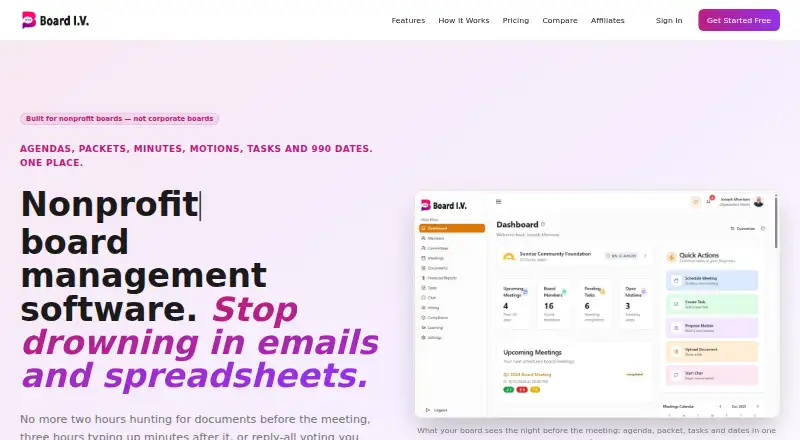
What Board I.V. is
Board I.V. organizes nonprofit board work, including agendas, packets, minutes, motions, votes, tasks, documents, and compliance dates. Agenda items can hold documents and owners, and notes can become formal minutes with motions and vote counts. Digital motions and polls keep a vote record and audit trail; passed motions can be turned into tasks with owners and due dates. Compliance tracking covers filing dates, state registrations, board terms, conflict-of-interest disclosures, and D&O renewals, with reminders. The service is designed for nonprofit boards, churches, social service agencies, schools, foundations, associations, and volunteer-run groups. Members can open agendas, packets, and tasks from an email link on a phone without installing software. Board I.V. is available on Android, iOS, and web, integrates with Zoom, and allows meeting links from other providers to be added manually. A Free plan is listed as free for 1–3 members and 500MB storage. Standard is $39 a month for up to 15 members and 10GB storage; the Professional plan is $89 a month with unlimited members and 100GB storage. A 14-day Professional trial requires no credit card and reverts to Free unless upgraded.
Good
- Motions and polls keep a digital vote record and audit trail.
- Compliance reminders cover registrations, terms, disclosures, and renewals.
- Members can access board materials by email link on a phone.
- The 14-day Professional trial requires no credit card.
Watch out
- Standard supports up to 15 members.
- The service is not intended for organizations requiring SOC 2 attestation, HIPAA BAAs, or SSO.
- Some meeting links must be added manually.
Who it suits
Board I.V. fits nonprofit and volunteer-led groups that need a shared place for meetings, votes, tasks, and compliance reminders. It also suits board members who need phone access without installing software.
Verdict
Board I.V. brings meeting administration, board decisions, and compliance reminders together for nonprofit groups. Review its security limitations and member caps against your organization’s requirements before choosing a plan.
Plans and prices
From Board I.V.'s own pricing page, checked 15 Oct 2026.
| Plan | Price | What it gives you |
|---|---|---|
| Free — Small board | Free | 1–3 members · 500MB storage · basic meetings, agendas, tasks, chat and voting · Free forever |
| Standard — Growing nonprofit | $39 a month | Up to 15 members · 10GB storage · extra seats $5/seat/month · agendas, minutes, votes, financial reports and integrations · $39/month |
| Professional — Multi-committee board | $89 a month | Unlimited members · 100GB storage · advanced voting, compliance calendar, strategic plans, branding and exports · $89/month |
| Standard — Growing nonprofit (annual) | $390 a year | Up to 15 members · 10GB storage · extra seats $5/seat/month · $390/year (2 months free) |
| Professional — Multi-committee board (annual) | $890 a year | Unlimited members · 100GB storage · advanced voting, compliance calendar, strategic plans, branding and exports · $890/year (2 months free) |
The facts
Each one read from Board I.V.'s own pages, with the date it was checked.
What it does
- Access
- Board members can access the agenda, packet and tasks from an email link; the site says it works on a phone and requires no software installation.checked 4 Oct 2026
- Access controls
- The site says only invited people can access data and roles control access to financials, evaluations and compliance records.checked 4 Oct 2026
- Agenda and minutes
- Agenda items can carry documents, owners and motions, and notes can be turned into formal minutes with motions and vote counts recorded.checked 4 Oct 2026
- Agenda builder
- Agenda templates support time estimates, presenters and one-click Board Book publication.checked 15 Oct 2026
- Analytics
- Analytics include category breakdowns, period comparisons and financial trend views.checked 15 Oct 2026
- Audience
- It is designed for nonprofit boards, churches, social service agencies, schools, foundations, associations and volunteer-run groups.checked 4 Oct 2026
- Branding
- Standard offers preset themes, while Professional adds custom colors, logos and white-label mode.checked 15 Oct 2026
- Committees
- The platform supports creating committees, appointing chairs and organizing committee members.checked 15 Oct 2026
- Compliance
- Its compliance tracking covers 990 filing dates, state registrations, board terms, conflict-of-interest disclosures and D&O renewals with reminders.checked 4 Oct 2026
- Compliance tracking
- Compliance features track Form 990 filings, state registrations, board terms, conflicts, D&O insurance, audits and evaluations.checked 15 Oct 2026
- Consultant-described benefit
- Raiser Sharp presents Board I.V. as a way to reduce nonprofit board chaos and make follow-through visible.checked 15 Oct 2026
- Consultant recommendation
- Raiser Sharp Consulting recommends Board I.V. for running meetings, organizing documents, assigning tasks and tracking decisions.checked 15 Oct 2026
- Dashboard
- The dashboard shows key metrics, upcoming meetings, financial information and quick actions.checked 15 Oct 2026
- Data handling
- The site says data is encrypted in transit and at rest, scoped to each organization, and not sold or used to train outside models.checked 15 Oct 2026
- Data protection
- The site says data is encrypted in transit and at rest, scoped to the organization, and never sold or used to train outside models.checked 4 Oct 2026
- Digital voting
- Voting supports secret ballots, quorum rules, deadlines, comments and audit trails.checked 15 Oct 2026
- Document hub
- Documents are organized in folders with access controls and sharing functions.checked 15 Oct 2026
- Financial reporting
- Financial tools support budgets, AI generation, budget-versus-actuals analysis, trends and CSV exports.checked 15 Oct 2026
- Fundraising
- Fundraising tools manage campaigns, member commitments, contributions and strategy types.checked 15 Oct 2026
- G2 listing identity
- G2’s 4.4 out of 5 from 323 reviews belongs to Board International’s enterprise planning product, not Board I.V.checked 15 Oct 2026
- Integrations
- The site lists Zoom, Microsoft Teams, Microsoft Office, Stripe, Google Drive and Dropbox integrations, with AI-agent MCP integrations on paid tiers.checked 15 Oct 2026
- Learning Center
- Organizations can share training videos, documents and external resources for member onboarding.checked 15 Oct 2026
Where it runs
- App-store listing identity
- The Apple listing found is Nasdaq Boardvantage, rated 3.4 out of 5 from 54 ratings, and is unrelated to Board I.V.checked 15 Oct 2026
- GetApp listing identity
- GetApp’s 4.5 out of 5 from 138 reviews belongs to an enterprise planning product named Board, not Board I.V.checked 15 Oct 2026
The full review of Board I.V.
Board I.V. is board-governance software for nonprofits and other volunteer-led organizations that need to keep meeting work and compliance obligations connected. It is most appealing to groups whose members rely on phone access without installing an app, though its security exclusions rule it out for some organizations.
Overview
Agendas, packets, minutes, motions, votes, tasks, documents and compliance dates share one workspace. That connected workflow is useful for organizations that want decisions and their follow-up to stay together: agenda items can include documents and owners, and meeting notes can be turned into formal minutes with motions and vote counts. Members can open agendas, packets and tasks from an email link on a phone without installing software, lowering the barrier for occasional board participants.
Board I.V. describes Zoom integration. For Google Meet, Microsoft Teams, Webex or another provider, meeting links can be added manually; that is workable, but does not offer the same stated integration. The product says data is encrypted in transit and at rest, scoped to each organization, and not sold or used to train outside models. Access is limited to invited people, with roles controlling access to financials, evaluations and compliance records. However, organizations requiring SOC 2 attestation, HIPAA BAAs or SSO should look elsewhere.
Key features
Decisions and follow-through
Motions and polls have a digital vote record and audit trail, and passed motions can become tasks with owners and dates. This makes Board I.V. a better fit for groups that need to track what a board approved and who must act next than a meeting tool focused only on agendas and minutes.
Compliance reminders
Tracking covers 990 filing dates, state registrations, board terms, conflict-of-interest disclosures and D&O renewals. Reminders for these recurring governance obligations can reduce reliance on separate calendars, particularly for volunteer-run organizations. Board I.V. says a human answers support at [email protected], a direct support route for groups that need help managing the system.
Pricing
The Free plan costs nothing (billed $0/month) and allows 1–3 members with 500MB of storage. It is a sensible starting point for a very small board, but the narrow member range and storage allowance make it a limited long-term choice as records accumulate or the group grows.
Standard costs $39 a month (billed $39/month or $390/year (2 months free)). It includes up to 15 members and 10GB of storage, with extra seats at $5/mo. This is the practical fit for a growing nonprofit within that cap; organizations with more than 15 members must either pay for added seats or consider Professional.
Professional costs $89 a month (billed $89/month or $890/year (2 months free)) and includes unlimited members and 100GB of storage. It suits multi-committee boards or larger organizations that would outgrow Standard’s member allowance. The 14-day Professional trial requires no credit card, and accounts move to Free afterward unless upgraded, so prospective customers should plan around the smaller Free limits if they do not continue.
Platforms
Board I.V. is available on Android, iOS and the web. Email-link access to agendas, packets and tasks works on a phone without a software installation, which is useful when board members do not want to install another app.
Who it's for
Its audience includes nonprofit boards, churches, social service agencies, schools, foundations, associations and volunteer-run groups. The combination of meeting records, follow-up tasks and compliance reminders is particularly relevant to organizations that need a shared governance workflow. Board I.V. is not the right choice for an organization that currently requires SOC 2 attestation, HIPAA BAAs or SSO.
Pros and cons
- Pros: Motions, vote records, audit trails and owned, dated follow-up tasks connect board decisions to action.
- Pros: Compliance reminders cover filing, registration, board-term, disclosure and insurance renewal dates.
- Pros: Members can reach meeting materials and tasks on a phone through an email link without installing software.
- Cons: The Free plan supports only 1–3 members and 500MB of storage, making it a constrained option for even modest growth.
- Cons: Standard caps at 15 members before extra seats at $5/mo, while Professional is needed for unlimited members.
- Cons: Organizations requiring SOC 2 attestation, HIPAA BAAs or SSO need another product.
- Cons: Zoom integration is described, but links for other meeting providers must be added manually.
Alternatives
For organizations comparing nonprofit board tools, see the Nonprofit Board Management Software category.
BoardSite is another freemium option for Android, iOS and web; its Free plan supports up to 5 users, 10 documents and 1 vote per month.
BoardKite is web-only, with a free tier for 3 users and a Core plan at €39 a month for up to 10 members; consider it if those limits and its listed meeting, agenda-planning, minutes, decision and action features fit your group.
NonprofitBOD offers a free web plan for one board and up to 5 members, with a governance cockpit, meetings, agendas, minutes, compliance calendar, task queue and document library; it is an option for a smaller board seeking those functions at no cost.
BoardSpot is a paid option for Android, iOS, macOS, web and Windows, with an Essentials plan at $95 a year and unlimited document storage, unlimited committees and no additional per-user cost.
Quorum has Android, iOS and web apps and a free plan; its Starter plan costs $49 a month (billed $49/month or $490/year — 2 months free) for up to 7 board members, with a launch checklist, document library and templates, board votes and deadlines.
Boardable is a paid option with Android, iOS, macOS, web and Windows support and a free trial; its Essentials plan starts at $20.99 /user/mo, billed annually at $251.88.
BoardEffect is a paid option for Android, iOS, web and API.
Nonprofit Liaison is a paid option for web, iOS and Android, with an Essential plan billed annually via ACH and unlimited board members, committees and admins.
Verdict
Choose Board I.V. if your nonprofit or volunteer-run group wants one place for meeting records, votes, assigned follow-through and compliance reminders, especially if members need phone access without installing software. Its Free tier is tightly sized and its security limitations matter: organizations that need SOC 2 attestation, HIPAA BAAs or SSO should choose another platform.
Getting started
- Visit https://boardiv.com/.
- Choose the Free plan or start the 14-day Professional trial without a credit card.
- Use the web service or access it on Android or iOS.
- Invite board members, who can open agendas, packets, and tasks from an email link.
- Add Zoom integration or manually add meeting links from another provider.
Limits worth knowing
The Free plan covers 1–3 members and 500MB of storage. Standard costs $39/month or $390/year and covers up to 15 members with 10GB of storage; extra seats cost $5/mo. The 14-day Professional trial requires no credit card, then the account switches to Free unless upgraded.
Questions
Is Board I.V. free?
Yes. Its Free plan costs $0/month and covers 1–3 members with 500MB storage.
How much do paid plans cost?
Standard costs $39/month or $390/year, and Professional costs $89/month or $890/year. Both annual prices include two months free.
Is there a free trial?
Yes. The Professional trial lasts 14 days and requires no credit card. The account switches to Free afterward unless upgraded.
Which platforms can I use?
Board I.V. is available on Android, iOS, and the web. Members can also open agendas, packets, and tasks from an email link on a phone without installing software.
Which meeting services does it connect with?
The site describes Zoom integration. Links from Google Meet, Microsoft Teams, Webex, or another provider can be added manually.
Who makes Board I.V.?
Board I.V. says it is built by Joe Morrison, who has spent 40 years inside nonprofit boardrooms.
Alternatives to Board I.V.
- 1

Boardable
AndroidiOSWebLinux7.8From $20.99 a month - 2
Board Management
Free planWebmacOSWindows7.7From $49 a month - 3

BoardSite
Free planAndroidiOSWeb7.3From $79 a month - 4
My Board View
Free planAndroidiOSWeb7.3Free plan - 5

BoardSpot
AndroidiOSWebmacOS7.1From $1,140 a year - 6

Atlas Governance
AndroidiOSWeb7.0From $17 a month