
Binary Ninja
Binary Ninja is an interactive platform for decompiling, disassembling, debugging, and analyzing binaries.
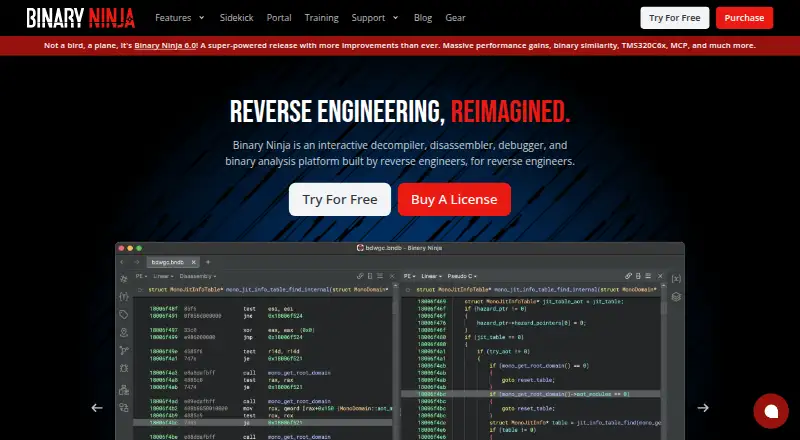
What Binary Ninja is
Binary Ninja is an interactive platform for decompiling, disassembling, debugging, and analyzing binaries. Its decompiler can produce C or BNIL for supported architectures, with users able to switch between the outputs on demand. The API has C++, Python, and Rust bindings for automating analysis workflows inside or outside the interface. Its native debugger supports local and remote debugging on Windows, macOS, and Linux. The free desktop edition is for evaluation or education and has no API or plugin access; the Free plan lists five decompilation architectures, while product details specify a four-architecture limit. Plugins can be managed in the client, but are unavailable in the Free edition. Binary Ninja Cloud runs in a browser and supports all architectures, but requires submitted binaries and has strict performance limits, with no API or plugins. The desktop platform is available for Windows, macOS, and Linux.
Good
- Decompiler outputs C or BNIL for supported architectures.
- API offers C++, Python, and Rust bindings.
- Native debugger supports local and remote debugging.
- Cloud edition runs in a browser.
Watch out
- Free desktop edition has no API or plugin access.
- Free edition architecture limit is described as four and five.
- Cloud has strict performance limits and no API or plugins.
- Personal license is for non-commercial use.
Who it suits
Binary Ninja suits people who need interactive binary analysis, decompilation, or local and remote debugging. The free desktop option is limited to evaluation or education, while commercial-use licenses are listed separately.
Verdict
Binary Ninja offers decompilation, debugging, and automation, with licensing options for personal and commercial use. Check the free-edition limits and Cloud restrictions before choosing an edition.
Plans and prices
From Binary Ninja's own pricing page, checked 14 Oct 2026.
| Plan | Price | What it gives you |
|---|---|---|
| Free | Free | evaluation and education · 5 decompilation architectures · 8 file formats · no plugins · free edition |
| Personal | $199, paid once | non-commercial use · 12+ decompilation architectures · 9+ file formats · student price $49 · one-time purchase plus taxes and fees; includes one year of updates |
| Commercial | $1,799, paid once | commercial use · 12+ decompilation architectures · headless processing · student price $449 · one-time purchase plus taxes and fees; includes one year of updates |
| Ultimate | $3,499, paid once | 19+ decompilation architectures · Firmware Ninja · Binary Similarity · collaboration features · one-time purchase plus taxes and fees; includes one year of updates |
| Ultimate (Floating) | $5,499, paid once | floating licensing · 19+ decompilation architectures · Enterprise collaboration features · one-time purchase plus taxes and fees; includes one year of updates |
The facts
Each one read from Binary Ninja's own pages, with the date it was checked.
What it does
- API languages
- Documented bindings include Core, C++, Python and Rust; the Rust binding is described as experimental and incomplete.checked 14 Oct 2026
- Automation
- Analysis can be automated from inside or outside the UI with C++, Python and Rust APIs.checked 14 Oct 2026
- Binary patching
- Users can edit assembly, flip conditional jumps, modify raw bytes and compile C shellcode with the built-in SCC compiler.checked 14 Oct 2026
- Cloud limits
- Binary Ninja Cloud runs in a browser, supports all architectures, and requires submitted binaries; it has strict performance limits and no API or plugins.checked 30 Sep 2026
- Debugging
- The native debugger supports local and remote debugging on Windows, macOS and Linux.checked 14 Oct 2026
- Decompilation
- Its decompiler emits C-like output and BNIL intermediate-language views for supported architectures.checked 14 Oct 2026
- Disassembly
- The product disassembles binaries for architectures including x86, ARM, PowerPC, MIPS, RISC-V, MSP430, TriCore and others.checked 14 Oct 2026
- Documentation depth
- Developer documentation includes a cookbook, plugin writing, automation, architecture lifting, BNIL guides, types, workflows and API references.checked 14 Oct 2026
- Enterprise collaboration
- The Enterprise server provides synchronized project commits and real-time team collaboration, with SSO, access control and auditing options listed for Ultimate.checked 14 Oct 2026
- File-format integrations
- The purchase comparison lists Ghidra and IDB import plus Ghidra export, and bundled BinDiff/BinExport integrations are documented.checked 14 Oct 2026
- Headless processing
- Commercial and Ultimate editions can run plugins without the graphical interface, while Personal API use is limited to GUI-loaded plugins or the embedded console.checked 14 Oct 2026
- Independent product description
- Top Business Software describes Binary Ninja as a multi-platform tool for disassembly, decompilation and analysis with C++, Python and Rust automation APIs.checked 14 Oct 2026
- Integrations
- The purchase comparison lists Ghidra and IDB import, Ghidra export, and Sidekick capability; some Sidekick features require a separate purchase.checked 30 Sep 2026
- Interactive analysis
- The interface provides control-flow visualization, synchronized views, multiple tabs, split views, layouts and annotations.checked 14 Oct 2026
- Licence model
- The application is sold under Free, Non-commercial, Commercial, Ultimate and Enterprise Server licences rather than one open-source licence.checked 14 Oct 2026
- Limit: disclosure criticism
- A Hacker News discussion criticized a Binary Ninja promotional tutorial for appearing insufficiently transparent about sponsorship and product promotion.checked 14 Oct 2026
- MCP integration
- Binary Ninja can expose analysis data to Model Context Protocol clients through a built-in MCP server.checked 14 Oct 2026
The company
- Company
- Binary Ninja is made by Vector 35, whose site lists a mailing address in Melbourne, Florida.checked 30 Sep 2026
- Company founded
- LinkedIn lists Vector 35 as founded in 2015, privately held and employing 11–50 people.checked 14 Oct 2026
- Company headquarters
- Vector 35 lists its primary office in Melbourne, Florida, with a PO Box mailing address there.checked 14 Oct 2026
- Company legal name
- The maker identifies itself as Vector 35 Inc, a Delaware C corporation.checked 14 Oct 2026
- Headquarters
- Melbourne, Florida, United Stateschecked 23 Sep 2026
Money
- Free desktop limits
- The free desktop edition is for non-commercial use or evaluation, supports four decompilation architectures, and does not provide API or plugin access.checked 30 Sep 2026
Where it runs
- Linux limitation
- Distributions such as Arch and Kubuntu generally work but are unofficially supported and depend on the required glibc baseline.checked 14 Oct 2026
The full review of Binary Ninja
Overview
Binary Ninja, made by Vector 35, brings interactive disassembly, decompilation, debugging, and binary analysis into one platform. Its decompiler can present supported architectures as C or BNIL, and users can switch between those representations. The product has desktop editions and a browser-based option, Binary Ninja Cloud.
Its scope suits workflows that need more than viewing disassembly: the API offers C++, Python, and Rust bindings for automating analysis inside or outside the interface, while the native debugger supports local and remote sessions on Windows, macOS, and Linux. Edition limits matter, though: the free desktop version excludes API and plugin access, and Cloud has no API or plugins and imposes strict performance limits.
Binary Ninja is listed in the broader fields covered by Decompiler Software and Reverse Engineering Tools.
Key features
Switchable decompiler output
For supported architectures, the decompiler produces either C or BNIL. Being able to change the output on demand gives users two ways to inspect the same analysis, with the available architecture count determined by the edition.
Automation and debugging
The API's C++, Python, and Rust bindings can automate analysis workflows from within the user interface or externally. The native debugger handles both local and remote debugging across Windows, macOS, and Linux.
Plugins and integrations
Community plugins can be installed and updated using the in-client Plugin Manager, but plugins are not available in the Free edition. Purchase comparisons also list Ghidra and IDB import, Ghidra export, and Sidekick capability; some Sidekick features require a separate purchase.
Cloud and desktop editions
Binary Ninja Cloud runs in a browser, supports all architectures, and requires users to submit binaries. Its strict performance limits and lack of API and plugin support distinguish it from the desktop offering. The free desktop edition is limited to non-commercial use or evaluation and provides no API or plugin access.
Pricing
Binary Ninja uses a freemium model. The listed prices are one-time amounts for perpetual client licenses, with one year of updates included on paid plans.
| Plan | Price | Terms and included capabilities |
|---|---|---|
| Free | free | Evaluation and education; 5 decompilation architectures; no API or plugin access. |
| Personal | $199, paid once | Non-commercial use; 12+ decompilation architectures; one named user on multiple machines. |
| Commercial | $1,799, paid once | Commercial use; 12+ decompilation architectures; headless processing. |
| Ultimate | $3,499, paid once | Commercial use; 19+ decompilation architectures; remote project management and collaboration features. |
| Ultimate (Floating) | $5,499, paid once | Floating license; 19+ decompilation architectures; remote project management and collaboration features. |
The free desktop edition is for evaluation or education and is also described as non-commercial. Personal is non-commercial, while Commercial and both Ultimate plans permit commercial use. The paid editions include a year of updates; the supplied plan details do not specify what happens to update access afterward.
Platforms
The listed platforms are API, Linux, macOS, web, and Windows. Documented tested desktop support includes Windows 10 and 11, macOS 15 and 26, and Ubuntu 24.04 and 26.04; availability of x64 and arm64 builds varies by system. Cloud provides browser access, with binary submission required.
Who it's for
Binary Ninja is aimed at people who analyze compiled software and need decompilation, disassembly, or debugging in one platform. The Free edition may fit evaluation and education, while Personal is limited to non-commercial use. Commercial and Ultimate plans are intended for commercial work, with higher tiers adding headless processing or remote project management and collaboration capabilities.
Users who need API automation or community plugins should account for the desktop edition restrictions: those features are unavailable in Free, and Cloud has neither. Cloud's all-architecture support may be useful when browser access is preferred, but its performance limits and submitted-binary workflow are important constraints.
Pros and cons
Pros
- Decompilation can be viewed as C or BNIL, with output switchable on demand.
- The API offers C++, Python, and Rust bindings and supports automation inside or outside the interface.
- The native debugger supports local and remote debugging on Windows, macOS, and Linux.
- Paid plans cover personal and commercial use, with higher architecture counts on Ultimate editions.
Cons
- Free desktop use is restricted to evaluation or education and excludes API and plugins.
- Cloud requires binary submission, has strict performance limits, and lacks API and plugin support.
- Some Sidekick features require a separate purchase.
- Paid licenses include one year of updates, but the supplied plan information does not detail update terms beyond that period.
Alternatives
Options to compare include IDA Pro, rev.ng, JEB, Recaf, Ghidra, RetDec, Relyze, and ILSpy.
Verdict
Binary Ninja combines several core binary-analysis tasks with an API and a native debugger, while offering both desktop licensing and browser-based Cloud access. Its edition boundaries are central to choosing it: Free omits API and plugins, Cloud has substantial performance constraints, and paid desktop plans vary by intended use, architecture count, and advanced capabilities. For a reader deciding whether it fits, the main question is whether those capabilities align with the needed license and whether the applicable platform and edition limitations are acceptable.
Getting started
- Visit https://binary.ninja/.
- Choose the free desktop edition for evaluation or non-commercial use, or select a paid plan.
- For browser use, open Binary Ninja Cloud and submit a binary.
- Install or update community plugins through the in-client Plugin Manager when using an edition with plugin access.
Limits worth knowing
The Free plan is for evaluation and education and provides no API or plugin access. Personal is limited to non-commercial use; Commercial and Ultimate plans include commercial use.
Questions
Is Binary Ninja free?
Yes. The Free plan costs nothing and is for evaluation and education.
How much do paid plans cost?
Personal is $199, paid once, Commercial is $1,799, paid once, Ultimate is $3,499, paid once, and Ultimate (Floating) is $5,499, paid once.
Which platforms does Binary Ninja support?
The listed platforms are API, Linux, macOS, web, and Windows. The native debugger supports local and remote debugging on Windows, macOS, and Linux.
Does the free edition support plugins or the API?
No. The free desktop edition does not provide API or plugin access.
What does Binary Ninja Cloud include?
Cloud runs in a browser and supports all architectures. It requires submitted binaries and has strict performance limits, with no API or plugins.
Who makes Binary Ninja?
Binary Ninja is made by Vector 35, whose site lists a mailing address in Melbourne, Florida.
Alternatives to Binary Ninja
- 1
Frida
Free planOpen sourceAndroidiOSAPILinux7.7Free plan - 2

rev.ng
Free planOpen sourceWebAPILinuxmacOS7.7Free plan - 3

JEB
Free planAPILinuxmacOSSelf-hosted7.6From $1,200 a year - 4
Ghidra
Free planOpen sourceAPIExtensionLinuxmacOS7.3Free plan - 5

IDA Pro
Free planLinuxmacOSWindows7.0From $1,099 a year - 6
Boomerang
Free planLinuxmacOSWindows6.7Free plan