
BetterMerge
BetterMerge sends personalized mail merge campaigns from Gmail using contacts and fields in Google Sheets.
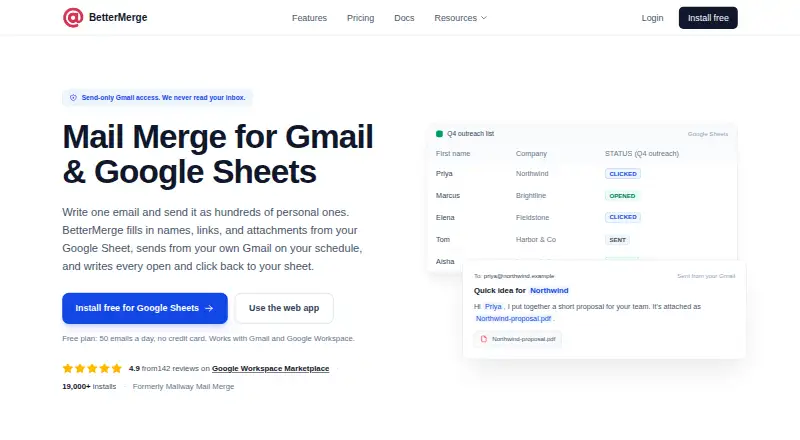
What BetterMerge is
BetterMerge sends personalized mail merge campaigns from Gmail using contacts and fields in Google Sheets. Spreadsheet columns can customize subject lines, email bodies, links, images, and attachments. The service tracks opens, link clicks, and unsubscribes, and can return activity data to Sheets. Campaigns can be scheduled, with controls for daily limits, sending days, time ranges, and delays between messages. BetterMerge connects to Gmail, Google Sheets, and Google Drive for personalized attachments, and it lists API access. The company says it requests send-only Gmail access, rather than permission to read, search, or delete mailbox messages. Its privacy policy says it stores campaign and tracking information and encrypted OAuth tokens, but not spreadsheet contents, sent email content, Drive files, or Gmail message history. A free plan is listed as free and includes 50 emails per day, one sender, up to five campaigns each month, and open and click tracking. Gmail.com accounts are limited to 500 emails per day on any plan; Google Workspace limits depend on plan, account edition, and domain reputation. BetterMerge describes itself as built for small businesses and professionals across several fields.
Good
- Google Sheets fields personalize email content and attachments.
- Tracks opens, clicks, and unsubscribes.
- Campaigns can be scheduled with delivery controls.
- Integrates with Gmail, Sheets, and Drive.
- Free plan includes open and click tracking.
Watch out
- Free plan allows up to five campaigns per month.
- Gmail.com accounts are capped at 500 emails per day.
- Google Workspace sending limits depend on plan and account factors.
Who it suits
BetterMerge suits small businesses and professionals who want to personalize Gmail outreach using Google Sheets, including sales, recruiting, finance, operations, schools, nonprofits, and events. It may be useful when scheduled sends, attachment personalization, or campaign tracking are needed.
Verdict
BetterMerge connects spreadsheet-based personalization with Gmail sending, tracking, and scheduling controls. Review the free-plan campaign cap and account-specific sending limits before choosing it for regular outreach.
Plans and prices
From BetterMerge's own pricing page, checked 30 Sep 2026.
| Plan | Price | What it gives you |
|---|---|---|
| Free | Free | 50 emails/day on Gmail.com and Google Workspace · 1 sender · up to 5 campaigns/month · open and click tracking |
| Lite | — | 500 emails/day · 1 sender · scheduling · file attachments · follow-ups based on opens or clicks |
| Plus | — | 500 emails/day on Gmail.com or 1,500/day on Google Workspace · 3 senders · personalized attachments · delivery automation |
| Pro | — | 500 emails/day on Gmail.com or 2,000/day on Google Workspace · 5 senders · email verification before sending |
The facts
Each one read from BetterMerge's own pages, with the date it was checked.
What it does
- Campaign tracking
- It tracks opens, link clicks, and unsubscribes and can write activity back to Google Sheets.checked 30 Sep 2026
- Hosting
- The privacy policy says data is processed and stored in US-based Hetzner data centers in US-East.checked 30 Sep 2026
- Integrations
- The product integrates with Gmail, Google Sheets, and Google Drive for personalized attachments.checked 30 Sep 2026
- Intended users
- BetterMerge describes itself as built for small businesses and professionals, including sales, recruiting, finance, operations, schools, nonprofits, and events.checked 30 Sep 2026
- Limits
- Gmail.com accounts are limited to 500 emails per day on any plan; Google Workspace quotas depend on plan, account edition, and domain reputation.checked 30 Sep 2026
- Personalization
- Spreadsheet columns can personalize subject lines, email bodies, links, images, and attachments.checked 30 Sep 2026
- Privacy
- BetterMerge says it requests send-only Gmail access and cannot read, search, or delete mailbox messages.checked 30 Sep 2026
- Product
- BetterMerge sends personalized mail merge campaigns from Gmail using contacts and merge fields in Google Sheets.checked 30 Sep 2026
- Sending controls
- Campaigns can be scheduled, and delivery automation can set daily limits, sending days, time ranges, and delays between emails.checked 30 Sep 2026
- Service providers
- The privacy policy names Paddle for payment processing, Firebase for authentication, Sentry for error tracking, and analytics providers; it says campaign data, templates, and Sheets data are not shared with third-party providers.checked 30 Sep 2026
- Stored data
- Its privacy policy says it stores campaign and tracking information and encrypted OAuth tokens, but not Google Sheets contents, sent email content, Drive files, or Gmail message history.checked 30 Sep 2026
- Support
- The pricing comparison lists basic support for Free and standard support for paid plans, with chat support on paid plans.checked 30 Sep 2026
The company
- Headquarters
- Indiachecked 28 Sep 2026
The full review of BetterMerge
BetterMerge is a Gmail mail-merge service built around Google Sheets, Drive, and spreadsheet-driven personalization. It fits small businesses and professionals who need measurable outreach without leaving Google Workspace. The main trade-off is that useful controls and higher volumes are split among paid tiers, while Gmail quotas still set hard ceilings.
Overview
BetterMerge turns rows in Google Sheets into individualized email campaigns sent through Gmail. It is aimed at sales, recruiting, finance, operations, schools, nonprofits, events, and other small-organization workflows where each recipient needs tailored content. The extension and web app keep the workflow close to the tools those users already use, and API access supports broader automation.
The free tier is suitable for occasional, small batches, but regular outreach quickly encounters its campaign and daily-send caps. Gmail.com accounts cannot exceed 500 emails per day on any plan; Google Workspace limits vary with the subscription, account, and domain reputation, so a higher BetterMerge allowance is not a guaranteed delivery volume.
Key features
Google Sheets columns can populate subject lines, email bodies, links, images, and attachments. That is more flexible than a mail merge limited to names or a few fields, and it works well for segmented invitations, recruiting messages, sales follow-ups, or event communications. Google Drive supplies files for personalized attachments, while Gmail remains the delivery channel.
Tracking records opens, link clicks, and unsubscribes, and activity can be written back to Google Sheets. This makes the spreadsheet useful as a campaign log rather than merely an input list. Scheduling is available on Lite, while Plus adds delivery automation for daily limits, sending days, time windows, and delays between messages. Those controls are valuable for paced outreach, but they are not all included in the free plan.
BetterMerge says its Gmail permission is send-only: it cannot read, search, or delete mailbox messages. Its privacy policy says it stores campaign and tracking information plus encrypted OAuth tokens, but not Google Sheets contents, sent email content, Drive files, or Gmail message history. Processing and storage use US-East data centers operated by Hetzner. Paddle handles payments, Firebase authentication, and Sentry error tracking; the policy says campaign data, templates, and Sheets data are not shared with third-party providers.
Pricing
| Plan | Price | What it includes |
|---|---|---|
| Free | free | 50 emails/day on Gmail.com and Google Workspace, one sender, up to five campaigns/month, open and click tracking, basic support |
| Lite | Custom pricing | 500 emails/day, one sender, scheduling, file attachments, follow-ups based on opens or clicks, standard support and chat |
| Pro | Custom pricing | 500 emails/day on Gmail.com or 2,000/day on Google Workspace, five senders, pre-send email verification, standard support and chat |
| Plus | Custom pricing | 500 emails/day on Gmail.com or 1,500/day on Google Workspace, three senders, personalized attachments, delivery automation, standard support and chat |
Free is a sensible starting point for a single sender testing a few campaigns, but five campaigns per month and 50 daily messages constrain ongoing prospecting. Lite is the practical fit when timing, attachments, or open/click-triggered follow-ups matter. Pro favors teams needing five senders and the highest stated Workspace allowance, while Plus is better for controlled pacing and personalized files; it has fewer senders and a lower Workspace ceiling than Pro. Paid plans have custom pricing, so budget comparison requires a quote.
Platforms
BetterMerge is available as a browser extension and web app. It connects Google Sheets and Google Drive to Gmail, supports email output and personalized attachments, and offers API access for integrations or custom workflows.
Who it's for
Choose BetterMerge if your contacts already live in Google Sheets and your team wants individualized Gmail messages with spreadsheet-based reporting. It is particularly well matched to small businesses and professional functions that need scheduling, paced delivery, or follow-up triggers without adopting a separate CRM mailer.
It is less suitable for organizations that need volumes above Gmail or Workspace quotas, more than five sending identities, or a predictable published subscription price. The free tier is for light use rather than sustained outreach.
Pros and cons
Pros
- Deep spreadsheet personalization: fields can control text, subjects, links, images, and attachments.
- Useful campaign feedback: opens, clicks, and unsubscribes can flow back into Google Sheets.
- Granular delivery options: scheduling and automation can limit pace and define sending windows.
- Narrow Gmail permission: send-only access avoids mailbox reading, searching, and deletion.
Cons
- Free plan is tightly capped: one sender, five campaigns monthly, and 50 messages per day limit regular outreach.
- Features are tiered: scheduling, verification, personalized attachments, and automation are divided among paid plans.
- Custom paid pricing: Lite, Pro, and Plus provide no listed subscription figure for quick cost comparison.
- Account quotas still apply: Gmail.com is capped at 500 daily messages, and Workspace capacity depends on account and domain factors.
Alternatives
For a broader document-generation and merge API across self-hosted and desktop platforms, consider Carbone. S-Docs is a better direction for Salesforce document templates and e-signature allowances. Choose CraftMyPDF or APITemplate.io when PDF/image generation and REST-style integrations are the priority rather than Gmail campaigns. PDF4me Merge & Split suits API-based PDF operations with one-time call packs. G Merge Plus is another Gmail mail-merge option. Mailmeteor is worth comparing for its free 500-emails-per-month allowance and bundled templates, tracking, scheduling, and attachments. PDFMonkey focuses on document generation with a free monthly allowance.
Verdict
BetterMerge is a strong choice for Google-centric professionals who need rich row-level personalization, campaign tracking, and controlled Gmail delivery in one workflow. Its send-only permission model and Sheets reporting add practical reassurance. Look elsewhere if you need transparent paid pricing, substantially larger volumes, or a broader multi-channel outreach platform than Gmail quotas and the tier structure permit.
Alternatives to BetterMerge
- 1

Carbone
Free planOpen sourceWebAPILinuxmacOS8.3Free plan - 2

Mailmeteor
Free planAndroidiOSWebAPI8.2From $5.99 a month - 3

S-Docs
Free planiOSWebAPI7.9From $25 a month - 4
 7.6From €5 a month
 - 5
 7.5From $29 a month
 - 6
Text Control ReportingCloud
AndroidiOSWebAPI7.1From $39 a month