
Bankflow
Bankflow is a web and API service for turning bank and card statements into organized financial information for small businesses.
What Bankflow is
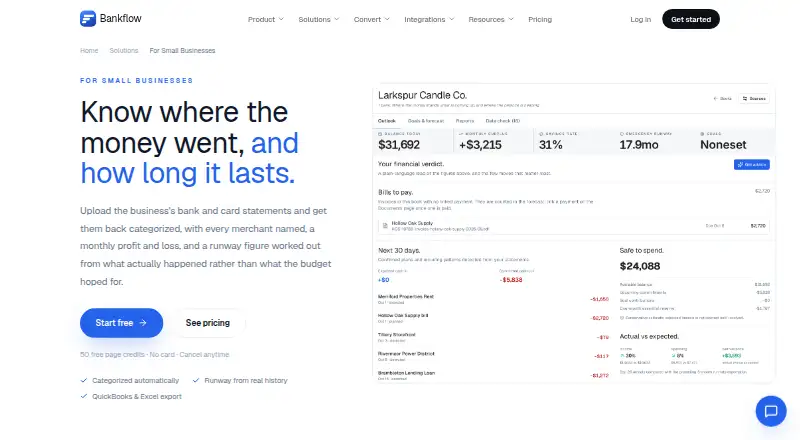
Bankflow is a web and API service for turning bank and card statements into organized financial information for small businesses. You can upload PDF, CSV, and Excel statements in batches without choosing a bank or template first. The service categorizes transactions automatically, resolves merchant names, and lets you save corrections as rules for later imports. Its cash-flow view brings together monthly income, spending, and runway under three conditions: the current burn rate, essentials-only spending, and no income. Scenario planning lets you test events such as losing a client or paying a large one-off expense against your own history. Statements can also be forwarded to a private import address, without granting mailbox login access. Bankflow provides Excel, CSV, OFX, and QBO exports, plus accounting layouts or imports for QuickBooks, Xero, Sage, MYOB, and NetSuite. Developer API access and webhooks are available on every plan, with usage taken from credits. Plans include Free with 50 one-time credits, Starter at $14.99 a month with 300 monthly credits, Pro at $39.99 a month with 1,000, and Business at $99.99 a month with 3,000. Live chat and email support come with every plan.
Good
- Imports PDF, CSV, and Excel statements in batches
- Automatically categorizes transactions and resolves merchant names
- Provides runway views under three spending scenarios
- Offers scenario planning using your financial history
- Exports to Excel, CSV, OFX, and QBO
- API and webhooks included on every plan
Watch out
- Free plan provides 50 one-time credits
- Bank synchronization is unavailable, with zero connections
- Large or unusually heavy documents can consume extra credits
Who it suits
Bankflow suits small businesses that need to turn statement files into categorized transactions, profit and loss information, and cash-runway views. It also fits teams needing accounting exports, scenario planning, or API and webhook access without connecting bank accounts.
Verdict
Choose Bankflow if statement-file analysis, runway calculations, and accounting exports are your priority. It is especially useful when you want API access on the Free plan. Look elsewhere if direct bank synchronization is essential, since the listed setup has no bank connections.
Plans and prices
From Bankflow's own pricing page, checked 15 Oct 2026.
| Plan | Price | What it gives you |
|---|---|---|
| Free | Free | 1 client workspace · all features · 50 credits one-time |
| Starter | $14.99 a month | Unlimited client workspaces · all features · 300 credits a month |
| Pro | $39.99 a month | Unlimited client workspaces · all features · 1,000 credits a month |
| Business | $99.99 a month | Unlimited client workspaces · all features · 3,000 credits a month |
The facts
Each one read from Bankflow's own pages, with the date it was checked.
What it does
- Accounting exports
- Exports include CSV, XLSX, JSON, OFX, QBO and other accounting-system formats.checked 15 Oct 2026
- API
- A versioned REST API at api.bankflow.app accepts authenticated document uploads and returns normalized transaction data.checked 15 Oct 2026
- API availability
- API keys, the v1 API and webhooks are included on every plan, including Free.checked 15 Oct 2026
- Auto-categorization
- Transactions are automatically assigned categories and can be refined with user rules.checked 15 Oct 2026
- Automated intake
- Users can forward bank statement emails to a private import address, and Bankflow says it does not request mailbox login access.checked 4 Oct 2026
- Cash flow
- The cash flow view shows monthly income and spending plus runway at current burn, essentials-only burn, and with no income.checked 4 Oct 2026
- Cash-flow analytics
- Dashboards provide inflow, outflow, net-position, trend, category and merchant analysis.checked 15 Oct 2026
- Categorization
- Transactions are categorized automatically, merchant names are resolved, and users can turn corrections into rules for future statements.checked 4 Oct 2026
- Community listing
- Launch Llama's listing recorded 41 community upvotes and an August 31, 2026 update.checked 15 Oct 2026
- Compliance limitation
- Bankflow states that it has not completed its own SOC 2 audit; listed provider attestations cover infrastructure providers.checked 15 Oct 2026
- Data retention
- Source documents can be deleted after processing, while parser working text is automatically removed after 30 days.checked 15 Oct 2026
- Documentation
- Public documentation covers getting started, installation, settings, connected accounts, dashboard use and API reference material.checked 15 Oct 2026
- Exports and integrations
- Bankflow lists Excel, CSV, OFX, and QBO exports, plus accounting layouts or imports for QuickBooks, Xero, Sage, MYOB, and NetSuite.checked 4 Oct 2026
- Import workflows
- Users can upload files, forward emails, use client upload links or connect cloud-folder workflows.checked 15 Oct 2026
- Input formats
- The service accepts PDF, CSV, XLSX and JSON statements, plus photographed receipts and invoices.checked 15 Oct 2026
- Installation
- Bankflow is a progressive web app installable from browsers on Windows, macOS, Linux, Chromebook, iOS and Android without an app-store download.checked 15 Oct 2026
- Integrations
- Document outputs are supported for QuickBooks, Xero, Sage, NetSuite, MYOB, Wave, FreshBooks, GnuCash and Moneydance.checked 15 Oct 2026
- Invoice integrations
- Invoices and receipts can be sent to QuickBooks and Xero as bills or CSV data.checked 15 Oct 2026
- License
- The terms state that Bankflow and its underlying technology are owned by the company and protected by intellectual-property law.checked 15 Oct 2026
- Limit: bank connectivity
- Independent directory descriptions note that Bankflow does not connect directly to bank accounts and instead processes uploaded or forwarded statements.checked 15 Oct 2026
- Limit: credit usage
- Credits are consumed per processed page, and documents with no extracted transactions still consume credits.checked 15 Oct 2026
- Limit: service availability
- The terms disclaim guaranteed uninterrupted access and say outages or maintenance may occur.checked 15 Oct 2026
- Merchant intelligence
- Bankflow normalizes merchant names and identifies recurring charges and duplicate merchants.checked 15 Oct 2026
The company
- Maker
- Launch Llama identifies Alan Mark as Bankflow's maker, and Mark describes Bankflow as a side project he started.checked 15 Oct 2026
The full review of Bankflow
Bankflow is a statement-driven finance workspace for small businesses that need categorized transactions, profit-and-loss reporting, and cash-runway planning. It is strongest for teams comfortable supplying files and wanting exports or API access, while businesses expecting a live connection to their bank should choose another approach.
Overview
Bankflow builds a financial picture from bank and card statement files rather than direct account feeds. PDF, CSV, and Excel statements can be imported in batches, with no bank or template selection required before starting. That is useful when a business receives statements in mixed formats or works across several institutions. The cost is an ongoing file-import workflow: accounts do not update automatically.
Once statements are processed, Bankflow produces categorized transactions, monthly income and spending views, profit-and-loss figures, and cash-runway estimates. It therefore covers more than simple conversion of documents, but its usefulness depends on keeping imported statements current.
Key features
Imports, categorization, and intake
Automatic categorization and merchant-name resolution reduce the amount of first-pass cleanup. A correction can become a rule for future statements, so recurring merchants should require less repeated editing as a workflow matures. Users can also forward statement emails to a private import address. Bankflow says this process does not require mailbox login access, which gives businesses an alternative to downloading every attachment manually.
Cash flow and what-if planning
The cash-flow view separates monthly income and spending and calculates runway at current burn, essentials-only burn, and a no-income level. Those three perspectives make the output more useful than a single balance figure: a business can compare its normal operating position with a stripped-back survival budget. Scenario planning applies events such as losing a client or paying a large one-off expense to the business's own history. It is a practical way to examine possible pressure on liquidity, provided the underlying statements are representative.
Exports, integrations, and API
Excel, CSV, OFX, and QBO exports support spreadsheet work and handoff to accounting systems. Bankflow also lists accounting layouts or imports for QuickBooks, Xero, Sage, MYOB, and NetSuite. Developer API access and webhooks are included on every plan, including Free; usage comes from the plan's credit balance. That makes the service unusually relevant to a small business building an automated intake or reporting process without first paying for an API tier.
Security and data controls
Browser communications use TLS 1.2 or later, stored data is encrypted at rest, and production access is restricted to authorized personnel. Uploaded files are not permanently stored beyond the account, financial data is not used for advertising, and documents or application data can be deleted from Settings. Every plan includes live chat and email support from the Bankflow team.
Pricing
| Plan | Price | Credits |
|---|---|---|
| Free | free | 50 credits one-time |
| Starter | $14.99 a month | 300 credits/month |
| Pro | $39.99 a month | 1,000 credits/month |
| Business | $99.99 a month | 3,000 credits/month |
Free is a finite 50-credit allowance, roughly one credit per page, rather than an ongoing monthly quota. It suits evaluating the workflow or processing occasional statements. Starter is the sensible entry point for a small operation with recurring monthly imports; Pro and Business are aimed at higher document volumes. Paid credits reset each billing cycle. Oversized pages and unusually heavy documents can consume more than one credit, while purchased top-up credits roll over for six months. All plans retain API, webhooks, and live support, so upgrading primarily buys processing capacity rather than removing those capabilities.
Platforms
Bankflow is offered through the web and an API. It has no bank connections, so neither platform provides direct synchronization with financial institutions.
Who it's for
Choose it for a small business that receives statement files, needs a repeatable categorization process, wants runway and scenario views, or must export data into accounting software. The Free plan is also a credible API evaluation option. It is a poor fit for organizations whose priority is continuous bank-feed synchronization or who cannot maintain a statement-import routine.
Pros and cons
Pros
- Batch PDF, CSV, and Excel imports without bank or template setup.
- Rules created from corrections can reduce recurring categorization work.
- Runway is shown for normal, essentials-only, and no-income conditions, with history-based scenarios.
- Excel, CSV, OFX, QBO, and multiple accounting-system formats support downstream work.
- API access and webhooks are included on Free, with support on every plan.
Cons
- No bank synchronization means statements must be supplied manually.
- The Free allowance is only 50 one-time credits.
- Heavy documents can consume multiple credits, making page-based estimates less predictable.
Alternatives
For a wider comparison, see Cash Flow Management Software.
- Caflou is a freemium option with Android, iOS, web, and API access.
- onbalance is a free Android and iOS app.
- Cash Pocket is free on Android, iOS, and the web, with no stated subscriptions or other fees.
- Trezy offers web-based cash-flow tracking, AI categorization, and a free tier with one bank account.
- Bokeping provides API and web access, with a free tier including CSV bank import and financial statements.
- BankSummary is a web freemium service whose free plan covers up to two accounts.
- Cashvue is free to use while in public beta.
- Statement is a paid web application.
Verdict
Bankflow is a strong choice for small businesses that can work from statement files and value categorization rules, runway analysis, accounting exports, and API access on the Free plan. Its decisive limitation is the absence of bank synchronization: businesses that require continuously refreshed bank data should look elsewhere.
Getting started
- Open the Bankflow small-business website
- Create an account on the Free or a paid plan
- Upload PDF, CSV, or Excel statement files in batches
- Forward statements to your private import address if preferred
- Use categorized transactions, cash-flow views, and scenario planning
- Export data or connect through the API and webhooks
Limits worth knowing
The Free plan includes 50 credits issued once, roughly one credit per page. Paid credits reset each billing cycle; oversized pages and unusually heavy documents may consume more than one credit, while top-up credits roll over for six months.
Questions
Is there a free Bankflow plan?
Yes. Free costs nothing and includes 50 one-time credits.
What do paid Bankflow plans cost?
Starter is $14.99 a month, Pro is $39.99 a month, and Business is $99.99 a month.
Which statement files can Bankflow import?
It accepts PDF, CSV, and Excel files in batches.
Can Bankflow connect directly to banks?
No bank synchronization is listed, and the bank connection limit is zero.
Which accounting systems are supported?
Bankflow lists layouts or imports for QuickBooks, Xero, Sage, MYOB, and NetSuite, plus Excel, CSV, OFX, and QBO exports.
Does every plan include API access?
Yes. Developer API access and webhooks are included on every plan, including Free, and usage draws from credits.
Alternatives to Bankflow
- 1
Cash Pocket
Free planAndroidiOSWeb7.3Free plan - 2

Bokeping
Free planWebAPI7.2From $29 a month - 3
Caflou
Free planAndroidiOSWebAPI7.0Free plan - 4
onbalance
Free planAndroidiOS6.8Free plan - 5

BankSummary
Free planWebAPI6.7Free plan - 6

Agicap
AndroidiOSWebAPI6.6