
Asset Giant
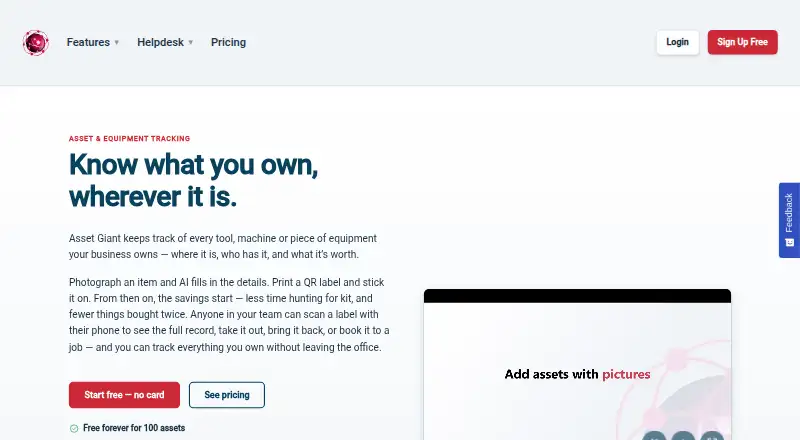
Asset Giant tracks business tools, equipment and other physical assets, including location, custody and value.
What Asset Giant is
Asset Giant tracks business tools, equipment and other physical assets, including location, custody and value. It runs in a browser on phones, tablets and computers, with Android and iOS also listed as platforms. Users can photograph an item and review AI suggestions for details such as make, model and category. Teams can print QR labels on ordinary printers, then scan them with a phone to open records or check items in and out. A booking calendar and alerts cover due backs, warranties, tests, inspections and low stock. The product also supports quotes, invoices and hire rates; paid plans add card payments through Stripe. Free Forever allows 100 assets for one user and has no alerts. Data can be exported, and the maker says exceeding a plan limit or cancelling does not delete it, though some older items may be paused.
Good
- QR labels support phone-based check-in and check-out.
- AI suggests item details from photographs.
- Booking calendar and asset alerts are included.
- Inventory can be exported.
Watch out
- Free Forever is limited to 100 assets and one user.
- The free plan excludes alerts.
- There are no mobile apps.
Who it suits
It suits businesses and groups managing physical equipment, including construction and trades, hire businesses, schools, sports clubs and community organisations. Teams that need alerts or more than 100 assets would need a paid plan.
Verdict
Asset Giant brings asset records, booking and QR workflows together in a browser-based service. The free tier is restricted, while paid plans raise the usage limits and add alerts.
Plans and prices
From Asset Giant's own pricing page, checked 4 Oct 2026.
| Plan | Price | What it gives you |
|---|---|---|
| Free Forever | Free | 100 assets · 1 user · 50 MB storage · 25 AI lookups/month · 1 custom field · 1 month activity history · Free; no card or time limit |
| Crew | £19 a month | 500 assets · 3 users · 500 MB storage · 500 AI lookups/month · 10 custom fields · 12 months activity history · £19/mo; yearly billing also available |
| Business | £79 a month | 5,000 assets · 10 users · 5 GB storage · 5,000 AI lookups/month · 50 custom fields · 36 months activity history · £79/mo; yearly billing also available |
| Growth | £149 a month | 20,000 assets · 25 users · 25 GB storage · 7,500 AI lookups/month · 100 custom fields · 36 months activity history · £149/mo; yearly billing also available |
| Enterprise | Priced on request | Unlimited assets · unlimited users · unlimited storage · unlimited AI lookups/month · 200 custom fields · unlimited activity history · Contact Sales |
The facts
Each one read from Asset Giant's own pages, with the date it was checked.
What it does
- AI cataloguing
- Users can photograph an item and have AI suggest details such as its make, model and category for review.checked 4 Oct 2026
- Data export
- Users can export inventory, and the maker says exceeding a plan limit or cancelling does not delete data; some older items may be paused.checked 4 Oct 2026
- Integrations
- Paid plans include iCal calendar feeds, while custom API and data integrations are listed as an Enterprise feature.checked 4 Oct 2026
- Intended users
- The maker describes use by construction and trades, media and events, hire businesses, schools, sports clubs and community organisations.checked 4 Oct 2026
- Purpose
- Asset Giant tracks business tools, equipment and other physical assets, including their location, custody and value.checked 4 Oct 2026
- QR workflows
- Teams can print QR labels on ordinary printers and scan items with a phone to view records or check items in and out.checked 4 Oct 2026
- Scheduling
- The product includes an asset booking calendar and alerts for due backs, warranties, tests, inspections and low stock.checked 4 Oct 2026
- Security and privacy
- The maker says company data is isolated and private, protected by login and user roles, and not sold.checked 4 Oct 2026
- Support
- The pricing page lists an automated helpdesk chatbot on all plans, standard email support on Crew and Business, and phone support on Enterprise.checked 4 Oct 2026
Money
- Billing tools
- Asset Giant supports quotes, invoices and hire rates, with card payments through Stripe on paid plans.checked 4 Oct 2026
- Free tier limits
- Free Forever includes 100 assets for one user, and alerts are not included on that plan.checked 4 Oct 2026
The company
- Company
- Asset Giant is made by Blueworkz Ltd, based in Pitstone, Buckinghamshire, United Kingdom, and founded by Dan Huke.checked 4 Oct 2026
- Headquarters
- Pitstone, Leighton Buzzard, Buckinghamshire, United Kingdomchecked 28 Sep 2026
Where it runs
- Platform
- Asset Giant runs in a web browser on phones, tablets and computers; the maker specifies iPhone Safari, Android Chrome and Samsung Internet, with nothing to install.checked 4 Oct 2026
The full review of Asset Giant
Asset Giant is a browser-based system for keeping track of business equipment, tools and other physical assets, including who has them and where they are. It is best suited to small teams that need to book equipment, manage returns and use QR labels without installing an app. Its free tier is a useful starting point, but the one-user, 100-asset cap and lack of alerts make a paid plan more practical for ongoing team use.
Overview
Asset Giant brings inventory records together with custody, location and value tracking. Teams can scan a QR label on an item with a phone to open its record or check it in and out; labels can be printed on an ordinary printer. That combination makes it more than a static inventory: it can support shared equipment and hire workflows, though teams should weigh the plan limits against the size of their inventory and staff.
Key features
Catalogue and identify assets
Users can photograph an item and have AI suggest details such as make, model and category for review. This can speed up catalogue entry, but the suggestions are for users to check rather than a substitute for maintaining accurate records. Barcode scanning is also supported alongside QR scanning.
Bookings, returns and alerts
An asset booking calendar helps coordinate equipment use, while check-in and check-out workflows make custody changes easier to record. Alerts cover due backs, warranties, tests, inspections and low stock. Since alerts are excluded from Free Forever, teams that depend on reminders will need a paid plan.
Hiring and integrations
Quotes, invoices and hire rates support businesses that lend or rent equipment; card payments through Stripe are available on paid plans. Paid plans also include iCal calendar feeds. Custom API and data integrations are reserved for Enterprise, so organisations needing bespoke connections should factor in custom pricing.
Access and data
Asset Giant runs in a browser on phones, tablets and computers, with no installation required. The maker specifies iPhone Safari, Android Chrome and Samsung Internet. There are no mobile apps. The maker says company data is isolated and private, protected by login and user roles, and not sold. Users can export inventory; exceeding a plan limit or cancelling does not delete data, though some older items may be paused.
Pricing
Asset Giant has a free tier and four paid tiers. There is no free trial; Free Forever has no card requirement or time limit. Paid monthly prices are shown below, and yearly billing is also available for Crew, Business and Growth.
| Plan | Price | Limits and included capacity |
|---|---|---|
| Free Forever | free | 100 assets, 1 user, 50 MB storage, 25 AI lookups/month, 1 custom field and 1 month of activity history |
| Crew | £19 a month | 500 assets, 3 users, 500 MB storage, 500 AI lookups/month, 10 custom fields and 12 months of activity history |
| Business | £79 a month | 5,000 assets, 10 users, 5 GB storage, 5,000 AI lookups/month, 50 custom fields and 36 months of activity history |
| Growth | £149 a month | 20,000 assets, 25 users, 25 GB storage, 7,500 AI lookups/month, 100 custom fields and 36 months of activity history |
| Enterprise | Custom pricing | Unlimited assets, users, storage, AI lookups and activity history; 200 custom fields |
Free Forever is a no-cost way for one person to catalogue up to 100 assets, but its 50 MB storage, 25 monthly AI lookups, single custom field and one-month history leave little room for a growing operation. It also omits alerts. Crew at £19 a month is the first paid step for small teams: it raises the cap to 500 assets and three users and adds longer history, more storage and AI lookups. The pricing page lists an automated helpdesk chatbot on all plans and standard email support on Crew and Business.
Business at £79 a month fits a larger operation needing up to 5,000 assets and 10 users, with 36 months of activity history. Growth at £149 a month expands that to 20,000 assets and 25 users, plus more storage, AI lookups and custom fields. Enterprise is the route for unlimited capacity and custom API or data integrations; it has custom pricing and phone support. The maker describes data as retained after cancellation or exceeding a cap, but some older items may be paused, so plan limits still matter operationally.
Platforms
Asset Giant works through a web browser on Android and iOS devices as well as computers and tablets. The mobile browser support covers iPhone Safari, Android Chrome and Samsung Internet. Because it has no mobile apps, it suits teams comfortable using a browser for scanning and records rather than those seeking a dedicated app.
Who it's for
Asset Giant is aimed at construction and trades, media and events, hire businesses, schools, sports clubs and community organisations. Its strongest fit is a group sharing physical equipment that needs bookings, return reminders, QR-based access and a record of custody. A lone user with a small inventory can start free; teams needing alerts or more than one user must move to a paid plan. Businesses requiring bespoke integrations should look to Enterprise, while those needing a dedicated mobile app should consider another option.
Pros and cons
- Pros: QR labels printed on ordinary printers can open records and support check-in and check-out, making item handoffs workable without specialist label equipment.
- Pros: Booking, due-back alerts and maintenance-related reminders combine scheduling with asset records, particularly useful for shared or hired equipment.
- Pros: Inventory export and the stated retention of data after cancellation or exceeding a limit reduce the risk of losing records when plans change.
- Cons: Free Forever allows only one user and 100 assets, and omits alerts, so it is too constrained for a team relying on reminders.
- Cons: There is no mobile app; mobile use is through a browser, which may not suit teams that specifically want an installed app.
- Cons: Custom API and data integrations require Enterprise, putting bespoke connectivity behind a custom-priced tier.
Alternatives
For a broader comparison, browse Asset Tracking Software. Consider Prey if you want a freemium option with a free trial and support across desktop operating systems as well as mobile and web. Lansweeper is another freemium choice with a 14-day full trial and a free continuation for up to 100 assets. Shelf offers a free Personal plan with unlimited assets for one user and three custom fields; it may suit an individual prioritising asset capacity over team seats. AssetTiger is an alternative with a free plan and mobile platforms. MapYourTag has a free plan capped at 10 assets and two users, with email alerts included, so it may appeal to a very small team that values alerts at no cost. Reftab offers a free plan for up to 50 assets with mobile apps and barcode and QR-code support, a fit for users who want an installed app. Scanlily includes 500 items on its free plan for one user and allows unlimited items with QR labels, worth considering for a solo user focused on QR-labelled inventory. Sortly has a free tier for 100 unique items and one user, and may suit users comparing a similarly sized no-cost starting point.
Verdict
Choose Asset Giant if your organisation shares, books or hires physical equipment and wants QR-based check-in and check-out, reminders and asset records in one browser service. The free plan can establish a small inventory, but its single seat and lack of alerts make Crew the more realistic starting point for a working team. Look elsewhere if a dedicated mobile app or bespoke integrations without an Enterprise arrangement are priorities.
Getting started
- Open Asset Giant in a supported phone, tablet, or computer browser
- Choose Free Forever or a paid plan
- Photograph items for AI-suggested details and review them
- Print QR labels on an ordinary printer
- Scan labels by phone to view records or check items in and out
- Add bookings, alerts, quotes, invoices, or hire rates as needed
Limits worth knowing
Free Forever allows 100 assets for one user, 50 MB storage, 25 AI lookups per month, one custom field, and one month of activity history. Alerts are not included on that plan.
Questions
Is there a free plan?
Yes. Free Forever is free, with no card or time limit. It includes 100 assets for one user.
What do paid plans cost?
Crew is £19 a month, Business £79 a month, and Growth £149 a month. Enterprise is billed by contacting sales.
Which devices and browsers work?
Asset Giant runs in a browser on phones, tablets, and computers. The maker specifies iPhone Safari, Android Chrome, and Samsung Internet.
Does Asset Giant have mobile apps?
No mobile apps are listed; the product runs in a web browser and requires nothing to install.
Are integrations available?
Paid plans include iCal calendar feeds. Custom API and data integrations are listed as an Enterprise feature.
Who makes Asset Giant?
Blueworkz Ltd makes Asset Giant. The company is based in Pitstone, Buckinghamshire, United Kingdom, and was founded by Dan Huke.
Alternatives to Asset Giant
- 1

AssetCenter
Free planAndroidiOSWebAPI8.0From $39 a month - 2
Lansweeper
Free planWebAPILinuxmacOS8.0Free plan - 3

AssetTiger
Free planAndroidiOSWebAPI7.9Free plan - 4

Reftab
Free planAndroidiOSWeb7.9From $9 a year - 5
Prey
Free planAndroidiOSWebAPI7.5From $1.30 a month - 6

QR Chameleon
Free planWebAPI7.5From $4 a month