
Amotions AI
Amotions AI provides private real-time coaching during customer conversations, AI roleplay before calls, and post-call scorecards and feedback.
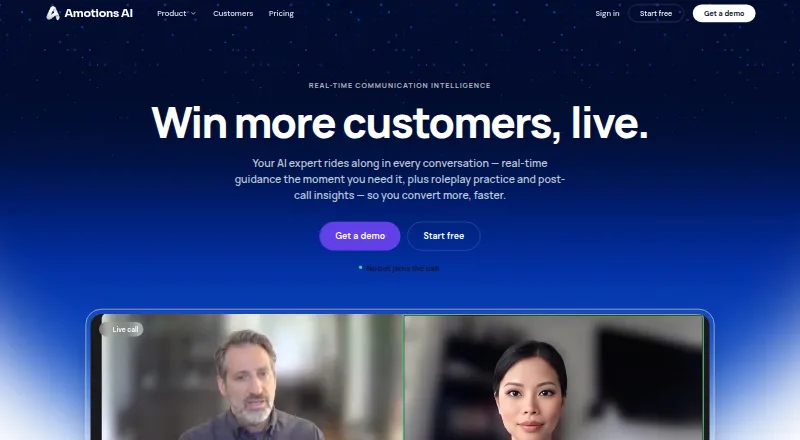
What Amotions AI is
Amotions AI provides private real-time coaching during customer conversations, AI roleplay before calls, and post-call scorecards and feedback. During live conversations, it can suggest discovery questions, objection responses, technical answers, and next steps on the user’s screen. Teams can tailor guidance with their playbooks, product knowledge, objections, and talk tracks. Zoom and Salesforce are listed as native connectors; other meeting and call workflows use a desktop app, browser overlay, or upload options. Amotions says it does not join meetings as a participant. Salesforce writeback creates Tasks, but full transcripts and rubric breakdowns are not pushed into the CRM, and Salesforce sync into Amotions is manual. Real-time coaching is not available as a mobile-phone app. The company says it does not publish a SOC 2 report, ISO 27001 certificate, or public HIPAA attestation. The product is aimed at customer-facing sales and service teams, including insurance, real estate, mortgage, healthcare, dental, solar, and contact-center teams.
Good
- Provides live suggestions for questions, objections, and next steps.
- Teams can tailor coaching with their own playbooks.
- Includes roleplay, scorecards, and transcripts on Basic.
- Zoom and Salesforce are listed as native connectors.
Watch out
- There is no free trial.
- Real-time coaching is unavailable as a mobile-phone app.
- Salesforce sync into Amotions is manual.
- The company does not publish SOC 2, ISO 27001, or public HIPAA attestations.
Who it suits
Amotions AI is aimed at customer-facing sales and service teams that want private call guidance, roleplay, and post-call feedback. Its stated audience includes teams in insurance, real estate, mortgage, healthcare, dental, solar, and contact centers.
Verdict
Amotions AI combines in-call coaching with roleplay and post-call feedback, with guidance kept private on the user’s screen. Consider its mobile limitation and stated Salesforce sync constraints when assessing fit.
Plans and prices
From Amotions AI's own pricing page, checked 28 Sep 2026.
| Plan | Price | What it gives you |
|---|---|---|
| Basic | Free | Limited usage · live coaching, roleplay, scorecards, transcripts · 2 playbook documents or links · Free |
| Starter | $49 a month | Monthly real-time coaching usage limit · AI roleplay · post-call insights · transcripts · custom playbooks · personalized coaching · custom scoring and rubrics · $49/ seat / month billed annually; or $59/seat/month billed monthly |
| Professional | $99 a month | More generous real-time coaching usage · custom AI agents · basic team dashboard · includes 3× the usage of Starter · $99/ seat / month billed annually; or $109/seat/month billed monthly |
| Enterprise | Priced on request | Sized to rollout · manager dashboards · advanced admin controls · multi-call insights · integrations · Custom; quoted by sales |
The facts
Each one read from Amotions AI's own pages, with the date it was checked.
What it does
- Audience
- The product is aimed at customer-facing sales and service teams, including insurance, real estate, mortgage, healthcare, dental, solar, and contact-center teams.checked 28 Sep 2026
- Compliance
- The site says it does not publish a SOC 2 report, ISO 27001 certificate, or public HIPAA attestation; healthcare buyers can discuss HIPAA-oriented configurations during a deployment review.checked 28 Sep 2026
- Data use
- Customer transcripts, audio uploads, and chat sessions are not used to train third-party foundation models, and organization data is separated by workspace.checked 28 Sep 2026
- Infrastructure
- The company says coaching workloads run in isolated Google Cloud environments, including Cloud Run, with encrypted transmission and storage.checked 28 Sep 2026
- Integrations
- Zoom and Salesforce are listed as native connectors; Teams, Google Meet, phone calls, and supported dialers use a desktop app or browser overlay and/or upload workflows.checked 28 Sep 2026
- Live coaching
- During live conversations, it privately suggests discovery questions, objection responses, technical answers, and next steps.checked 28 Sep 2026
- Mobile limitation
- Real-time coaching is not available as a mobile-phone app; phone or dialer calls can be coached through a computer workflow using speaker audio.checked 28 Sep 2026
- No meeting bot
- Amotions says it does not join Zoom, Teams, or Meet as a meeting participant; guidance appears privately on the user's screen.checked 28 Sep 2026
- Playbook training
- Customers can provide playbooks, objections, product knowledge, and talk tracks to tailor coaching to their process.checked 28 Sep 2026
- Purpose
- Amotions AI provides private real-time coaching during customer conversations, AI roleplay before calls, and post-call scorecards and feedback.checked 28 Sep 2026
- Salesforce limits
- Salesforce writeback creates Tasks; full transcripts and rubric scorecard breakdowns are not pushed into CRM, and Salesforce sync into Amotions is manual.checked 28 Sep 2026
- Support
- Starter and Basic include self-serve help and in-product guidance; Enterprise includes sales-assisted rollout.checked 28 Sep 2026
The company
- Headquarters
- Burlingame, California, United Stateschecked 28 Sep 2026
The full review of Amotions AI
Amotions AI is a coaching platform for customer-facing sales and service teams, especially those working from shared playbooks. It combines call-time prompts with roleplay and post-call review, but fits computer-based workflows better than mobile-first teams.
Overview
The platform supports the full conversation cycle: teams can rehearse with AI roleplay before a call, receive private prompts during it, then review scorecards and feedback afterward. Supplying product knowledge, objections, talk tracks, and playbooks lets teams align coaching with their own process. That makes Amotions a more natural fit for repeatable sales or service conversations than for people seeking a general meeting assistant.
Amotions does not join meetings as a participant; coaching appears on the user's screen. That avoids introducing a visible meeting bot, while requiring reps to work from a computer. Phone and dialer calls can use a computer workflow with speaker audio, but real-time coaching is not available as a mobile-phone app.
Key features
- Live coaching: Prompts can suggest discovery questions, objection responses, technical answers, and next steps. This is useful when reps need discreet support without interrupting the conversation, though it depends on a computer-based setup.
- Playbook-based guidance: Teams can provide their own playbooks and product materials to tailor coaching. This is valuable for organizations with established processes, but Basic's two-document-or-link allowance is narrow for teams with multiple products or workflows.
- Roleplay and post-call review: AI roleplay provides practice before calls, while transcripts, scorecards, feedback, and next-step extraction support review afterward. Together, these features serve teams that want coaching around more than call playback alone.
- Integrations: Zoom and Salesforce are native connectors; Teams, Google Meet, phone calls, and supported dialers use a desktop app or browser overlay and/or upload workflows. Salesforce writeback creates Tasks, but does not send full transcripts or rubric scorecard breakdowns to the CRM, and Salesforce data sync into Amotions is manual. Teams relying on richer, automatic CRM data flow should weigh that limitation carefully.
- Data and compliance: Customer transcripts, audio uploads, and chat sessions are not used to train third-party foundation models, and organization data is separated by workspace. The company says workloads run in isolated Google Cloud environments with encrypted transmission and storage. It does not publish a SOC 2 report, ISO 27001 certificate, or public HIPAA attestation; healthcare buyers can discuss HIPAA-oriented configurations during deployment review.
Pricing
Amotions has a free Basic plan and paid plans starting at $49/user/mo. No free trial is offered. Starter is $49/seat/month billed annually or $59/seat/month billed monthly. It includes a monthly real-time coaching usage limit, AI roleplay, post-call insights, transcripts, custom playbooks, personalized coaching, custom scoring, and rubrics. This is the entry paid tier for teams that need the full coaching workflow and process-specific materials.
Professional is $99/seat/month billed annually or $109/seat/month billed monthly. It includes more generous real-time coaching usage, custom AI agents, a basic team dashboard, and three times Starter's usage. Teams needing additional capacity or an initial team view may find the step up worthwhile; those satisfied with Starter's usage limit may not need it.
Basic costs nothing and includes limited usage of live coaching, roleplay, scorecards, and transcripts, plus two playbook documents or links. It can support a small evaluation, but the usage and playbook caps constrain ongoing or broader team use. Enterprise has custom pricing quoted by sales, with rollout sizing, manager dashboards, advanced admin controls, multi-call insights, and integrations. Starter and Basic include self-serve help and in-product guidance; Enterprise adds sales-assisted rollout.
Platforms
Amotions supports macOS, web, and Windows. Real-time coaching is not offered through a mobile-phone app. Phone or dialer calls can still be coached through a computer workflow using speaker audio, which is a compromise for teams whose calls happen on mobile devices.
Who it's for
Amotions is aimed at customer-facing sales and service teams, including insurance, real estate, mortgage, healthcare, dental, solar, and contact-center organizations. It is best suited to teams that can supply shared coaching materials and conduct conversations through computer-based workflows. Mobile-first reps, or Salesforce teams that require full transcripts and scorecard breakdowns pushed into the CRM, are less well served.
Pros and cons
- Pros: Coaching, practice, and post-call feedback span the conversation lifecycle, so teams can support reps before, during, and after customer calls.
- Pros: Private on-screen guidance avoids adding an AI meeting participant, which suits teams that want prompts without a visible bot.
- Pros: Custom playbooks, scoring, and rubrics can align coaching with an organization's sales or service process.
- Cons: No mobile-phone app provides real-time coaching, limiting fit for reps whose calls are primarily mobile.
- Cons: Salesforce writeback is limited to Tasks, with manual sync into Amotions and no full transcript or rubric breakdown pushed to the CRM.
- Cons: Basic has limited usage and only two playbook documents or links, so it is a constrained free option for teams with several workflows.
- Cons: The company does not publish SOC 2, ISO 27001, or public HIPAA attestations, which may complicate review for organizations with formal compliance requirements.
Alternatives
AI Sales Call Analysis Software is a useful category starting point for comparing call-analysis tools.
Choose ConversationPilot if an individual wants full live coaching for $39 a month on Solo, or needs a free tier limited to three calls monthly without live coaching. Its platform coverage matches Amotions on macOS, web, and Windows, and it also offers a free trial.
Choose TalkPilot if mobile access matters: it supports Android and iOS as well as desktop platforms, and its free plan includes five conversations per month, up to 30 minutes each, plus five practice runs and three scenarios.
Colibri.ai is another freemium call-analysis option.
Avoma is another freemium option, with web, iOS, and Android support.
Jiminny is a freemium alternative with a free trial and broad platform coverage, including mobile apps and an extension.
Mindtickle is a paid alternative with training, virtual roleplays, coaching, and analytics; its Readiness plan excludes two-way AI Role Play.
Rafiki AI is a paid alternative with a free trial and mobile support; its Starter plan is $19 a month billed annually for up to three users.
ExecVision uses custom pricing and invites buyers to contact sales for a customized demo.
Verdict
Amotions AI is a strong fit for sales and service teams that want private, playbook-led coaching across practice, live calls, and post-call review. Its computer-based workflow and tailored coaching are the main reasons to choose it; teams needing mobile coaching, fuller Salesforce data flow, or published compliance attestations should look elsewhere.
Getting started
- Open the Amotions AI website.
- Choose the Basic free plan or a paid plan.
- Use the desktop app, browser overlay, or upload workflow for supported calls and meetings.
- Connect Zoom or Salesforce where applicable.
- Provide playbooks, objections, product knowledge, or talk tracks to tailor coaching.
Limits worth knowing
Basic has limited usage and supports two playbook documents or links. Starter has a monthly real-time coaching usage limit; Professional includes three times Starter's usage. Enterprise is sized to rollout and quoted by sales.
Questions
Is there a free plan?
Yes. Basic is free, with limited usage and two playbook documents or links.
How much do paid plans cost?
Starter costs $49/seat/month billed annually or $59/seat/month billed monthly. Professional costs $99/seat/month billed annually or $109/seat/month billed monthly; Enterprise is quoted by sales.
Which platforms are supported?
Amotions AI lists macOS, web, and Windows. Real-time coaching is not available as a mobile-phone app.
Does it join video meetings?
No. Amotions says it does not join Zoom, Teams, or Meet as a participant; guidance appears privately on the user's screen.
Which integrations are native?
Zoom and Salesforce are listed as native connectors. Salesforce writeback creates Tasks, but full transcripts and rubric breakdowns are not sent to the CRM.
Is customer data used to train third-party models?
The company says customer transcripts, audio uploads, and chat sessions are not used to train third-party foundation models, and organization data is separated by workspace.
Alternatives to Amotions AI
- 1

Avoma
Free planAndroidiOSWebAPI8.4From $19 a month - 2

Colibri.ai
Free planWebAPIExtensionLinux7.9From $20 a month - 3

ConversationPilot
Free planWebmacOSWindows7.6From $384 a year - 4

TalkPilot
Free planAndroidiOSmacOSWindows7.2Free plan - 5

Jiminny
AndroidiOSWebAPI7.1From $42 a month - 6
Mindtickle
AndroidiOSWebAPI7.1