Everything Xiaomi is reader-supported. When you buy through links on our site, we may earn an affiliate commission. As an Amazon Associate I earn from qualifying purchases. Learn more
If you’ve ever used a Xiaomi phone, you’ve probably noticed it comes packed with quite a few pre-installed apps—often called bloatware. Some are system essentials, but many are Xiaomi’s own services or third-party apps you might never touch. The problem is, these can hog storage, run in the background, and even show ads. Luckily, you don’t have to just live with them. This guide will show you how to uninstall or disable those apps, from the easiest methods to a more advanced ADB approach—no rooting needed.
Why Bother Uninstalling Pre-Installed Apps?
Getting rid of unwanted apps can actually make a noticeable difference:
As an Amazon Associate I earn from qualifying purchases.
Recommended Free Tools
- Free up storage: Those apps can take up more space than you realize.
- Boost performance: Fewer background apps mean your phone can run smoother and maybe even save battery.
- Declutter: A cleaner app drawer is always nicer.
- Privacy: You limit the data those unused apps can collect.
- Fewer ads: Some pre-installed apps contribute to ads in MIUI, so removing them helps here too.
What You Should Know Before You Start
- System apps vs. bloatware: Not all pre-installed apps can or should be removed. Essential system apps keep your phone stable, and uninstalling them might cause problems—or worse, brick your device. We’re focusing on the bloatware and non-essential Xiaomi apps here.
- Disable or uninstall? Some apps only let you disable them, which stops them from running and hides them from your app list but doesn’t free up storage.
- No rooting here: This guide avoids rooting your device, since rooting can void warranties and introduce risks.
Method 1: Direct Uninstall (Easiest for Many Bloatware Apps)
A good chunk of Xiaomi’s pre-installed apps can be uninstalled just like any app you downloaded.
Shopping ad

- USA MARKET ONLY WORK ON TMOBILE BOOST MINT TELLO OR ANY UNDER TMOBILE NETWORK PHONE NEEDS A SIM CARD ALREADY ACTIVATED ,OUTSIDE USA WORKS ANY GSM CARRIER SIM GSM FCC ID: 2AFZZPC0AG
- Dual SIM (nano SIM + nano SIM or nano SIM + eSIM) (NO MICRO SD) 5G: 5G SA: n1/2/3/5/7/8/20/26/28/38/40/41/66*(70M)//77/78/485G NSA: n1/3/5/7/8/20/28/38/40/41/66*(70M)/77/784G LTE TDD: B38/40/41/42/484G LTE FDD: B1/2/3/4/5/7/8/18/19/20/26/28/66*(70M)/713G WCDMA: 1/2/4/5/6/8/192G GSM: 2/3/5/8Supports 4x4 MIMO*5G SA/NSA N66(70M) and 4G B66(70M): UL 1710MHz~1780MHz, DL 2110MHz~2180MHz*5G connectivity may vary based on region availability and local operator support.
- 6.83" 1.5K 120Hz ultra-bright AMOLED displayResolution: 2772 x 1280Contrast ratio: 8,000,000:1Refresh rate: Up to 120Hz*Refresh rate can be adjusted to up to 120Hz for supported apps.Peak brightness: 3500 nits covering 25% display areaHBM brightness: 2000 nitsTypical brightness: 800 n: 2560Hz*480Hz touch sampling rate is activated under Game Turbo Mode.*2560Hz instant touch sampling rate is activated under Game Turbo Mode.12-bit color depth, 68 billion colorsDCI-P3 wide display 2.0HDR10+TÜV Rheinland Low Blue Light (Hardware Solution) CertifiedTÜV Rheinland Flicker Free CertifiedTÜV Rheinland Circadian Friendly CertifiedDolby VisionCorning Gorilla Glass 7i
- MediaTek Dimensity 9500s3nm manufacturing process1 x Cortex-X925, up to 3.73GHz3 x Cortex-X4, up to 3.3GHz4 x Cortex-A720, up to 2.4GHzImmortalis-G925 MC11NPU 890 - 8500mAh (typ)100W HyperChargeUSB Type-C charging portUp to 27W reverse chargingSupports PD3.0/PD2.0Smart charging
- Wi-Fi Protocol: Wi-Fi 7/ Wi-Fi 6/ Wi-Fi 5/ Wi-Fi 4 and 802.11a/b/g*Wi-Fi 7/Wi-Fi 6 capability may vary based on regional availability and local network support. Wi-Fi connectivity (including Wi-Fi frequency bands, Wi-Fi standards and other features as ratified in IEEE Standard 802.11 specifications) may vary based on regional availability and local network support. The function may be added via OTA when and where applicable.WLAN frequency: 2.4G Wi-Fi | 5G Wi-FiSupports Multi-Link Operation, 2x2 MIMO, 8x8 Sounding for MU-MIMO, Wi-Fi Direct, MiracastBluetooth 6.0, Dual-BluetoothSupports SBC / AAC / LDAC / LHDC 5.0 / LC3 / ASHA / AuracastNFC
How to do it:
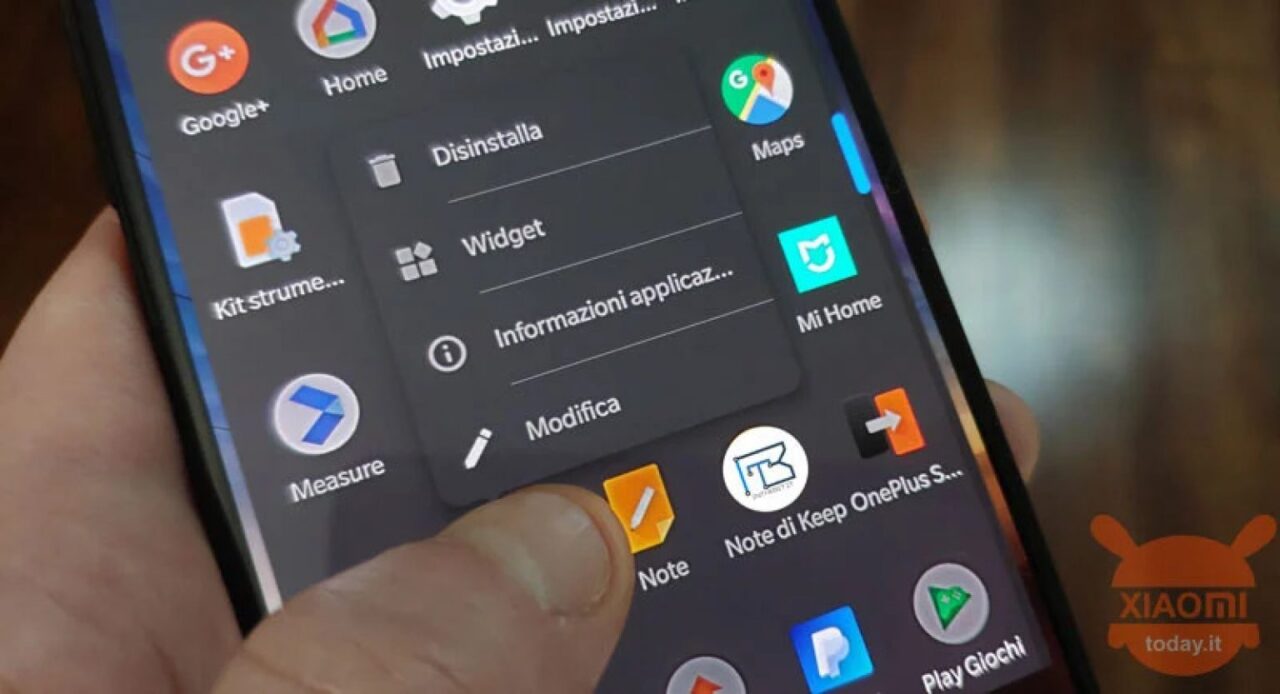
- From your Home screen or app drawer:
- Find the app you want gone.
- Long-press its icon.
- Tap Uninstall or the i (info) icon, then hit Uninstall.
- Confirm when prompted.
- Or from Settings:
- Go to Settings > Apps > Manage apps.
- Scroll to find the app.
- Tap it, then hit Uninstall if available.
- If you only see Disable, that means full uninstall isn’t possible here.
Common apps you can uninstall:
- Mi Community
- Mi Store
- GetApps (Xiaomi’s own app store)
- Mi Browser (though some like to keep it)
- Certain pre-installed games or social apps like Facebook, TikTok
Method 2: Disable Apps (When Uninstall Isn’t an Option)
For apps without an uninstall option, disabling is the next best thing. It stops them running and removes them from view.
How:
- Follow the same path to App Info as above.
- Tap Disable.
- Confirm the action.
- The app icon disappears, and it won’t run in the background.
If you want to bring it back later, go to Settings > Apps > Manage apps, filter by Disabled, tap the app, and select Enable.
Method 3: Use Xiaomi ADB/Fastboot Tools (No Root, More Control)
If you want to get serious and uninstall more stubborn apps without rooting, this method uses your computer and the Android Debug Bridge (ADB) interface. It’s a bit technical, so proceed carefully.
Shopping ad

- International Model - No Warranty in US. USA ONLY COMPATIBLE WITH TMOBILE / MINT, TELLO GLOBAL VERSION . ****** Does NOT Work With Verizon Sprint Boost Metro Pcs At&t Cricket ***** . Unlocked Worldwide . - FCC ID: 2AFZZPNFAG
- Dual Nano sim 5G + eSIM (No micro SD support): 5G: Supports NSA + SA5G: 5G SA: 1/2/3/5/7/8/12/20/25/26/28/38/40/41/48/66/75/77/78 5G NSA: n1/3/5/7/8/20/28/38/40/41/66/75/77/78: 4G: LTE FDD: B1/2/3/4/5/7/8/12/13/17/18/19/20/25/26/28/32/66/71 4G: LTE TDD: B38/39/40/41/42/48: 3G: UMTS: B1/2/4/5/6/8/192G: GSM: B2/3/5/8 Supports 4x4 MIMO
- Leica Summilux optical lensVARIO-SUMMILUX 1:1.67-3.0/15-115 ASPH.Leica 23mm main camera50MPLight Fusion 9502.4μm 4-in-1 Super Pixelf/1.67OIS23mm equivalent focal lengthLeica 115mm periscope telephoto50MPf/3.0OIS115mm equivalent focal lengthLeica 15mm ultra-wide camera12MPf/2.215mm equivalent focal length120º FOV Rear camera video recording8K (7680 x 4320) video recording at 30fps4K video recording at 120fps p (190+ (1280 x 720) video recording at 30fpsLog video recording up to 4K at 30fps, 60fpsSlow-motion video recording:- 720p at 120fps, 240fps, 480fps, 960fps, 1920fpootSteady
- 6.83" 144Hz eye-care AMOLED displayCorning Gorilla Glass 7iResolution: 1.5K, 2772 x 1280, 447 PPIRefresh rate: Up to 144Hz refresh rate*Touch sampling rate: Up to 480Hz, 3500Hz instantaneous*Color gamut: 100% DCI-P3Color depth: 12bit, 68 billion colorsBrightness: 600 (typ), 2000 (HBM)Peak brightness: 3500nits (UHBM) @APL25 dimmingOriginal color PRO | Pro HDR | Wet Touch Technology 2.0 | Xiaomi Vision Care*HDR10+, Dolby VisionTÜV Rheinland Low Blue Light (Hardware Solution) CertifiedTÜV Rheinland Flicker Free CertifiedTÜV Rheinland Circadian Friendly CertifiedTÜV Rheinland Intelligent Eye Care Certified
- MediaTek Dimensity 95003nm processCPU:1 x C1-Ultra, up to 4.21GHz3 x C1-Premium, up to 3.5GHz4 x C1-Pro, up to 2.7GHzGPU: Mali G1-UltraAI: NPU 990
You’ll need:
- A PC or Mac or Linux machine
- USB cable
- ADB and Fastboot tools installed (grab official Platform Tools from Google’s developer site)
- A charged Xiaomi phone
Steps:
- Enable Developer Options:
- Go to Settings > About phone.
- Tap MIUI version 7-8 times until you see “You are now a developer!”
- Turn on USB Debugging:
- Go to Settings > Additional settings > Developer options.
- Toggle on USB debugging and accept warnings.
- Connect your phone to your computer via USB.
- Open a command prompt or terminal window in the folder with your ADB tools.
- Check connection:
- Type adb devices and hit enter.
- Your device should appear with a serial number.
- Find app package names:
- Use an app like “Package Name Viewer” on your phone, or in the terminal:
adb shell pm list packages | grep ‘xiaomi’
This lists Xiaomi-related apps.
- Use an app like “Package Name Viewer” on your phone, or in the terminal:
- Uninstall apps:
- Run:
adb shell pm uninstall –user 0 <package_name>
Replace <package_name> with the actual package name. - If successful, you’ll see “Success.”
- Run:
Example package names (double-check before uninstalling):
Do these 3 things before closing this tab:
1Repair Windows errors before they cause bigger problems2Scan for outdated or missing drivers - takes under a minute3Clear out junk files and repair common Windows errors- com.miui.analytics (Analytics)
- com.miui.bugreport (Bug Report)
- com.miui.daemon (MSA ads daemon)
- com.miui.cleanmaster (Cleaner)
- com.xiaomi.glgm (Games)
- com.mi.globalbrowser (Mi Browser)
- com.xiaui.powerkeeper (MIUI Powerkeeper)
- com.miui.weather2 (Weather)
- com.miui.videoplayer (Mi Video)
- com.xiaomi.midrop (ShareMe / MiDrop)
- com.xiaomi.mipicks (GetApps / Themes)
- com.google.android.apps.tachyon (Google Duo)
- com.google.android.googlequicksearchbox (Google App — be careful with this one, as it’s core to Google services)
To reinstall an app:
adb shell cmd package install-existing –user 0 <package_name>
Easier Way: Xiaomi ADB/Fastboot Tools GUI
For a simpler, safer experience, try the open-source Xiaomi ADB/Fastboot Tools GUI made by Szaki:
- Download it from GitHub (look for the latest .jar file).
- You’ll need Java installed to run it.
- Enable USB debugging on your phone and connect it to your PC.
- Launch the tool; it will detect your device and list uninstallable or disable-able apps.
- Check the ones you want gone and hit Uninstall or Disable.
After Debloating
- Restart your phone to settle changes.
- Keep an eye on how your phone performs—if something breaks, you can reinstall or enable the app you removed last.
- Repeat the process occasionally, especially after big MIUI updates, to keep bloatware in check.
By following these methods, you can clean up your Xiaomi device from unwanted pre-installed apps without rooting. Just be careful when removing apps tied to core system functions, and you’ll enjoy more storage, better performance, and less clutter in no time.
Quick Recap
Product prices and availability are accurate as of the date/time indicated and are subject to change. Any price and availability information displayed on Amazon at the time of purchase will apply.
Quick wins for a faster PC:
Scan for outdated or missing drivers - takes under a minuteDriver Scan →Repair Windows errors before they cause bigger problemsFix Now →