What’s actually slowing this PC down?
Pick the symptom - the matching free tool is one click away.
Everything Xiaomi is reader-supported. When you buy through links on our site, we may earn an affiliate commission. As an Amazon Associate I earn from qualifying purchases. Learn more
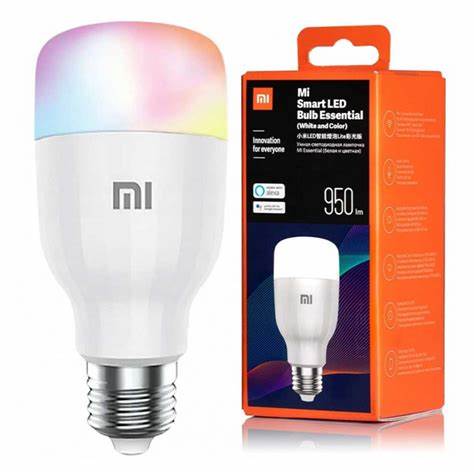
Connecting your Xiaomi Smart Bulb to Google Home allows you to control your lighting using voice commands and integrate it seamlessly into your smart home ecosystem. This guide provides a step-by-step approach to achieve this integration.
Prerequisites
Before starting, ensure the following:
- Your Xiaomi Smart Bulb is compatible with Google Assistant.
- You have the Mi Home app installed and set up on your smartphone.
- You have the Google Home app installed and set up on your smartphone.
- Both your smartphone and the smart bulb are connected to the same Wi-Fi network.
- You have a Google account linked to your Google Home app.
Step-by-Step Guide
- Set Up the Xiaomi Smart Bulb in the Mi Home App
- Install and Open Mi Home App
- Download the Mi Home app from the Google Play Store or Apple App Store.
- Open the app and sign in with your Xiaomi account. If you don’t have one, create a new account.
- Add the Smart Bulb
- Tap the “+” icon in the top right corner to add a new device.
- Select “Add device” and search for your Xiaomi Smart Bulb model.
- Follow the on-screen instructions to connect the bulb to your Wi-Fi network.
- Rename the Bulb
- After successful setup, rename the bulb to a recognizable name, such as “Living Room Light,” for easier voice control.
- Link Mi Home to Google Home
- Open Google Home App
- Launch the Google Home app on your smartphone.
- Add Device
- Tap the “+” icon in the top left corner.
- Select “Set up device.”
- Choose “Works with Google.”
- Link Mi Home Account
- In the list of available services, search for “Mi Home.”
- Tap on “Mi Home” and sign in with your Xiaomi account credentials.
- Authorize Google to access your Mi Home devices.
- Assign Devices to Rooms
- After linking, your Xiaomi Smart Bulb will appear in the device list.
- Assign the bulb to a specific room for organized control.
- Control the Bulb Using Google Assistant
Now that the bulb is linked, you can control it using voice commands:
As an Amazon Associate I earn from qualifying purchases.
Do these 3 things before closing this tab:
1Repair Windows errors before they cause bigger problems2Fix the driver behind crashes, sound loss and screen glitches3Clear out junk files and repair common Windows errors- “Hey Google, turn on the Living Room Light.”
- “Hey Google, dim the Living Room Light to 50%.”
- “Hey Google, change the Living Room Light to blue.”
Troubleshooting Tips
- Bulb Not Responding: Ensure the bulb is powered on and connected to the Wi-Fi network.
- Device Not Appearing in Google Home: Confirm that the Mi Home account is correctly linked to Google Home.
- Voice Commands Not Working: Check that the bulb’s name is easily pronounceable and doesn’t conflict with other device names.
Personal Experience
In my experience, integrating Xiaomi Smart Bulbs with Google Home has streamlined my daily routines. The ability to control lighting through voice commands adds convenience and enhances the smart home experience.
Quick Recap
Shopping ad

- 16 Million DIY Colors: Govee smart light bulbs own millions of color and 54 preset scene modes, you can explore your favored one or pick one suits your moods most, bringing yourself a real fantastic lighting experience(Working Voltage: AC 120V).
- Music Sync: Our smart light bulbs change color and brightness simultaneously when sounds are detected by the microphone on your phone. Note: only works when the microphone is not occupied. Download Govee Home App and enable microphone permissions.
- Smart Control: Govee color changing light bulbs make it possible to control your bulbs with simple voice commands. And you'd also feel free to turn your smart light bulbs on/off, adjust brightness, or change the colors, set scenes via Govee Home App. (Note: Doesn't support 5G)
- Group Control: Simplify daily setups by grouping smart bulbs & Govee devices. Create a scheme, add devices, and control them simultaneously. Ensure bulbs are on stable 2.4GHz WiFi for optimal experience. Please Note: This A19 smart bulb cannot be used with smart switches.
- Timer and Schedule: Applying the ceiling fan light bulbs to your daily routine now is easier than ever, with timer function and modes like Sunrise & Sunset, you can set your bulbs to brighten when you wake up, and gradually dim when you fall asleep.
Shopping ad

- 【Matter-Certified】 Matter devices work with any certified platform such as Apple Home, Alexa, Google Home & SmartThings. All Matter-certified devices in your local area network (LAN) will work smoothly even when your home internet goes offline. Take control of your smart home with Matter Multi-Admin by granting access to trusted individuals to manage your devices with ease and security.
- 【Extra Bright 1100-Lumen Light】Tapo L535E provides 1100 lumens of crisp, high-quality lighting, which is brighter than most standard 800-lumen smart color bulbs. It can brighten up your daily routine or activities and is ideal for any space in your home that requires brighter lighting.
- 【Millions of Colors & Dimmable】 Easily design scenarios with various vivid colors for your daily routine or special activities with this smart light bulbs. Adjust the brightness from 1% to 100% conveniently with the Tapo app.
- 【Vibrant Colors & Tunable white】 Experience more attractive and vibrant colors with a higher Color Rendering Index (CRI). Witness the true color spectrum in every corner of your home. Tune your lights to warm white (2500K) for restful sleep in the evening, or cool white (6500K) during working hours or when you need a morning boost.
- 【Voice & Remote Control】 Free up your hands by using simple voice commands with Alexa, Siri, or Google Assistant. Control your smart light bulbs from anywhere with the Tapo app Dim, turn on or off, or change the colors of your light bulb remotely at your fingertips.
Shopping ad

- Long battery life Soft ambient glow Smart dual sensor detection Effortless switching between two modes
Shopping ad

- Higher Brightness: With over 1000 lumens (120V), these smart bulbs can brighten large space for your home. Get high brightness (75W Equivalent) and vibrant colors(CRI90+) while saving more on your energy bill.
- Millions of Color Options: Select from 16 million colors and 1-100% dimmable brightness to make your space feel more vibrant with 1000 high lumens options for holiday decorations. There are also tunable 2700k-6500k warm white to cool daylight options for reading or relaxing.
- Light It Your Way: With Govee Home App, you can access up to 54 scene modes for your Wi-Fi light bulbs. Our smart light bulbs change color when your phone's microphone detects sound. You can also use the timer schedule of Sunrise & Sunset to fit in with your daily routine.
- Easy Smart Control: With a more stable connection on Wi-Fi and Bluetooth, you can control the smart bulbs remotely using Govee Home App or voice control your smart bulbs via Matter, Alexa or Google Assistant.
- Group Control: Own more than one Govee smart product? Create a group to simultaneously control multiple smart bulbs from anywhere with stable 2.4GHz Wi-Fi. You can also control these color-changing light bulbs with your family for added fun.
Shopping ad

- Multicolor & Auto White: Dimmable 16 million colors and warm to cool whites(2500K-6500K). Set your bulb to automatically adjust its color temperature to match natural light patterns from dawn to dusk. Explore endless lighting possibilities to create your favorite light effects for everything from a dinner party to a late-night study session. Great for holiday decorations.
- Voice Control: Get hands-free control of your lights with your voice via Amazon Alexa or Google Assistant. Perfect for times when your hands are full or entering a dark room.
- Remote Control: Control your smart light bulb from anywhere with your smartphone using the free Kasa smart app (iOS, Android). Dim, turn on or off or change the colors of your light bulb remotely at your fingertips.
- Energy Monitoring & Scheduling: Monitor real-time energy usage. Drive down energy consumption without losing quality (60 W equivalent). Use timer or schedules to set your lights to automatically turn on and off whenever you want, such as waking up with a soft glow in the morning with sunrise offset.
- Trusted & Reliable: Kasa is trusted by over 6 Million users. UL certified for safety use. Require 2.4GHz Wi-Fi network connection.
Product prices and availability are accurate as of the date/time indicated and are subject to change. Any price and availability information displayed on Amazon at the time of purchase will apply.
Independent reader supportYour contribution helps us test, update, and keep practical guides available for everyone.