Zim
Zim is a free desktop text editor for maintaining a personal collection of linked wiki pages, with offline access on Linux, macOS, and Windows.
What Zim is
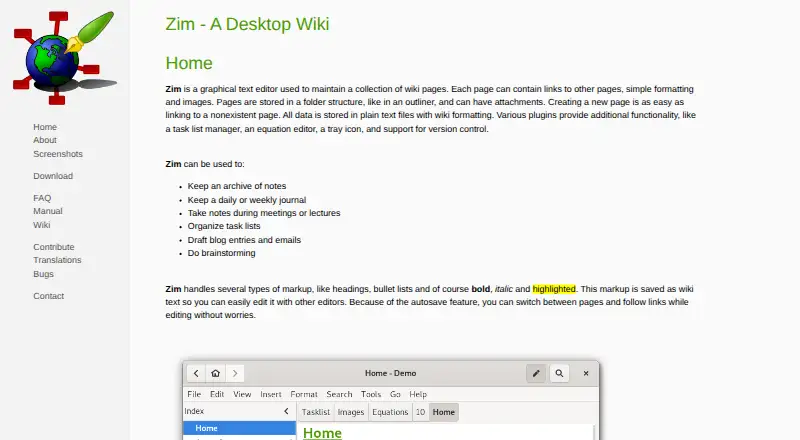
Zim is a free desktop text editor for maintaining a personal collection of linked wiki pages, with offline access on Linux, macOS, and Windows. It saves pages automatically as plain text files using wiki formatting, while images remain separate linked files. Pages can be arranged hierarchically, and backlinks show which other pages refer to a page. Zim reopens at the location where it was closed. Included plugins provide tools such as spell checking, equations, task lists, full-text search, a tray icon, and version control support. Notebooks can be exported to HTML, LaTeX, Markdown, and reStructuredText. The project describes uses ranging from personal notes and TODO lists to journals, meeting notes, brainstorming, and longer drafts. It integrates with Git, Mercurial, and Bazaar. Zim is designed for one user rather than shared notebook editing, and notebooks lack native encryption and password protection. The listed Windows installer supports 64-bit Windows 11; the macOS app supports Big Sur through Sequoia.
Good
- Works offline on Linux, macOS, and Windows
- Automatically saves and restores the last location
- Exports to HTML, LaTeX, Markdown, and reStructuredText
- Includes full-text search and version control support
Watch out
- Designed for a single user, not shared editing
- No native encryption or password protection
- Windows installer excludes older and 32-bit systems
Who it suits
Zim suits individuals who want an offline, linked notebook for notes, lists, journals, or longer drafts. It is less suited to shared notebooks or users who need built-in password protection.
Verdict
Zim combines plain-text storage, linked pages, and useful export options in a free offline editor. Its single-user design and lack of native notebook protection may rule it out for some users.
Plans and prices
From Zim's own pricing page, checked 9 Oct 2026.
| Plan | Price | What it gives you |
|---|---|---|
| Zim | Free | Completely free software; open source |
The facts
Each one read from Zim's own pages, with the date it was checked.
What it does
- Autosave
- Pages are saved automatically, and Zim reopens at the place where it was closed.checked 9 Oct 2026
- Collaboration
- Zim is described as a single-user program not intended for multiple people sharing one notebook, though users can work with version control such as Git or Mercurial.checked 9 Oct 2026
- Dependencies
- Some plugins have external dependencies that are not required for Zim's core functionality.checked 9 Oct 2026
- Export
- Zim supports exporting to HTML, LaTeX, Markdown, and reStructuredText formats.checked 9 Oct 2026
- Integrations
- Git,Mercurial,Bazaarchecked 20 Sep 2026
- Note sharing
- Nochecked 20 Sep 2026
- Offline access
- Yeschecked 20 Sep 2026
- Organization
- Pages can be organized hierarchically and linked pages show backlinks to pages that refer to them.checked 9 Oct 2026
- Plugins
- Included plugins include spell checking, an equation editor, a task list, a tray icon, full text search, and version control support.checked 9 Oct 2026
- Product
- Zim is a graphical text editor for maintaining a collection of linked wiki pages on a desktop.checked 9 Oct 2026
- Real-time collaboration
- Nochecked 20 Sep 2026
- Security
- Zim notebooks do not natively support encryption or password protection; the FAQ suggests using an external encryption tool such as encfs.checked 9 Oct 2026
- Storage
- Pages are saved as plain text files with wiki formatting, and images are stored as linked image files.checked 9 Oct 2026
- Support
- The project directs bug reports to its GitHub issue tracker and lists an IRC channel, public wiki, and mailing list as community resources.checked 9 Oct 2026
- Use cases
- The project describes Zim for personal notes, TODO lists, journals, meeting notes, brainstorming, and drafting longer documents.checked 9 Oct 2026
Money
- Free plan
- Yeschecked 20 Sep 2026
Where it runs
- macOS support
- The listed macOS app supports macOS Big Sur through macOS Sequoia.checked 9 Oct 2026
- Platforms
- The download page lists Windows and macOS installers and packages for multiple Linux distributions and BSD flavors.checked 9 Oct 2026
- Supported platforms
- windows,macos,linuxchecked 20 Sep 2026
- Windows support
- The listed Windows installer is built and tested on 64-bit Windows 11; older versions and 32-bit systems are not supported by that installer.checked 9 Oct 2026
Alternatives to Zim
- 1

Notion
Free planAndroidiOSWebmacOS9.1From $10 a month - 2

Goodnotes
Free planAndroidiOSWebmacOS9.0From $11.99 a year - 3
Turtl
Free planOpen sourceAndroidAPIExtensionLinux9.0From $3 a month - 4

Obsidian
Free planAndroidiOSExtensionLinux8.9From $50 a year - 5

Supernotes
Free planAndroidiOSWebAPI8.9From £6 a month - 6
Notesnook
Free planAndroidiOSWebLinux8.8From $1.99 a month