
YouCam Enhance
YouCam Enhance is an AI-powered photo and video enhancement app from Perfect Corp, available on Android, iOS and the web.
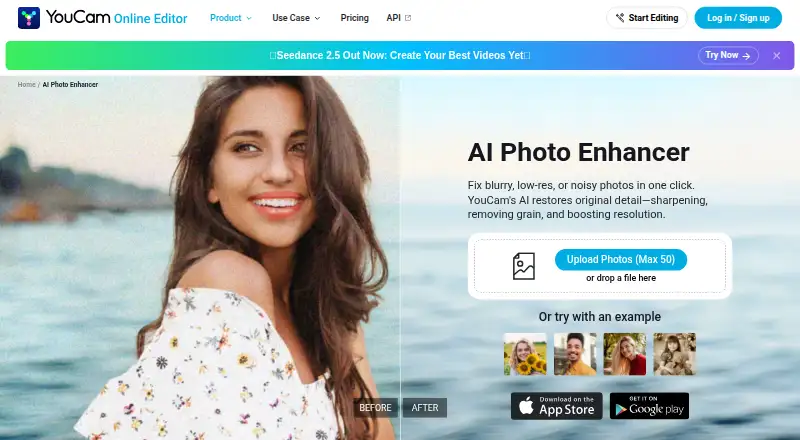
What YouCam Enhance is
YouCam Enhance is an AI-powered photo and video enhancement app from Perfect Corp, available on Android, iOS and the web. Its photo tools can unblur and sharpen images, reduce noise, improve lighting and upscale images by up to 4x or near 4K quality. AI Photo Repair can address scratches, noise, faded colors and lighting in old or damaged photos. Video features include enhancement, repair, lighting correction, denoising and upscaling to 4K. The app also supports AI image generation, image-to-video and text-to-video generation, plus a chat-based AI editing assistant. The browser photo enhancer accepts JPG, PNG and WEBP, with batch uploads of up to 50 photos. Premium includes batch processing, and the app page says photo enhancement and lighting tools support batch work. Some advanced AI generation features use credits and may require an additional purchase even on paid plans. The app is free to download; Premium pricing varies by region and promotion. iPhone requires iOS 16.0 or later, and iPad is not currently supported.
Good
- Free to download, with a free plan.
- Enhances and restores photos and videos.
- Browser tool accepts JPG, PNG and WEBP.
- Browser batch uploads support up to 50 photos.
- Supports Android, iOS and web.
Watch out
- Some AI generation features may need extra credits.
- iPad is not currently supported.
- iPhone requires iOS 16.0 or later.
- Premium pricing varies by region and promotions.
Who it suits
It suits photographers, online sellers, creators and people preparing social posts, product photos or print materials. iPhone users need iOS 16.0 or later, and iPad users should note that iPad is not supported.
Verdict
YouCam Enhance covers photo repair, video enhancement and generative tools across mobile and web. Check platform limits and credit requirements, and confirm Premium pricing in the relevant app store.
Plans and prices
From YouCam Enhance's own pricing page, checked 4 Oct 2026.
| Plan | Price | What it gives you |
|---|---|---|
| Free download | Free | Free to download; Premium subscription unlocks unlimited AI features, batch processing, and higher-quality output; some advanced AI generation features may require additional credits |
| Premium subscription | Priced on request | Unlimited basic enhancement features on paid plans; some advanced AI generation features may require additional credits · Pricing varies by region and promotional period; check the App Store or Google Play |
The facts
Each one read from YouCam Enhance's own pages, with the date it was checked.
What it does
- AI generation and editing
- The app also supports AI image generation, image-to-video and text-to-video generation, plus a chat-based AI editing assistant.checked 4 Oct 2026
- Batch processing
- Premium includes batch processing, and the app page says photo enhancement and lighting tools support batch work.checked 4 Oct 2026
- Credit limits
- Some advanced AI generation features, including video generation and image-to-video, use credits and may require an additional purchase even on paid plans.checked 4 Oct 2026
- Intended users
- The maker describes use cases including photographers, online sellers, creators, social media posts, e-commerce product photography, and print materials.checked 4 Oct 2026
- Photo enhancement
- Its photo tools unblur and sharpen images, reduce noise, improve lighting, and upscale images by up to 4x or near 4K quality.checked 4 Oct 2026
- Photo restoration
- AI Photo Repair can detect and fix scratches, noise, faded colors, and lighting in old or damaged photos.checked 4 Oct 2026
- Purpose
- YouCam Enhance is an AI-powered photo and video enhancement app developed by Perfect Corp.checked 4 Oct 2026
- Security
- The app page says store privacy disclosures indicate data is encrypted in transit and no data is shared with third parties; device identifiers and usage data are collected for analytics and app functionality and are not linked to personal identity.checked 4 Oct 2026
- Support
- Users can contact support through Settings → Send Feedback inside the app.checked 4 Oct 2026
- Video tools
- The app offers video enhancement, repair, lighting correction, and denoising, with video upscaling up to 4K.checked 4 Oct 2026
- Web formats and batch limit
- The browser photo enhancer supports JPG, PNG, and WEBP and allows batch uploads of up to 50 photos.checked 4 Oct 2026
The company
- Founded
- 2015checked 23 Sep 2026
Money
- Free trial
- A free trial is offered on yearly plans, with duration and availability varying by region and promotion.checked 4 Oct 2026
Where it runs
- Platforms and device limits
- The app is available for iPhone and Android; iPhone requires iOS 16.0 or later, supports Apple Vision, and iPad is not currently supported.checked 4 Oct 2026
The full review of YouCam Enhance
YouCam Enhance is an AI-powered photo and video enhancement app from Perfect Corp., available on mobile and the web. It suits people who need to repair older images or improve photos and clips without separating those jobs across tools. Its strongest case is the breadth of enhancement and creative features; paid access still does not remove credit charges for some advanced generation.
Overview
Photo repair is the clearest reason to choose YouCam Enhance: it can sharpen and unblur images, reduce noise, improve lighting, upscale up to 4x or near 4K quality, and repair scratches and faded color in old photos. Video enhancement adds repair, lighting correction, denoising and upscaling to 4K. That range makes it more versatile than a photo-only enhancer, though advanced video and image-to-video generation can consume credits even for subscribers.
Key features
Photo and video repair
AI Photo Repair targets the common problems in old or damaged photographs, including scratches, noise, faded colors and poor lighting. Face enhancement and an all-in-one enhancement mode broaden its photo tools. The stated maximum output resolution is 16.777216 MP, so the near-4K claim should not be read as unlimited resolution for every image.
Video tools cover enhancement, repair, lighting and denoising, with upscaling up to 4K. This is useful for people who want both still-image restoration and clip cleanup in one app, but generation features bring a separate credit consideration.
Batch work and generative tools
Premium includes batch processing, and photo enhancement and lighting tools support batch work. In the browser, users can upload up to 50 photos at once in JPG, PNG or WEBP format. That is a practical advantage for sellers or creators handling repeated image corrections; it does not mean every tool or platform has the same batch limit.
AI image generation, image-to-video and text-to-video generation, plus a chat-based editing assistant, extend the app beyond restoration. These extras are less straightforward to budget for: some advanced generation, including video and image-to-video, uses credits and may require an additional purchase even on a paid plan.
Pricing
Free download
The free download costs nothing. It provides a way to start with the app, but Premium is required for unlimited AI features, batch processing and higher-quality output. Readers who only need occasional enhancement may find the free entry point sufficient; frequent or batch work points toward a subscription.
Premium subscription
Premium has custom pricing: the price varies by region and promotional period, and billing is through the App Store or Google Play. Paid plans include unlimited basic enhancement features, but some advanced AI generation features may still require additional credits. Check the relevant store before subscribing, particularly if video generation is central to the purchase.
A free trial is offered. The subscription terms provided do not state a trial length or renewal schedule, so confirm those terms in the store before starting the trial.
Platforms
YouCam Enhance is available on Android, iOS and the web. On iPhone it requires iOS 16.0 or later and supports Apple Vision; iPad is not currently supported. The web photo enhancer accepts JPG, PNG and WEBP, with batch uploads capped at 50 photos.
The app’s privacy disclosures say data is encrypted in transit and not shared with third parties. Device identifiers and usage data are collected for analytics and app functionality and are not linked to personal identity. Support is available through Settings → Send Feedback in the app.
Who it's for
Photographers, online sellers and creators can use the repair tools to improve image clarity and lighting, while e-commerce teams may benefit from browser batch uploads. It also suits people restoring damaged family photos or preparing images for social posts and print materials. It is a less compelling fit for someone seeking predictable all-in pricing for frequent generative video work, since credits can add to a subscription.
Pros and cons
- Pros: Photo restoration covers scratches, noise, faded color and lighting, giving old or damaged images a defined repair path.
- Pros: Photo and video enhancement, repair and upscaling sit alongside AI generation and chat-based editing, reducing the need to switch between separate kinds of tools.
- Pros: Browser batch uploads support up to 50 JPG, PNG or WEBP photos, a useful workflow for repeated product or creator imagery.
- Cons: Premium pricing varies by region and promotion, so the recurring cost must be checked in the relevant app store.
- Cons: Some advanced generation features may require extra credits even on paid plans, making total spend less predictable for heavy use.
- Cons: iPad is not supported, limiting iOS users who want a tablet workflow.
Alternatives
AI Photo Enhancer Software is the category directory for comparing options. Consider PicWish Photo Enhancer if you want broad platform coverage, including Windows, macOS and API, or a free allowance of five standard enhancements per day; its free downloads are limited to non-HD for most features. ImageColorizer may suit someone who prefers a defined free monthly allowance of 50 credits and single processing, or a paid Starter plan at $6.90 a month.
PhotoBoost offers a free starting point with two introductory credits and cloud output up to 3 MP. LetsEnhance is an API-only option with 10 free credits on signup and output up to 8 megapixels on its free plan. AI Photo Enhancer is another paid option with a free plan and trial, across iOS, macOS and web.
Choose Topaz Photo if you want a paid Windows or macOS tool with unlimited local rendering; its Personal plan is $25 a month, billed every month for 12 months. AVCLabs Photo Enhancer AI offers a paid, credit-based alternative on Android, macOS, web and Windows. Remini is a freemium option for web, iOS and Android, with weekly premium tiers.
Verdict
YouCam Enhance is a strong fit for creators, photographers and sellers who want photo restoration, batch enhancement and video cleanup in one place. Choose it for that breadth and its dedicated repair tools; look elsewhere if you need a clear subscription price or expect advanced generative video use without extra credit costs.
Alternatives to YouCam Enhance
- 1

ImageColorizer
Free planAndroidiOSWebmacOS8.2From $19.99 a year - 2
PhotoBoost
Free planAndroidiOSWebLinux8.2From $39.99 a year - 3

PicWish Photo Enhancer
Free planAndroidiOSWebAPI8.0From $9.95 a month - 4

DaVinci AI Photo Restoration
AndroidiOSWeb7.7From $39.99 a month - 5
Hotpot AI Photo Restorer
Free planWebAPISelf-hosted7.6$12 one-time - 6
LetsEnhance
Free planAPI7.1From $9 a month