y-cruncher
y-cruncher computes Pi and other mathematical constants to trillions of digits, and also serves as a multi-threaded benchmark and stress-testing program for …
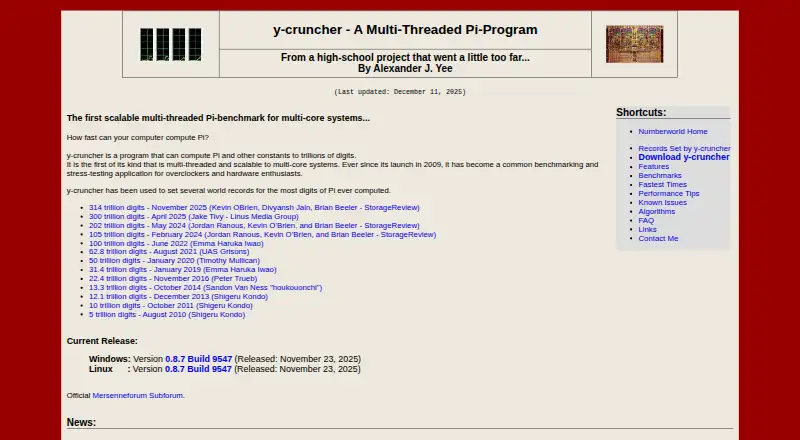
What y-cruncher is
y-cruncher computes Pi and other mathematical constants to trillions of digits, and also serves as a multi-threaded benchmark and stress-testing program for overclockers and hardware enthusiasts. For most constants, it uses separate methods for calculation and verification. Its multithreading can use modern multi-core processors without significantly increasing memory use, and it supports SIMD instruction sets including SSE, AVX, and AVX512. For calculations that exceed available memory, the program manages swap space and can use multiple drives for disk swapping. It can detect and correct minor errors attributed to hardware instability or software bugs. Windows and Linux downloads are listed. Linux users can choose a static build, which lacks TBB and NUMA binding, or a dynamic build that supports all features but is less portable. Listed requirements include Windows 8 or later, 64-bit Linux, and an x86 or x64 processor. The project is on hiatus for major algorithm redesigns and rewrites, though maintenance and some processor optimizations will continue. Non-commercial and academic use is free; commercial licensing may be available by contacting the developer.
Good
- Calculates Pi and other constants to trillions of digits
- Separate calculation and verification methods for most constants
- Supports SSE, AVX, and AVX512
- Can use multiple drives for disk swapping
Watch out
- Static Linux build lacks TBB and NUMA binding
- Dynamic Linux build is less portable
- Major algorithm redesigns and rewrites are on hiatus
- Commercial-use licensing requires contacting the developer
Who it suits
It suits overclockers and hardware enthusiasts who want to calculate mathematical constants or benchmark and stress-test systems. Linux users should choose between the static build’s feature limits and the dynamic build’s lower portability.
Verdict
y-cruncher combines large constant calculations with benchmarking and stress testing, plus tools for memory pressure and minor errors. Check the Linux build trade-offs and licensing terms for your intended use.
Plans and prices
From y-cruncher's own pricing page, checked 8 Oct 2026.
| Plan | Price | What it gives you |
|---|---|---|
| Non-commercial / academic use | Free | Non-commercial use; academic use permitted, including commercial technology reviews · commercial-purpose licensing may be available by contacting the developer |
The facts
Each one read from y-cruncher's own pages, with the date it was checked.
What it does
- Benchmarking
- The maker describes it as a multithreaded, scalable Pi benchmark used for benchmarking and stress testing by overclockers and hardware enthusiasts.checked 8 Oct 2026
- Commercial licensing
- Commercial use requires contacting the developer, and the license says commercial-use licenses may be available depending on intended usage.checked 8 Oct 2026
- Developer
- The product page identifies Alexander J. Yee as its author.checked 8 Oct 2026
- Distribution
- The license permits mirroring and distributing the software free of charge for any purpose.checked 8 Oct 2026
- Downloads
- The maker lists Windows and Linux downloads; Linux builds are available in static and dynamic versions.checked 7 Oct 2026
- Error handling
- The maker describes the program as semi-fault-tolerant and says it can detect and correct minor errors caused by hardware instability or software bugs.checked 8 Oct 2026
- Large computations
- It manages swap space for computations that need more memory than is available and can use multiple hard drives for faster disk swapping.checked 8 Oct 2026
- License
- Downloading the listed binaries constitutes acceptance of the license agreement.checked 7 Oct 2026
- Multithreading
- Its multithreading can use modern multi-core processors without significantly increasing memory usage.checked 7 Oct 2026
- Performance
- It supports multithreading and SIMD vector instructions including SSE, AVX, and AVX512.checked 8 Oct 2026
- Purpose
- y-cruncher computes Pi and other mathematical constants to trillions of digits.checked 8 Oct 2026
- Requirements
- The maker lists Windows 8 or later, 64-bit Linux, and an x86 or x64 processor as system requirements.checked 7 Oct 2026
- Support and maintenance
- The developer says the project is on hiatus for major algorithm redesigns and rewrites, while maintenance and some processor optimizations will continue.checked 7 Oct 2026
- System requirements
- The listed requirements include Windows 8 or later, 64-bit Linux, and an x86 or x64 processor.checked 8 Oct 2026
- Vectorization
- It supports processor SIMD instruction sets including SSE, AVX, and AVX512.checked 7 Oct 2026
- Verification
- For most constants, the program provides separate algorithms for computation and verification.checked 8 Oct 2026
- Warranty
- The license provides the software as is and disclaims warranties, including implied warranties of merchantability and fitness.checked 8 Oct 2026
The company
- Founded
- 2009checked 28 Sep 2026
Where it runs
- Linux limitation
- The static Linux build lacks TBB and NUMA binding; the dynamic build supports all features but is described as less portable.checked 8 Oct 2026
- Platforms
- The current release page lists downloads for Windows and Linux, with static and dynamic Linux builds.checked 8 Oct 2026
The full review of y-cruncher
Overview
y-cruncher is a Windows and Linux program for calculating Pi and other mathematical constants at very large scales, with a separate role as a processor benchmark and stress test. It suits hardware enthusiasts and researchers who need demanding multi-core computation as well as a way to check results.
Its appeal is the unusual mix of large calculations, verification, and hardware stress testing in a free non-commercial package. Choose something else if the goal is to adjust CPU, memory, or motherboard settings: y-cruncher runs workloads but does not tune hardware.
Key features
For most constants, y-cruncher offers separate algorithms for calculation and verification. That distinction is useful when a result needs checking rather than simply timing a run, though its verification is tied to the constants it supports.
Multithreading can use modern multi-core processors without significantly increasing memory use, and SIMD support includes SSE, AVX, and AVX512. These capabilities make it a demanding benchmark and stress test across multi-vendor x86 and x64 hardware. They serve computation, not overclocking: there are no CPU or memory tuning controls, motherboard controls, or automatic overclocking.
When a calculation exceeds available memory, y-cruncher manages swap space and can use multiple drives to speed disk swapping. It can also detect and correct minor errors caused by hardware instability or software bugs. Those features help sustain large runs, but do not turn the program into a substitute for stable hardware or a general-purpose error-correction tool.
Pricing
The non-commercial and academic-use plan costs nothing. Academic use is permitted, including commercial technology reviews; other commercial use requires contacting the developer, and a commercial-use license may be available depending on intended usage. There is no free trial because the software is free for the permitted uses.
Downloading the listed binaries constitutes acceptance of the license agreement. The license permits free mirroring and distribution, but provides the software as is and disclaims warranties, including implied warranties of merchantability and fitness. Organizations should settle licensing before relying on it for commercial-purpose work.
Platforms
The listed system requirements are Windows 8 or later, 64-bit Linux, and an x86 or x64 processor. Linux users can choose static or dynamic builds: the static version is more portable but lacks TBB and NUMA binding, while the dynamic build supports all features but is less portable. Windows users avoid that particular trade-off.
The project is on hiatus for major algorithm redesigns and rewrites, although maintenance and some processor optimizations will continue. That makes y-cruncher a strong fit for current calculation and stress-testing needs, but readers seeking an actively advancing feature set should weigh the more limited development direction.
Who it's for
y-cruncher is best for overclockers and hardware enthusiasts who want a substantial multi-threaded CPU workload, and for users calculating large mathematical constants who value separate verification algorithms. Its ability to work beyond available memory is also relevant when a calculation exceeds RAM and suitable disk space is available.
It is not the right choice for changing clock speeds, memory settings, or motherboard behavior. Nor is its free plan intended for general commercial use; that requires a licensing conversation with the developer.
Pros and cons
- Pro: Separate calculation and verification algorithms for most constants give large results an additional correctness check.
- Pro: Multithreading and SSE, AVX, and AVX512 support make it useful for processor benchmarking and stress testing.
- Pro: Swap management and multi-drive swapping let computations exceed available memory.
- Con: It has no CPU, memory, or motherboard tuning controls, so it cannot replace overclocking utilities.
- Con: The static Linux build omits TBB and NUMA binding; the full-featured dynamic build sacrifices portability.
- Con: Major algorithm redesigns and rewrites are on hiatus, limiting the project's stated development ambitions.
Alternatives
For memory-focused testing, MemTest86 is a better fit when its Free Edition's lack of usage restrictions or its Pro Download, at $116, paid once with free upgrades for 12 months, matches your needs. HCI MemTest is another memory-testing option, with a free Windows version and a 5.00 USD one-time Pro plan.
MemTest86+ suits readers who want a free, GPLv2 stand-alone memory tester for private or commercial use. OCCT is an alternative for personal testing, with a free Personal plan and a 4.50 EUR-per-month Supporter plan.
Prime95, RyzenAdj, Universal x86 Tuning Utility, and ASUS GPU Tweak III are additional alternatives. Browse the PC Overclocking Software category for more options.
Verdict
Choose y-cruncher if you want a free, non-commercial tool that combines exceptionally large constant calculations with processor benchmarking, stress testing, and result verification. Its memory-aware handling of oversized runs is a notable strength. Look elsewhere if you need hardware tuning controls, a fully featured portable Linux build, or a commercial license without first discussing intended use.
Getting started
- Visit https://www.numberworld.org/y-cruncher/.
- Choose the Windows or Linux download.
- On Linux, choose between the static build, which lacks TBB and NUMA binding, and the dynamic build, which supports all features but is less portable.
- Confirm your system meets the listed requirements: Windows 8 or later, 64-bit Linux, and an x86 or x64 processor.
- Review and accept the license agreement when downloading the binaries.
Limits worth knowing
The free plan is for non-commercial and academic use. Commercial use requires contacting the developer; commercial-purpose licenses may be available depending on intended usage.
Questions
Is y-cruncher free?
Yes, non-commercial and academic use is free. Commercial use requires contacting the developer for licensing.
Which operating systems does it support?
The listed downloads are for Windows and Linux. Requirements include Windows 8 or later or 64-bit Linux, and an x86 or x64 processor.
Does it have a free trial?
No. The listed pricing model is freemium with a free plan and no free trial.
Who developed y-cruncher?
The site identifies Alexander J. Yee as the developer.
What are the Linux build differences?
The static version lacks TBB and NUMA binding. The dynamic version supports all features but is less portable.
Can it be used commercially?
Commercial use requires contacting the developer. The license says commercial-use licenses may be available depending on intended usage.
Alternatives to y-cruncher
- 1
MemTest86
Free planLinuxmacOSSelf-hostedWindows7.5From $76 a year - 2
HCI MemTest
Free planLinuxWindows7.3$5 one-time - 3
CoreCtrl
Free planOpen sourceLinux7.1Free plan - 4
AIDA64
AndroidiOSWindows7.0€59.95 one-time - 5

ASUS GPU Tweak III
Free planWindows6.7Free plan - 6

OCCT
Free planLinuxWindows6.6Free plan