Xpano
Xpano is a panorama tool for Linux, macOS and Windows that imports image directories and detects groups of pictures that can be stitched together.
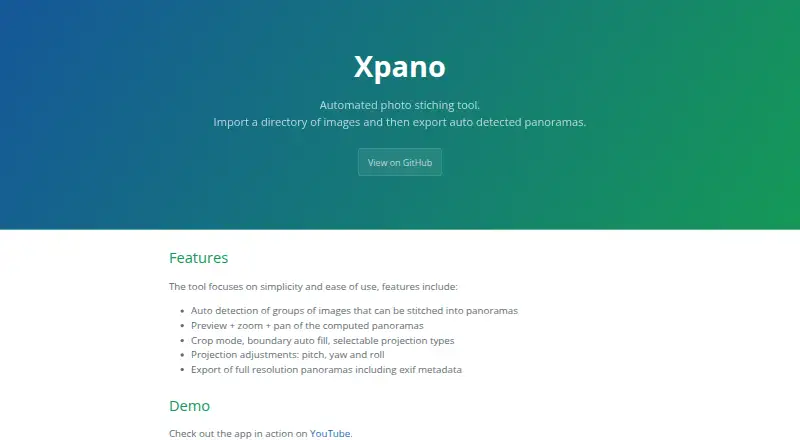
What Xpano is
Xpano is a panorama tool for Linux, macOS and Windows that imports image directories and detects groups of pictures that can be stitched together. You can preview computed panoramas, zoom and pan around them, then use crop mode, boundary auto fill, projection choices, and pitch, yaw and roll adjustments. The app uses OpenCV and its stitching module to compute panoramas, then exports full-resolution images with EXIF metadata. It also supports automatic command-line processing and can open its graphical interface with the --gui flag. The maximum panorama size is user selectable and defaults to 100 MPx. Xpano is distributed under the GPL-3.0-or-later license, and its listed plan is free with no price or usage limits stated. The project names Tomas Krupka as maintainer and contact. Its release page says build logs can be used to verify the source commit hash and SHA-256 checksum.
Good
- Automatically detects image groups for panoramas
- Preview, zoom and pan before export
- Offers crop and projection controls
- Exports full-resolution panoramas with EXIF metadata
- Supports automatic command-line processing
Watch out
- Maximum panorama size defaults to 100 MPx
- Distributed under the GPL-3.0-or-later license
Who it suits
Xpano suits users who want to turn sets of images into panoramas on Linux, macOS or Windows. Its command-line processing may also suit users who want to automate the workflow.
Verdict
Xpano combines automatic image grouping with preview, adjustment and export tools across desktop platforms. It is listed as free, with no stated usage limits.
Plans and prices
From Xpano's own pricing page, checked 4 Oct 2026.
| Plan | Price | What it gives you |
|---|---|---|
| Xpano | Free | No price or usage limits stated |
The facts
Each one read from Xpano's own pages, with the date it was checked.
What it does
- Command line
- Xpano supports automatic command-line processing and can launch its GUI with the --gui flag.checked 4 Oct 2026
- Developer
- The project page names Tomas Krupka as its maintainer and contact.checked 4 Oct 2026
- Editing
- Xpano includes crop mode, boundary auto fill, selectable projection types, and pitch, yaw, and roll adjustments.checked 4 Oct 2026
- Export
- Xpano exports full resolution panoramas with EXIF metadata.checked 4 Oct 2026
- Image grouping
- The tool automatically detects groups of images that can be stitched into panoramas.checked 4 Oct 2026
- Image processing
- The app uses OpenCV and its stitching module to compute panoramas.checked 4 Oct 2026
- License
- Xpano is distributed under the GPL-3.0-or-later license.checked 4 Oct 2026
- Maximum size
- The release notes state that the maximum panorama size is user selectable and defaults to 100 MPx.checked 4 Oct 2026
- Preview
- Computed panoramas can be previewed, zoomed, and panned.checked 4 Oct 2026
- Purpose
- Xpano imports a directory of images and exports automatically detected panoramas.checked 4 Oct 2026
- Source verification
- The release page says build logs can be used to verify the source commit hash and SHA-256 checksum.checked 4 Oct 2026
Where it runs
- Platforms
- The maker lists Windows and macOS executables, Ubuntu packages, Nix packages, Flathub, and the Microsoft Store.checked 4 Oct 2026
The full review of Xpano
Overview
Xpano is a panorama-making application for turning image folders into stitched views. It is a strong fit for photographers who want automatic image grouping and fine control over a panorama without paying for software. Its appeal is focus: it takes a set of images through preview and adjustment to full-resolution export, rather than trying to serve as an all-purpose photo editor.
Key features
Xpano imports a directory and automatically identifies groups of images that can be stitched into panoramas. That can reduce the manual sorting involved in assembling a shoot, particularly when a folder contains multiple candidate sequences. The trade-off is its narrow scope: this is a panorama workflow, not a broader tool for managing or editing a photo library.
Before export, users can zoom and pan around a computed panorama, then refine it with crop mode, boundary auto fill, projection choices, and pitch, yaw, and roll adjustments. Those controls make Xpano more useful than a hands-off stitching step when framing or projection needs attention. They remain directed at the panorama itself, rather than offering general image-editing capabilities.
Exports retain full resolution and EXIF metadata, which matters when preserving image detail and capture information. Xpano uses OpenCV and its stitching module to calculate panoramas. The maximum output size is adjustable and defaults to 100 MPx, giving users a clear starting limit that can be changed for their needs.
Automatic command-line processing suits repeatable workflows, while the --gui flag launches the graphical interface. Users can choose between scripting and visual adjustment without needing separate applications for those two entry points.
Xpano is open source under GPL-3.0-or-later. The release page says build logs can be used to verify the source commit hash and SHA-256 checksum, a useful provenance check for users who care about matching a build to its source.
Pricing
Xpano: free. The free plan has no stated usage limits, and the project is open source. That makes it a straightforward choice for anyone who wants a dedicated panorama tool without a paid tier to weigh against its features.
Platforms
Xpano runs on Linux, macOS, and Windows. Its command-line processing is especially relevant to users comfortable automating work; the GUI provides a visual route for previewing and adjusting results.
Who it's for
Choose Xpano if you regularly work with overlapping images and want automatic grouping, panorama-specific adjustments, and full-resolution export across desktop operating systems. It is less suitable if you need a general photo editor or a mobile-first panorama app.
Pros and cons
- Automatic grouping: Detects image sets that can be stitched, reducing manual selection when working from a directory.
- Useful refinement controls: Preview, crop, fill, projection, and orientation adjustments offer more control than simply accepting an automatic result.
- Full-resolution export with EXIF: Preserves detail and capture metadata in the output.
- GUI and command line: Supports both visual work and automatic processing.
- Focused rather than broad: Panorama-specific tools do not replace a general-purpose photo editor.
- Adjustable size cap: The default maximum is 100 MPx, so users handling larger panoramas need to change that setting.
Alternatives
Hugin is another free, open-source option for Linux, macOS, and Windows if you want a direct alternative to compare with Xpano. OpenPano is also free and available on those three desktop platforms. For a command-line-oriented or self-hosted route, stitching offers a free Python package with CLI and Docker options. Panorama Stitcher is worth considering for macOS users who only need to stitch up to five images on its free Mini plan. PhotoPad is a freemium choice across desktop, mobile, and web platforms if broader platform coverage is more important. MikuMikuDance is another freemium option. ON1 Portrait AI and Panoweaver are paid alternatives with free trials.
Browse the Panorama Stitching Software category for more options.
Verdict
Xpano is a good choice for photographers who want a free, open-source desktop panorama workflow with automatic grouping, adjustable previews, and full-resolution export. Its focused controls and command-line mode are the main reasons to choose it; look elsewhere if your priority is general photo editing or a mobile app.
Alternatives to Xpano
- 1
PhotoPad
Free planAndroidiOSWebExtension8.2Free plan - 2

Adobe Lightroom
AndroidiOSWebmacOS7.9 - 3

Adobe Photoshop
AndroidiOSWebmacOS7.9 - 4

Luminar Neo
AndroidiOSWebAPI7.6$129 one-time - 5

ON1 Photo RAW
AndroidiOSExtensionmacOS7.5From $89.99 a year - 6
Avidemux
Free planOpen sourceWebLinuxmacOSWindows7.3Free plan