OpenPano
OpenPano is a free C++ program for automatic panorama stitching, written without computer vision libraries.
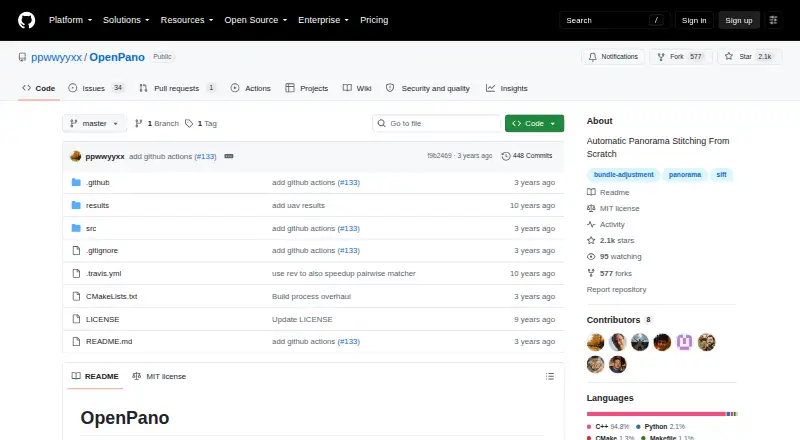
What OpenPano is
OpenPano is a free C++ program for automatic panorama stitching, written without computer vision libraries. It offers cylinder, camera estimation, and translation modes, each with its own image capture or ordering requirements. The project lists SIFT feature detection, RANSAC-based homography or affine transforms, focal estimation, bundle adjustment, and straightening techniques. It supports Linux, macOS, and Windows, with CMake and make instructions for Linux, macOS, and WSL, and a Visual Studio 2015 process for Windows. Building requires Eigen and FLANN; libjpeg and CImg are optional image input and output components. The project recommends manually reducing images of four megapixels or more to save time. Wide-angle photos with substantial distortion may work poorly unless camera parameters are used to undistort them. Default memory use can be high, while LAZY_READ reduces it with a minor slowdown. OpenPano includes an MIT License that permits use and distribution subject to its conditions, and supplies the software without warranty.
Good
- Free under an MIT License.
- Supports Linux, macOS, and Windows.
- Offers cylinder, camera estimation, and translation modes.
- Includes several listed stitching and straightening techniques.
Watch out
- Windows build instructions may not work.
- Large images may need manual downscaling.
- Default memory consumption can be large.
- Strongly distorted wide-angle images may perform poorly.
Who it suits
OpenPano suits people who want a free panorama-stitching program and are comfortable building software from source. Its multiple modes accommodate different image capture or ordering requirements.
Verdict
OpenPano provides several panorama stitching modes and a range of listed algorithms at no cost. Readers should account for its build process, image requirements, and memory use.
Plans and prices
From OpenPano's own pricing page, checked 4 Oct 2026.
| Plan | Price | What it gives you |
|---|---|---|
| OpenPano (MIT-licensed software) | Free | No pricing or usage limits stated |
The facts
Each one read from OpenPano's own pages, with the date it was checked.
What it does
- Algorithms
- The project lists SIFT features, RANSAC-based homography or affine transformation, focal estimation, bundle adjustment, and straightening techniques.checked 4 Oct 2026
- Build
- The README gives CMake and make build instructions for Linux, macOS, and WSL, plus a Visual Studio 2015 process for Windows.checked 4 Oct 2026
- Dependencies
- Build dependencies include Eigen and FLANN, while libjpeg and CImg are optional image input/output components.checked 4 Oct 2026
- Development status
- The README lists Python bindings and macOS and Windows GitHub Actions among its TODOs.checked 4 Oct 2026
- Image requirements
- The project says wide-angle images with heavy distortion do not work well unless camera parameters are used to undistort them.checked 4 Oct 2026
- License
- The repository includes the MIT License, which grants permission to use, copy, modify, distribute, sublicense, and sell copies subject to its conditions.checked 4 Oct 2026
- Memory
- The README describes memory consumption as large with the default libc allocator and says LAZY_READ can reduce it with a minor slowdown.checked 4 Oct 2026
- Purpose
- OpenPano is a C++ program for automatic panorama stitching, written from scratch without computer vision libraries.checked 4 Oct 2026
- Stitching methods
- It offers cylinder, camera estimation, and translation modes, each with stated image capture or ordering requirements.checked 4 Oct 2026
- Usage limits
- The README recommends manually downscaling images of four megapixels or more to save time.checked 4 Oct 2026
- Warranty
- The MIT license provides the software “AS IS” without warranty.checked 4 Oct 2026
Where it runs
- Windows support
- The README cautions that the Windows build process may not work and invites pull requests to improve it.checked 4 Oct 2026
The full review of OpenPano
Overview
OpenPano is a C++ program that automatically stitches images into panoramas, best suited to people comfortable building software and preparing image sets. Its range of stitching approaches is appealing at no cost, but it is a poor fit for anyone who expects a polished, ready-to-run workflow—especially on Windows.
Key features
OpenPano provides cylinder, camera-estimation and translation modes, each with its own image-capture or ordering requirements. That variety can accommodate different source sets, but users need to match the mode to how their images were made rather than expect the program to remove all setup decisions.
The project combines SIFT features with RANSAC-based homography or affine transformations, focal estimation, bundle adjustment and straightening techniques. This makes OpenPano a technically substantial option for stitching and correcting panoramas; it will suit users who value those processing components more than a consumer-focused interface.
Image preparation matters. The project recommends manually downscaling images of four megapixels or more to save time. Wide-angle shots with heavy distortion are unlikely to work well unless camera parameters are used to undistort them first. Memory consumption is high with the default libc allocator; LAZY_READ can reduce it, with a minor slowdown.
Pricing
OpenPano is free under the MIT-licensed software plan, listed as free. No usage limits are stated. The MIT License permits use, copying, modification, distribution, sublicensing and sale subject to its conditions, while providing the software “AS IS” without warranty.
Platforms
OpenPano targets Linux, macOS and Windows. Linux and macOS builds use CMake and make instructions, while the Windows process uses Visual Studio 2015; the project cautions that its Windows build may not work and invites pull requests to improve it. Build dependencies include Eigen and FLANN, with libjpeg and CImg available as optional image input/output components. The documented setup is therefore a meaningful hurdle, particularly for Windows users. Python bindings and macOS and Windows GitHub Actions remain on the project’s TODO list.
Who it's for
OpenPano makes the most sense for technically inclined users who want free panorama stitching, can build C++ software, and are willing to select a mode and prepare images to suit it. It is less suitable for people seeking a straightforward consumer workflow, users who rely on dependable Windows setup, or photographers working with heavily distorted wide-angle images who cannot undistort them first.
Pros and cons
Pros
- Free, MIT-licensed software permits modification and redistribution subject to the license conditions.
- Three stitching modes and a range of listed alignment and correction techniques give technically inclined users meaningful options.
- LAZY_READ offers a way to reduce high memory consumption, with only a minor slowdown.
Cons
- Building requires dependencies and a technical setup process, rather than a ready-to-use installation path.
- The Windows build may not work, making that platform a less dependable choice.
- Images of four megapixels or more should be manually reduced to save time; heavily distorted wide-angle images need undistortion using camera parameters.
- Default memory consumption is high, and the lower-memory option slows processing slightly.
Alternatives
For another free, open-source option across Linux, macOS and Windows, Hugin is worth considering; its plan is free to use, modify and share. Xpano is another free option for those same platforms.
Mac users who only need to stitch up to five images can consider the free Panorama Stitcher Mini. If broad platform coverage matters more than a free-only plan, PhotoPad has a free plan and supports Android, iOS, Linux, macOS, web and Windows; its Pro and Home annual plans have no published prices in the plan details.
Panoweaver is a paid alternative with a free trial and plans that include batch and HDR stitching, tripod removal, and branding or custom URL features. Readers seeking a broader photo-editing subscription can compare Adobe Lightroom, which offers plans with cloud storage and monthly generative credits. MikuMikuDance is another freemium option. For portrait-focused software, consider ON1 Portrait AI, a paid option with a free trial.
Browse more options in Panorama Stitching Software.
Verdict
Choose OpenPano if you want a free, modifiable panorama stitcher and are comfortable building software, choosing an appropriate mode and managing image size and memory. Its range of stitching methods is the main reason to choose it; look elsewhere if you need a reliable Windows build or a more turnkey workflow.
Alternatives to OpenPano
- 1
PhotoPad
Free planAndroidiOSWebExtension8.2Free plan - 2

Adobe Lightroom
AndroidiOSWebmacOS7.9 - 3

Adobe Photoshop
AndroidiOSWebmacOS7.9 - 4

Luminar Neo
AndroidiOSWebAPI7.6$129 one-time - 5

ON1 Photo RAW
AndroidiOSExtensionmacOS7.5From $89.99 a year - 6
Avidemux
Free planOpen sourceWebLinuxmacOSWindows7.3Free plan