XMS
XMS is a web-based exhibition management platform for trade fairs, connecting venue rules, event catalogs, and exhibitor self-service.
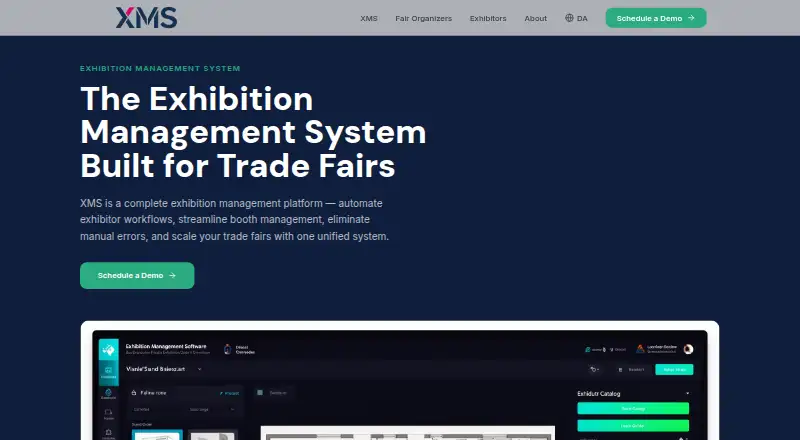
What XMS is
XMS is a web-based exhibition management platform for trade fairs, connecting venue rules, event catalogs, and exhibitor self-service. Organizers can manage pricing, deadlines, product availability, and unlimited catalogs tailored to individual events, including visibility windows. Venue owners define services for particular venues and halls, while the system validates orders against assigned locations. Exhibitors browse catalogs and order booth equipment, furniture, and services through a self-service portal. The visual Stand Designer places rented products on a digital floor plan to create booth layout blueprints. Organizers can assign booths, communicate with exhibitors, review or modify orders, create multi-level approval chains, flag orders over budget thresholds, and track changes. Automated confirmations, communication logs, batch processing, reminders, and notifications support order operations. Product usage and financial reports can be exported to accounting software, with multi-currency support and automated invoicing. Teams can assign roles and permissions across concurrent events. XMS is paid, with pricing available on request, and offers personalized demos and listed phone and email support.
Good
- Exhibitor self-service ordering portal
- Visual booth layout designer
- Multi-level approvals and budget flags
- Accounting exports with multi-currency support
- Roles and permissions across events
Watch out
- Paid platform with pricing on request
- Web platform only
- Requires a personalized demo for prospective customers
Who it suits
XMS suits fair organizers, venue owners, and exhibitors managing catalogs, booth services, approvals, and event orders. It also fits teams needing stand layouts, accounting exports, permissions, and exhibitor messaging.
Verdict
XMS brings venue constraints, catalogs, exhibitor orders, booth assignment, approvals, and reporting into one web platform. Its workflow and stand-design tools address coordinated trade-fair operations, while pricing requires contacting the provider.
The facts
Each one read from XMS's own pages, with the date it was checked.
What it does
- Accounting export
- XMS provides product usage and financial reports for export to accounting software, and states that it supports multiple currencies and automated invoicing.checked 11 Oct 2026
- Catalogs
- Organizers can create unlimited catalogs tailored to individual events and control their visibility and availability windows.checked 11 Oct 2026
- Communications
- The platform offers automated order confirmations, communication logs, batch processing, reminders, and notifications.checked 11 Oct 2026
- Demo and support contact
- XMS invites prospective customers to schedule a personalized demo and lists [email protected] and +45 60 56 04 20, with phone hours Monday–Friday 08:00–17:00 and Saturday 10:00–14:00.checked 4 Oct 2026
- Exhibitor portal
- Exhibitors can browse a rental marketplace, place orders, and design stands through a self-service portal.checked 11 Oct 2026
- Intended users
- The platform describes tools for fair organizers, location owners, and exhibitors.checked 4 Oct 2026
- Order operations
- XMS supports automated order confirmations, communication logs, batch processing, reminders, and notifications.checked 4 Oct 2026
- Order workflows
- The platform supports order review, approval or modification, multi-level approval chains, budget flags, and an audit trail of changes.checked 11 Oct 2026
- Organizer tools
- Organizers can manage event catalogs, pricing, deadlines, and product availability from a dashboard.checked 11 Oct 2026
- Pricing
- The opened maker page directs visitors to schedule a personalized demo but does not state prices.checked 11 Oct 2026
- Product
- XMS is an exhibition management platform for trade fairs that connects organizers, venue owners, and exhibitors.checked 11 Oct 2026
- Reporting
- The platform provides product usage and financial reports for export to accounting software, along with multi-currency support and automated invoicing.checked 4 Oct 2026
- Security
- The site describes XMS as having a security-first design and says teams can assign roles and permissions.checked 11 Oct 2026
- Security positioning
- The company describes the product as having a security-first design.checked 4 Oct 2026
- Stand design
- The visual Stand Designer lets exhibitors drag and drop rented products onto a digital floor plan to create booth layout blueprints.checked 4 Oct 2026
- Stand designer
- The visual Stand Designer lets exhibitors place rented products on a digital floor plan to create booth layout blueprints.checked 11 Oct 2026
- Support
- The site lists phone support at +45 60 56 04 20 and email support at [email protected].checked 11 Oct 2026
- Support hours
- Listed phone hours are Monday–Friday 08:00–17:00, Saturday 10:00–14:00, and Sunday closed.checked 11 Oct 2026
- Venue rules
- Venue owners can define services available at specific halls, and the system validates exhibitor orders against those rules.checked 11 Oct 2026
Where it runs
- Approval workflows
- Organizers can review, approve, or modify exhibitor orders, set multi-level approval chains, flag orders over budget thresholds, and track changes.checked 4 Oct 2026
The company
- Team permissions
- XMS allows organizers to assign team roles and permissions across concurrent events.checked 4 Oct 2026
Alternatives to XMS
- 1

Zoho Backstage
Free planAndroidiOSWebAPI8.2From ₹7,900 a month - 2

Marketspread
Free planAndroidiOSWebAPI7.9From $12 a year - 3

BoothHQ
Free planAndroidiOSWebAPI7.8From $99 a month - 4

PheedLoop
AndroidiOSWebAPI7.6From $2,450 a year - 5
xh
Free planOpen sourceAndroidLinuxmacOSWindows7.6Free plan - 6

Fairoo
AndroidiOSWebAPI7.5€3,000 one-time