
Xmake
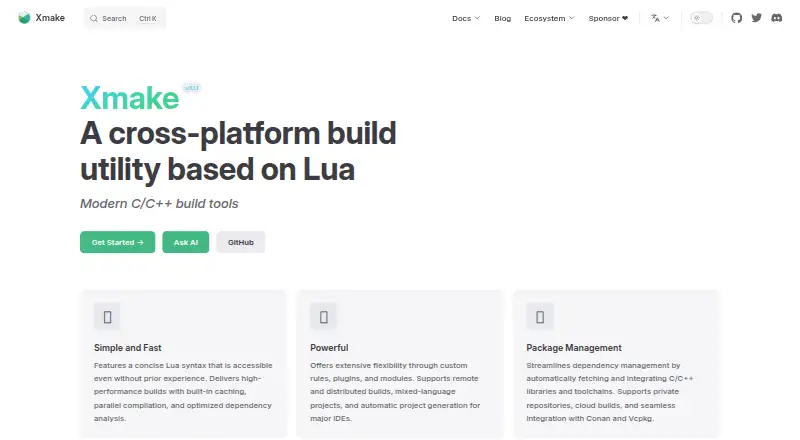
Xmake is a free, Lua-based build utility that can compile source code or generate project files.
What Xmake is
Xmake is a free, Lua-based build utility that can compile source code or generate project files. Its project scripts are handled by a dependency-free core written in C. For builds, it offers caching, parallel compilation, and dependency analysis, and supports mixed-language projects alongside custom rules, plugins, and modules. Its package tools manage C and C++ dependencies: `xmake require` works with a project, while `xrepo` handles global package commands. Xmake supports its own and user-built repositories as well as sources such as Conan, Conda, Vcpkg, Homebrew, and system package managers. For remote builds, it documents token and password authentication and server-side trusted-host checks. It can generate project files for major IDEs; documented plugins include VS Code, IntelliJ IDEA, CLion, Zed, and Sublime. Installation guides cover Windows, macOS, Linux, FreeBSD, and Android's Termux, and the documentation includes examples for iOS and Android applications. The project describes its concise configuration syntax as approachable for novices while retaining build-system flexibility.
Good
- Builds source or generates project files.
- Includes caching and parallel compilation.
- Manages C/C++ dependencies through package commands.
- Supports mixed-language projects and custom rules.
- Documents token and password authentication for remote builds.
Watch out
- Installation instructions do not cover iOS or Android.
- Remote builds recommend token authentication for clients.
- The project is maintained primarily in its creator’s spare time.
Who it suits
Xmake may suit developers who want Lua-based build configuration with project generation, package management, or remote compilation. Its stated configuration approach is intended to be approachable for novices while retaining flexibility.
Verdict
Xmake combines source builds, project generation, package management, and remote compilation in a free, Lua-configured utility. Check its platform and IDE documentation against the tools you use.
The facts
Each one read from Xmake's own pages, with the date it was checked.
What it does
- Authentication
- The distributed compilation guide recommends token authentication for connecting clients to build servers.checked 3 Oct 2026
- Build and project generation
- Xmake can build source code directly or generate project files, and it includes package management for C/C++ dependencies.checked 3 Oct 2026
- Build performance
- The homepage says Xmake uses built-in caching, parallel compilation, and optimized dependency analysis.checked 3 Oct 2026
- Build speed
- The homepage lists built-in caching, parallel compilation, and optimized dependency analysis among its build features.checked 3 Oct 2026
- Community and support
- Xmake describes itself as a community-driven open-source project maintained primarily in the creator’s spare time and invites users to its community and sponsorship channels.checked 3 Oct 2026
- Core
- Its Lua project scripts are driven by a dependency-free core program written in C.checked 3 Oct 2026
- Distributed builds
- Xmake documents built-in distributed compilation and support for GCC, Clang, Windows, and MSVC.checked 3 Oct 2026
- Extensibility
- Xmake supports custom rules, plugins, and modules, as well as mixed-language projects.checked 3 Oct 2026
- IDE integrations
- Officially documented IDE plugins include VS Code and IntelliJ IDEA/CLion; the docs also list Zed and Sublime plugins.checked 3 Oct 2026
- IDE support
- The homepage says Xmake can automatically generate project files for major IDEs.checked 3 Oct 2026
- Installation caution
- Xmake advises against root installation, describing it as insecure and warning of possible operating-system file errors when run as root.checked 3 Oct 2026
- Intended users
- The project introduction says Xmake’s concise configuration syntax is friendly to novices while retaining build-system flexibility.checked 3 Oct 2026
- Mobile targets
- Build configuration examples cover Android and iPhoneOS targets.checked 3 Oct 2026
- Package commands
- The xmake require command manages packages for the current project, while xrepo provides global package management commands.checked 3 Oct 2026
- Package management
- Xmake includes package management for integrating C/C++ dependencies, and its homepage names Conan and Vcpkg integrations.checked 3 Oct 2026
- Package repositories
- Xmake supports its official package repository, user-built repositories, and third-party sources including Conan, Conda, Vcpkg, Homebrew, and system package managers.checked 3 Oct 2026
- Purpose
- Xmake is a lightweight, cross-platform build utility based on Lua that can build source code or generate project files.checked 3 Oct 2026
- Remote build security
- Remote compilation supports token and password authentication, plus server-side trusted-host verification.checked 3 Oct 2026
- Support
- The site links to a community and GitHub and Gitee project pages for documentation and help.checked 3 Oct 2026
- What it does
- Xmake is a lightweight, cross-platform build utility based on Lua, with a dependency-free core written in C.checked 3 Oct 2026
Where it runs
- Install platforms
- The installation page gives instructions for Windows, Linux, and macOS.checked 3 Oct 2026
- Platform support
- The installation guide documents Windows, macOS, Linux, FreeBSD, and Termux on Android.checked 3 Oct 2026
The full review of Xmake
Overview
Xmake is a Lua-configured build utility that compiles source code or generates project files, with a C core that has no external dependencies. It is best suited to developers who want build automation, C/C++ dependency management, and IDE project generation in one tool. Its breadth is appealing, though teams should check that its documented platforms and integrations match their workflow.
Build scripts can be extended with custom rules, plugins, and modules, and can cover mixed-language projects. Xmake also supports dependency locking, artifact packaging, and build caching, making it a more complete project build tool than a compiler wrapper. Its project describes the configuration syntax as approachable for newcomers without giving up flexibility.
Xmake is a community-driven open-source project maintained primarily in its creator’s spare time. Users can turn to its community and GitHub and Gitee project pages for help. It belongs among Build Automation Software for readers comparing tools that coordinate compilation and project setup.
Key features
Build execution and IDE generation
Xmake can compile source directly or generate project files for major IDEs. Officially documented plugins cover VS Code and IntelliJ IDEA/CLion; the documentation also lists Zed and Sublime plugins. Caching, parallel compilation, and optimized dependency analysis are intended to reduce repeated work and make larger builds more manageable, though the actual benefit depends on the project and its build patterns.
Dependencies and extensibility
The xmake require command manages packages for an individual project, while xrepo offers global package commands. Xmake has an official repository and supports user-built repositories and third-party sources including Conan, Conda, Vcpkg, Homebrew, and system package managers. That range can simplify dependency integration, especially for C/C++ projects, but teams with an established package workflow should confirm that their chosen sources fit it.
Custom rules, plugins, and modules let teams shape build behavior, while mixed-language support accommodates projects that cross language boundaries. The trade-off is that teams need to maintain Lua configuration and any custom extensions they rely on.
Distributed compilation
Built-in distributed compilation supports GCC and Clang as well as Windows and MSVC. Clients can authenticate to build servers with a token or password, and servers can verify trusted hosts. This can help teams move compilation to shared infrastructure, but remote execution brings server setup and access-control decisions; Xmake recommends token authentication for client connections.
Pricing
Xmake is free, with a free plan and no free trial. There are no paid tiers, seat limits, or usage quotas described. That makes it a straightforward choice for individuals and teams seeking an open-source build utility without a subscription, though the project’s community-driven maintenance model may not suit organizations that require a commercial support arrangement.
Platforms
Installation instructions cover Windows, Linux, and macOS, while the installation guide also documents FreeBSD and Termux on Android. The documentation includes examples for iOS and Android applications. Xmake automatically generates project files for major IDEs, but users should check the relevant platform and IDE documentation before adopting it for a particular toolchain. One practical caution: Xmake advises against installing as root, warning that doing so is insecure and can cause operating-system file errors.
Who it's for
Xmake suits developers who want a single Lua-based utility for compiling source, generating IDE projects, and managing dependencies—particularly C/C++ teams that can use its package commands and repository integrations. Its extensibility also makes it worth considering for mixed-language projects or teams that need custom build rules. It is a less obvious fit for organizations that need a formal commercial support contract, or whose existing workflow depends on integrations they have not confirmed in Xmake.
Pros and cons
- Pros: Direct builds and IDE project generation offer two ways to fit into a development workflow.
- Pros: C/C++ package commands and multiple repository sources can reduce the work of managing dependencies.
- Pros: Caching, parallel compilation, and distributed builds provide several ways to handle compilation workload.
- Pros: Lua configuration, custom extensions, and mixed-language support allow teams to adapt build behavior to their projects.
- Cons: Lua scripts and custom rules create configuration that teams must understand and maintain.
- Cons: Distributed compilation requires build-server setup and secure client access.
- Cons: The project is primarily maintained in its creator’s spare time, which may be a concern for teams seeking commercial support guarantees.
Alternatives
Consider Bazel if you want a free, open-source build and test tool from Google, rather than Xmake’s Lua-configured approach. Nx is a freemium option for readers who value a free Hobby plan with 50,000 monthly-reset credits, five contributors, ten concurrent CI connections, and community support; it also offers a free trial.
Buck2 is another free build system, from Meta. Gradle may suit readers looking for its open-source build system. Pants is a no-charge, royalty-free Apache License 2.0 option, while Rush is a free, open-source JavaScript monorepo manager installable via npm. For a managed service with a usage-based free allowance, Google Cloud Build charges $0.006 per build-minute after the first 2,500 free build-minutes per billing account each month. Apache Maven is also a free build tool for Linux, macOS, and Windows.
Verdict
Choose Xmake if you want a free, flexible build utility that combines Lua-based configuration, direct compilation, IDE project generation, and C/C++ package management. Its strongest reason to choose is the range of build and dependency workflows it brings together; look elsewhere if your team needs commercial support or depends on a platform, IDE, or package integration it does not document.
Alternatives to Xmake
- 1

AWS CodeBuild
Free planWebAPILinuxmacOS7.9From $0.01 a month - 2

fastlane
Free planAndroidiOSLinuxmacOS7.4Free plan - 3

Nx
Free planWebLinuxmacOSSelf-hosted7.2From $29 a month - 4

Bazel
Free planLinuxmacOSWindows6.7Free plan - 5

FASTBuild
Free planLinuxmacOSWindows6.6Free plan - 6
Open Build Service
Free planWebAPILinuxSelf-hosted6.6Free plan