Xcas
Xcas is a free interface for computer algebra, graphing, geometry, spreadsheets, statistics, and programming.
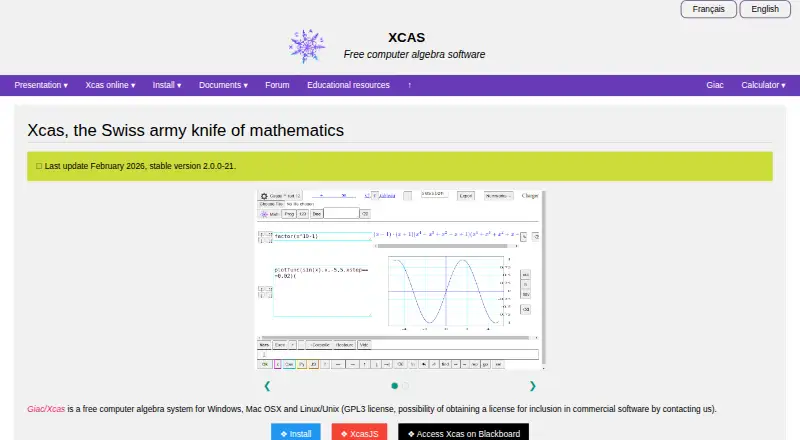
What Xcas is
Xcas is a free interface for computer algebra, graphing, geometry, spreadsheets, statistics, and programming. Its symbolic math tools cover arbitrary-precision arithmetic, polynomial operations, simplification, equation solving, calculus, and linear algebra. Users can make programmable dynamic 2-D geometry and work with 3-D geometry and graphs. The spreadsheet supports relative and absolute references, formal objects in cells, and one- and two-dimensional statistics, including regressions. Programming tools include functions, variables, tests, loops, a program editor, and an interactive debugger, with C-like, Maple, MuPAD, and TI89 syntax modes. Xcas runs on Android, iOS, Linux, macOS, web, and Windows. The browser edition can run locally without installation or an internet connection, though it is less complete and slower than compiled desktop versions. Its Giac library can be used from C++, Python, Java, and JavaScript, and the site describes interfaces with LaTeX and TeXmacs. The software is free under GPL3; commercial software inclusion requires contacting the makers about a dual license. The site provides tutorials, guides, a forum, and documentation, which it describes as incomplete in its English overview.
Good
- Includes symbolic calculus and linear algebra.
- Supports dynamic 2-D and 3-D geometry.
- Browser version can run offline.
- Giac is usable from several programming languages.
Watch out
- Browser version is less complete and slower.
- Documentation is described as incomplete in English.
- Some Windows setups may have 3-D display problems.
- Mac OS 14 package is unsigned.
Who it suits
Xcas may suit students, educators, and others who need symbolic math, graphing, geometry, statistics, or programming in one interface. Its offline browser option may be useful when installation or internet access is not available.
Verdict
Xcas covers a wide range of mathematical and programming tasks and is available at no listed charge. Consider the browser version's limitations and the platform-specific issues noted by its maker.
Plans and prices
From Xcas's own pricing page, checked 11 Oct 2026.
| Plan | Price | What it gives you |
|---|---|---|
| Xcas | Free | Free computer algebra system · GPL3 license · commercial software inclusion requires contacting the makers about a dual license |
The facts
Each one read from Xcas's own pages, with the date it was checked.
Where it runs
- Browser use
- The browser version can run locally without installation or an internet connection, but is less complete and slower than compiled desktop versions.checked 11 Oct 2026
- Platforms
- The maker lists Windows, Mac OS X, and Linux/Unix for the desktop system, and provides browser instructions for Android and iOS devices.checked 11 Oct 2026
What it does
- Compatibility
- Giac/Xcas has compatibility modes for users of Maple, MuPAD, and TI calculator CAS software.checked 11 Oct 2026
- Geometry and graphs
- Xcas supports programmable dynamic 2-D geometry and 3-D geometry and graphs.checked 11 Oct 2026
- Integrations
- The Giac calculation library can be used from C++, Python, Java, and JavaScript programs; the site also describes interfaces with LaTeX and TeXmacs.checked 11 Oct 2026
- Intended use
- The maker describes Xcas as a possible replacement for high-end graphing calculators and lists use in educational materials and high-school testing among its acknowledgments.checked 11 Oct 2026
- Mobile detail
- The maker says Android users can open Xcas in Firefox or Chrome and iOS users can open Xcas in a browser, while noting that its iOS instructions had not been tested by the author.checked 11 Oct 2026
- Notable limitations
- The maker warns that Xcas may have 3-D display problems on some Windows setups and reports crashes or unrecognized keystrokes under some versions of Ubuntu's Unity environment.checked 11 Oct 2026
- Programming
- Xcas includes functions, variables, tests, loops, a program editor, an interactive debugger, and syntax modes including C-like, Maple, MuPAD, and TI89.checked 11 Oct 2026
- Purpose
- Xcas is an interface for computer algebra, function graphs, interactive 2-D and 3-D geometry, spreadsheets, statistics, and programming.checked 11 Oct 2026
- Security and trust
- The maker's installation page says the Mac OS 14 package is unsigned and describes allowing installation of the non-signed package.checked 11 Oct 2026
- Spreadsheet and statistics
- Its spreadsheet supports relative and absolute references, formal objects in cells, and 1-D and 2-D statistics including regressions.checked 11 Oct 2026
- Support and documentation
- The site provides a forum, tutorials, reference guides, and documentation, which it describes as incomplete on its English overview.checked 11 Oct 2026
- Symbolic math
- Its computer algebra features include arbitrary-precision arithmetic, polynomial operations, simplification, equation solving, calculus, and linear algebra.checked 11 Oct 2026
The company
- Founded
- 2000checked 28 Sep 2026
The full review of Xcas
Xcas suits students and technically minded users who need a flexible environment for symbolic mathematics, graphing, geometry, statistics, and programming. Its breadth and free GPL3 license are strong reasons to consider it; its slower, less complete browser version and platform-specific problems call for care.
Overview
Founded in 2000, Xcas provides an interface to the Giac computer algebra system. It reaches well beyond equation solving, combining mathematical tools with spreadsheets and programming. That makes it a plausible replacement for a high-end graphing calculator and a capable setting for coursework or exploration, but potentially more system than someone seeking quick answers needs.
Compatibility modes for Maple, MuPAD, and TI calculator CAS software can help users accustomed to those systems carry familiar syntax into Xcas. The English overview describes the documentation as incomplete, though tutorials, reference guides, and a forum offer support.
Key features
Symbolic mathematics
Xcas handles arbitrary-precision arithmetic, polynomial operations, simplification, equation solving, calculus, and linear algebra. This range is useful for working through expressions and mathematical problems, rather than relying only on numerical answers.
Geometry and graphs
Programmable dynamic 2-D geometry, 3-D geometry, and graphs give users room to explore relationships visually and interactively. The flexibility is valuable for learning and investigation, although 3-D display problems on some Windows setups may make that part of the experience unreliable.
Spreadsheet, statistics, and programming
The spreadsheet supports relative and absolute references as well as formal objects in cells. Its 1-D and 2-D statistics include regressions, making it useful for more than symbolic work. Programming tools include functions, variables, tests, loops, a program editor, and an interactive debugger, with C-like, Maple, MuPAD, and TI89 syntax modes. That breadth suits users who want to build and inspect calculations, but is more complexity than a basic solver requires.
Developers can use the Giac calculation library from C++, Python, Java, and JavaScript programs. Xcas also describes interfaces with LaTeX and TeXmacs, extending its relevance beyond its own interface.
Pricing
Xcas costs free. The free plan is a GPL3-licensed computer algebra system, with no paid tier described. It is a strong fit for individual learners and users who want broad mathematical tools without a software charge. Commercial software that includes Xcas requires contacting its makers about a dual license, so the free terms should not be assumed to cover commercial inclusion.
Platforms
Xcas supports Android, iOS, Linux, macOS, the web, and Windows, and it offers offline use. The browser version can run locally without installation or an internet connection, but it is slower and less complete than compiled desktop versions; users who need the full experience should favor a desktop build.
For mobile access, the maker says Android users can open Xcas in Firefox or Chrome and iOS users can use a browser, while noting that the iOS instructions have not been tested by the author. The Mac OS 14 package is unsigned, and the installation instructions describe allowing a non-signed package. On Ubuntu, some versions of the Unity environment have been associated with crashes or unrecognized keystrokes.
Who it's for
Xcas is best suited to students, educators, and technically minded users who want symbolic mathematics alongside geometry, graphing, statistics, spreadsheets, or programming. Its potential role as a high-end graphing-calculator replacement makes it relevant for coursework and mathematical exploration. A reader who only needs a quick, guided answer to a routine problem may prefer a more focused solver.
Pros and cons
- Pros: Broad mathematical coverage combines symbolic algebra, calculus, linear algebra, graphing, geometry, statistics, and spreadsheets in one environment.
- Pros: Programming tools, several syntax modes, and a Giac library usable from four programming languages suit users who want to automate or extend calculations.
- Pros: The free GPL3 plan and offline browser mode make it accessible without a software charge or a network connection.
- Cons: The browser version is slower and less complete than compiled desktop builds, so it is a compromise for users who need full capability.
- Cons: The English documentation is described as incomplete, which may make the system's many tools harder to learn.
- Cons: Some Windows 3-D setups and Ubuntu Unity versions have reported display problems, crashes, or unrecognized keystrokes; Mac OS 14 users also face an unsigned installer.
- Cons: Commercial inclusion requires arranging a dual license, so the free plan is not a blanket commercial-use permission.
Alternatives
For a wider selection of options, see Math Solver Apps.
- GeoGebra is worth considering if you want a free-plan option across mobile, desktop, and web platforms; its source code is licensed under EUPL 1.2, while its installers and web services are limited to non-commercial use.
- MathPad may suit readers who want an AI tutor alongside a solver: its free plan provides 10 daily credits and three AI Tutor trial messages per day, while its Basic plan costs $14.99 a month for 500 monthly credits.
- MalMath is a more focused choice for Android, iOS, or web solver use; it has a free plan and a 2.99 USD one-time Premium in-app purchase.
- PARI/GP is another free, GPL-licensed computer algebra option for Android, Linux, macOS, web, and Windows; its optional packages are distributed separately.
- AI Mathbot is a free-plan alternative for mobile and web users seeking a basic math solver; it also offers Pro subscriptions on monthly or yearly terms.
- Mathway is a solver alternative with free access to its solver and calculators, and step-by-step solutions; an optional subscription unlocks additional access.
- SnapXam may fit readers seeking algebra, trigonometry, and calculus explanations through APIs, including a free Solve API plan with step-by-step explanations.
- AllMath AI Math Solver offers a free plan with 70,000 total credits, a basic model, priority response times, and 24/7 support; it may suit users who want an AI solver with a stated credit allowance.
Verdict
Choose Xcas if you want a free, broad computer algebra environment that can cover symbolic work, visual mathematics, statistics, and programming, including offline use. Its range is the main reason to choose it; if you need a faster, more complete browser experience or depend on trouble-free 3-D or Ubuntu Unity behavior, look elsewhere.
Getting started
- Open the Xcas website
- Choose a desktop platform or browser access
- Use the browser version locally without installation or internet access
- Install the platform package when using a compiled edition
- Review tutorials, reference guides, forum posts, and documentation
Limits worth knowing
The browser edition is less complete and slower than compiled desktop versions. The English overview describes the documentation as incomplete.
Questions
Is Xcas free?
Yes. The listed Xcas plan costs nothing, and the software is offered under GPL3.
Which platforms support Xcas?
Xcas is available on Android, iOS, Linux, macOS, the web, and Windows.
Can Xcas work offline?
Its browser version can run locally without installation or an internet connection.
Can commercial software include Xcas?
Commercial software inclusion requires contacting the makers about a dual license.
What programming integrations are available?
The Giac calculation library can be used from C++, Python, Java, and JavaScript, with interfaces described for LaTeX and TeXmacs.
Alternatives to Xcas
- 1

Mathway
Free planAndroidiOSWebExtension8.2From $39.99 a year - 2

CameraMath
Free planAndroidiOSWebAPI8.0From $59.99 a year - 3

MathPad
Free planAndroidiOSWebAPI8.0From $14.99 a month - 4
MalMath
Free planAndroidiOSWeb7.8From $24.99 a year - 5

Cymath
Free planAndroidiOSWeb7.3From $5 a month - 6
GeoGebra
Free planAndroidiOSWebAPI7.3Free plan