
MathPad
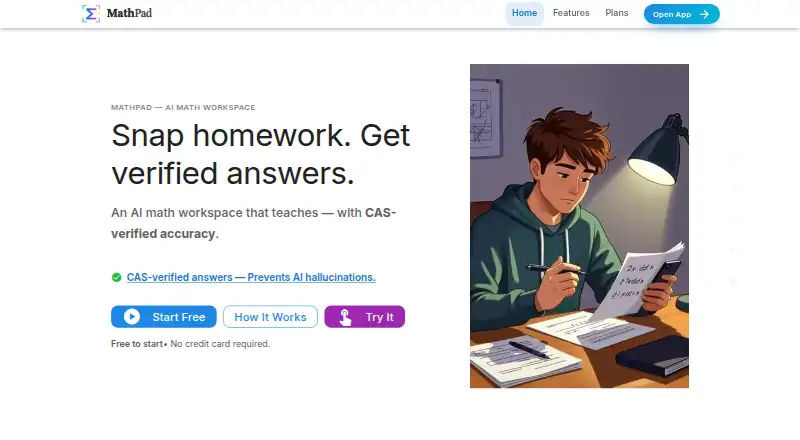
MathPad is an AI math workspace for solving problems, explaining concepts, and creating math documents.
What MathPad is
MathPad is an AI math workspace for solving problems, explaining concepts, and creating math documents. SnapSolve uses OCR to read a photo of handwritten or printed math and return a step-by-step solution with CAS verification. Its AI Tutor offers interactive guidance, hints, concept explanations, and work checking. The editor supports LaTeX, AsciiMath, MathML, Typst, and MathJSON with a live preview, while OCR can extract equations and accompanying text. A document converter handles more than 21 formats, including PDF, DOCX, EPUB, and Jupyter notebooks. Google Workspace add-ons work in Docs, Sheets, Slides, and Forms; the Office add-in supports Word, Excel, and PowerPoint on desktop and Office Online. MathPad is available on Android, iOS, Linux, macOS, Windows, and the web, as well as through an extension and API. The free plan includes 10 daily credits and three AI Tutor trial messages per day. Basic costs $14.99 a month; SnapSolve uses two credits, Step Checker three, and document processing one credit per page.
Good
- AI Tutor offers hints and step-by-step guidance
- Editor supports five math formats with live preview
- Converter supports more than 21 document formats
- Uploaded images and PDFs are not stored
Watch out
- Free plan limits users to 10 daily credits
- AI Tutor free access is three trial messages daily
- SnapSolve uses two credits per problem
Who it suits
MathPad suits students, teachers, and others who solve math problems or prepare math documents. Its tools cover photo input, handwritten math, explanations, and document conversion.
Verdict
MathPad brings problem solving, tutoring, OCR, and document tools together across several platforms. Review the credit costs and plan limits if you expect frequent use.
Plans and prices
From MathPad's own pricing page, checked 14 Oct 2026.
| Plan | Price | What it gives you |
|---|---|---|
| Free | Free | 10 daily credits · 3 AI Tutor trial messages/day · core AI features · SnapSolve · OCR · Step Checker |
| Basic | $14.99 a month | 500 monthly credits · 20 problem sets/quizzes per month · 100 document-OCR pages/month · basic support · monthly |
| Pro | $39.99 a month | 5,000 monthly credits · 1,000 document-OCR pages/month · Google Forms export · premium equation conversion · priority support · monthly |
| Lifetime Membership | $499, paid once | Lifetime access · limited availability · one-time payment |
The facts
Each one read from MathPad's own pages, with the date it was checked.
What it does
- AI limitation
- The terms warn that AI-generated content outside pure mathematics can contain errors and should be independently checked.checked 14 Oct 2026
- AI tutor
- The AI Tutor supports interactive conversations, step-by-step guidance, hints, concept explanations, and work verification.checked 29 Sep 2026
- AI Tutor
- The AI Tutor supports follow-up questions, hints, concept explanations, and guided work checking.checked 14 Oct 2026
- API
- MathPad offers public APIs without signup for LaTeX-to-image rendering and math-format conversion.checked 29 Sep 2026
- Audience
- MathPad presents its tools for students, teachers, and other users creating or working with math documents.checked 29 Sep 2026
- CAS verification
- The service says its computer-algebra system checks mathematical steps before results are shown.checked 14 Oct 2026
- Chrome availability
- The Chrome extension listing showed version 1.0.0, 45 users, and a December 9, 2025 update.checked 14 Oct 2026
- Chrome privacy disclosure
- The extension listing says it handles personally identifiable, payment, authentication, activity, and website-content data, while declaring that data is not sold or used for unrelated purposes.checked 14 Oct 2026
- Data retention
- The privacy policy says account data is deleted within 30 days after account deletion and inactive accounts are deleted after two years with 30-day advance notice.checked 29 Sep 2026
- Discord integration
- The Discord bot provides free rendering, conversion, and calculator commands plus linked-account commands for solving, tutoring, OCR, and step checking.checked 14 Oct 2026
- Document conversion
- The converter supports more than 21 formats, including Markdown, DOCX, PDF, HTML, LaTeX, EPUB, Jupyter notebooks, Typst, JSON, and CSV/TSV.checked 14 Oct 2026
- Export formats
- Downloads include LaTeX, Markdown, HTML, MathML, AsciiMath, Typst, MathJSON, SVG, PNG, PDF, DOCX, PPTX, ZIP, and TSV/JSON.checked 14 Oct 2026
- G2 listing status
- G2 categorizes MathPad under Digital Learning Platforms and says there are insufficient reviews to provide buying insight.checked 14 Oct 2026
- Google data handling
- The vendor says Workspace documents are accessed only when explicitly used, processed in real time, not permanently stored, and governed by Google's Limited Use policy.checked 14 Oct 2026
- Google Play availability
- The Android listing showed at least 50 downloads and an update dated November 25, 2025.checked 14 Oct 2026
- Google Play data safety
- Google Play states that no data is shared with third parties, data is encrypted in transit, and users can request deletion; it also lists location and personal-data collection.checked 14 Oct 2026
- Google Play developer
- Google Play identifies the Android developer as INNOVIS LLC at 82 Wendell Ave Ste 100, Pittsfield, Massachusetts, United States.checked 14 Oct 2026
- Google Workspace
- The add-on works in Docs, Sheets, Slides, and Forms, including equation insertion and quiz export to Forms.checked 29 Sep 2026
- Google Workspace integration
- The add-on works in Docs, Sheets, Slides, and Forms, with equation insertion, conversions, batch processing, and auto-graded quiz export.checked 14 Oct 2026
- Handwriting recognition
- Digital Ink recognizes handwritten or printed mathematics and can output formats including LaTeX, HTML, and MathML.checked 14 Oct 2026
- Limit: credit consumption
- The pricing page says SnapSolve costs 2 credits, Step Checker 3, problem sets and quizzes 3 each, documents 1 per page, exports 1 each, and handwriting 1 per session.checked 14 Oct 2026
- Math input
- The math editor supports LaTeX, AsciiMath, MathML, Typst, and MathJSON with live preview.checked 29 Sep 2026
- Microsoft integration
- MathPad advertises a native add-in for Microsoft Word, Excel, and PowerPoint on desktop and web.checked 14 Oct 2026
Money
- Limit: plan gating
- The Free tier locks problem sets, document OCR, Google exports, premium equation conversion, and most support access behind paid plans or limits.checked 14 Oct 2026
The full review of MathPad
Overview
MathPad is an AI math workspace for people who need more than a calculator, especially students and educators working with equations and math documents. Its breadth is its strongest case: it combines photo solving and tutoring with editing, OCR, document conversion, and office add-ins. That range comes with credit and monthly processing limits, so frequent users should weigh the quotas before committing.
Key features
Solving and learning
SnapSolve turns a photo into an OCR-processed, step-by-step solution, with CAS verification available, for 2 credits per use. The AI Tutor supports interactive guidance, hints, concept explanations, and work verification; the separate Step Checker costs 3 credits per check. This division suits learners who want to move between getting help and checking their own work, but credit use can add up when tackling many problems. The free plan’s three tutor messages per day make it better for occasional questions than sustained tutoring.
Math editing and documents
The editor accepts LaTeX, AsciiMath, MathML, Typst, and MathJSON with a live preview, a useful span for people moving equations between technical formats. OCR handles handwritten as well as printed mathematics and can extract math and text together in multiple formats. The converter supports more than 21 formats, including PDF, DOCX, LaTeX, EPUB, and Jupyter notebooks; document processing costs 1 credit per page, so long documents consume credits page by page.
Office tools and API
MathPad integrates with Google Docs, Sheets, Slides, and Forms, including equation insertion and quiz export to Forms. Its Microsoft Office add-in works in Word, Excel, and PowerPoint on desktop and Office Online. Public APIs, usable without signup, cover LaTeX-to-image rendering and math-format conversion. These extensions give MathPad relevance beyond solving homework, particularly for people preparing math materials, though they are not substitutes for checking the plan quotas attached to regular processing.
Privacy and security
MathPad says uploaded images and PDFs are processed in real time and not stored, and that user data is not used to train or improve its AI models. It also describes HTTPS/TLS encryption, secure authentication, and database-level access controls. Account data is deleted within 30 days of account deletion; inactive accounts are deleted after two years with 30 days’ advance notice. Those are useful safeguards for document work, though account retention still matters to anyone leaving the service.
Pricing
The Free plan costs nothing and provides 10 daily credits plus three AI Tutor trial messages per day. At 2 credits for a SnapSolve use, that daily allowance can cover only a handful of photo solutions before other credit-consuming work is counted. It is a sensible way to try the workflow, not a generous option for heavy use.
Basic costs $14.99 a month, billed $14.99 /mo. It includes 500 monthly credits, 20 Problem Sets & Quizzes per month, and 100 Document OCR pages per month. This is the practical starting point for regular individual use, but frequent image solving and document conversion compete for the same monthly credit pool.
Pro costs $39.99 a month, billed $39.99 /mo, and raises the allowance to 5000 monthly credits and 1000 Document OCR pages per month, with priority support. It is the better fit for sustained, high-volume work; the higher quota is its central advantage over Basic. Lifetime Membership costs $499, paid once, billed as a one-time payment, for lifetime access. It avoids a recurring charge, but the stated offer does not give comparable credit or page quotas, so it is difficult to assess against monthly plans for frequent processing.
Platforms
MathPad covers Android, iOS, Linux, macOS, web, and Windows, along with an extension and API. Offline mode is supported. This broad reach suits people switching between mobile problem solving and desktop document work, though platform breadth does not remove the plan’s usage limits.
Who it's for
MathPad is a strong fit for students who want photo-based worked solutions and guided explanations, and for teachers or other math-document users who need equation editing, OCR, conversion, or office integrations. It is less compelling for someone who only needs an occasional answer: the free tutor allowance is narrow, while a paid plan may be more than that use case requires.
Pros and cons
- Pros: Combines tutoring, photo solving, math-format editing, OCR, and conversion, reducing the need to switch among separate tools.
- Pros: Google Workspace and Microsoft Office integrations support equation work and, in Forms, quiz export.
- Pros: Public conversion and rendering APIs are offered without signup.
- Cons: Credit costs apply to core tasks, and document conversion consumes credits by page.
- Cons: Free tutor use is capped at three trial messages per day, while Basic limits quizzes and OCR pages monthly.
- Cons: Lifetime Membership gives no stated quotas comparable to the monthly credit and page allowances.
Alternatives
For a broader comparison, browse Math Solver Apps. Choose Mathway if you want a freemium solver and calculators across Android, iOS, web, and Windows, with step-by-step solutions and an optional subscription. Solvely is another freemium option with a free trial and Android, browser extension, iOS, and web coverage. Symbolab may suit readers focused on solver steps and practice: its $9.95 a month plan includes full solution steps, AI chat, practice, access from any device, no ads, and unlimited storage. For lower-cost detailed sub-steps, Cymath offers a free solver and Cymath Plus at $5 a month, with ad-free use and detailed sub-steps on most problems. GeoGebra is a freemium option for Android, iOS, Linux, macOS, web, and Windows. MathBuddy gives free-account users three questions per day with full step-by-step explanations and several input methods. Mathos AI (MathGPTPro) has a free tier with limited video generation and image input, plus flashcards, quizzes, and auto-drawn graphs. Photomath is worth considering on Android or iOS for free step-by-step explanations; its Basic tier excludes custom visual aids and extra how-and-why tips.
Verdict
MathPad is best for students and educators who will use both its problem-solving help and its math-document tools. The breadth of formats, office integrations, and tutoring options makes it more than a photo solver, but credit consumption and plan caps are the main reasons to look elsewhere if your needs are occasional or narrowly focused.
Getting started
- Open MathPad on the web or install it on a supported platform
- Create an account for the workspace features, or use public APIs without signup
- Start with the Free plan or select Basic, Pro, or Lifetime Membership
- Upload a handwritten or printed problem to SnapSolve
- Enter math in the editor or connect Google Workspace or Microsoft Office
Limits worth knowing
The Free plan includes 10 daily credits and three AI Tutor trial messages per day. Basic includes 500 monthly credits, 20 monthly Problem Sets & Quizzes, and 100 Document OCR pages; each SnapSolve request costs two credits, Step Checker costs three, and document processing costs one credit per page.
Questions
Is MathPad free?
Yes. The Free plan costs $0.00 and includes 10 daily credits plus three AI Tutor trial messages per day.
What do paid plans cost?
Basic is $14.99 per month, Pro is $39.99 per month, and Lifetime Membership is $499 one time.
Which platforms are supported?
MathPad lists Android, API, extension, iOS, Linux, macOS, web, and Windows.
Can it read handwritten math?
Yes. Image OCR recognizes handwritten or printed mathematics, and SnapSolve turns photos into step-by-step solutions with CAS verification.
What document formats can it convert?
The converter supports more than 21 formats, including PDF, DOCX, LaTeX, EPUB, and Jupyter notebooks.
Does MathPad offer offline use?
Yes. Offline mode is listed.
Alternatives to MathPad
- 1

Mathway
Free planAndroidiOSWebExtension8.2From $39.99 a year - 2

CameraMath
Free planAndroidiOSWebAPI8.0From $59.99 a year - 3
MalMath
Free planAndroidiOSWeb7.8From $24.99 a year - 4

Cymath
Free planAndroidiOSWeb7.3From $5 a month - 5
GeoGebra
Free planAndroidiOSWebAPI7.3Free plan - 6
Photomath
Free planAndroidiOS7.3From $69.99 a year