Worksnaps
Worksnaps is a time-tracking service for remote work that records work in 10-minute intervals called work snaps.
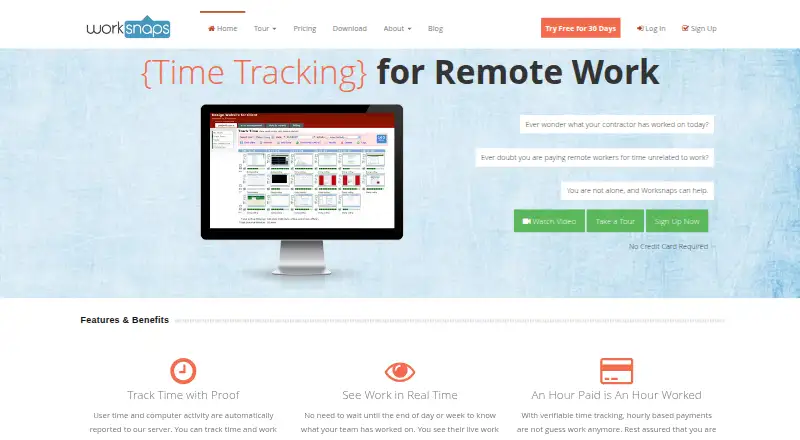
What Worksnaps is
Worksnaps is a time-tracking service for remote work that records work in 10-minute intervals called work snaps. Each snap can be reviewed using a screenshot, activity volume, and the applications in use. Its client records mouse and keyboard click counts and active applications, but not typed keystrokes. Users can approve or deny screenshots, pause tracking, switch to private mode, and set filters for screenshots and application names. Project and user dashboards, customizable reports, calendar and timeline views, and invoices based on logged time help teams review work. Integrations such as Asana, Jira, Basecamp, Trello, Redmine, Teamwork, Zapier, Freshbooks, and Harvest can import projects and tasks or synchronize logged time. The client supports Windows 7 through 11, macOS 10.9 or later, and Linux; the web console works with most modern browsers. Worksnaps offers a free plan for one person and one project, plus a 30-day trial. Screenshots are kept for two years, with shorter retention available on request.
Good
- Free plan covers one person and one project.
- Work snaps include screenshots and activity volume.
- Users can pause tracking or use private mode.
- Reports include calendar and timeline views.
- Integrations can synchronize logged time.
Watch out
- Free plan is limited to one project.
- Screenshots are stored for two years by default.
Who it suits
Worksnaps suits freelancers, remote staff, distributed teams, and outsourcing firms that need logged time with reviewable activity records. Its privacy controls may also suit teams that want to manage screenshot capture.
Verdict
Worksnaps combines time logs, activity review, reporting, and integrations for remote teams. Consider the one-project free plan or the paid tiers, and review its screenshot controls and retention period before choosing it.
Plans and prices
From Worksnaps's own pricing page, checked 11 Oct 2026.
| Plan | Price | What it gives you |
|---|---|---|
| Free plan | Free | Yourself · One project · at no charge as long as you want |
| Starter | $20 a month | 4 Users · Unlimited Projects · Unlimited Observers · per month |
| Team | $40 a month | 10 Users · Unlimited Projects · Unlimited Observers · per month |
| Department | $70 a month | 20 Users · Unlimited Projects · Unlimited Observers · per month |
| Business | $90 a month | 30 Users · Unlimited Projects · Unlimited Observers · per month |
The facts
Each one read from Worksnaps's own pages, with the date it was checked.
What it does
- Activity data
- The client records mouse and keyboard click counts and active applications, but does not capture actual keystrokes.checked 11 Oct 2026
- Integration behavior
- Integrations can import projects and tasks and synchronize logged time to third-party services.checked 11 Oct 2026
- Integrations
- The listed integrations include Asana, Jira, Basecamp, Trello, Redmine, Teamwork, Zapier, Freshbooks, and Harvest, among others.checked 11 Oct 2026
- Intended users
- The site identifies freelancers, contractors, virtual assistants, remote staff, distributed teams, outsourcing firms, and startups as users.checked 11 Oct 2026
- Payment handling
- The pricing FAQ says payments are processed by PayPal and Worksnaps does not store credit card or PayPal information.checked 11 Oct 2026
- Privacy controls
- Users can approve or deny screenshots, pause the client, use private mode, and configure filters for screenshots and application names.checked 11 Oct 2026
- Purpose
- Worksnaps provides verifiable time tracking designed for remote work.checked 11 Oct 2026
- Reports
- The service offers project and user dashboards, customizable reports, calendar and timeline views, and invoices based on logged time.checked 11 Oct 2026
- Screenshot retention
- Uploaded screenshots are stored for two years, after which they are purged; a shorter retention period can be requested.checked 11 Oct 2026
- Security
- The privacy policy says Worksnaps uses SSL for transmitted information and commercially reasonable security methods.checked 11 Oct 2026
- Support
- Customers can contact support by email or open a support ticket.checked 11 Oct 2026
- User limits
- The paid plan user count excludes the account owner, and each user beyond 30 costs $3.00 per month.checked 11 Oct 2026
- Work snaps
- Each work snap represents 10 minutes of work and can be verified with a screenshot, activity volume, and active applications.checked 11 Oct 2026
Where it runs
- Browser access
- The Worksnaps web console supports most modern browsers.checked 11 Oct 2026
- Desktop platforms
- The downloadable Worksnaps Client supports Windows 7 through 11, macOS 10.9 or above, and Linux distributions.checked 11 Oct 2026
Alternatives to Worksnaps
- 1

Harvest
Free planAndroidiOSWebmacOS8.3From $9 a month - 2
BusyBusy
Free planAndroidiOSWebAPI8.1From $9.99 a month - 3

TimeCamp
Free planAndroidiOSWebLinux8.1From $3.99 a month - 4

Timesheets.com
Free planAndroidiOSWebAPI8.1From $4.40 a month - 5
Yaware.TimeTracker
Free planAndroidiOSWebAPI8.1From $3.20 a month - 6

Clockify
Free planAndroidiOSLinuxmacOS8.0From $0.79 a month