
WorkAdventure
WorkAdventure is a virtual space for teams to meet and collaborate, and it is also presented for events, classrooms, and recruitment.
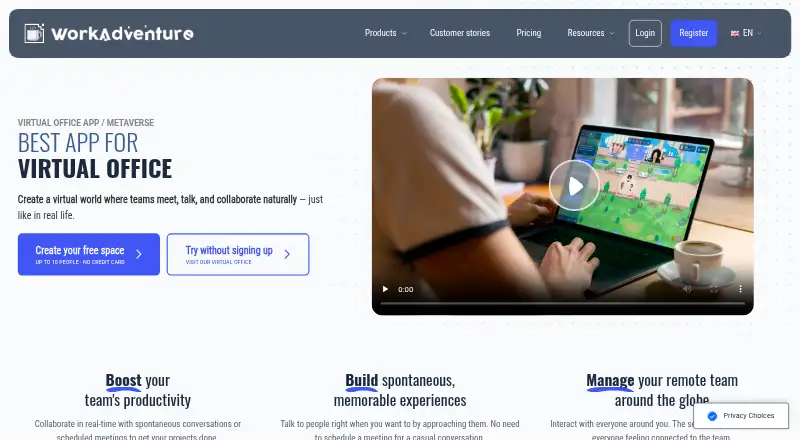
What WorkAdventure is
WorkAdventure is a virtual space for teams to meet and collaborate, and it is also presented for events, classrooms, and recruitment. People can approach one another’s avatars to begin private text, audio, or video conversations. The free plan has no stated time limit, but it allows 10 simultaneous users; people above that limit cannot enter the space. Persistent rooms, spatial audio, guest access, screen sharing, and role-based access controls are listed.
WorkAdventure runs on the web, mobile platforms, desktop systems, and self-hosted installations. It can also be installed as a Progressive Web App on computers and phones. Integrations include Microsoft Teams, Google Calendar, Google Meet, YouTube, and Google Drive tools. Paid plans list map editing, personalized desks, white labeling, and custom domains; OpenID Connect single sign-on is available on Premium, not Free. The maker says it complies with GDPR and hosts services in the EU. Event is €4.00 per user per day, and Business is €8.00 per user per month; the Free plan costs €0.00.
Good
- Free plan has unlimited duration
- Supports private text, audio, and video chats
- Can be installed as a Progressive Web App
- Self-hosting is available
Watch out
- Free plan is limited to 10 simultaneous users
- OpenID Connect SSO is unavailable on Free
- Event costs €4.00 per user per day
Who it suits
WorkAdventure may suit teams looking for a virtual meeting space with spontaneous conversations, persistent rooms, and guest access. Its event, classroom, and recruitment use cases may also suit organizers in those settings.
Verdict
WorkAdventure combines avatar-based conversations with persistent rooms, screen sharing, and integrations. The free plan’s 10-user ceiling is a key constraint, while paid plans list added customization and access options.
Plans and prices
From WorkAdventure's own pricing page, checked 30 Sep 2026.
| Plan | Price | What it gives you |
|---|---|---|
| Free | Free | limited to 10 users · unlimited duration · 1 free hour with a dedicated customer success manager |
| Event | €4, paid once | event duration · during-event customer success manager · recording · access controls · integrations · per day per user |
| Business | €8 a month | remote office · monthly or yearly configuration · full-time customer success manager · recording · access controls · integrations · per month per user |
The facts
Each one read from WorkAdventure's own pages, with the date it was checked.
What it does
- APIs
- The developer documentation lists Room, Inbound, Map Storage, and Scripting APIs, and says an existing Zapier plugin uses the Inbound API.checked 30 Sep 2026
- Authentication
- OpenID Connect SSO is available on Premium plans and is not available on the Free plan.checked 30 Sep 2026
- Communication
- Users can approach avatars to start spontaneous text, audio, or video conversations in private bubbles.checked 30 Sep 2026
- Customization
- The pricing page lists map templates and an editor, personalized desks, white labeling, and custom domains on paid plans.checked 30 Sep 2026
- Integrations
- Listed integrations include Microsoft Teams, Outlook, Google Calendar, Google Meet, YouTube, Klaxoon, Google Drive, Docs, Sheets and Slides, Excalidraw, and others.checked 30 Sep 2026
- Product
- WorkAdventure is a virtual world for teams to meet, talk and collaborate, and the maker also presents it for virtual events, classrooms, and recruitment.checked 30 Sep 2026
- Security
- The maker says it complies with GDPR, stores no unnecessary data, and hosts all services in the EU.checked 30 Sep 2026
- Self-hosted license
- The FAQ says the self-hosted version uses AGPL v3 modified by the Commons Clause and cannot be offered as an online subscription service by others.checked 30 Sep 2026
- Self-hosting
- The maker makes the core available on GitHub for deployment on users’ own infrastructure and says self-hosters can contact them for deployment or installation help.checked 30 Sep 2026
- Support
- Paid plans list onboarding expertise and priority customer support; the Free plan includes documentation and one free hour with a dedicated customer success manager.checked 30 Sep 2026
Money
- Free limit
- The freemium plan allows 10 simultaneous users, and users over that limit are denied access to the virtual space.checked 30 Sep 2026
Where it runs
- Installable app
- WorkAdventure can be installed as a Progressive Web App on computers and phones.checked 30 Sep 2026
- Supported browsers
- The privacy policy lists current Chrome, Firefox, Safari, and Microsoft Edge, plus mobile browsers tested with Chrome on Android and Safari on iOS.checked 30 Sep 2026
The full review of WorkAdventure
WorkAdventure is a virtual world for teams to meet and collaborate, also presented for events, classrooms, and recruitment. It suits groups that want a persistent shared space for spontaneous conversations and planned meetings. Its free plan’s 10-user cap makes it a practical starting point for small teams, but a constraint for a growing remote office.
Overview
People approach avatars to start private text, audio, or video conversations, so informal encounters are part of the space rather than limited to scheduled calls. Persistent rooms, spatial audio, screen sharing, guest access, and role-based access controls support both everyday collaboration and hosted sessions. The 10-participant room capacity and the free plan’s simultaneous-user limit matter: once 10 users are in the free space, additional users are denied access.
Key features
Integrations include Microsoft Teams, Outlook, Google Calendar and Meet, YouTube, Klaxoon, Google Drive, Docs, Sheets and Slides, and Excalidraw. Developers can build around Room, Inbound, Map Storage, and Scripting APIs; an existing Zapier plugin uses the Inbound API. That breadth gives teams options to connect workflows, though the APIs are most useful when someone can configure or develop those connections.
Paid plans include map templates and an editor, personalized desks, white labeling, and custom domains. OpenID Connect single sign-on is available on Premium plans, not Free, which makes the free tier a weaker fit for organizations requiring that authentication option. The maker says it complies with GDPR, stores no unnecessary data, and hosts all services in the EU.
The Free plan includes documentation and one free hour with a dedicated customer success manager. Paid plans add onboarding expertise and priority customer support. WorkAdventure can be installed as a Progressive Web App on computers and phones, and its core is available on GitHub for self-hosting. The self-hosted license is AGPL v3 modified by the Commons Clause, which prevents others from offering it as an online subscription service.
Pricing
Free costs nothing, lasts indefinitely, and is limited to 10 users. It is suited to a small group or an initial evaluation, but not a larger team that needs dependable access beyond that ceiling.
Event costs €4, paid once, billed per day per user for the event duration. It includes a during-event customer success manager, recording, access controls, and integrations, making it the relevant paid option for time-bounded gatherings rather than a standing office.
Business costs €8 a month, billed per month per user. It includes a remote office, monthly or yearly configuration, a full-time customer success manager, recording, access controls, and integrations. This is the plan aimed at ongoing team use; its per-user charge means cost scales with the team.
Platforms
WorkAdventure supports Android, iOS, Linux, macOS, Windows, and web, with an API and self-hosted deployment also available. The privacy policy names current Chrome, Firefox, Safari, and Microsoft Edge, and says mobile browsers have been tested with Chrome on Android and Safari on iOS.
Who it's for
WorkAdventure is a strong match for teams that value spatial, avatar-based encounters and want a persistent virtual office, as well as organizers running virtual events, classrooms, or recruitment sessions. Small groups can start free; larger teams should weigh the per-user Business cost against their need for a shared space. Self-hosting may suit organizations that want deployment on their own infrastructure, but the license restriction rules out repackaging it as a subscription service.
Pros and cons
- Pro: Spontaneous private text, audio, and video conversations make informal contact possible alongside screen-shared meetings.
- Pro: A broad set of integrations and four APIs offer routes to connect the space with existing tools and custom workflows.
- Pro: EU hosting and the maker’s GDPR commitments may suit teams with data-location concerns.
- Con: The free plan denies entry above 10 simultaneous users, limiting its usefulness for larger teams.
- Con: OpenID Connect SSO is reserved for Premium plans, so Free does not cover organizations that require it.
- Con: Business pricing is per user, so a persistent office can become a larger recurring commitment as headcount grows.
Alternatives
Virtual Meeting Room Software is a useful category comparison if WorkAdventure’s spatial, persistent approach is not the format you want.
- Hubs is worth considering if open-source customization and self-hosting are priorities; its Community Edition is free.
- Glue may suit teams comparing capped free meeting spaces: its free plan allows 10 members, 10 spaces, 30 minutes per session, and 2GB of team file storage.
- Topia may fit a group seeking a free demo with capacity for 50 people, though its demo limits broadcasting and screensharing to one each.
- Samudaia is another free option for teams seeking a team-sized workspace during early access.
- flat.social is a simpler free option for groups of up to five people at once, with unlimited session length.
- RAUM is an alternative for teams willing to consider a paid plan without a free tier; its Professional Plus plan starts at 12 concurrent users.
- Arthur is an enterprise product with custom pricing.
- Frame is an alternative with a free trial rather than a free plan.
Verdict
Choose WorkAdventure if your team wants a persistent virtual office where people can encounter one another naturally, with integrations and customization options to support ongoing use. The free tier is useful for small groups, but its strict 10-user cutoff is the main reason to look elsewhere or budget for a paid plan.
Getting started
- Open the WorkAdventure website
- Use it in a supported browser or install its Progressive Web App
- Choose the Free plan or a paid Event or Business plan
- Invite participants or guests to a room
- Connect listed services or use the documented APIs
- Self-host the core on your own infrastructure if required
Limits worth knowing
The Free plan is unlimited in duration but supports 10 simultaneous users; additional users are denied access to the virtual space. OpenID Connect SSO is not included on Free; the pricing page lists customization options on paid plans.
Questions
Is there a free plan?
Yes. Free access lasts indefinitely and permits 10 simultaneous users.
How much do paid plans cost?
Event is €4.00 per user per day, and Business is €8.00 per user per month.
Which platforms are supported?
WorkAdventure supports web, Android, iOS, Linux, macOS, and Windows, plus Progressive Web App installation.
Can it be self-hosted?
Yes. The core is available for deployment on your own infrastructure, with help available from the maker.
Does it offer single sign-on?
OpenID Connect SSO is available on Premium plans and is not available on Free.
What integrations are listed?
Integrations include Microsoft Teams, Outlook, Google Calendar, Google Meet, YouTube, Klaxoon, Google Drive, Docs, Sheets, Slides, and Excalidraw.
Alternatives to WorkAdventure
- 1

Glue
Free planAndroidiOSWebmacOS7.5From €50 a month - 2

Topia
Free planAndroidiOSWeb7.3From $4 a month - 3
Watch2Gether
Free planAndroidiOSWebWindows7.1From $9.99 a month - 4
Frame
AndroidiOSWeb7.0From $10 a month - 5

RAUM
AndroidiOSWebmacOS6.9From €99 a month - 6

flat.social
Free planWeb6.7From $6 a month