
Samudaia
Samudaia is a virtual office for remote and hybrid teams, organized around a shared 2D map with live presence.
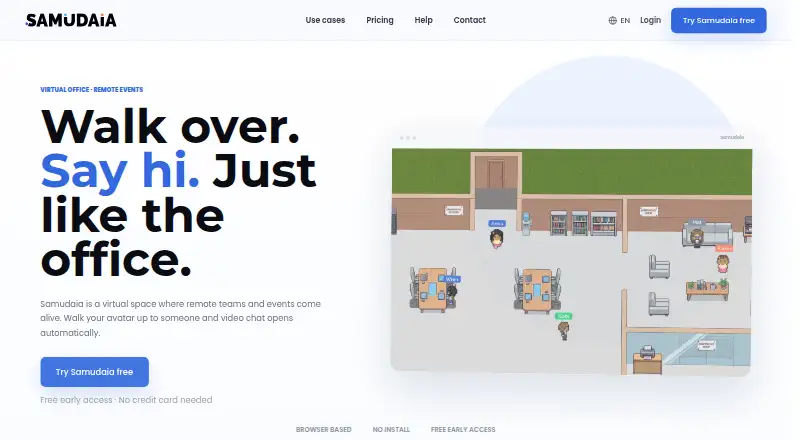
What Samudaia is
Samudaia is a virtual office for remote and hybrid teams, organized around a shared 2D map with live presence. Members can enter a video room by moving their avatar into it; doing so connects their camera and microphone to those already inside, without a meeting link. Workspaces include map themes, avatars, status, multiple workspaces, roles and permissions, screen sharing, background blur, a shared whiteboard, and per-room chat. Members can invite colleagues by email or through a single join link. Video and audio use WebRTC through LiveKit, and the whiteboard uses an Excalidraw canvas. Samudaia runs on Linux, macOS, Windows, and the web, with no mobile apps listed. The plan is free during early access, requires no credit card, and offers a team-sized workspace; paid plans for large organizations are in development. The product does not support outside guests or spatial audio, and is not sized for 200-person all-hands events.
Good
- Live presence appears on a shared 2D map.
- Room entry connects camera and microphone automatically.
- Includes roles and permissions.
- Offers screen sharing and a shared whiteboard.
- Free during early access without a credit card.
Watch out
- No spatial audio.
- Outside guests cannot join a workspace.
- No mobile apps are listed.
- Not sized for 200-person all-hands events.
Who it suits
Samudaia is aimed at fully remote and hybrid teams, including small companies, startups, agencies, and studios. It may also suit virtual events and meetups where participants can join a shared workspace.
Verdict
Samudaia offers a map-based office where team conversations begin by entering a room rather than joining a meeting link. Its guest-access and event-size limits make it a more specific fit than a general-purpose meeting space.
Plans and prices
From Samudaia's own pricing page, checked 1 Oct 2026.
| Plan | Price | What it gives you |
|---|---|---|
| Free | — | No credit card · team-sized workspace · large-organisation paid plans in development · Free during early access |
The facts
Each one read from Samudaia's own pages, with the date it was checked.
What it does
- Automatic conversations
- Walking an avatar into a room connects the user’s camera and microphone to everyone already inside, without a meeting link.checked 1 Oct 2026
- Core features
- The office includes map themes, avatars, presence and status, multiple workspaces, roles and permissions, screen sharing, background blur, a shared whiteboard and per-room chat.checked 1 Oct 2026
- Data practices
- Samudaia says it does not sell personal data and uses written Article 28 GDPR contracts with selected processors.checked 1 Oct 2026
- Integrations
- The privacy policy identifies Clerk as an authentication processor and lists hosting, communications, storage, analytics and support processors generally.checked 1 Oct 2026
- Invitations
- Workspace members can be invited by email or a single join link.checked 1 Oct 2026
- Limitations
- Samudaia has no spatial audio, no open-floor conversations, is not sized for 200-person all-hands events and does not support guests from outside the workspace.checked 1 Oct 2026
- Product
- Samudaia is a virtual office where teams share a 2D map, see live presence and enter video rooms by walking into them.checked 1 Oct 2026
- Security and privacy
- Samudaia’s privacy policy is written for GDPR compliance and says it applies access controls, encryption in transit where applicable and least-necessary access.checked 1 Oct 2026
- Support
- Support is provided through a help center, documentation and a contact form for product questions, technical problems and feedback.checked 1 Oct 2026
- Target users
- The product is positioned for fully remote and hybrid teams, small companies and startups, agencies and studios, plus virtual events and meetups.checked 1 Oct 2026
- Technology
- Video and audio use WebRTC through LiveKit, and the shared whiteboard is an Excalidraw canvas.checked 1 Oct 2026
Where it runs
- Platforms
- Samudaia runs in browsers on Windows, macOS, Linux and ChromeOS with nothing to install.checked 1 Oct 2026
The full review of Samudaia
Samudaia is a virtual office built around a shared map, with video rooms that open as teammates walk into them. It is best for remote or hybrid teams that want informal drop-ins within a shared workspace. Its free early-access plan lowers the barrier to trying that format, but no guest access or large all-hands support narrows its role.
Overview
Rather than organizing contact around meeting links, Samudaia puts colleagues on a 2D office map. Walking an avatar into a room connects camera and microphone to the people already there, making it a better fit for spontaneous team conversations than for meetings that need outside participants. Rooms persist, so teams can return to the same shared space instead of treating every conversation as a new event.
That approach has clear boundaries. Samudaia does not support open-floor conversations or spatial audio, and it is not sized for 200-person all-hands events. Teams looking to recreate the sound and movement of a busy physical office, or to host a large company-wide meeting, should choose another format.
Key features
Map themes and avatars let teams give the office a distinct look, while live presence and status show who is around. Multiple workspaces, roles and permissions help organize groups and manage access. Members can join through an email invitation or a single workspace link; neither option provides access to people outside the workspace.
Rooms combine screen sharing, background blur, a shared whiteboard and per-room chat. These tools make the space useful for working through tasks as well as talking, though they do not remove the need for a separate meeting format when guests or large audiences are involved. Video and audio use WebRTC through LiveKit, and the whiteboard is an Excalidraw canvas.
Samudaia’s privacy policy is written for GDPR compliance. It says the service uses access controls, encryption in transit where applicable and least-necessary access, does not sell personal data, and uses written Article 28 GDPR contracts with selected processors. The policy identifies Clerk as an authentication processor and describes other hosting, communications, storage, analytics and support processors generally. Support comes through a help center, documentation and a contact form.
Pricing
Free: The plan is billed Free during early access, requires no credit card and provides a team-sized workspace. That makes it a straightforward option for small teams evaluating a map-based office without taking on a paid subscription. There is no free trial because the plan itself is free.
Samudaia says paid plans for large organizations are in development; no paid price or plan terms are available. The Free plan’s team-sized scope and lack of outside guests are important constraints for organizations that need broader access or larger events.
Platforms
Samudaia is available on Linux, macOS, Windows and the web. It has no mobile apps, so teams relying on phones or tablets for day-to-day access should look elsewhere.
Who it's for
Samudaia is aimed at fully remote and hybrid teams, small companies and startups, agencies and studios, as well as virtual events and meetups. Its room-based setup is most compelling when the participants belong to one workspace and benefit from seeing who is present. It is a weaker fit for events that depend on outside guests or for organizations needing a 200-person all-hands space.
Pros and cons
- Pro: Walking into a room starts a camera-and-microphone conversation without a meeting link, supporting quick drop-ins.
- Pro: Presence, status, persistent rooms and per-room collaboration tools make the map useful as an ongoing team space rather than just a call launcher.
- Pro: The Free early-access plan requires no credit card, giving small teams a way to use the core workspace without a paid plan.
- Con: Guests from outside the workspace cannot join, ruling it out for many client calls and open meetups.
- Con: No spatial audio or open-floor conversations limits its ability to reproduce informal office interaction.
- Con: It is not sized for 200-person all-hands events and has no mobile apps, narrowing its usefulness for large or mobile-first teams.
Alternatives
WorkAdventure is worth considering for teams that need a freemium virtual office across mobile, desktop, web and self-hosted platforms; its Free plan is limited to 10 users but has unlimited duration.
Hubs is the alternative to consider when open-source customization and self-hosting matter more than Samudaia’s room-based team setup.
Glue may suit teams that want a free tier with stated caps of 10 members, 10 spaces, 30 minutes per session and 2GB of file storage.
Topia is an option for web and mobile virtual events; its Demo plan has a 50-person capacity, with broadcasting and screen sharing each limited to one.
Watch2Gether fits shared media viewing better, with a free Starter plan that supports two people and 720p streaming.
Overte is a fully open-source virtual-world and social VR option for Linux, Windows and self-hosted use.
Tangle may be a better fit for Mac or Windows teams seeking a free server with up to 50 team members and rooms capped at 25.
flat.social is another web-based option if spatial audio matters; its free plan supports up to five people at once with unlimited session length.
For more options, see Virtual Meeting Room Software.
Verdict
Choose Samudaia if your remote or hybrid team wants a persistent shared office where casual conversations start by entering a room, and its free early-access workspace fits your team. Look elsewhere if you need guest participation, mobile apps, spatial or open-floor audio, or an all-hands space for 200 people.