Web to PDF
Web to PDF turns webpage URLs into downloadable files for offline sharing or record keeping.
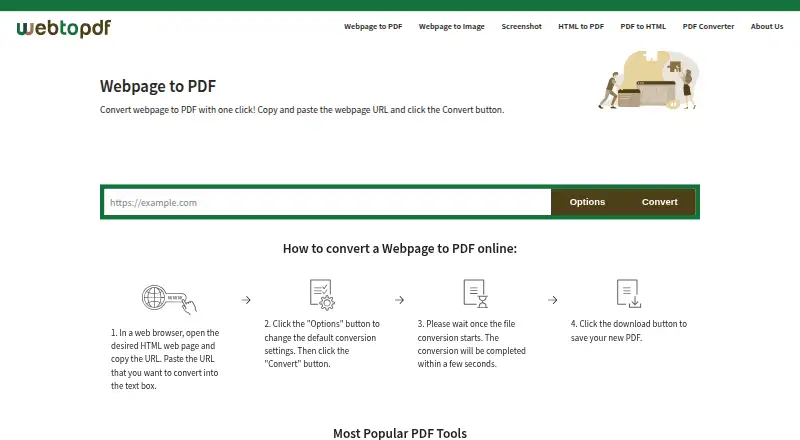
What Web to PDF is
Web to PDF turns webpage URLs into downloadable files for offline sharing or record keeping. It can create PDF, JPG, PNG, GIF, or TIFF files, and lists additional conversion targets including HTML, HTM, or MHT to PDF and PDF to HTML. Page controls include size, orientation, margins, and zoom, with support for custom dimensions. Other options include print layout, removing JavaScript or links, page numbers, grayscale, bookmarks, and a configurable wait time. Its conversion engine is based on open-source Chromium and renders content updated with JavaScript. For PDF output, you can add a text watermark, set a password, or disallow extraction and printing. The service is free for individuals, groups, companies, and public institutions, with no separate license, account, or email required. The FAQ says conversions are free, while the terms allow frequency limits based on usage and server capacity. Files may remain available for up to one hour and can be deleted earlier. The service cannot convert webpages that require a login because it cannot share an authentication session. It says files are machine processed without human review and transferred over HTTPS, but advises against using the service for highly sensitive or critical files. No REST API is provided.
Good
- No account, email, or separate license required.
- Exports PDFs and four image formats.
- Custom page dimensions, margins, and zoom are available.
- PDFs can have passwords and extraction restrictions.
Watch out
- Login-required webpages cannot be converted.
- Terms allow conversion frequency limits based on usage and capacity.
- Files may remain available for up to one hour.
- No REST API is provided.
Who it suits
Web to PDF suits people who want to convert public webpages or listed document formats without creating an account. Its layout controls and PDF restrictions may help with sharing or keeping a formatted copy, but it is not suited to login-gated pages or sensitive files.
Verdict
Web to PDF offers flexible page formatting and several output formats without requiring an account. Keep its login-page restriction, potential usage-based frequency limits, and short file availability window in mind, and avoid highly sensitive or critical files.
Plans and prices
From Web to PDF's own pricing page, checked 11 Oct 2026.
| Plan | Price | What it gives you |
|---|---|---|
| Free | Free | Unlimited conversions · no limit on files or pages per file · no account or license required |
The facts
Each one read from Web to PDF's own pages, with the date it was checked.
What it does
- API limitation
- The FAQ says Web to PDF does not provide a REST API and describes API services as under development.checked 11 Oct 2026
- Conversion options
- Options include print layout, removing JavaScript or links, page numbers, grayscale, bookmarks, and a configurable wait time.checked 11 Oct 2026
- File retention
- Processed files can remain available for download for up to one hour and can be deleted sooner with the delete button.checked 11 Oct 2026
- Login-page limitation
- The service does not support converting webpages that require a login because it cannot share an authentication session with them.checked 11 Oct 2026
- No registration
- Users do not need to create an account or provide an email address to convert files.checked 11 Oct 2026
- Output formats
- The converter supports PDF, JPG, PNG, GIF, and TIFF output.checked 11 Oct 2026
- Page layout
- Users can set page size, orientation, margins, and zoom, including custom page dimensions.checked 11 Oct 2026
- Privacy and security
- The site says files are machine processed without human review and transferred over HTTPS; its terms advise against using the service for highly sensitive or critical files.checked 11 Oct 2026
- Purpose
- Web to PDF converts a webpage URL into a downloadable PDF for offline sharing or record keeping.checked 11 Oct 2026
- Rendering engine
- The conversion engine is based on the open-source Chromium project and renders JavaScript-updated page content.checked 11 Oct 2026
- Support
- Support is available by email at [email protected], and the site recommends checking its FAQ for common issues.checked 11 Oct 2026
- Usage limits
- The FAQ says conversions are free, while the terms say conversion frequency may be limited based on usage and server capacity.checked 11 Oct 2026
- Watermarks and access controls
- Users can add a configurable text watermark and set a PDF password or disallow extraction and printing.checked 11 Oct 2026
Money
- Free use
- The service is free for individuals, groups, companies, and public institutions, with no separate license required.checked 11 Oct 2026
The full review of Web to PDF
Web to PDF is a browser-based converter for turning public webpages and several document types into downloadable files. It suits individuals, teams, companies, and public institutions that need configurable captures without accounts or licensing work. The strongest case is its unusually broad layout and output control at no cost; authenticated pages, retention limits, and possible throttling make it less suitable for critical or automated workflows.
Overview
The service converts webpage URLs and HTML, HTM, or MHT files to PDF, webpages to JPG, PNG, GIF, or TIFF, and PDFs to HTML. Its Chromium-based engine renders content updated by JavaScript, so modern pages are handled more reliably than by a purely static capture. Conversion requires no registration, email address, or separate license.
This is a convenient transactional tool rather than an archive. A page that requires a login cannot be converted because the service cannot share an authentication session. Download links for processed files can remain active for up to one hour, and the terms caution against highly sensitive or critical material even though files are machine processed without human review and transferred over HTTPS.
Key features
Detailed page control
Page size, orientation, margins, and zoom can be adjusted, including custom page dimensions. Print layout, page numbers, grayscale, bookmarks, and a configurable wait time help tailor a result for records, handouts, or consistent documentation. Options to remove JavaScript or links are useful when a cleaner or less interactive copy is preferred, while a quick one-off capture may not justify configuring every setting.
Formats and protection
Output is not limited to PDF: webpage captures can be produced as JPG, PNG, GIF, or TIFF, which fits image-based sharing and workflows that do not consume PDF files. A configurable text watermark can identify or label a document. For PDFs, users can set a password and disable extraction or printing, providing practical controls for distributing a restricted copy, although those controls do not turn the service into a high-assurance document vault.
Conversion scope
The free converter covers URL or webpage to PDF, HTML/HTM/MHT to PDF, webpage to image formats, and PDF to HTML. There is no REST API; API services are described as under development, so recurring server-side pipelines need another solution.
Pricing
The Free plan costs nothing and includes unlimited conversions, with no stated limit on the number of files or pages per file. It requires no account or license and is available to individuals, groups, companies, and public institutions. That makes it an unusually capable option for occasional or even substantial manual conversion without subscription administration.
“Unlimited” does not guarantee unlimited throughput. The FAQ says conversions are free, while the terms allow conversion frequency to be limited according to usage and server capacity. In practice, the plan is best for interactive use rather than a guaranteed high-volume queue. There is no paid tier described, so organizations needing formal service levels, an API, or predictable capacity must look elsewhere.
Platforms
Web to PDF is delivered as a web service and is listed for Linux, macOS, Windows, and the web. A browser is the practical entry point across those systems; no separate desktop application or local installation is required by the service description.
Who it's for
Choose it for public webpages, reports, articles, and other material that must be saved, shared, or recorded with control over paper size, orientation, waiting time, and output format. It is especially well matched to users who value account-free access and need image outputs or PDF safeguards in addition to ordinary conversion.
Look elsewhere for pages behind sign-in, long-term file availability, sensitive records, guaranteed conversion frequency, or API-driven automation. The short download window also means users must retrieve and store results promptly.
Pros and cons
- Pro: No account, email, or separate license is needed, reducing setup and administrative friction.
- Pro: Custom dimensions, print and rendering controls, bookmarks, grayscale, and wait time support carefully formatted captures.
- Pro: PDF, JPG, PNG, GIF, and TIFF outputs cover both document and image workflows.
- Pro: Watermarks, passwords, and restrictions on extraction or printing add useful distribution controls.
- Con: Login-required webpages cannot be processed, excluding private dashboards and member portals.
- Con: Frequency may be limited by usage and server capacity despite the free plan's unlimited-conversion wording.
- Con: Files may disappear after one hour, and the service advises against highly sensitive or critical files.
- Con: No REST API is available, limiting unattended or integrated workflows.
Alternatives
For a broader commercial toolkit with OCR, batch processing, and access across desktop, mobile, browser, extension, and API channels, consider HiPDF; its Basic plan is $39.95 a year billed annually.
If you need an API-oriented converter with a defined monthly allowance, HTML2PDF Rocket offers a free plan with 200 credits per month and a 5 MB PDF limit per file.
PDF Agile is another freemium option for users who want a desktop-and-web PDF application with conversion plans.
Choose MinerU or Docling when an open-source or locally controlled document workflow is the priority. Ghostscript is a free, self-hostable tool for users comfortable with a technical PDF pipeline.
Convertio suits readers seeking a broad online conversion service with paid file-size and credit tiers. FoxyUtils Online PDF Tools is a web-only alternative with subscription features such as OCR and cloud connections.
For a wider shortlist, browse PDF Converter Software.
Verdict
Web to PDF is the right choice for anyone who needs free, accountless webpage conversion with unusually fine control over layout, formats, and PDF distribution settings. Its main reason to choose it is capability without a paywall or setup. Look elsewhere when conversion must reach authenticated pages, run through an API, preserve files beyond a short window, or handle sensitive and mission-critical content.
Alternatives to Web to PDF
- 1

Convertio
Free planAndroidiOSWebAPI8.3From $6.99 a month - 2

HiPDF
Free planAndroidiOSWebAPI8.2Free plan - 3

MinerU
Free planOpen sourceWebAPILinuxmacOS8.2From $59.90 a year - 4
PDF Agile
Free planWebmacOSWindows7.8$39 one-time - 5
HTML2PDF Rocket
Free planAndroidWebAPILinux7.5From $5 a month - 6
FoxyUtils Online PDF Tools
Free planWeb7.0Free plan