VOSviewer
VOSviewer constructs and visualizes bibliometric networks, including networks of terms that appear together in scientific literature.
What VOSviewer is
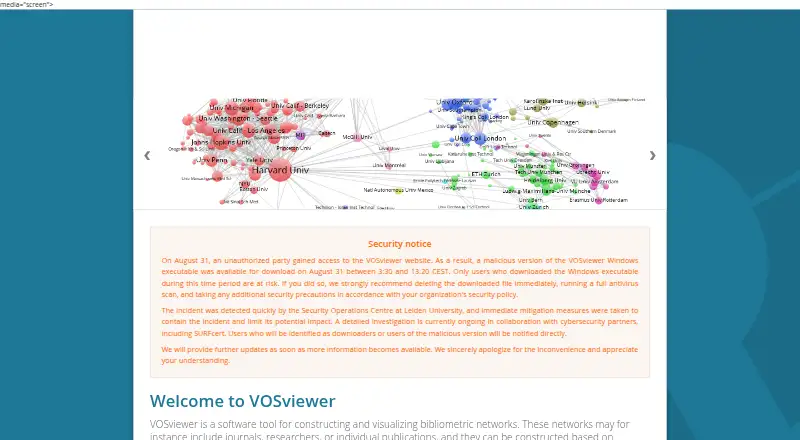
VOSviewer constructs and visualizes bibliometric networks, including networks of terms that appear together in scientific literature. It supports citation, bibliographic coupling, co-citation, and co-authorship relationships, drawing on sources such as Web of Science, Scopus, Dimensions, Lens, PubMed, Crossref, Europe PMC, OpenAlex, Semantic Scholar, OpenCitations, and WikiData. Analysis features include network layout and clustering, English-language text mining, fractional counting, and thesaurus-based data cleaning. Users can explore density and overlay views with zooming and scrolling, then save high-resolution screenshots in bitmap or vector formats. VOSviewer Online runs in a browser, opens VOSviewer JSON and map and network files, and shares visualizations by link, QR code, or embeddable HTML. The stand-alone version supports sharing through Google Drive, Microsoft OneDrive, and Dropbox. Builds are available for Windows and macOS, while the other-systems version runs as a JAR. Running VOSviewer requires Java 8 or higher. The software can be used freely for any purpose.
Good
- Supports four bibliometric relationship types.
- Includes data from a broad range of listed sources.
- Offers density and overlay visualizations.
- Free to use for any purpose.
Watch out
- Running the software requires Java 8 or higher.
- Other-systems version runs as a JAR file.
- VOSviewer’s website reported an unauthorized access incident and investigation.
Who it suits
VOSviewer suits researchers and research institutions analyzing bibliometric relationships or terms in scientific literature. Its online version may suit users who want to share interactive visualizations in a browser.
Verdict
VOSviewer combines network analysis with online visualization and sharing options. Users should note the Java requirement for running the software and the reported website security incident.
Plans and prices
From VOSviewer's own pricing page, checked 8 Oct 2026.
| Plan | Price | What it gives you |
|---|---|---|
| Free | Free | Can be used freely for any purpose |
The facts
Each one read from VOSviewer's own pages, with the date it was checked.
What it does
- Analysis techniques
- It provides network layout and clustering techniques, English-language text mining, fractional counting, and thesaurus-based data cleaning.checked 8 Oct 2026
- Data sources
- The software supports data from Web of Science, Scopus, Dimensions, Lens, PubMed, Crossref, Europe PMC, OpenAlex, Semantic Scholar, OpenCitations, and WikiData.checked 8 Oct 2026
- Intended users
- The maker describes VOSviewer-based analyses for research institutions and research funders to support strategic decision making.checked 8 Oct 2026
- Network types
- It supports networks based on citation, bibliographic coupling, co-citation, and co-authorship relations.checked 8 Oct 2026
- Online version
- VOSviewer Online runs in a web browser and can share interactive visualizations or embed them in online platforms.checked 8 Oct 2026
- Purpose
- VOSviewer constructs and visualizes bibliometric networks and can visualize co-occurrence networks of terms extracted from scientific literature.checked 8 Oct 2026
- Runtime requirement
- Running VOSviewer requires Java version 8 or higher.checked 8 Oct 2026
- Security notice
- The maker reports that an unauthorized party accessed the website and a malicious Windows executable was available for download on August 31 from 3:30 to 13:20 CEST; its investigation is ongoing.checked 8 Oct 2026
- Sharing integrations
- The stand-alone version’s sharing feature supports Google Drive, Microsoft OneDrive, and Dropbox.checked 8 Oct 2026
- Supported systems
- The download page provides builds for Windows, macOS, and other systems; the other-systems version runs as a JAR file.checked 8 Oct 2026
- Support resources
- The site provides a manual with detailed and up-to-date functionality information, along with a video, book chapter, and paper.checked 8 Oct 2026
- Visualization
- Visualizations include density and overlay views, zooming and scrolling, and high-resolution screenshots saved in bitmap or vector formats.checked 8 Oct 2026
- Web sharing
- VOSviewer Online can open VOSviewer JSON files and map and network files, and share visualizations through a link, QR code, or embeddable HTML.checked 8 Oct 2026
The company
- Headquarters
- Leiden, Zuid-Holland, Netherlandschecked 28 Sep 2026
Where it runs
- Platform integration
- VOSviewer Online is integrated into Digital Science’s Dimensions platform for creating co-authorship and citation network visualizations.checked 8 Oct 2026
The full review of VOSviewer
VOSviewer is a free tool for building and exploring maps of research literature. It is best suited to researchers and institutions studying publication relationships or recurring terms; its depth in bibliometric mapping is a strength, while the Java requirement and a reported website incident merit care.
Overview
VOSviewer turns bibliographic data into networks based on citation, bibliographic coupling, co-citation, and co-authorship. It can also map terms that appear together in scientific literature. Support for sources including Web of Science, Scopus, Dimensions, Lens, PubMed, Crossref, Europe PMC, OpenAlex, Semantic Scholar, OpenCitations, and WikiData gives researchers multiple ways to assemble an analysis.
This is a specialist mapping tool, not a complete literature-review workflow. Its value is clearest when the question concerns connections among publications, authors, or terms, rather than managing every stage of a review.
Key features
Analysis and visualization
Network layout and clustering organize relationships into maps. English-language text mining extends the analysis to terms, while fractional counting and thesaurus-based cleaning give researchers ways to refine counts and terminology. These capabilities make VOSviewer useful for examining patterns across a body of literature, though the emphasis remains on mapping and analysis rather than broad review management.
Density and overlay views, along with zooming and scrolling, help users inspect maps at different scales. High-resolution screenshots can be saved in bitmap or vector formats, a practical advantage when results need to be included in reports or presentations.
Online sharing and integrations
VOSviewer Online runs in a browser and can open VOSviewer JSON, map, and network files. Users can share interactive visualizations by link or QR code, or embed them as HTML. The stand-alone version also supports sharing through Google Drive, Microsoft OneDrive, and Dropbox. Its integration with Digital Science’s Dimensions platform adds a route for creating co-authorship and citation visualizations there.
Pricing
VOSviewer is free: its Free plan costs nothing and can be used for any purpose. There is no paid tier or seat limit in the stated plan, so individual researchers and institutions can use the same core software without choosing between feature levels.
Platforms
VOSviewer supports Linux, macOS, web, and Windows. The download page provides builds for Windows, macOS, and other systems; the other-systems build runs as a JAR file. Running the software requires Java 8 or higher, which adds a setup dependency for desktop users. The browser-based VOSviewer Online avoids that desktop runtime requirement for online visualization and sharing.
The maker reports that an unauthorized party accessed its website and that a malicious Windows executable was available for download on August 31 from 3:30 to 13:20 CEST. The investigation is ongoing. Windows users should take this notice into account when obtaining the software.
Who it's for
Researchers who need to map publication networks or co-occurring terms are the clearest fit. Research institutions and funders can also use VOSviewer analyses to support strategic decision-making. Readers looking primarily for a full review-management workflow should consider tools aimed more directly at that task.
A manual with current functionality guidance, plus a video, book chapter, and paper, provides ways to learn the software and its methods.
Pros and cons
- Pros: Multiple bibliographic sources and several network types support varied research questions without requiring separate mapping tools.
- Pros: Interactive browser sharing, embedding, and bitmap or vector exports make maps usable beyond the desktop application.
- Pros: Free use for any purpose removes plan costs as a barrier for individuals and institutions.
- Cons: Desktop use requires Java 8 or higher, an extra prerequisite for users who want the downloadable software.
- Cons: The maker’s report of a malicious Windows executable on its website makes download safety a particular concern for Windows users.
- Cons: Its focus on bibliometric networks makes it a less direct choice for readers seeking comprehensive review management.
Alternatives
For a broader comparison, see Literature Review Software.
RevMan is a freemium option with a free plan and trial across Linux, macOS, web, and Windows; choose it if you want to explore a different review-focused product.
ASReview is free and open source, with no licensing fees or subscriptions; it may suit readers seeking that model and who can account for possible costs of running their own hardware or server.
Rayyan offers a free plan capped at three active reviews, two free reviewers, one sample, and limited mobile app access, as well as an Essential plan at $4.99 a month billed per seat. Consider it if those review limits and mobile availability better match your needs.
Bibliometrix is a free R package available on CRAN with a Biblioshiny web interface; it is an alternative for readers who prefer that package and interface combination.
Elicit has a free Basic plan with limited use of Research Agent and Research Reports, alongside unlimited search across more than 138 million papers, summaries, and chat with papers. It may fit readers whose priority is those search and paper-interaction tools.
EviSynth offers free academic access, unlimited collaborators, and no trials or subscriptions; it may suit academic users who prioritize those terms.
Inciteful provides free core tools with no stated usage limits and uses a fully open-source codebase, an alternative for readers who value that approach.
Litmaps has a free plan capped at 20 inputs, 100 articles, and one Litmap, with monthly summaries and no collaboration. Its free tier may suit a smaller, solo workflow, while VOSviewer is a better fit for network mapping and analysis.
Verdict
Choose VOSviewer if you need free, purpose-built mapping of bibliographic relationships and terms, especially when interactive sharing or high-resolution exports matter. Look elsewhere if you need a broader review workflow, or if the Java prerequisite and Windows security notice make its desktop setup an unwelcome fit.