ViSearch
ViSearch turns video into searchable text and media, creating transcripts, summaries, chapters, and quizzes.
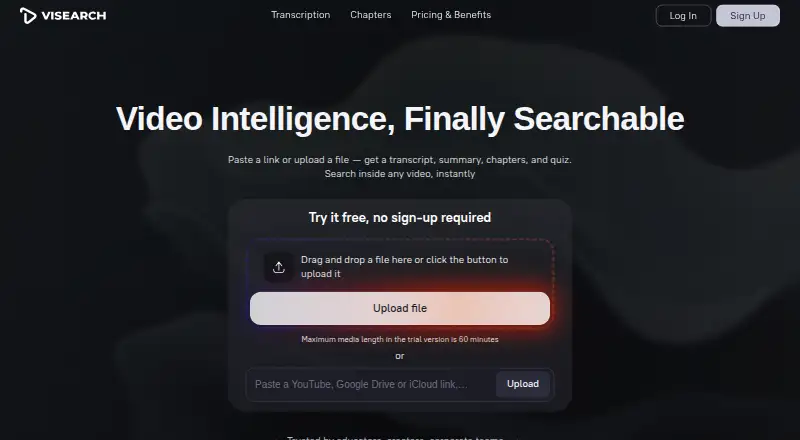
What ViSearch is
ViSearch turns video into searchable text and media, creating transcripts, summaries, chapters, and quizzes. Search options include full-text, semantic, and visual searches, including searches across a video library. It transcribes and translates in more than 90 languages, adds speaker labels, and exports TXT, DOCX, or PDF files. Timestamped chapters, structured summaries, and multiple-choice, true/false, or open-ended quiz questions can be generated; quiz questions link to video timestamps, and the site says they work with any LMS. Upload common video and audio formats or provide YouTube, Google Drive, iCloud, or direct file URLs. Videos may be up to 10 hours long, while the no-sign-up trial is limited to 10 minutes and the signed-up free allowance to 20 minutes. Embedding, REST API integration, and on-premise deployment are listed. ViSearch offers a free plan; paid processing is priced per minute: Basic at $0.09/min, Pro at $0.15/min, and Visual at $0.25/min. The operator, Kobaltstack LLC, is based in New York.
Good
- Searches video with text, semantic, and visual methods.
- Transcribes and translates in more than 90 languages.
- Creates timestamped chapters, summaries, and quizzes.
- Offers REST API integration and on-premise deployment.
Watch out
- No-sign-up trial is limited to 10 minutes.
- Signed-up free allowance is limited to 20 minutes.
- Paid processing is priced per minute.
Who it suits
ViSearch may suit educators, course creators, content creators, teams, and media organizations that need to search or repurpose video. Its API and on-premise deployment options may also suit teams integrating video processing into their workflows.
Verdict
ViSearch combines video search with transcription, summaries, chapters, and timestamp-linked quizzes. The free allowance is limited, and paid processing starts at $0.09/min for Basic.
Plans and prices
From ViSearch's own pricing page, checked 20 Oct 2026.
| Plan | Price | What it gives you |
|---|---|---|
| Free | Free | no credit card required · up to 20 minutes of video processing |
| Basic | $0.09, paid once | full-text search · AI transcript with speaker labels · SRT/VTT subtitles · per minute |
| Pro | $0.15, paid once | Basic features · semantic search · timestamped chapters · smart summaries · auto-generated quizzes · per minute |
| Visual | $0.25, paid once | Pro features · visual search · uploaded-image search · face and speaker search · per minute |
The facts
Each one read from ViSearch's own pages, with the date it was checked.
What it does
- Chapters
- It automatically creates named, timestamped chapters that users can edit and export.checked 20 Oct 2026
- Chapters and summaries
- It creates timestamped chapters and structured summaries that can be exported or shared.checked 3 Oct 2026
- Chrome extension details
- The listed extension version is 3.0.117, updated November 25, 2024, with 49 users and 55 languages.checked 20 Oct 2026
- Chrome extension source
- The Chrome listing says its source code is open and available for self-service at github.com/new4u.checked 20 Oct 2026
- Chrome privacy disclosure
- The extension listing says the developer will not collect or use user data and does not sell it outside approved use cases.checked 20 Oct 2026
- Data rights
- The policy describes access, correction, deletion and restriction rights, including GDPR and California rights.checked 20 Oct 2026
- Embedding and deployment
- ViSearch advertises iframe embedding, REST API integration and on-premise deployment for teams.checked 20 Oct 2026
- Exports
- Transcripts, chapters, summaries and quizzes can be exported as TXT, DOCX or PDF, while subtitles can be exported as SRT or VTT.checked 20 Oct 2026
- Full-text search
- The service searches exact words, phrases and quotes and jumps to their timestamps.checked 20 Oct 2026
- Input integrations
- Users can upload files or provide YouTube, Google Drive, iCloud and direct-file URLs.checked 20 Oct 2026
- Inputs and formats
- Users can upload common video and audio formats or paste YouTube, Google Drive, iCloud, and direct file URLs.checked 3 Oct 2026
- Intended users
- The site presents ViSearch for content creators, educators and course creators, teams, organizations, and media organizations.checked 3 Oct 2026
- In-video search
- It supports full-text, semantic, and visual search, including searches across a video library.checked 3 Oct 2026
- Legal operator
- The website identifies Kobaltstack LLC as the operator and lists 447 Broadway, 2nd Floor, 3436, New York, NY 10013, US.checked 20 Oct 2026
- Licence
- Terms grant a revocable, non-exclusive, non-transferable limited service licence and prohibit resale, modification and reverse engineering.checked 20 Oct 2026
- LinkedIn size
- LinkedIn lists the company size as 2–10 employees and shows one employee on the public page.checked 20 Oct 2026
- LMS integration
- The site says generated quizzes can be embedded in any learning-management system.checked 20 Oct 2026
- Praise: searchable video workflow
- The sole SaaSHub reviewer called the tool useful, specifically praising automatic chapters, quizzes and finding an exact video moment quickly.checked 20 Oct 2026
- Privacy
- The privacy policy says it does not sell personal information and may share it with providers for hosting, payments, analytics, and support.checked 3 Oct 2026
The company
- Company and headquarters
- The site identifies Kobaltstack LLC as the operator and lists its address as 447 Broadway, 2nd Floor, 3436, New York, NY 10013, New York, US.checked 3 Oct 2026
- Headquarters
- New York, New York, United Stateschecked 28 Sep 2026
- LinkedIn company description
- LinkedIn describes visearch UG (haftungsbeschränkt) as a technology and internet startup analyzing and indexing video content across platforms.checked 20 Oct 2026
- LinkedIn founded
- The LinkedIn page lists visearch UG (haftungsbeschränkt) as founded in 2024.checked 20 Oct 2026
- LinkedIn ownership type
- LinkedIn labels visearch UG (haftungsbeschränkt) a public company.checked 20 Oct 2026
The full review of ViSearch
ViSearch is a video-intelligence service that makes recordings searchable and turns them into transcripts, summaries, chapters, and timestamped quizzes. It is aimed at educators, creators, media teams, and organizations working with sizeable video libraries. Its strongest case is a workflow that needs more than transcription; buyers focused only on basic captions may find the per-minute model less compelling.
Overview
ViSearch combines library-wide discovery with tools for converting video into reusable text and learning material. Full-text, semantic, visual, audio, and multimodal search address different retrieval needs: a transcript is enough for exact phrases, while semantic and visual modes are intended for finding ideas or imagery. Search can run across a video library rather than being limited to one file.
The service accepts common video and audio formats, plus YouTube, Google Drive, iCloud, and direct file URLs. Videos may be up to 10 hours long. A no-sign-up trial handles up to 10 minutes, while a signed-up free allowance reaches 20 minutes, giving occasional users a way to assess the workflow before paying.
Key features
Search and transcription
Basic provides full-text search, AI transcription with speaker labels, and automatic SRT or VTT subtitles. Transcription and translation cover more than 90 languages, with TXT, DOCX, and PDF export. That combination suits interviews, lectures, meetings, and multilingual archives where searchable text and portable documents matter.
Semantic search starts at Pro, and Visual adds search by uploaded image plus face and speaker search. These upgrades are meaningful for large or visually driven collections, but unnecessary if users only need keyword lookup and captions.
Learning and editorial outputs
Pro generates timestamped chapters, structured summaries, and multiple-choice, true/false, and open-ended questions tied to moments in the video. ViSearch says those quizzes integrate with any learning management system, making the feature more relevant to course creators than to buyers seeking a simple media index. Chapters and summaries are not part of Basic, so the lower tier is a narrower transcription product.
Deployment and controls
Teams can embed results with an iframe, connect through a REST API, or use on-premise deployment. The privacy policy says personal information is not sold, though providers may receive it for hosting, payments, analytics, and support. ViSearch cites encryption in transit and reasonable organizational and technical safeguards, while acknowledging that absolute security is not guaranteed.
Pricing
| Plan | Price | Includes |
|---|---|---|
| Free | free | Up to 20 minutes of video processing; no credit card required |
| Basic | $0.09, paid once, billed $0.09/min | Full-text search, AI transcript with speaker labels, SRT and VTT subtitles |
| Pro | $0.15, paid once, billed $0.15/min | Basic features, semantic search, timestamped chapters, smart summaries, auto-generated quizzes |
| Visual | $0.25, paid once, billed $0.25/min | Pro features, visual search, search by uploaded image, face and speaker search |
Processing is charged by the minute rather than through a recurring subscription in the published tiers. Free is suitable for a short test or occasional clip; Basic is the economical choice when exact text search and subtitles are sufficient. Pro costs more per processed minute but adds the outputs most useful for teaching and structured review. Visual is for collections where image- or identity-based retrieval justifies the highest rate. A refund request can be made within 14 days of purchase, and support aims to respond within two business days.
Platforms
ViSearch is offered through the web and API, with self-hosted deployment for organizations that require on-premise operation. Iframe embedding and REST integration support delivery inside an existing site or application.
Who it's for
Content creators can turn uploads into captions, searchable transcripts, and summaries. Educators and course creators benefit from timestamped chapters and quiz formats that connect questions to specific video moments. Teams, organizations, and media groups with large archives gain the most from library-wide semantic or visual discovery and from API or on-premise options. It is less suited to buyers who need unlimited processing at a flat monthly price or only occasional caption generation beyond the free allowance.
Pros and cons
- Pros: Search spans full text, meaning, audio, and visual content, including across libraries.
- Pros: More than 90-language transcription and translation, speaker labels, and TXT, DOCX, and PDF exports cover common publishing needs.
- Pros: Pro links chapters, summaries, and several quiz types to timestamps, with stated LMS integration.
- Pros: API, iframe embedding, and on-premise deployment accommodate custom and team workflows.
- Cons: The free allowance is capped at 20 minutes, and the no-sign-up trial at 10 minutes.
- Cons: Semantic search and learning outputs require Pro, while visual and identity search require the $0.25/min Visual tier.
- Cons: Per-minute billing can become expensive for long-running archives compared with a flat subscription.
Alternatives
FrameQuery is a better fit for users wanting freemium local, Drive, or NAS workflows across API, macOS, web, and Windows; its free plan has no monthly indexing hours and requires indexing for face, voice, and AI-tag search.
VGG Image Annotator suits buyers seeking free, BSD-licensed annotation software with no paid tiers or stated usage limits.
DISKO is the alternative for macOS and web users who need screenwriting, shot-list tools, and review links, with a 2 GB free cloud plan and a $12.00-per-month Pro founders rate.
Moment Search favors on-device processing on macOS and Windows, with a free plan covering one footage source and up to 25 indexed videos.
Cinestar is a free Linux and macOS option with an open-source MIT core; local AI services require Ollama.
MomentSearch is a free option available on API, Linux, macOS, self-hosted, web, and Windows.
Nomad Media is a paid alternative available on API, Linux, macOS, web, and Windows.
QMedia is free, open-source software under the MIT license, with API, self-hosted, and web availability.
For a broader category view, see AI Video Search Tools.
Verdict
Choose ViSearch if you need searchable video plus transcripts, structured summaries, chapters, or timestamp-linked quizzes, and can match your usage to per-minute tiers. Look elsewhere if your priority is unlimited bulk processing, a flat subscription, or a fully local free tool; ViSearch's strongest discovery features sit behind higher processing rates.
Alternatives to ViSearch
- 1

Deepgrip
Free planWebAPILinuxmacOS7.7From $89 a month - 2

FrameQuery
Free planWebAPImacOSWindows7.7From $19 a month - 3
VGG Image Annotator
Free planOpen sourceWebLinuxmacOSSelf-hosted7.7Free plan - 4

DISKO
Free planWebmacOS7.4From $12 a month - 5

Twelve Labs
Free planWebAPI7.3From $29 a month - 6

Cinestar
Free planOpen sourceAPILinuxmacOSSelf-hosted7.2Free plan