
Cinestar
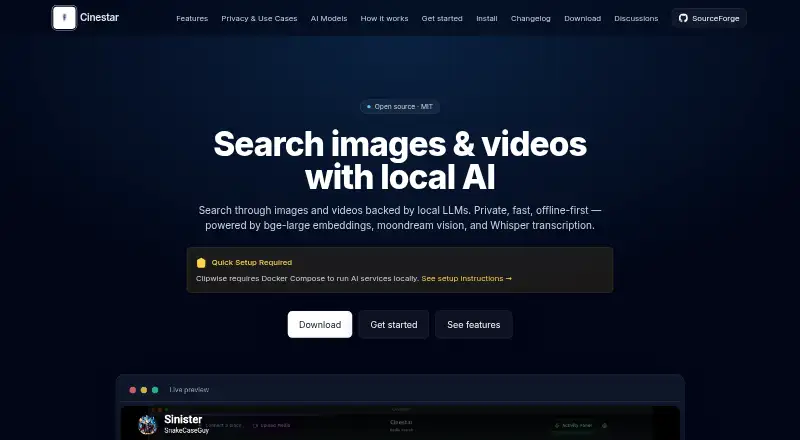
Cinestar is open-source software for finding images and video moments with local AI processing.
What Cinestar is
Cinestar is open-source software for finding images and video moments with local AI processing. It can ingest folders or videos, transcribe audio with Whisper, embed frames using BGE, and generate captions with Moondream. Natural-language searches return moments with timecodes and thumbnails; Cinestar stores vectors in SQLite-Vec and uses Llama 3.2 to process and organize content. The maker says processing runs locally, with no analytics, telemetry, usage tracking, or data uploads. The MIT-licensed software is available for Linux and macOS. Local AI services require Ollama, and the listed BGE, Moondream, and Llama 3.2 models total about 2–4 GB to download. The site also describes plugins for tasks including face recognition, metadata extraction, transcoding, collaboration, backups, and multi-user access, along with an open API for custom plugins. The maker presents it for personal media managers, content creators, media organizations, and academic or market researchers. The changelog lists v0.1.52, dated October 11, 2025, as its latest release on that page.
Good
- Searches media with natural-language queries.
- Returns matching moments with timecodes and thumbnails.
- Maker says AI processing stays local.
- Open API supports custom plugins.
Watch out
- Local AI services require Ollama.
- Listed model downloads total about 2–4 GB.
- Available for Linux and macOS only.
Who it suits
Cinestar may suit personal media managers, content creators, media organizations, and academic or market researchers working with image and video collections. It is for users prepared to install Ollama and the listed AI models.
Verdict
Cinestar offers local multimodal search with plugins and an open API. Its Ollama requirement and model downloads are key setup considerations.
Plans and prices
From Cinestar's own pricing page, checked 4 Oct 2026.
| Plan | Price | What it gives you |
|---|---|---|
| Cinestar (MIT open-source core) | Free | Open-source core; local AI services require Ollama |
The facts
Each one read from Cinestar's own pages, with the date it was checked.
What it does
- AI dependency
- The install guide requires Ollama and lists roughly 2–4 GB of model downloads.checked 20 Oct 2026
- API
- Cinestar’s site advertises an open API for creating custom plugins.checked 20 Oct 2026
- Audio processing
- Audio files are transcribed and analyzed for searchable content.checked 20 Oct 2026
- Changelog
- Version 0.1.52, dated October 11, 2025, unified configuration files and fixed Whisper model downloading in packaged builds.checked 20 Oct 2026
- Developer setup
- Building from source requires Node.js 18 or newer, npm, and the commands npm install followed by npm run dev or npm run build.checked 20 Oct 2026
- Docker deployment
- The documentation supplies Docker Compose configurations for Ollama and Whisper services, including optional multi-GPU load balancing.checked 20 Oct 2026
- Documentation depth
- The install page includes health checks, Ollama API testing, service ports, memory reservations, and Nginx routing examples.checked 20 Oct 2026
- Downloads
- The v0.1.64 directory contains Linux ARM64, Linux x86_64, and macOS installers dated November 5, 2025.checked 20 Oct 2026
- GitHub activity
- The public release repository shows 1 star, 1 fork, and zero listed issues or pull requests.checked 20 Oct 2026
- Image recognition
- Images receive AI-generated captions that can be searched.checked 20 Oct 2026
- Independent architecture detail
- The independent report says Cinestar combines 70% vector similarity from sqlite-vec with 30% SQLite FTS5 scoring.checked 20 Oct 2026
- Independent performance detail
- That write-up reports approximately 40 seconds to make a 60-minute video searchable during its initial audio phase.checked 20 Oct 2026
- Independent technical report
- An independent engineering write-up describes a five-phase pipeline that makes video segments searchable after local Whisper transcription and later enriches them with visual captions.checked 20 Oct 2026
- Indexing
- Vectors are stored in SQLite-Vec and organized with Llama 3.2.checked 20 Oct 2026
- Installation
- The install guide instructs macOS users to copy Cinestar.app into Applications and clear Gatekeeper quarantine when necessary.checked 20 Oct 2026
- Integrations
- Listed plugin possibilities include Google Photos-style face recognition, social sharing, LDAP, audit trails, backups, compliance reporting, and multi-user access control.checked 20 Oct 2026
- Intended users
- The maker presents personal media managers, content creators, media organizations, and academic or market researchers as use cases.checked 4 Oct 2026
- Licence
- Cinestar is presented as open source under the MIT licence.checked 20 Oct 2026
- License
- The site identifies Cinestar as open source under the MIT license.checked 4 Oct 2026
- Limit: hardware demand
- The independent report estimates about 4 GB memory with all models loaded and about 500 MB of disk per hour of video.checked 20 Oct 2026
- Limit: project maturity
- SourceForge labels Cinestar Alpha, shows zero weekly downloads on the project summary, and says users should be the first to post a review.checked 20 Oct 2026
- Local processing
- The project says AI processing runs on the user’s own machine for privacy.checked 20 Oct 2026
Where it runs
- Linux install
- The install guide includes Linux commands for installing Ollama and names Linux in the site's Mac/Linux install link.checked 4 Oct 2026
- macOS install
- The install guide provides steps for downloading Cinestar.app, moving it to Applications, and opening it past Gatekeeper.checked 4 Oct 2026
The full review of Cinestar
Overview
Cinestar is an open-source media search tool for Linux and macOS. It is best suited to people who want to find scenes or images across local collections without sending media to a cloud service. Its search breadth is appealing, but running Ollama and downloading several AI models are part of getting started.
Key features
Cinestar can index folders and videos, transcribe audio with Whisper, embed video frames using BGE, and create image and video captions with Moondream v2. Llama 3.2 (3B) handles language tasks and content organization, while SQLite-Vec stores the vectors. Natural-language searches return relevant moments with timecodes and thumbnails, which can make locating a scene more direct than browsing files one by one.
Visual, audio, and multimodal search serve different ways of looking for material. Plugins cover potential additions such as face recognition, album creation, metadata extraction, transcoding, collaboration, LDAP, audit trails, backups, compliance reporting, and multi-user access. The open API allows custom plugins. That flexibility may suit varied workflows, but teams should choose Cinestar for the capabilities they need rather than assume every plugin will fit their requirements.
The maker says AI processing runs locally and that Cinestar has no analytics, telemetry, usage tracking, or data uploads. That is a strong fit for privacy-conscious personal collections and organizations handling sensitive media. Local processing also means users need to supply the computing environment and manage the model downloads themselves.
Pricing
Cinestar is free and open source under the MIT license. The Cinestar (MIT open-source core) plan costs nothing and includes the open-source core; local AI services require Ollama. There are no paid tiers or stated usage caps in the plan. The trade-off is setup: Ollama is required, and the listed BGE, Moondream, and Llama 3.2 models total about 2–4 GB to download.
Platforms
Cinestar supports Linux and macOS. The macOS install guide calls for downloading Cinestar.app, moving it to Applications, and opening it past Gatekeeper. Linux instructions include commands for installing Ollama. The changelog names v0.1.52, dated October 11, 2025, as the latest release on that page.
Who it's for
Cinestar suits personal media managers, content creators, media organizations, and academic or market researchers who want local search across images and video. Its multimodal approach and plugin options are useful when a collection needs more than basic file lookup. It is a weaker choice for someone who wants a hosted service or a setup that avoids installing local AI services and models.
Pros and cons
- Pros: Local AI processing and no analytics, telemetry, usage tracking, or data uploads address privacy concerns.
- Pros: Visual, audio, and multimodal search combine transcription, frame embeddings, and captions to help locate moments in video as well as images.
- Pros: An MIT license, open API, and plugins offer room to adapt the tool to different media workflows.
- Cons: Ollama and roughly 2–4 GB of model downloads add setup time and storage needs.
- Cons: Linux and macOS support excludes users seeking a Windows version.
Alternatives
Browse AI Video Search Tools for more options. Choose FrameQuery if you want metadata search and local, Drive, or NAS sharing and backup; its free plan has no monthly indexing hours, while face, voice, and AI-tag search require indexed video. DISKO may suit a macOS or web workflow centered on screenwriting, shot lists, and review links; its free cloud plan includes 2 GB, with a Pro plan at $12 a month.
Twelve Labs is an API and web option with a free plan that includes 600 minutes of video, 90-day index access, and limits of 10 hours and 100 videos per index, with five concurrent indexing tasks. ViSearch offers API, self-hosted, and web access; its free plan covers up to 20 minutes of video processing, and its Basic plan charges $0.09, paid once, billed $0.09/min. Vivu is a web and API alternative with 20 indexing minutes and 50 search credits per month on its free plan.
MomentSearch is another free option available on Linux, macOS, Windows, web, and self-hosted environments. Scout Suite is a free, open-source multi-cloud security auditing tool rather than a media search alternative. SentrySearch is a free option for Linux, macOS, Windows, and self-hosted use.
Verdict
Choose Cinestar if you want free, open-source search across local images and video, value keeping AI processing on your own machine, and can accommodate Ollama and the model downloads. Its combination of timecoded results, multiple search modes, and extensibility is its clearest draw. Look elsewhere if you need Windows support or prefer not to manage local AI setup.
Alternatives to Cinestar
- 1

Deepgrip
Free planWebAPILinuxmacOS7.7From $89 a month - 2

FrameQuery
Free planWebAPImacOSWindows7.7From $19 a month - 3
VGG Image Annotator
Free planOpen sourceWebLinuxmacOSSelf-hosted7.7Free plan - 4

DISKO
Free planWebmacOS7.4From $12 a month - 5

Twelve Labs
Free planWebAPI7.3From $29 a month - 6
ViSearch
Free planWebAPIExtensionSelf-hosted7.3$0.09 one-time