Viper FTP
Viper FTP is a macOS file manager and transfer client for moving files between local and remote locations.
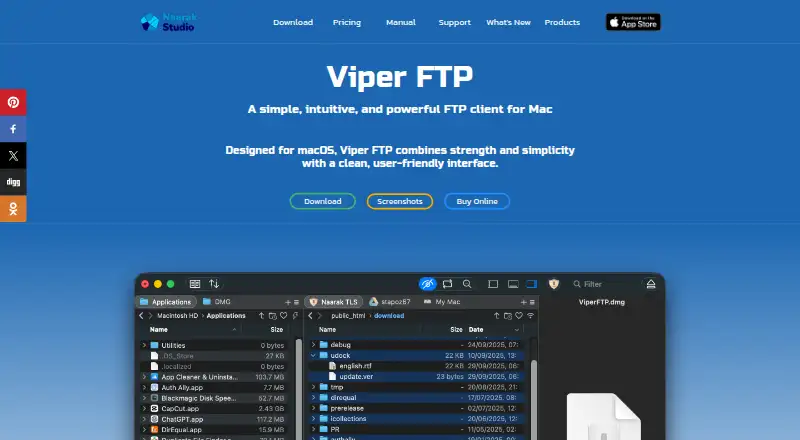
What Viper FTP is
Viper FTP is a macOS file manager and transfer client for moving files between local and remote locations. It supports FTP, FTPS, SFTP, WebDAV, Amazon S3, Google Drive, Dropbox, and YouTube uploads. Server groups let users send files or folders to multiple destinations in one action. Folder Observer watches a linked local folder and uploads added items to its remote destination. The app previews local and remote media or documents, edits remote files, compares files and folders, and manages archives. A transfer queue tracks activity in detail, while an action history records operations. Individual files can be password-encrypted with AES-256 in CBC mode. Its privacy policy says transfers go directly between the device and selected server or cloud storage, without processing or storing file contents or transfer metadata. Available protocol encryption includes SFTP, FTPS, or HTTPS when supported and configured remotely. Viper FTP requires macOS 10.13 or later and supports Apple silicon.
Good
- Supports major transfer protocols and clouds
- Batch uploads through server groups
- Automatic Folder Observer uploads
- Remote preview and editing
- AES-256 file encryption
Watch out
- macOS 10.13 or later required
- No free plan
- Trial limited to 14 days
- Some encryption depends on remote configuration
Who it suits
It suits Mac users handling several transfer protocols, synchronized folders, batch destinations, and remote file management. Business license options cover five or unlimited company Macs.
Verdict
Viper FTP combines broad protocol support with transfer automation, file tools, and direct-transfer privacy terms. Its subscriptions and licenses are organized around home, individual, small-business, or site Mac coverage.
Plans and prices
From Viper FTP's own pricing page, checked 8 Oct 2026.
| Plan | Price | What it gives you |
|---|---|---|
| Monthly Subscription | $5 a month | Install on 3 home Macs · Cancel anytime · $5 / mo |
| Annual Subscription | $15 a year | Install on 3 home Macs · Cancel anytime · $15 / yr |
| Annual Business Subscription | $59 a year | For 5 Macs in your company · Cancel anytime · $59 / yr |
| Single User License | $29, paid once | One user license · Install on 3 home Macs · $29 |
| Small Business License | $99, paid once | For 5 Macs in your company · $99 |
| Site License | $399, paid once | For all Macs in your company · $399 |
The facts
Each one read from Viper FTP's own pages, with the date it was checked.
What it does
- Batch transfers
- Users can create server groups and upload files or folders to multiple servers with a single action.checked 8 Oct 2026
- Business licenses
- The EULA describes a Small Business License for up to five office computers and a Site License for an unlimited number of company computers.checked 8 Oct 2026
- Encryption
- The site says users can encrypt individual files with a password using AES-256 in CBC mode.checked 8 Oct 2026
- File synchronization
- Yeschecked 21 Sep 2026
- File tools
- The app can preview local or remote media and documents, edit remote files, compare files and folders, and manage archives.checked 8 Oct 2026
- Folder Observer
- Folder Observer automatically uploads items added to a linked local folder to its remote destination.checked 8 Oct 2026
- History and transfers
- The user guide lists a transfer queue with detailed tracking and an action history log.checked 8 Oct 2026
- License limit
- The EULA allows a single-user license on three household computers for personal use or one office computer for commercial use.checked 8 Oct 2026
- Product
- Viper FTP is a file manager and FTP client for macOS that transfers files between local and remote locations.checked 8 Oct 2026
- Protocol coverage
- multi-protocolchecked 21 Sep 2026
- Protocols and services
- It supports FTP, FTPS, SFTP, WebDAV, Amazon S3, Google Drive, Dropbox, and YouTube uploads.checked 8 Oct 2026
- Support
- Naarak Studio provides a support form that accepts a macOS version and an attachment of up to 50 MB.checked 8 Oct 2026
- Transfer automation
- Yeschecked 21 Sep 2026
- Transfer privacy
- The privacy policy says files transfer directly between the device and the chosen server or cloud storage, and that Viper FTP does not process or store file contents or transfer metadata.checked 8 Oct 2026
- Transfer security
- The privacy policy says encryption such as SFTP, FTPS, or HTTPS is available when supported by the protocol and properly configured on the remote side.checked 8 Oct 2026
- Upgrades
- The EULA says minor upgrades are included with single-user licenses, while major upgrades may require an additional purchase or fee.checked 8 Oct 2026
Money
- Free plan
- Nochecked 21 Sep 2026
The company
- Maker
- The product site identifies Naarak Studio as the developer and describes its work as developing software for Mac OS.checked 8 Oct 2026
Where it runs
- Platform requirement
- The product site states that Viper FTP requires macOS 10.13 or later and is compatible with Apple silicon.checked 8 Oct 2026
- Supported platforms
- macoschecked 21 Sep 2026
Alternatives to Viper FTP
- 1

WinSCP
Free planOpen sourceWindows7.9Free plan - 2
Cyberduck
Free planmacOSWindows7.9Free plan - 3
Serv-U FTP Server
AndroidiOSWebAPI7.8 - 4

FileZilla Client
Free planLinuxmacOSWindows7.7Free plan - 5
FTP Commander
Free planAndroidWindows7.6$49.95 one-time - 6

FTP Rush
Free planAndroidiOSLinuxmacOS7.5Free plan